Defining a time series
Defining a time series is declaring, up front, what the engine should compute as data arrives. This is administration work: done once, changed rarely, and with consequences for data already stored — the last section of this page covers those.
Columns
A time series has four kinds of column, and only the first two are yours to name freely.
Aggregated columns (columns)
These hold a value aggregated over each time bucket. Each one names an aggregation function, and the engine re-applies it every time new data lands in an existing row. The available functions come from the time series functions catalog.
When timeBucket is 0, all received data is stored instead of aggregated, and only FIRST (keep the
first value) or LAST (overwrite with the newest) make sense. Two consequences worth knowing:
- The search endpoint returns all the historical data collected.
- Several data streams can land in different columns of the same row when they share an
atvalue.
When timeBucket is greater than 0, bucketColumn becomes required: it names the column the engine
adds to search responses holding the end date of each bucket.
Context columns (context)
Context columns capture the value at the moment the bucket was created, and are never updated afterwards even if the aggregated columns keep changing. That is why they take no aggregation function. Use them for the things you want to know about the device at that point in time — its serial number, its firmware version, its subscription — so that a row is self-describing.
Identifier column (identifierColumn)
Required. It names the column that identifies the device, and always maps to
provision.administration.identifier._current.value with filter=YES. The engine adds it to every row of
every search result, using the name you chose.
Bucket columns (bucketColumn, bucketInitColumn)
Named by you, filled by the engine, holding the end and start instants of the bucket.
The path field
Every column and context needs a path, which the engine uses as a query to extract a data stream value
and project it into the column. A path has two or three parts:
1. The data stream identifier — a data stream defined in an OpenGate data model.
Communication modules need an index
If the data stream id contains communicationModules[], the index is required:
device.communicationModules[0].subscription.mobile.imsi
2. The data stream field — appended with a dot, one of:
_current.value · _current.date · _current.at · _current.feedId · _current.source ·
_current.sourceInfo
3. The value path — only when the data stream holds a JSON object or array, a JSONPath down to a primitive value.
What a column can be filtered by
Every column and context carries a filter value that decides how queries may use it:
| Value | Meaning |
|---|---|
NO |
Not filterable. The default |
YES |
Optional equality filter |
ALWAYS |
Required equality filter: every query must constrain this column |
RANGE |
Range filter, >, < and BETWEEN, as well as equality |
RANGE is only allowed on numeric columns, integer and number. Columns of type date-time are
always range-searchable whatever the value says, so you do not need RANGE for a bucket or a timestamp.
Retention
retention sets how long rows stay in the time series, in seconds. It cannot exceed the retention allowed
by your organization’s policies.
The sorts section
Sorting is declared in the definition, not composed at query time. The sorts section holds a list of
named sorts, each one an ordered list of columns with a direction, and a query then asks for a sort by its
identifier.
| Field | Rules |
|---|---|
identifier |
Required, unique within the list. Letters, digits, spaces, _ and -. Generated as a UUID if you omit it, which makes it awkward to use, so name it |
description |
Optional free text, for whoever reads the definition later |
columns |
Required, at least one. Each entry is a column name from the columns or context sections plus a direction of ASC or DESC |
At least one sort is mandatory. Order matters inside columns: the list is the sort precedence.
The reverse of every sort comes for free
For each sort you declare, OpenGate also exposes its reverse, served by the same index through a reverse
scan. Those appear in the definition marked derived: true, which is read-only: the platform sets it and
the web console uses it. Never declare a derived sort yourself on create or update — flip the direction of
an existing one and you are duplicating an index you already have.
Filtering and sorting limits
There is no fixed maximum number of filterable columns or declared sorts. Instead, each filterable column, each context and each declared sort consumes optimization units, and each time series has a budget of them. That budget is the real limit, and it is what keeps queries fast.
| Where to look | What it tells you |
|---|---|
The searchOptimizationInfo section of a time series |
usedSearchOptimizationUnits and freeSearchOptimizationUnits |
POST .../optimizationPlan |
What a definition would consume, before you commit to it |
Simulate with optimizationPlan while you are still designing. It is much cheaper than discovering the
budget is spent after the fact — and since the reverse of each sort is free, declaring both directions
wastes units for nothing.
Creating and updating
Creating a time series starts collecting data from devices into it. Updating one is where care is needed: changes can affect the data already stored or its structure, which triggers an adaptation process. Until that process finishes, dirty values can be present.
These fields can be modified:
Name · Description · IdentifierColumn · BucketColumn · BucketInitColumn · Retention ·
TimeBucket · Context · Columns · Sorts
Simulate the update before applying it
PUT accepts an onlyPlan query parameter. With onlyPlan=true nothing is modified: the response is a
plan that summarizes the changes you asked for and explains their consequences, warning you where
necessary. Default is false.
Use it on any non-trivial change. It is the difference between reading about dirty values and causing them.
Rules for columns and contexts:
- Names are unique across all columns, contexts, the identifier and both bucket columns. You cannot rename something to a name already in use.
filter: ALWAYSis immutable. You cannot add or remove a column or context that has it, you cannot set it on an existing one, and you cannot change it away once it is set.- Paths cannot be edited. Remove the column and create it again, which gets you the same result.
Creation example
A daily time series (timeBucket: 86400) retained for 30 days, with one context column and one aggregated
column summing the bytes a device sent:
Content of timeserie.json:
The reverse of that sort, oldest bucket first, is available without declaring it.
Changing the time bucket
Buckets have a fixed length, so changing timeBucket changes the length of new ones. As a precaution,
buckets in the future are deleted when you do this. The situations below are the edge cases worth
understanding before you change it on a live time series.
Buckets that started before the change and end after it
The engine closes them at the instant of the update, and if needed the next bucket starts at that same instant and runs until the following one would start according to the new definition.
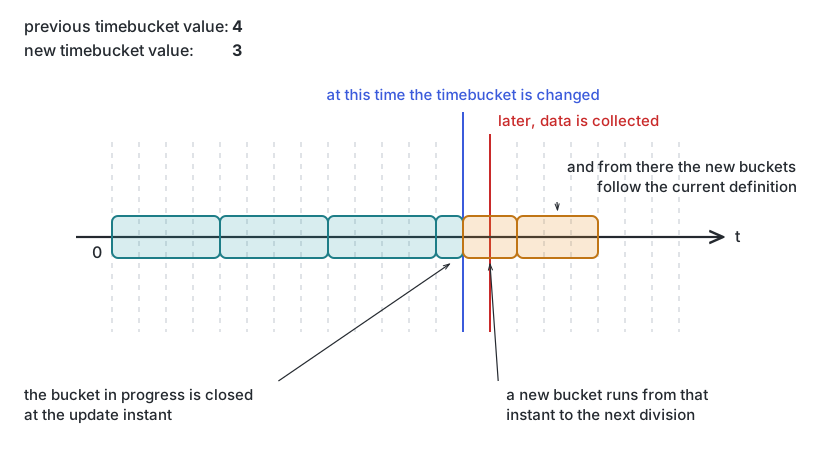 Changing the time bucket to a lower value
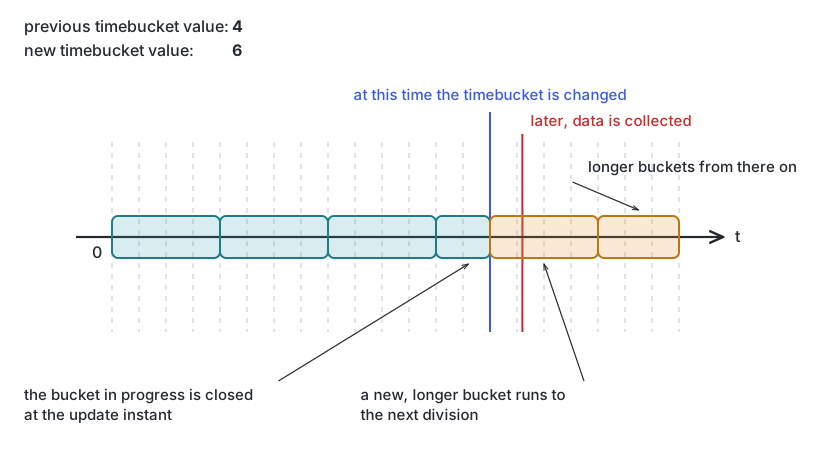 Changing the time bucket to a bigger value
Devices with no buckets yet
Adaptation only applies to devices that collected data before the change. A device whose first data arrives after the update simply gets a bucket following the new definition.
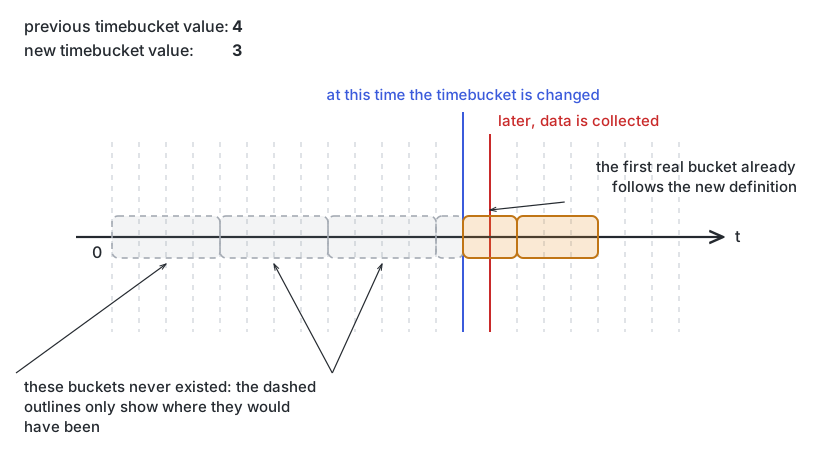 Changing the time bucket before the first data collection of a device
Both at once
Combine the two and different devices end up with buckets that do not line up with each other. A device can also collect data belonging to a bucket in the past: if that bucket exists the engine uses it as is, otherwise it creates a new one following the new definition. Both are the price of changing the bucket length.
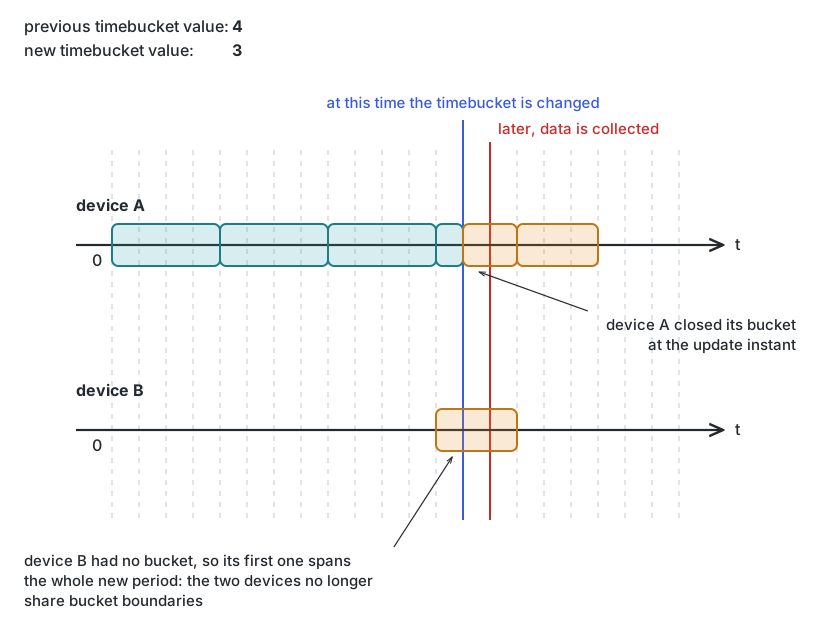 Two devices with different buckets after changing the time bucket
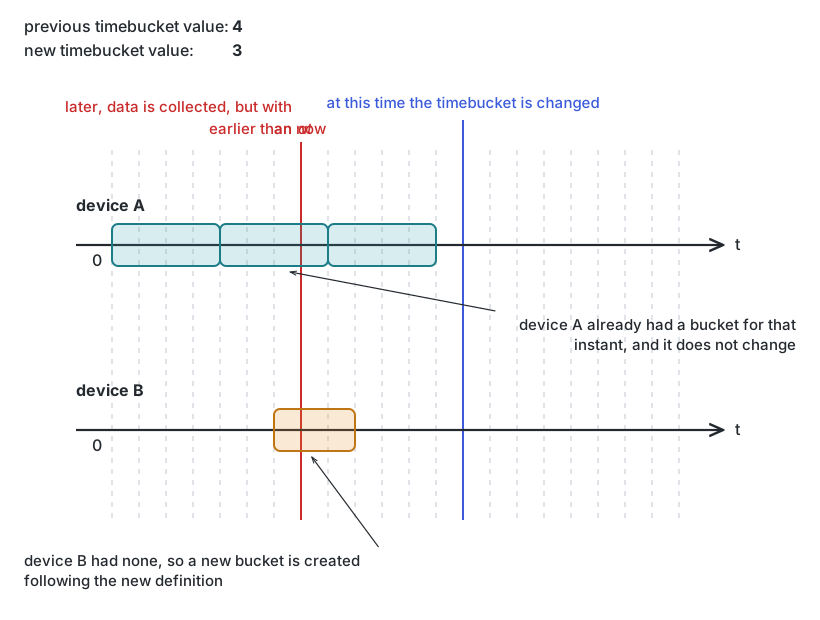 Two devices with different buckets in the past after changing the time bucket
From zero to a higher value
Going from timeBucket: 0 to a real length means each collection now creates a bucket of the new length.
Zero-length buckets that the new bucket would overlap are absorbed rather than left behind, and their
values feed the aggregation functions of each column.
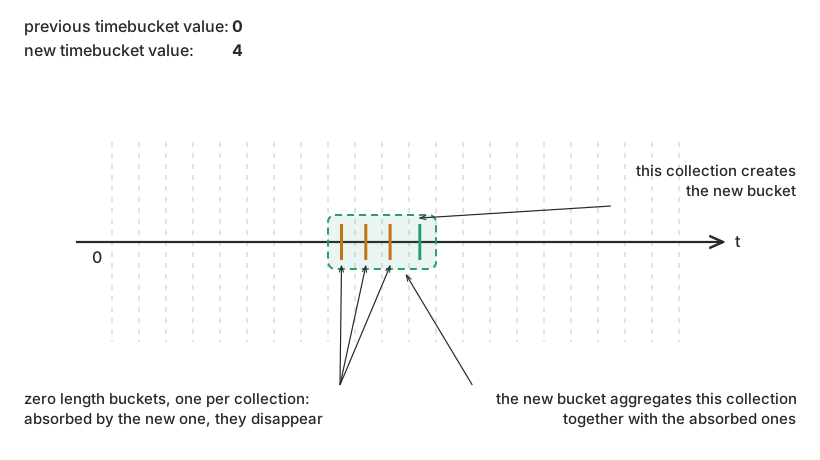 Changing the time bucket from zero to a higher value
Deleting
Removes the time series identified in the URL. Confirm the identifier before sending the request.