Catalogs: Vulnerabilities, OIDs, MIBs and more
What the probe knows before it is plugged in
A scanner is only as good as the data behind it, and the usual arrangement is to fetch that data on demand: a vulnerability feed pulled at scan time, a vendor lookup resolved against a web service, a MIB downloaded when an unknown OID turns up. Every one of those assumes a route to the internet.
Axiom Border carries all of it. Nothing is downloaded at run time — not before a scan, not during one, not to interpret a result afterwards. A probe in an air-gapped plant resolves manufacturers, names OIDs, and matches vulnerabilities with exactly the same coverage as one sitting in an office.
The rule that decides what is updatable
Data is updatable in the field. Decisions are not.
The IEEE registry and the CVE database are facts about the world that change without anyone here deciding anything, so they can be refreshed on a running probe. The industrial port table and the device-typing rules are auditable decisions, each with its evidence, and they stay compiled into the product on purpose — so that what the probe concludes about your network is reproducible, and changes only when the product does.
What ships, and where it comes from
| Catalogue | Source | What is installed |
|---|---|---|
| Vulnerabilities — CVE database | The NVD, the US NIST National Vulnerability Database | 13,275 unique CVEs across 218,111 vendor·product·version rows, in 20 vendor feeds |
| Manufacturers — IEEE registry | The IEEE, published registry of MAC address blocks | 39,979 assignments, laid over the built-in table |
| Manufacturers — built-in table | The same IEEE registry, frozen into the product at build | 38,242 prefixes. The floor that can never go missing |
| OIDs and MIBs | Vendor-published MIB modules, gathered from public sources | 12,547 modules in the format the probe reads, plus 15,869 in ASN.1 for your own tooling |
| Generic vulnerability checks | The upstream nuclei-templates project, pinned to a fixed release |
13,279 templates |
| OT/ICS vulnerability checks | Written by amplía))) for this product | 57 checks — 41 read-only, 16 intrusive behind two locks |
Every figure above is what the probe reports about itself. None of it needs a network to be true.
Vulnerabilities — why those 20 vendors
The vendor list is not “who makes industrial equipment”. It is which vendors the probe can actually put a name and a version to from what it observes — a neighbour announcement, a MAC address block, or a device declaring itself. A vendor the probe cannot identify would contribute rows that could never match anything.
| Group | Vendors |
|---|---|
| Network edge | Fortinet · Cisco |
| Automation and control | Siemens · Schneider Electric · Rockwell Automation · ABB · Mitsubishi Electric · Honeywell · Emerson · Yokogawa · Omron · WAGO · Beckhoff |
| Industrial networking | Moxa · Belden (Hirschmann, GarrettCom, Tofino) · Phoenix Contact · Advantech · Schweitzer Engineering |
| In the plant anyway | Synology · TP-Link |
The last group is there on purpose, and it is not a category error. Neither vendor makes industrial equipment, but both turn up in plants regardless — the NAS somebody parked the historical data on, the router somebody plugged in. The probe identifies them by MAC address block like anything else and their firmware carries versions, which is the only criterion this list applies.
What is in there, by severity: 1,341 critical, 4,853 high, 4,316 medium, 215 low, and 2,549 not scored, spanning disclosures from 1999 to 2026.
The database is what turns an identity into a finding without emitting a packet, and how complete the identity is decides what the probe is allowed to say:
| What was identified | What it reports |
|---|---|
| Vendor, product and exact version | Affected — a genuine “vulnerable to this CVE” |
| Vendor and product, version unknown | Potentially affected, verify — never presented as the same thing |
| Vendor only | No CVE can be pinned to the host, so it reports the vendor’s known CVE surface as a count and severity breakdown, with a recommendation to scan it actively |
That last row is the one worth reading twice. A host identified only down to its manufacturer is not a clean host — it is one the probe could not narrow far enough to name a finding. Reporting it as an empty row would be the single most misleading thing an assessment tool can do, so it reports the size of what it cannot yet see instead.
Two vendors that looked present and were not
Hirschmann and Phoenix Contact originally returned nothing at all, while appearing perfectly healthy in the list: the NVD files them under Belden and phoenixcontact respectively. Both are manufacturers the probe identifies routinely, so the empty feeds would have meant silent blind spots on common industrial equipment — a good illustration of why the coverage figures above are verified against the source rather than assumed.
Manufacturers — the registry and the floor beneath it
The installed IEEE registry turns a MAC address into a vendor name. It wins for the prefixes it carries; everything else keeps resolving against the table built into the product. See Passive and active for how that claim is presented with its evidence and its caveats.
Only the built-in table is mandatory
Remove the installed registry and nobody loses their manufacturer — resolution simply falls back to the table inside the product. That is deliberate: making the overlay compulsory would turn an offline-first probe into one that needs an external file to do its job.
Only full-length assignments are used
The IEEE publishes three sizes of address block. Axiom Border uses only the full-length (MA-L) assignments, because the two smaller kinds divide a single 24-bit prefix between several companies — including them would confidently attribute one company’s block to a different company. A wrong manufacturer is worse than no manufacturer.
Against the registry documented here, the installed file adds 1,737 prefixes the built-in table cannot resolve at all and changes the name on 270 more. Most of that second number is the registry tidying its own punctuation and character encoding rather than a company changing hands, but the ones that matter are in there: Phoenix Contact and ABB, now Hitachi Energy, are the renamings you are most likely to notice on a real inventory.
Take those three numbers as a snapshot, not a specification. They are a comparison between two things that both move on their own — the registry the IEEE republishes every few days, and the table compiled into whichever build you are running. The probe works the current figures out for itself and reports them; see checking what a probe actually has.
OIDs and MIBs — the SNMP catalogue
An OID like .1.3.6.1.4.1.6574.2.1.1.5 means nothing on its own. Turning it into diskTemperature
requires a MIB, and on an air-gapped probe you cannot look one up — so the catalogue ships with the
product.
| Contents | Used by | |
|---|---|---|
| JSON catalogue | 12,547 modules across 2,762 vendors | The probe. This is the catalogue it reads |
| ASN.1 catalogue | 15,869 modules | Not the probe — supplied for the host’s own SNMP tooling |
The modules are vendor-published MIBs, gathered from the manufacturers’ own documentation and public MIB collections, and installed as a single catalogue. It is treated as an external source of truth: it is not hand-edited, and it is refreshed as a whole rather than patched.
The ASN.1 tree is a convenience, not a spare copy
The probe never reads it. It is there so that snmpwalk and similar tools on the same host can resolve
names too — copy it to /usr/share/snmp/mibs if you want that. Pointing the probe at it does not work.
Vulnerability check templates
Two origins, and the pin is what holds the offline model together.
The generic templates come from the upstream project, pinned to a fixed release, and the engine’s own self-update is switched off. Both are load-bearing: an engine allowed to chase “latest” would try to download templates the first time it ran a scan, and a probe with no route out would simply fail there.
The OT/ICS suite is written in-house and lives inside the probe itself rather than in the templates directory. It is written out to disk each time a vulnerability scan runs, and anything left over from a previous version is removed at the same time.
That mirroring is a safety property, not housekeeping
Because the suite on disk is rebuilt from the copy inside the product at every scan, a check withdrawn in an upgrade stops firing everywhere. That matters most for the intrusive ones: a write-capable check removed on purpose cannot survive on disk and keep running.
It also explains a figure that looks alarming and is not — see checking what a probe actually has.
Where the probe looks for them
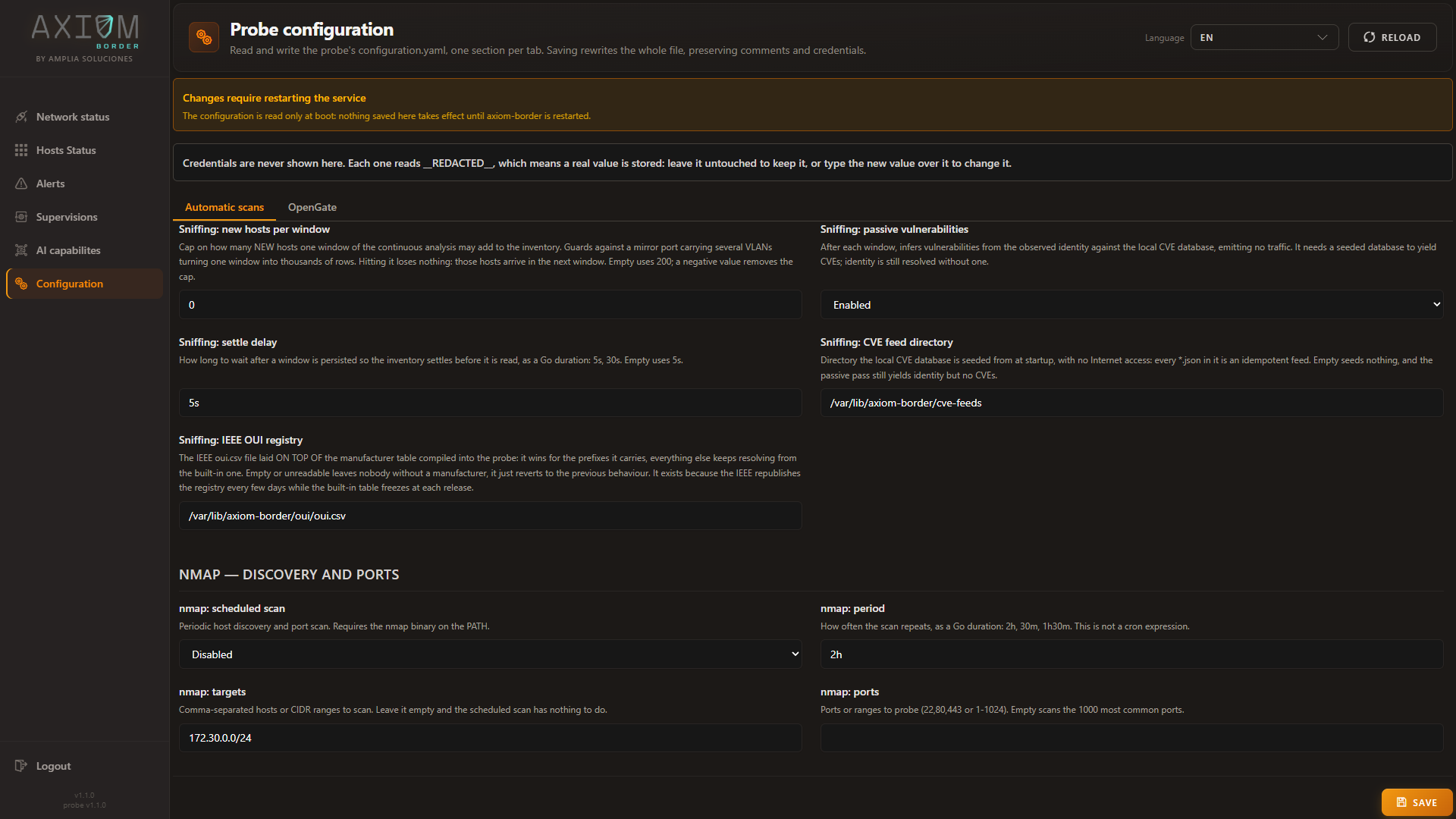
All three locations are set from Configuration → Automatic scans, and the defaults are correct for a standard installation — you only touch these to point the probe at data you placed somewhere else.
| Setting | What it points at |
|---|---|
| Sniffing: CVE feed directory | Where the CVE database is seeded from at start-up |
| Sniffing: IEEE OUI registry | The registry file laid over the built-in manufacturer table |
| SNMP: MIB directory | The MIB catalogue, in the format the probe reads |
Sniffing: passive vulnerabilities, on the same screen, is the switch that turns identity into findings after each observation window. With it on and no CVE database seeded, you still get identity — you just get no CVEs from it.
Working with OIDs from the console
Network status → the SNMP action on a host row opens the query panel. This is the normal way to
interrogate a device, and it needs no knowledge of OID numbering at all:
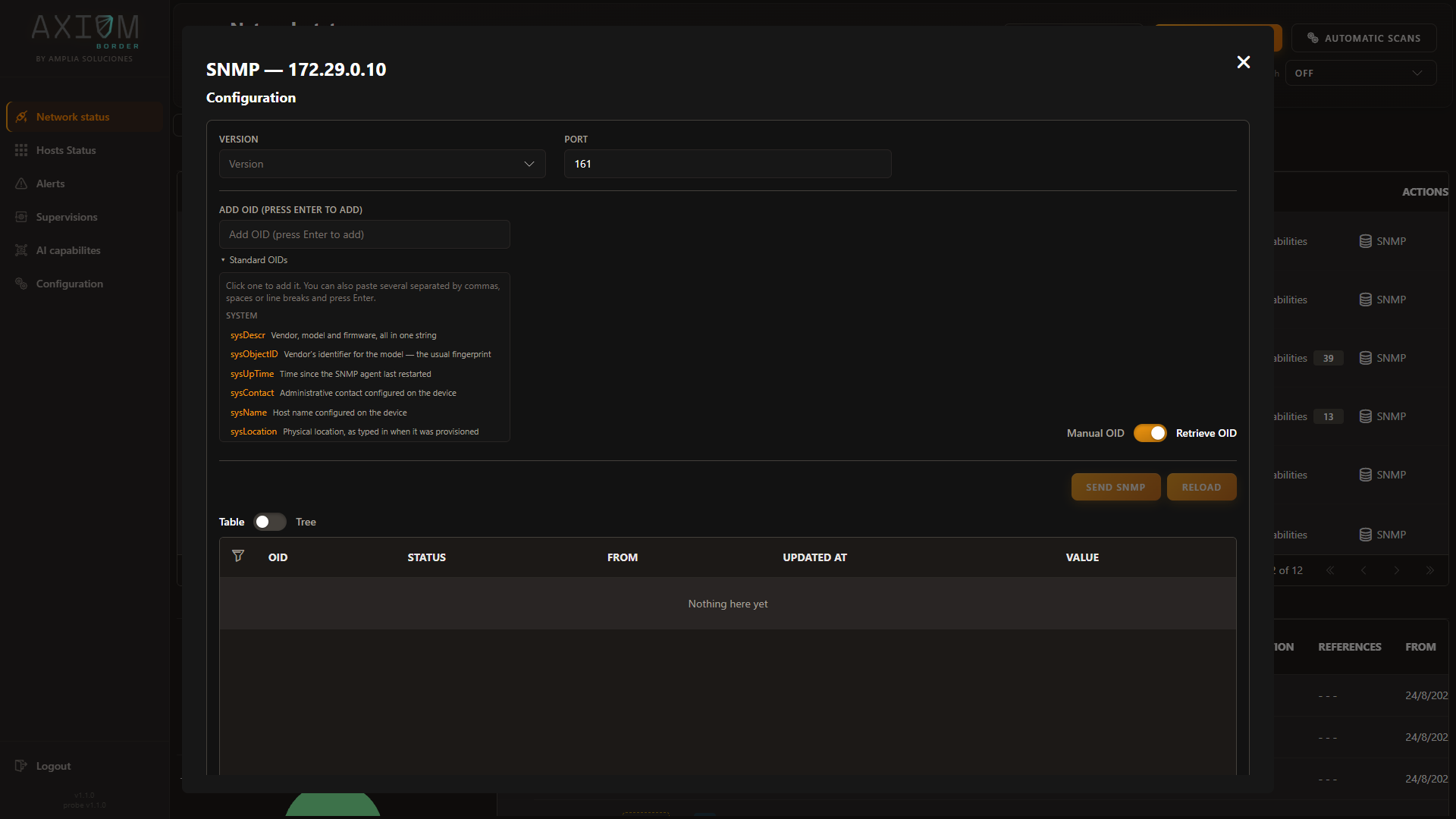
- Version and Port set how to talk to the device.
- Add OID takes a symbolic name or a numeric OID. You can paste several at once, separated by commas, spaces or line breaks.
- Standard OIDs expands into the common ones grouped by purpose — System, Interfaces, Host
resources — each explained in plain language rather than by number.
sysDescris described as vendor, model and firmware, all in one string;sysObjectIDas the vendor’s identifier for the model — the usual fingerprint. Click one to add it. - Manual OID / Retrieve OID switches between naming OIDs yourself and reading back what the probe already holds for that host.
- Results render as a Table or a Tree, and the tree is the one to use after a walk.
Credentials do not belong in this panel. Store them once as an SNMP profile — the console has a wizard for it, with predefined profiles to start from — and bind the profile to the host. See Security assessment.
How resolution works
Two directions matter, and they behave differently: symbols become OIDs before the request goes out, and OIDs get names again on the way back.
Inbound, when a query contains symbolic names, they are resolved before anything is sent on the wire: first a small built-in table of the universal system OIDs, then anything already numeric passes through untouched, then everything else is looked up in the vendor’s modules.
flowchart TB
    S["Requested name<br>sysDescr"] --> C1{"Built-in<br>system OID?"}
    C1 -->|"no"| C2{"Already<br>numeric?"}
    C2 -->|"no"| C3{"In the vendor's<br>modules?"}
    C3 -->|"no"| FAIL["Query fails<br>unresolved oids"]:::danger
    C1 -->|"yes"| OK["Numeric OID<br>sent on the wire"]
    C2 -->|"yes"| OK
    C3 -->|"yes"| OK
    classDef danger fill:#fff0ed,stroke:#ff664e,color:#101010
An unresolved symbol fails the whole query
If any requested symbol cannot be resolved, the run ends as failed — it does not silently skip the unknown ones and query the rest. The failure names the symbols it could not resolve, so the fix is usually obvious: correct the spelling, pick the name from Standard OIDs, or use the numeric OID.
Outbound, every OID that comes back is put through four steps, first match winning: the built-in
system OIDs; the vendor’s modules, trimming up to two trailing segments — which is how indexed OIDs
such as ifDescr.3 resolve to ifDescr; the SNMPv2 module; and a set of generic modules by exact match.
If nothing matches, the name comes back as unknown. The value is still returned — only the label is
missing.
Ambiguity yields no name rather than a wrong one
When trimming produces more than one candidate match, resolution stops and returns no name. This is deliberate, and it is the same principle the probe applies to manufacturer identity: a value labelled with a plausible-but-wrong symbol is worse than an unlabelled one, because it silently misleads whoever reads the report.
The vendor hint
Symbol resolution needs to know which vendor’s modules to search. Axiom Border works it out in order:
- The MIB named in the query itself.
- The default MIB from Configuration → Automatic scans → SNMP: default MIB.
- Inferred from the host’s manufacturer, as already recorded in the inventory.
The third is the useful one, and it is why running discovery before SNMP pays off: the manufacturer already established for that host becomes the vendor hint automatically. Explicit rules exist for common vendors — Synology, Cisco, HP, Huawei, Juniper, D-Link — falling back to the first word of the manufacturer name.
The hint is only consulted when a query actually contains non-numeric symbols. All-numeric queries need no vendor at all.
Values in results
Each result entry carries the numeric OID, the resolved name (or unknown), the formatted value and a
status. Values are formatted by type: numbers as numbers, IP addresses in dotted form, and byte strings
as text when they are printable, otherwise as hexadecimal — so binary values are legible rather than
mangled.
Walks mark disappearances, single queries do not
A walk covers a whole subtree, so an OID that was previously known and is now absent is genuinely gone, and gets marked as down. A single-OID query only asks about what you listed, so absence proves nothing and nothing is marked. This is why change detection over SNMP inventory should use walks.
Browsing the MIB catalogue
Listing vendors, searching for a symbol and inspecting a module are not in the console — the catalogue browser is available through the API only. Day-to-day this rarely matters, because the Standard OIDs helper covers the common cases and the vendor hint resolves the rest automatically. Reach for these when you are working out what a specific vendor exposes.
q is matched as a case-insensitive substring against object names. Always pass vendor when you
can: with it the search covers one vendor’s modules, without it the whole catalogue, and that is the
one operation whose cost grows with catalogue size. Everything else here is fast.
How a module ends up under a vendor
Vendor is derived from the module name: everything before the first hyphen, lowercased. So
SYNOLOGY-DISK-MIB belongs to vendor synology, and A3COM-HUAWEI-DEVICE-MIB to a3com. A module name
with no hyphen becomes its own vendor.
This is a heuristic rather than metadata read from the file. It works because MIB naming conventions are near-universal, but do not expect it to be perfect on unusual modules — which is the other reason to search by symbol rather than by browsing vendors.
Extending the MIB catalogue
To add a vendor’s MIB, place its JSON module in the configured catalogue directory. New modules are picked up automatically, and changing the directory reloads the catalogue from the new location.
A missing catalogue does not stop the probe
If the catalogue cannot be loaded — wrong path, unreadable files — the probe logs a warning and carries on with an empty catalogue rather than refusing to start.
The signature of that particular mistake is distinctive and worth recognising: numeric OIDs work,
sysDescr works, and everything else fails to resolve. Check SNMP: MIB directory in
Configuration → Automatic scans before looking anywhere else.
Keeping the catalogues current
Three of them can be replaced on a running probe, with no restart and no internet: the CVE feeds, the IEEE registry, and the vulnerability check template bundle. You bring the file to the probe by whatever means your site allows, and the probe takes it from there.
This is not in the console yet
Updating these catalogues is currently an API operation — the web console reads and edits where they live, but does not yet offer uploading a new one. The calls below are the supported path today.
The CVE database
Accepts a single feed file or the whole bundle. Ingestion is idempotent per feed: re-ingesting a feed
deletes its previous rows before writing the new ones, so a CVE withdrawn upstream disappears here too
rather than lingering as a stale finding. Add ?replace=true to empty the directory first instead of
merging into it.
The IEEE manufacturer registry
Takes the IEEE file exactly as published. The next observed frame already resolves against it — there is no reload step.
It is validated on a copy before anything is replaced. A file that fails to yield a single usable assignment is rejected and the running registry is left untouched, so a truncated download cannot take your manufacturer resolution down with it.
The vulnerability check templates
Checking what a probe actually has
The same shape exists for /security/oui-overlay and /security/vulnscan/templates.
Files on disk and rows ingested are two different numbers
Reading both at once is deliberate, because their disagreement is the exact signature of the most common
failure: the feeds are on the probe and nothing seeded them. A feed listed with a real size but
entries: 0 is a file sitting in the directory that is not a feed the probe can read.
The OT check count reads zero until the first scan
Because the industrial suite lives inside the probe and is written out at scan time, a probe that has not run a vulnerability scan yet reports 0 OT checks. The suite is present and will be used; it simply has not been laid down on disk yet.
Do not read that zero as a missing installation.
Why this is worth the disk it takes
Every catalogue here could have been a web service call. Making them local costs a few hundred megabytes and buys four things that matter in an industrial network:
- The probe works where it is most needed. Isolated segments are isolated deliberately. A tool that phones out to stay useful is either useless there or a hole in the isolation.
- Results are reproducible. The same probe, the same version, the same data, gives the same answer next month. A feed that silently moved underneath you does not.
- Nothing about your network leaves it to be analysed. Resolving a vulnerability against a hosted service means telling that service what you have.
- A scan cannot fail because something upstream was unreachable, renamed, or rate-limited.
And where the world genuinely does move — new CVEs, reassigned address blocks — you refresh it deliberately, on your own schedule, with a file you can inspect before you install it.