Configuration
Configuration
Axiom Border reads a single file, configuration.yaml, from the directory given by the
AXIOM_CONFIG_DIR environment variable (default: config). An example file,
configuration_example.yaml, is supplied alongside it — copy it rather than editing it in place, so you
always keep an untouched reference.
You will rarely edit the file by hand: the console’s Configuration view and the REST API write this same file — see Changing the configuration below.
No hot reload — restarts are mandatory
Every field in this file requires a service restart to take effect. There are no exceptions. The file is read once, when the service starts. If you change a value and nothing happens, you have not restarted the service. Saving from the console on a managed deployment restarts the service for you; everywhere else the restart is yours to run:
An invalid file stops the service
If configuration.yaml is missing or is not valid YAML, Axiom Border refuses to start rather than
running with defaults. This is intentional — a monitoring probe silently running on the wrong
configuration is worse than one that will not come up. Check the log if the service does not start.
Changing the configuration
Three paths write the same file. The web console is the recommended one: it edits the settings a running deployment actually tunes, validates them before writing, and on a managed deployment restarts the service for you. The REST API covers automation and driving a probe without shell access. Editing the file over a shell always works — it is just the least guarded of the three.
Open Configuration in the side menu. The view edits configuration.yaml itself, one group of
settings per tab:
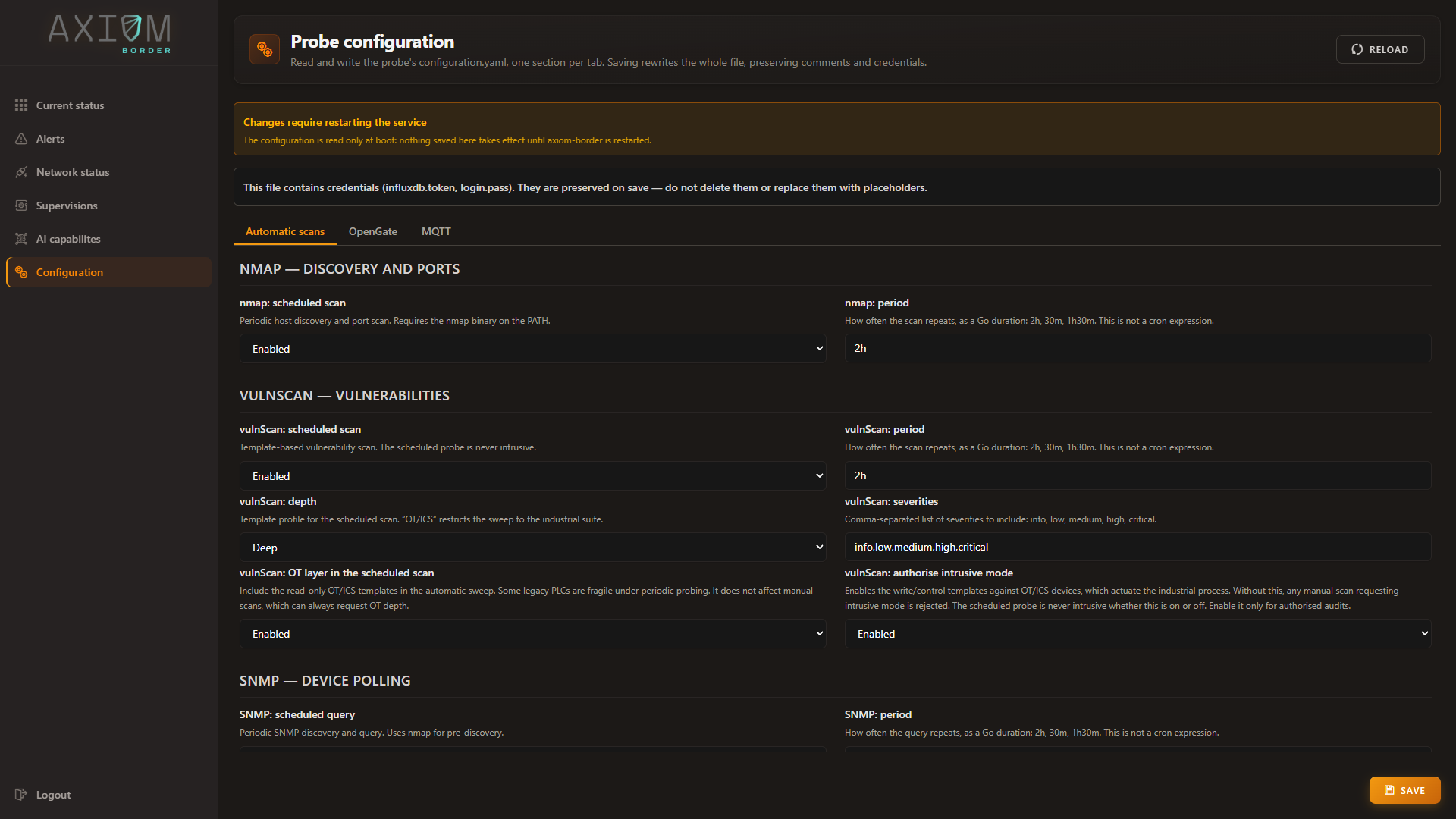
Each field is labelled in plain language rather than by its YAML key — nmap: period for schedule,
vulnScan: depth for level — and the reference further down this page maps them to the keys they
write. The two notices at the top are permanent, not the result of saving: they are there to tell you
before you edit that nothing applies until the service restarts, and that the file holds credentials
which are preserved for you.
| Tab | What it edits |
|---|---|
| Automatic scans | The securityProbes switches and intervals: enable and schedule for nmap, vulnScan and snmp; the vulnerability scan’s level, severity and OT switches; the sniffing block, including where the probe reads its catalogues from |
| OpenGate | The whole opengate block — connection, collect and provision |
| MQTT | The whole mqtt block — the embedded broker with its WebSocket and TLS listeners, the internal publisher and the operations client |
Everything else — logger, login, influxdb, apiPort, pagination and the per-probe details not
listed above, scan targets included — is changed through the API or the file.
Network status has a shortcut straight here: its Automatic scans action opens this view on the first tab, which is where you land when a scheduled scan looks stale or too frequent.
The forms are a window onto the file, not a copy of it. Saving rewrites the whole file but preserves everything the forms do not manage: comments, credentials, and every key outside the three tabs. Leaving a field blank removes its key from the file, returning that setting to its unset behaviour. Durations, ports and cron expressions are checked as you edit, and Save stays disabled while any field holds an invalid value — an invalid document never reaches the probe.
What happens after Save depends on the deployment:
- On a managed deployment, the console asks the deployment manager (Keystone) to restart the service and waits until it reports healthy again — when the green confirmation appears, the change is already live. The console is unresponsive for the few seconds the restart takes.
- On a plain systemd installation, the file is written and an amber banner stays on screen until
you restart the service yourself:
sudo systemctl restart axiom-border. - If the automatic restart fails, the write has still succeeded. Restart by hand —
keystonectl restart axiom-border, orsudo systemctl restart axiom-border— and the saved configuration applies.
Changing apiPort or the login credential raises an explicit lockout warning: the file is written
anyway, so before restarting make sure you can reach the new port or know the new password.
GET /config returns the current YAML and PUT /config replaces it. This exists so a probe can be
configured for a customer environment without shell access to the host.
The PUT response reports what happened:
| Field | Meaning |
|---|---|
restartRequired |
Always true — configuration only takes effect at startup |
message |
Confirmation text |
backup |
Path of the previous file’s backup. Omitted when there was no previous file |
warnings |
Present only when non-empty. Raised when apiPort or the login credentials change, because either can lock you out |
Console and API end in the same validated write, with three guarantees:
- Validation before writing. The document is validated exactly as at startup and checked for the six mandatory fields. Invalid YAML or a missing field returns HTTP 400 and nothing is written.
- Atomic replacement. The file is written to a temporary file in the same directory and renamed.
- Backup of the previous file, forced to
0600because it contains secrets.
The write is a full replacement, and the backup is a single level
PUT /config expects the complete file, not a patch — fetch, edit, send back whole. The console
handles this for you and sends the full document with your edits applied.
The backup is always the same filename, configuration.yaml.bak, and it is overwritten on every
write. There is only one level of history. If you need more, copy it aside yourself before saving.
To recover from a lockout, restore that file and restart.
Where the file lives
| Deployment | Path |
|---|---|
Installed with install.sh (systemd) |
/opt/axiom-border/config/configuration.yaml |
| Managed deployment | /var/lib/axiom-border/config/configuration.yaml — a stable path outside the per-version working directory |
Overriding any field with an environment variable
Every key can be overridden from the environment by upper-casing it and replacing dots with
underscores. A .env file in the working directory is also loaded.
| Configuration key | Environment variable |
|---|---|
logger.logLevel |
LOGGER_LOGLEVEL |
influxdb.token |
INFLUXDB_TOKEN |
login.pass |
LOGIN_PASS |
This is the recommended way to handle secrets: keep the tokens and passwords out of the YAML file entirely and inject them through the environment or your secret manager.
Required fields
Only six fields are validated as mandatory. If any is missing, the configuration is rejected:
login.user · login.pass · influxdb.url · influxdb.token · influxdb.org · apiPort
Everything else is optional and has a documented default.
logger
Backend logging, to console and to size-rotated files.
| Field | Type | Default | Description |
|---|---|---|---|
directory |
string | ./logs |
Destination directory for rotated log files |
inFile |
bool | true |
Write to file |
inConsole |
bool | true |
Echo to stdout |
colorInConsole |
bool | true |
ANSI colour codes on stdout. Disable when piping to a file or to journald |
logLevel |
string | DEBUG |
DEBUG | INFO | WARN | ERROR |
processId |
string | "" |
Process label added to every line; empty means no label |
fileName |
string | egprobe.log |
Base log filename; rotation appends suffixes |
maxSize |
int (MB) | 20 |
File size before rotation |
maxBackups |
int | 20 |
Number of rotated files kept |
compress |
bool | true |
gzip rotated backups |
Tip
DEBUG is the shipped default and it is verbose enough to flood a journal on a busy probe. For
production, INFO is the sane choice.
login
The single credential that protects the whole API except /auth/login.
| Field | Type | Required | Description |
|---|---|---|---|
user |
string | Yes | API username |
pass |
string | Yes | SHA256 hex digest of the password, not the password itself |
Generate the digest before writing it:
At login, the probe hashes the submitted password and compares it against this value.
Change the shipped credential
The example file carries a placeholder digest so that a fresh installation can log in. It must be replaced before the probe is reachable by anything. Treat a deployment still carrying the example digest as unauthenticated.
influxdb
Connection to the metrics database (InfluxDB 2.x) that stores metrics, audit records, scan results and alarms.
| Field | Type | Default | Required | Description |
|---|---|---|---|---|
url |
string | http://127.0.0.1:8086 |
Yes | Metrics database endpoint |
org |
string | axiom |
Yes | Organisation |
token |
string | — | Yes | Token with read/write permission on the organisation. Prefer injecting via INFLUXDB_TOKEN |
buckets |
[]string | see below | No | Buckets created at startup if they do not already exist |
Default bucket set: network_bucket, ssh_bucket, metrics_bucket, usb_bucket, eg_alarms,
audit_logs, networktraffic, availability, scanmetrics. The four per-channel event buckets are
populated by the oda-lite collector, the rest by the probe itself — see
Metrics ingestion.
The probe starts even when the metrics database is unreachable, and every feature that depends on it is inoperative until it recovers. This is deliberate for edge deployments where the database may be a separate node that boots later.
alerts and audit
| Block | Field | Type | Default | Description |
|---|---|---|---|---|
alerts |
offset |
duration | 10s |
Tolerance window applied to the alarm evaluation query range |
alerts |
bucket |
string | eg_alarms |
Bucket where alarms are written and read |
audit |
bucket |
string | audit_logs |
Bucket for audit events: logins, configuration changes, executions |
Top-level keys
| Field | Type | Default | Required | Description |
|---|---|---|---|---|
apiPort |
string | 8083 |
Yes | HTTP service port. Binds on 0.0.0.0 |
outputParquetPath |
string | ./ |
No | Destination directory for on-demand Parquet exports |
dbPath |
string | "" |
No | Local state database file. Empty resolves to ./db.dat, relative to the working directory |
gojascriptsDir |
string | "" |
No | Directory holding rule scripts. Empty resolves to resources/gojascripts |
gojaTimeout |
duration | 8s |
No, but set it | Maximum execution time for a rule script per event |
Two settings worth pinning down
Always set dbPath to an absolute path in production (for example
/var/lib/axiom-border/db.dat). Deployments that use per-version working directories will otherwise
create a fresh, empty database on every upgrade and appear to have lost all state.
Always set gojaTimeout explicitly. Without a time limit, rule scripts do not run at all.
pagination
Controls the two read modes over the metrics database. Every field has a default, so the block can be omitted entirely.
| Field | Type | Default | Description |
|---|---|---|---|
maxRecentEvents |
int | 1000 |
Number of most recent events kept per stream, which is also the cap of the /recent/* feed |
rangePageSize |
int | 100 |
Default page size for range queries |
rangeMaxPageSize |
int | 500 |
Maximum accepted pageSize |
rangeMaterializeMaxRows |
int | 40000 |
Row threshold. Below it, the whole range is cached, which allows jumping to any page and reporting an exact total. Above it, results are delivered sequentially, page after page |
rangeCacheTTL |
duration | 60s |
Lifetime of a cached range entry |
rangeCacheMaxEntries |
int | 8 |
Maximum ranges cached at the same time. Beyond it, the least recently used range is discarded |
rangeExportMaxRows |
int | 500000 |
Row cap for the streaming CSV export. A range exceeding it returns HTTP 400 asking you to narrow the window |
trainerDetails
HTTP client settings for the AI container. Only relevant on Linux with a container engine available — see AI capabilities.
| Field | Type | Default | Description |
|---|---|---|---|
serviceTlsCert |
string | "" |
Client TLS certificate towards the AI container |
serviceTlsKey |
string | "" |
Matching private key |
trainerContainerName |
string | trainer |
Base container name. The effective name is <trainerContainerName>-<agent> |
Three sub-blocks — metrics, healthCheck and predict — share the same four fields. The {port}
literal in each URL is substituted at runtime with the port of the corresponding AI agent.
| Sub-block | url |
timeout |
retries |
timeBetweenRetries |
Purpose |
|---|---|---|---|---|---|
metrics |
https://127.0.0.1:{port}/api/metrics |
2s |
1 |
2s |
Collect metrics from the AI container |
healthCheck |
https://127.0.0.1:{port}/health |
2s |
20 |
5s |
Wait for container startup — 20 attempts at 5 s gives roughly 100 s of margin |
predict |
https://127.0.0.1:{port}/api/predict |
10s |
1 |
2s |
Inference, invoked from rule scripts |
Note
Use whole seconds for timeBetweenRetries; fractions of a second are not honoured.
securityProbes
Security probes run two ways: automatically on an interval (schedule), and manually from the API or
UI. Results are stored in local state and in the metrics database — scanmetrics for aggregates,
availability for up/down.
Probes ship disabled, and the first scan runs at startup
nmap, vulnScan and snmp all default to enabled: false. Enable them only after confirming their
dependencies are present on the target host, because the first scan of an enabled probe runs as soon
as the service starts, not after the schedule interval has elapsed. A probe enabled without its
dependencies — the nmap binary on PATH, a readable templates directory, a valid capture interface —
will log errors on every boot.
securityProbes.nmap
Host discovery, port scanning and optional fingerprinting. Requires the nmap binary on PATH.
| Field | Type | Default | Description |
|---|---|---|---|
enabled |
bool | false |
Enable the scheduled probe |
schedule |
duration | 2h |
Interval between sweeps. Zero or negative falls back to 2h |
targets |
[]string | ["192.168.1.0/24"] |
Hosts and CIDR ranges to scan |
portFilter |
string | "" |
Port list such as "22,80,443". Empty means nmap’s top 1000 |
udp |
bool | false |
Add a UDP scan. Slow |
udpPorts |
string | common UDP ports | UDP ports probed when udp: true |
timing |
string | "" |
T1–T5. T2 is cautious, T4 is reasonable on healthy networks |
scanPorts |
bool | true |
When false, ping scan only (-sn) |
service |
bool | false |
Service and version detection (-sV) |
os |
bool | false |
OS fingerprinting (-O). Implies a SYN scan, which needs raw sockets and therefore root |
timeout |
duration | 5m |
Abort if nmap does not finish |
securityProbes.vulnScan
Template-based vulnerability scanning, including the embedded OT/ICS suite. The scan engine ships inside the product — there is no scanner binary to install.
| Field | Type | Default | Description |
|---|---|---|---|
enabled |
bool | false |
Enable the scheduled probe |
schedule |
duration | 2h |
Sweep interval. Also re-triggered by event, with debounce, when new hosts are recorded |
severity |
string (CSV) | info,low,medium,high,critical |
Severity filter, given as one comma-separated string |
level |
string | profundo |
Depth, translated to template tags — see below |
templatesDir |
string | "" |
Templates directory override for the scheduled probe |
defaultTemplatesDir |
string | ./vulnscan-templates |
Deployment-wide fallback |
timeout |
duration | 5m |
Scan cut-off. A request may override it |
allowTemplateUpdates |
bool | true |
Whether the probe may refresh templates from the network |
allowTemplateBundleUpload |
bool | true |
Whether an authenticated operator may upload a template set. Separate key on purpose — see below |
allowIntrusive |
bool | false |
Master lock for OT/ICS intrusive mode |
enableOT |
bool | false |
Add read-only OT templates to the scheduled sweep |
userAgent |
string | "" |
HTTP User-Agent for the web checks. Empty keeps a neutral, randomised browser value per request; set it only when a deployment needs a deterministic one |
level to tag mapping:
level value |
Tags applied |
|---|---|
ligero, rapido, fast |
tech,ssl |
medio, medium |
cve,misconfig,default-login,tech,ssl |
profundo, full, deep |
cve,misconfig,default-login,exposure,network,ssl,tech,ot |
ot, ics, industrial |
ot only |
Use one of the listed level values
A level value not in the table above applies no tag filter at all, so the scan walks the entire
template tree with only the severity filter. This is rarely what anyone intends and is dramatically
slower. Check for typos.
Templates directory resolution order: the templatesDir field of the scan request, then
securityProbes.vulnScan.templatesDir, then defaultTemplatesDir, then a vulnscan-templates
directory next to the product binary. Relative paths resolve against the working directory.
allowTemplateUpdates behaviour:
true(default, including when the key is absent): best-effort refresh to the latest template release. Being offline or having GitHub blocked does not abort the scan — local templates are kept. An empty directory triggers a full download.false: strict offline kill-switch. The network is never touched, even when the directory is empty. If nothing is on disk the scan fails with a clear error.
allowTemplateBundleUpload is a different question, which is why it is a different key.
allowTemplateUpdates asks may this process reach the network; this one asks may an authenticated
operator replace the template set. The deployed recipe sets the first to false — correctly, an OT
segment has no route out — so reusing it for uploads would have left the offline update path disabled
on every real deployment, which is the one scenario the product exists for. Set this to false to
freeze the templates at whatever the deployment installed; that is a posture, not the same decision as
closing egress. See Offline maintenance.
The OT suite never depends on this
The OT/ICS templates ship inside the product and the bundled set is restored after every template
update, so they survive a wipe-and-replace by the template manager and work with
allowTemplateUpdates: false on an air-gapped network. See
OT/ICS vulnerability scanning.
allowIntrusive governs the write/control layer of the OT suite over both REST and MQTT. A
request asking for intrusive mode while this is false is rejected, and the execution ends as
failed with an explicit message. The scheduled probe is never intrusive regardless of this flag.
enableOT adds the read-only ot tag to the scheduled sweep even when level would not include
it. It never enables the intrusive layer. Some older PLCs are fragile in the face of unexpected
connections; enable it only if the OT network tolerates periodic probing.
Recommended steady state for a probe on an industrial segment:
securityProbes.snmp
| Field | Type | Default | Description |
|---|---|---|---|
enabled |
bool | false |
Enable the scheduled probe |
schedule |
duration | 2h |
Interval. Zero or negative falls back to 2h |
targets |
[]string | ["192.168.1.0/24"] |
Hosts and CIDR ranges to interrogate |
mibDir |
string | MIBS/JSON-FORMAT |
MIB catalogue in JSON format |
mib |
string | synology |
Default MIB when no device match is found |
port |
int | 161 |
SNMP destination port |
timeout |
duration | 2m |
SNMP operation cut-off |
oids |
[]string | sysDescr, sysName, sysObjectID |
OIDs fetched by GET |
walkRoot |
string | "" |
Root OID for the walk. Empty means sysDescr |
workers |
int | 32 |
Walk parallelism. Zero or negative becomes 1 |
Host pre-discovery has a fixed 30 s limit
This probe uses nmap for host pre-discovery, with a fixed 30 second limit. A /24 range at T2 timing
will exhaust it. Narrow the range or raise the main nmap timing value.
With neither oids nor walkRoot set there is nothing for the probe to do.
securityProbes.sniffing
Continuous traffic capture with periodic persistence to the networktraffic bucket.
| Field | Type | Default | Description |
|---|---|---|---|
interfaces |
[]string | [] |
Interfaces to capture. An empty list disables sniffing — there is no separate enabled switch for this block |
bpf |
string | "" |
BPF filter. Empty captures all IPv4 |
promiscuous |
bool | true |
Put the NIC in promiscuous mode |
backend |
string | pcap |
Capture mode. pcap is the supported value |
duration |
duration | 10m |
Default window for a manual capture |
flushInterval |
duration | 5m |
Persistence interval for continuous capture. Zero or negative becomes 1 minute |
passiveVuln |
bool | true in the deployed recipe |
Infer vulnerabilities from the passive identity (CPE→CVE) after each window, emitting no traffic |
passiveVulnDelay |
duration | 5s |
Grace period after a flush, so the inventory settles before the inference reads it |
passiveVulnRowLimit |
int | 30 |
How many CVEs a device whose product is known but version is not may list one by one. Above the cap that device shows a summary with the count and severity breakdown instead. Version-confirmed findings are never summarised. A negative value removes the cap |
cveFeedDir |
string | "" |
Directory the local CVE database is seeded from at startup, offline. Empty disables seeding |
ouiFile |
string | "" |
IEEE OUI registry (oui.csv, verbatim) laid on top of the manufacturer table compiled into the binary. Its assignments win for the prefixes it carries; everything else keeps resolving from the built-in table, so empty, absent or unreadable is the pre-existing behaviour and cannot degrade anything. Refreshed in place with POST /security/oui-overlay |
This table is not exhaustive
The sniffing block has grown several fields that are not listed here yet (enabled, filterTargets,
interestNetworks, maxHostsPerFlush, snaplen). config/configuration_example.yaml is complete and
is the reference until this page catches up.
Interface naming is platform-specific and is the most common source of a probe that captures nothing:
| Platform | Format | Example |
|---|---|---|
| Linux | Simple name | eth0, enp3s0, wlan0 |
| macOS | BSD name | en0 |
| Windows | Npcap NPF device path | \\Device\\NPF_{GUID} |
On Windows, the friendly name (Ethernet, Wi-Fi) does not work. Discover the NPF path with
nmap --iflist and read the WINDEVICE column.
opengate
Optional cloud integration: inventory reporting (collect) and provisioning (provision). The whole
section is inert when enabled: false.
| Field | Type | Default | Description |
|---|---|---|---|
enabled |
bool | false |
Master switch |
apiKey |
string | "" |
Secret. Sent as the X-ApiKey header over HTTP, and used as the default MQTT password when collect.mqtt.password is empty |
cron |
string | */30 * * * * |
Five-field cron expression for provision and collect. Descriptors such as @hourly are accepted. Empty or invalid means the integration does not run |
minPeriod |
duration | 30m |
Throttle. If the cron interval is shorter than this, the cron is ignored and a plain ticker at minPeriod is used instead |
macDiscoveryTimeout |
duration | 10s |
Limit for resolving the local host MAC |
opengate.collect
| Field | Type | Default | Description |
|---|---|---|---|
enabled |
bool | false |
Enable collected-data reporting |
mode |
string | mqtt |
http or mqtt |
urlTemplate |
string | OpenGate south collect endpoint | URL template; {{deviceID}} is substituted |
deviceId |
string | "" |
Force a fixed device ID. Empty derives one per host from IP and MAC |
sendByParts |
bool | false |
Split the payload into components: ports, SNMP, vulnerabilities |
partSize.ports |
int | 100 |
Port rows per chunk |
partSize.snmp |
int | 100 |
SNMP entries per chunk |
partSize.vulnerabilities |
int | 100 |
Vulnerabilities per chunk |
retryCount |
int | 3 |
Retries for the collect publish or POST |
retrySleep |
duration | 5s |
Wait between retries |
mqtt.broker |
string | "" |
OpenGate broker URL. Required for mode: mqtt; empty skips sending |
mqtt.username |
string | "" |
MQTT username |
mqtt.password |
string | "" |
Secret. Empty falls back to opengate.apiKey |
mqtt.topic |
string | "" |
Publish topic, accepts {{deviceID}}. Required for mode: mqtt |
address.* |
string | — | Asset location metadata: country, region, province, town, postal, address |
opengate.provision
| Field | Type | Default | Description |
|---|---|---|---|
enabled |
bool | false |
Enable bulk provisioning |
bulkUrlTemplate |
string | OpenGate north bulk endpoint | Template with {organizationName} and {provisionProcessorId} placeholders |
searchUrl |
string | OpenGate north bulk search endpoint | Endpoint for querying bulk status |
organizationName |
string | "" |
Target OpenGate organisation. Needed when enabled |
provisionProcessorId |
string | "" |
Provision processor ID. Needed when enabled |
retryCount |
int | 3 |
Retries for the bulk file upload |
retrySleep |
duration | 5s |
Wait between retries |
pollMaxAttempts |
int | 10 |
Maximum bulk result polls |
pollSleep |
duration | 5s |
Wait between polls |
mqtt
Three independent blocks: broker is the MQTT broker embedded in the product, client is the internal
publisher of executions and alarms, and ops is the client that listens for OpenGate operations and
answers them.
mqtt.broker
| Field | Type | Default | Description |
|---|---|---|---|
enabled |
bool | true |
Start the embedded broker |
host |
string | 0.0.0.0 |
TCP listener interface |
port |
int | 1883 |
MQTT TCP port |
username |
string | "" |
Broker authentication. Empty username and password together allow anonymous access |
password |
string | "" |
Secret |
ws.enabled |
bool | true |
Secondary WebSocket listener, used by the web UI |
ws.host |
string | 0.0.0.0 |
Not configurable — the WebSocket listener always binds on all interfaces |
ws.port |
int | 1888 |
WebSocket port |
ws.path |
string | /ws |
WebSocket endpoint path. A leading slash is added if missing |
ws.tls |
bool | false |
TLS on the WebSocket listener |
tls.enabled |
bool | false |
TLS on the main MQTT listener |
tls.host |
string | "" |
TLS listener interface. Empty inherits broker.host |
tls.port |
int | 8883 |
MQTT-over-TLS port |
tls.verify |
bool | false |
Verify client certificates (mTLS) |
tls.caFile |
string | "" |
CA used to validate clients. Needed when verify is on |
tls.certFile |
string | "" |
Server certificate. Needed when TLS is enabled |
tls.keyFile |
string | "" |
Server private key. Needed when TLS is enabled |
Anonymous by default
With username and password both empty the embedded broker accepts anonymous connections. On any
network you do not fully control, set credentials and enable TLS. If you do enable TLS, supply a
complete and valid certificate set: an incomplete TLS block prevents the broker from starting at all.
mqtt.client
| Field | Type | Default | Description |
|---|---|---|---|
enabled |
bool | true |
Start the internal publisher |
broker |
string | tcp://127.0.0.1:1883 |
Broker URL, by default the embedded one. Empty disables the client with a warning |
clientId |
string | "" |
Empty generates a unique client ID automatically |
username |
string | "" |
Only sent when non-empty |
password |
string | "" |
Secret, only sent when non-empty |
topic |
string | axiom-border/executions |
Execution-event publish topic. Empty publishes nothing |
qos |
int | 1 |
Publish QoS |
retain |
bool | true |
Retain flag on published messages |
Auto-reconnect is always on, retrying every 5 seconds, with a 10 second initial connection timeout. Neither is configurable.
mqtt.ops
| Field | Type | Default | Description |
|---|---|---|---|
enabled |
bool | true |
Start the operations listener |
broker |
string | tcp://127.0.0.1:1883 |
Broker to subscribe against |
username |
string | "" |
MQTT username |
password |
string | "" |
Secret |
topicSubscribe |
string | odm/operation |
Incoming OpenGate operations topic |
topicPublish |
string | odm/response/{device-id} |
Response topic; {device-id} is substituted at runtime |
qos |
int | 1 |
QoS for both subscribe and publish |
retain |
bool | false |
Retain flag on responses |
If broker, topicSubscribe or topicPublish is empty, the operations module does not start.