Passive and Active
Two kinds of claim, not two views
This is the piece that gets misread most often, so it is worth saying whole. Passive and active analysis are not two windows onto the same inventory. They produce different kinds of statement about the network, and the product is built so that neither one can quietly erase the other.
The console says so on the face of it. In the vulnerabilities table on Network status, every finding carries an Origin:
| Origin | What it means |
|---|---|
| probe | The request was sent and the target answered. Demonstrated. |
| inferred | Derived from the device’s identity, with no traffic emitted. It is not proof — verify before acting. |
An inferred finding also carries how complete the identity behind it was, and that completeness decides what the probe is allowed to claim: the exact version licenses a plain affected; vendor and product with no version is potentially affected, verify; and the vendor alone pins no CVE to the host at all, so it is reported as a potential surface to go and confirm. The probe never hands you a conclusion without telling you what it rests on.
Five things worth knowing
1. The passive probe decides whether an active scan means anything
The correct way to install a probe in an industrial network is on a mirror port or a TAP: it receives everything and cannot be answered. On such a port an active scan returns nothing — and that nothing means “nobody can reply to me from here”, not “there is nothing here”.
So classifying the connection point is the first thing the passive probe does, and the console leads with the verdict. Open Notices on Network status:
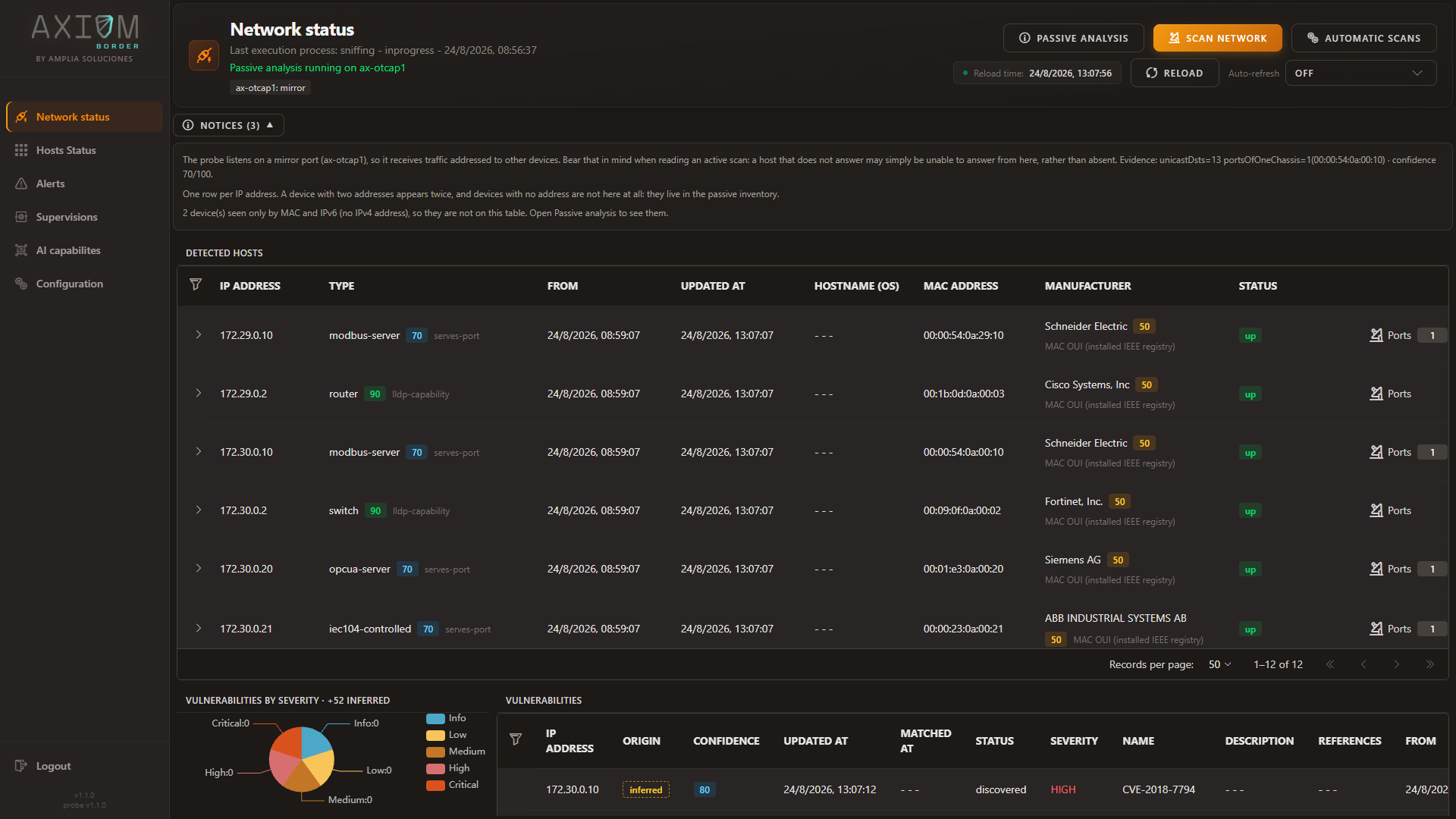
The probe listens on a mirror port, so it receives traffic addressed to other devices. Bear that in mind when reading an active scan: a host that does not answer may simply be unable to answer from here, rather than absent.
Without that line, half a day goes into working out why the discovery scan cannot find a network that is plainly there.
2. They discover along different axes
The passive probe indexes by MAC address. The active probes index by IP address. That is not a detail of bookkeeping — it changes what each one is capable of seeing at all.
- Passive analysis sees equipment with no IP address of its own: a fieldbus device, an unmanaged switch, a protection relay publishing multicast. None of these will ever produce a row in an active scan, however long you run it.
- Active scanning sees ports nobody happens to be using right now. A service that is listening but idle emits nothing to listen to, so passive analysis cannot know it is there.
Neither set contains the other. In the capture below the passive inventory holds 16 devices where the address-indexed table on the same probe holds 12, and the coverage note explains the gap in the probe’s own words:
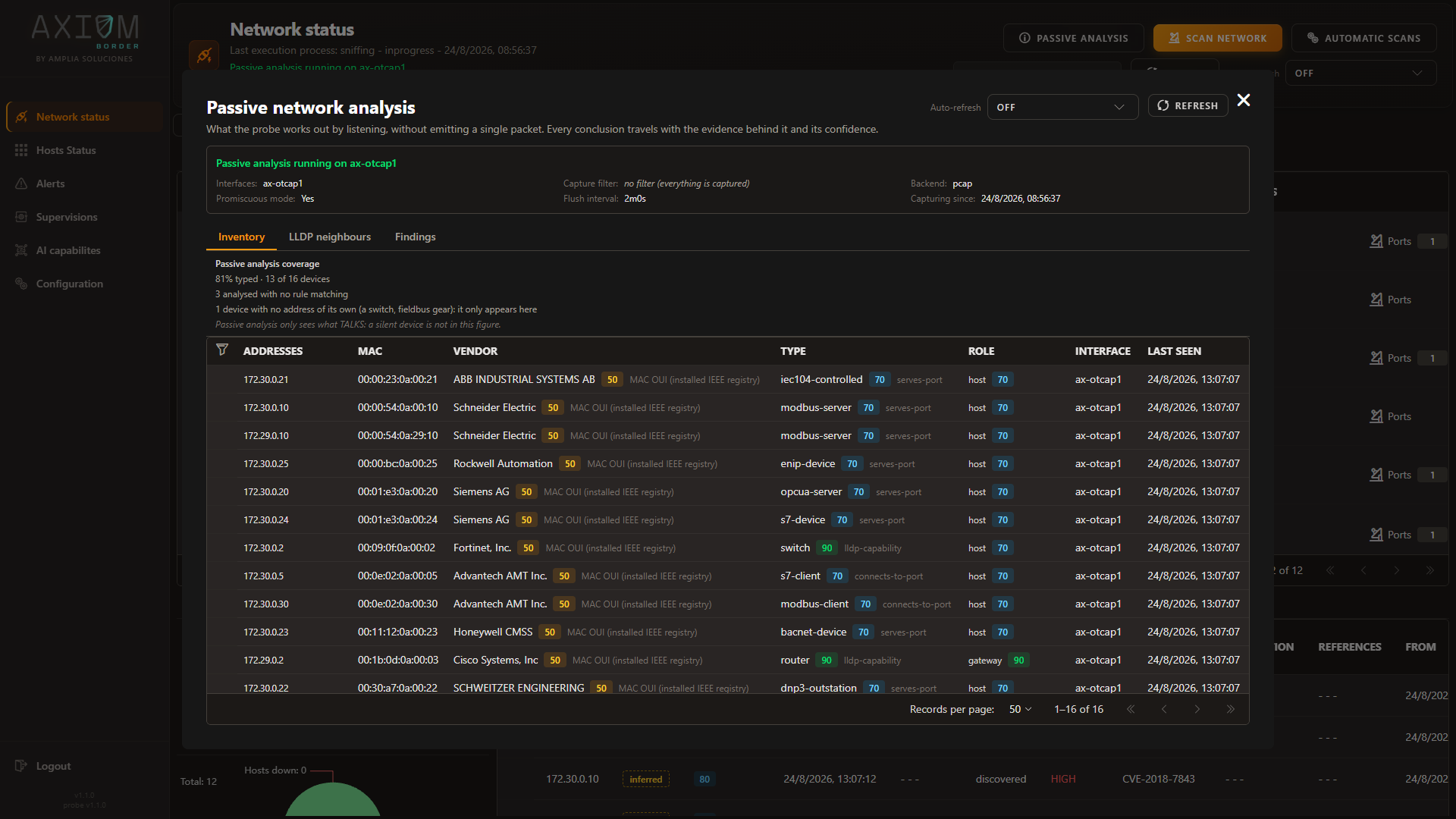
Note the closing caveat there, which is the honest limit of the technique: passive analysis only sees what talks — a silent device is not in this figure.
3. The passive probe feeds the active ones
The relationship is not merely parallel. What listening establishes is used to make the asking sharper:
- An SNMP target that is not yet in the inventory gets a quick discovery pass first, so the query goes to something known to be there.
- A vulnerability scan that comes back with nothing gets a discovery pass too, for one specific reason: to tell “unreachable” apart from “nothing wrong with it”. Those look identical in an empty report and mean completely different things.
4. Neither origin overwrites the other
Both write into the same identity record, and neither is allowed to win by arriving last. Each leaves its claim, its confidence and the evidence behind it, and the value you see is derived from all of them.
You can read this directly in the console. A manufacturer is shown with a confidence score and the source that produced it — the vendor registry installed on the probe, the device’s own declaration over its maker’s discovery protocol, or an active scan’s own table — each with its caveat attached. A registry entry names the network card; a device declaring itself names the device. Those are not the same claim, and the console does not pretend they are.
So when the active scan says Schneider Electric where the registry said Moxa, that disagreement is kept as data rather than resolved in silence. Nearly always it is telling you something true and useful: a network card from one vendor inside another vendor’s cabinet.
“Undecided” is a result, not a gap
A device the passive probe analysed without any rule matching is labelled undecided, and one written before passive analysis was available is labelled not analysed. They are shown differently on purpose: the first is a conclusion, the second is an absence of one. Neither is a failure, and neither is presented as an unknown you should chase.
5. An active scan does not close a passive inference
The one to hold on to.
A passive inference is not the outcome of a test. It is a statement about what a device is, drawn from how it behaves on the wire. An active scan failing to reproduce it does not refute it — the scan may not have looked for it, may not have been able to reach it, or may have been reading a mirror port where nothing can answer in the first place.
“I did not find it” is not “it is gone.” So a scan that comes back quiet leaves existing passive findings standing, and the console keeps showing them with their origin and their confidence. If you want one retracted, retract it deliberately — do not let an empty scan do it for you.
What it understands on the wire
Listening is only worth as much as what the probe can make sense of. It reads industrial traffic at two levels, and the second is the one a general-purpose scanner does not have at all.
Over IP — thirteen industrial protocols
Recognised from the conversation itself, which means the probe also records which side is serving and which is asking. That distinction is half the value: a station polling a controller and the controller answering are very different things to find on a segment.
| Protocol | Port | Protocol | Port |
|---|---|---|---|
| Modbus/TCP | 502 | BACnet/IP | 47808/udp |
| S7comm | 102 | EtherNet/IP | 44818 · 2222/udp |
| OPC UA | 4840 | PTP | 319–320/udp |
| DNP3 | 20000 | HART-IP | 5094/udp |
| IEC 60870-5-104 | 2404 | KNXnet/IP | 3671/udp |
| CODESYS | 1200 | FINS | 9600/udp |
| MELSEC | 5007 |
Four of those — CODESYS, MELSEC, KNXnet/IP and FINS — sit on ports their vendors use by convention rather than by registration, which someone else is entitled to use for something unrelated. They are still reported, because leaving a controller untyped merely because its maker never registered a port is the more expensive mistake. They are simply published at a lower confidence, visible to you in the console, so weaker evidence never passes for strong evidence.
Directly over Ethernet — where there is no IP to work with
The traffic that matters most in a substation or on a production line often has no IP layer at all. Nothing that keys off addresses and ports can describe it. Axiom Border reads it natively:
| Protocol | What it establishes |
|---|---|
| IEC 61850 GOOSE | The protection and control messaging between relays |
| IEC 61850 Sampled Values | The measurement stream feeding those relays |
| PTP / IEEE 1588 | Who the network’s grandmaster clock is — the time source the protection equipment trusts, where an unexpected one is a finding in itself |
| PROFINET DCP | Devices announcing and being addressed on a PROFINET segment |
PTP appears in both lists because it is genuinely spoken both ways, so the two tiers together come to sixteen distinct protocols, not seventeen.
Without these, a probe on such a segment could report a busy cable and nothing more. Traffic carried inside stacked VLAN tags is followed through the tags rather than measured from a fixed offset, so a QinQ segment reads correctly instead of producing confidently wrong values.
What it will not guess
The probe names a device’s role only where the evidence supports it — a Modbus server, a DNP3 outstation, an IEC-104 controlling station, a GOOSE publisher, a PTP node. It deliberately stops short of labelling something a PLC, an RTU or an HMI from traffic alone, because that is a claim about the device’s function that the wire does not actually establish. An honest protocol role beats a plausible-sounding guess.
Side by side
| Active scanning | Passive analysis | |
|---|---|---|
| Footprint on the network | Emits. Against a PLC, an aggressive scan is a genuine operational risk | Zero packets. Nothing a control device could misread |
| Identity is based on | The IP address | The MAC address, which survives a change of addressing |
| Equipment with no IP | Invisible | Inventoried |
| On a mirror port or TAP | No reply means no results | Works normally — and says why the active scan came back empty |
| Topology | Does not see it | Neighbours with their chassis and port, gateway verdict, address conflicts |
| Services | The real state of the port, confirmed | The services actually in use, and which side is serving |
| Traffic volume | — | Counters per host, and the breakdown behind them |
| Industrial protocols | The five the OT suite tests against | Thirteen over IP, plus four that never touch IP at all |
| Industrial posture | What the templates test for | What the equipment declares about itself as it operates |
They are complementary, and the product treats them that way. Use the active probes to confirm; use the passive one to know what is worth confirming, and to see the part of the network the active ones cannot reach.
Next: From event to alarm — what happens once one of them finds something.