Everything OpenGate stores about your fleet is queryable through one consistent mechanism: POST a JSON
query, get rows back. There is no query string to assemble and no SQL to learn — the resource lives in the
URL, and the conditions live in a JSON body.
How a query is built
flowchart LR
    URL["<b>The URL</b><br>what you are querying<br>/north/v80/search/devices"] --> REQ(["POST"])
    BODY["<b>The JSON body</b><br>which rows you want<br>filter, select, sort, group, limit"] --> REQ
    REQ --> RES["<b>Rows</b><br>JSON or CSV"]
Two things to learn, and this section is organized around exactly that:
What you can query — the index of every search endpoint, so you know which URL
to POST to.
Data Lake — the query language: filter, select, sort, group and limit.
Then, because three kinds of storage answer slightly differently, Query dialects
lays their differences side by side.
Your first query in 60 seconds
Ask for your devices. No filter, no options — just the resource:
You get an array named after the resource. Each row is a flat map of dotted field paths, and each value
is wrapped in _value._current.value — the same shape the platform uses to hold a current value and its
metadata:
Run the query with an empty body first. The paths you see in the response are exactly the paths you can
filter, sort and select on — which is the fastest way to learn any resource’s fields.
Swap devices in the URL for datapoints, entities/alarms or any resource from
What you can query, and the same body shape applies — only the field names change.
Every query in OpenGate is a POST to a URL that names what you are querying, with a JSON body that
says which rows you want. This page is the index of that first half: find your resource, take the URL,
and write the body using the query language.
The URL pattern
POST https://api.opengate.es/north/v80/search/<resource>
That covers most resources, which are global or scoped by your API key. Two families depart from it, and
knowing which one you are in saves a lot of guessing.
Time series and data sets — you query one named store, so the organization and its identifier are part
of the URL:
POST /north/v80/timeseries/provision/organizations/{organization}/{identifier}/data
POST /north/v80/datasets/provision/organizations/{organization}/{identifier}/data
Operations — note the missing north prefix, which the operations service predates:
Most search endpoints have a twin ending in /summary that returns aggregated counters instead of rows.
Same URL, same body, different answer: use it when you want how many, not which ones. See
Summary. Endpoints offering it are marked below.
Paths in the tables below
Paths are shown relative to /north/v80, except in the operations table, where they are relative to
/v80. A + in the Summary column means the endpoint also has a /summary twin. {org} is the
organization name and {id} the identifier of the time series or data set.
The clause syntax is the same everywhere, but the field names depend on the resource. They are dotted
paths, and entity searches expose two families of them:
Data sets and time series, where you define the columns yourself
Arrays are addressed with [], optionally indexed:
provision.device.communicationModules[].mobile.imei.
Each resource’s filterable fields are listed in its own API specification, rendered on the page named in the
tables above. The fastest shortcut, though, is to run the query with an empty body {} and read the paths
off the response: those are exactly the paths you can filter, sort and select on.
Data Lake
Searching data with OpenGate API
The searching API lets you retrieve provisioned and collected information from the entities registered on the platform.
Using search API, you can manage many situations in which you need to get information, collected by OpenGate, about your remote devices.
Some examples of questions you can answer using the searching API are:
Where is my lost truck?
Is my vending machine connected to Internet?
What is the software version of this smart meter which is rebooting all the time?
How is the signal strength of this weather station which is off-line most of the time?
What are the latest operations launched over different devices and their current status?
What are the latest raised alarms associated with my in-field resources?
What is the latest value and history of different sensors and machine parameters?
Searching Features
Where are the FROM and WHERE?
Well, if you’re still thinking in SQL, then you’ll expect to find the word FROM anywhere. Remember, OpenGate exposes its API through a REST interface, so in this case the word FROM is in the URL suffix.
That suffix is the resource you are querying, and every available one is listed in
What you can query. The WHERE — and the ORDER BY, the SELECT and the
GROUP BY — is the JSON body described below.
In all response cases, you must POST a valid JSON query and you’ll get an array with the matched specific resources. The query could have next main objects:
filter: Allows to select the resources that meets with desired information, see Filtering
limit: Allows paginating the response, see Pagination
sort: Allows sorting the results, see Sorting
select: Allows selecting only the parameters you need, see Selecting
Searching in OpenGate platform is pretty easy. You have to send a HTTP request to the API using the POST method, the prefix always is /north/v80/search. Optionally you can attach a JSON file (in the HTTP body) if you need to use paging, sorting, selecting, grouping or filtering features.
You can use the URL above for searching information. So for the impatient, let’s suppose you’re trying to search over your previously provisioned device list, and you’re thinking in a SQL WHERE clause like that:
name like'device_name'AND (
serialNumber like'82A75D494B0EBF7A95587285AE78E83F'OR serialNumber like'08D83B1864A1F9CFED76DAF426EB04D7')
Where the clauses behave differently: time series and data sets
accept the same syntax with stricter rules and a different response shape. The differences are collected
in Query dialects.
Subsections of Data Lake
Filtering
The search API uses the following filtering options to facilitate the search and allow to perform a wide range of consultations.
Several techniques solve the filtering issue when you’re querying over a RESTful interface. For example, you can use standard HTTP parameters to add filtering capabilities to your query. It’s pretty simple but doesn’t cover complex needs. We require a SQL-like approach, with typical operators like AND, OR, EQUAL, NOT EQUAL, etc. OpenGate allows you to filter your queries by sending a POST request to a specific URI. In the POST request, you must send a JSON document with a fashionable DSL structure. It is a command pattern approach in contrast with the entity/collection pattern used in the provisioning API.
Filtering operators
Filtering comparison operator list
eq: Equals.
neq: Not equals.
like: Regex pattern like.
gt: Greater than.
lt: Lower than.
gte: Greater than or equals.
lte: Lower than or equals.
in[]: Included in a concrete group.
nin[]: Not included in a concrete group.
exists: Exists.
within: Included in an areas.geometry GeoJson (exclusive for Area search).
See supported identifiers for existing comparison operator.
Let’s suppose we want to filter devices with device.operationalStatus equals to NORMAL and with device.communicationModules[].mobile.imei starting with 351873000102290.
If we were dealing with a SQL database we’d write the following SQL sentence:
SELECT*FROM device
WHERE device.operationalStatus LIKE'NORMAL'AND device.communicationModules[].mobile.imei LIKE'351873000102290'
Note
Remember, you can use all the data streams defined in the default data models and your own data streams in the WHERE clause.
Translating the previous SQL sentence to OpenGate searching API we’ll have:
{
  "filter": {
    "and": [
      {
        "like": {
          "provision.device.administrativeState": "NORMAL"
        }
      },
      {
        // The result will contain all devices with collected operational Status that
        // contains NORMAL and are related with communications modules with collected
        // imei containing 351873000102290
        "like": {
          "provision.device.communicationModules[].mobile.imei": "351873000102290"
        }
      }
    ]
  }
}
The result will contain all devices with collected operational Status that contains NORMAL and are related to communications modules with collected imei containing 351873000102290.
Another example comparing SQL to JSON, searching all devices except the one with serialNumber equal to 82A75D494B0EBF7A95587285AE78E83F:
SELECT*FROM device WHERE serialNumber <>'82A75D494B0EBF7A95587285AE78E83F'/north/v80/search/devices
By default, the search response includes all the data streams of the searched entities. You can retrieve only the information you need using the select sub-document in the search JSON.
The select sub-document can be used only on entity searching and must not be empty.
You can also use this sub-document when you search for information in CSV format.
Warning
If the size of the CSV file exceeds 18MB, you must paginate your searchings using the following parameters as HTTP headers:
page: It sets the CSV page you want.
size: It sets the number of rows you want in the CSV.
If the select clause isn’t in the filter, the behavior is the following:
In JSON format, the response will contain all the data streams collected or provisioned in the devices you are searching.
In CSV format, the search API raises an error in the response, asking for the select clause.
As described above, any data stream of the default data models or data models defined by the user can be used as select fields.
The order to apply the filters is securitization and next the following fields whenever there are resourceType, sort, filter, select (the data streams to show)
Select JSON object
select[]: Array of parameters to be selected.
name: String. Data stream name in the default or user-defined data models.
fields[]: Array of strings with the name of the fields to be retrieved.
The possible values are: (See current object attributes table for field description):
value
date
at
from
tags
feedId
scoring.performance
scoring.qrating
provType
value.simplexAttribute: where simplexAttribute is an attribute of the complex object. For example, the provision.device.location is a complex data stream. If you need only de postal code, the value would be value.postal
alias: String. Shortname replaces the parameter’s full name when a CSV format is required. Example:
Using “alias”=“imei”
The device.communicationModules[].mobile.imei becomes imei in the CSV header
The complete data stream name in the CSV header will appear if this field doesn’t exist. The CSV format shows this field, but the JSON format ignores it.
Select examples
Here’s how to search devices with a filter with a select clause
The following snippet shows the request using curl:
The API allows you obtaining the response to a search in blocks with predefined number of results.
limit:
start: Page number you request. The count starts with the number 1
size: The number of entities that you can see on the page
Default number of items returned
The search API limits the page size to 50 items by default, but you probably have thousands of devices. How do you walk through all your devices?
Well, let’s suppose you have exactly 2500 devices matching your query. Obviously, your result exceeds the default limit. In this case, you’ll find a page object in your response.
Please, take the resources field on the previous example as a placeholder for any reserved word into the scope of the searched resource: entities, devices, subscriptions, data models, bundles, data streams, data points, etc.
The number attribute is the current number of pages based on the limit setup.
What can you do to get the following page? It’s easy. You only have to include a limit object in your query. See next example.
See previous warning about the resources word in the example.
You can change the page limit from the beginning. Supposing you want to retrieve 50 items per query, you must set up the limit object with a starting point and the page size you want.
Paginated example request
Changing the starting page and the limit
{
  "limit": {
    "start": 2,
    "size": 50
  }
}
The top margin for the page size in the limit object is 1000. You’ll receive a server error response if you set up a size attribute over this limit.
See previous warning about the resources word in the example.
Summary
Responses to all search requests include a summary object with different counters regarding the results obtained. It is closely related to the grouping feature.
By default, the summary always shows the total count, the organization’s grouping counter, and the channel grouping counter.
count (field): number of occurrences found in the whole search
summaryGroup []: array of type of summarized specific object structure
SpecificObjectParameterDatamodel: object inside the Parameter of the data models
count: number of these specific elements found
list: array of each type of summarized element
count: number of these specific elements found
name: value of the parameter of the data model
Here’s how to search devices with a summary without a group clause
The five clauses — filter, select, sort, group, limit — look the same everywhere, but three
kinds of store answer them slightly differently. This page is the diff, so you do not have to read three
long pages to find it.
An object of parameters, each a field and a direction
A string: the identifier of a sort declared in the definition
A string: the identifier of a sort declared in the definition
group
Supported
Not applicable
Does not exist
limit
start and size
Same, with CSV caveat below
Same, with CSV caveat below
Response
Array named after the resource
columns plus data matrix
columns plus data matrix
CSV output
—
Yes
Yes
Why time series and data sets are stricter
Both are pre-computed projections: you declare their columns up front, and the platform builds indexes
for exactly those. That is what makes them fast, and it is also why you cannot filter or sort on an arbitrary
field.
Sorting is declared, not composed. A generic search accepts any field in its sort object. A time series
or a data set accepts only the identifier of a sort declared in its definition — a named, ordered list of
columns with directions — plus the reverse of each one, which the platform exposes automatically because the
same index serves it backwards. There is no per-column sortable flag and no cap on how many sorts a
definition may hold.
The real limit is a budget, not a number. Each filterable column and each declared sort consumes
optimization units, and each definition has a budget of them. Both stores offer an optimizationPlan
endpoint that reports what a definition would consume before you commit, and expose
usedSearchOptimizationUnits and freeSearchOptimizationUnits on the definition itself.
Filters have four modes, not two: NO, YES for optional equality, ALWAYS for a filter every query
must supply, and RANGE for >, < and BETWEEN. RANGE applies to numeric columns only; date-time
columns are always range-searchable.
The matrix response
Generic searches return objects, one per row. Time series and data sets return a matrix instead: a
columns array naming the fields, and a data array of rows, each row an array of values in that same
order.
Read the values off columns rather than hardcoding positions. If you do rely on the order, this is what it
is when you omit select:
Store
Column order without select
Time series
bucketColumn, then identifierColumn, then the context columns, then the aggregated columns
Data sets
identifierColumn, then the defined columns.name in declaration order
Time series additionally offer an aggregated read, POST .../{id}/dataset, which collapses every bucket
of a device into a single output row. There select.columns takes a column, an alias and an
aggregation function per output variable, and the result is always sorted ascending by identifierColumn,
which is included whether you ask for it or not. See Time series.
CSV output changes the rules
Time series and data sets can answer in CSV instead of JSON, and that switch changes two behaviours that
surprise people:
limit flips meaning. In JSON, omitting limit applies the configured defaults. In CSV, omitting it
means give me everything:
Sorting is disabled. CSV retrieval turns sorting off deliberately, to keep large exports fast. If you need
ordered output, either sort downstream or use the JSON response.
Complete retrieval is expensive
Omitting limit in CSV mode downloads the entire store. On a large time series that is a long, heavy request.
Page it unless you genuinely want everything.
CSV formatting — the quoting character, the escape character, the end-of-line sequence and how nulls are
represented — is customizable through HTTP header options, and you are responsible for the result being
well-formed CSV.
Undocumented header names
The specific header names for those CSV options are not currently published in the API specification. Until
they are, ask your platform contact for the exact names.
What stays the same
Worth stating plainly, because it is most of the surface:
POST with a JSON body, always.
X-ApiKey for authentication.
The filter operators — eq, neq, like, gt, lt, gte, lte,
in, nin, exists, and, or — behave identically in all three dialects.
limit uses start and size everywhere.
The utc=true header option returns date fields in UTC in all of them.
Alarms
An alarm is what OpenGate raises when a rule detects something worth a human’s attention: a device that
stopped reporting, a value out of range, an identification conflict. This API is how a back-office
application finds them, counts them, and records that somebody dealt with them.
The alarm life cycle
stateDiagram-v2
    direction LR
    [*] --> OPEN: a rule raises the alarm
    OPEN --> ATTENDED: action ATTEND
    OPEN --> CLOSED: action CLOSE
    ATTENDED --> CLOSED: action CLOSE
    CLOSED --> [*]
Status
Meaning
OPEN
The alarm is active
ATTENDED
An operator is dealing with it
CLOSED
The alarm is closed
Two more attributes tell you how much it matters:
Attribute
Values
severity
INFORMATIVE (only informative) · URGENT (needs attention soon) · CRITICAL (critical for service operation)
priority
LOW · MEDIUM · HIGH
Endpoints
To
POST to
Search alarms on any entity
/north/v80/search/entities/alarms
Search alarms on devices
/north/v80/search/entities/devices/alarms
Search alarms on subscriptions
/north/v80/search/entities/subscriptions/alarms
Count instead of list
The same three URLs with /summary
Attend or close alarms
/north/v80/alarms
Searches follow the standard query language: filter, select, sort, group and
limit, with results in JSON by default or CSV through header options.
Everyday queries follow from those: everything still open and critical, everything a given operator
attended, everything raised on one device last week.
Summaries group by alarm.name, alarm.rule, alarm.status and alarm.severity. Any other field
returns 400 Bad Request.
Attending and closing
Alarms are not deleted, they are moved along their life cycle. One request handles a batch, and the notes
field records why — which is what makes the alarm history auditable afterwards:
curl --request POST \
--header "X-ApiKey: <your-api-key>"\
--header "Content-Type: application/json"\
--data '{"action": "CLOSE", "alarms": ["50dca9ab-f552-4805-9cff-019090d5b92b"], "notes": "notes of the reason"}'\
https://api.opengate.es/north/v80/alarms
Field
Holds
action
ATTEND or CLOSE
alarms
The identifiers to act on, one or many
notes
The reason, stored as attentionNote or closureNote
The user performing the action is recorded in attentionUser or ClosureUser, with its timestamp, so you
can query later who handled what.
API specification
Data points
Deprecated — superseded by Time series
Data points are superseded by time series, and their availability in future versions
of OpenGate is not guaranteed.
Do not build new integrations on this API. If you are querying data points today, plan the move: define a
time series with the columns and aggregation you need, and query that instead.
What a data point is
A data point is one instance of a data stream at one instant. Its at attribute is when the measurement
was taken, and the whole set of data points for a data stream is the raw history of that measurement.
The practical difference shows up at fleet scale: asking a month of readings for ten thousand devices means
millions of data points to transfer and reduce yourself, versus a pre-aggregated table that answers in one
request.
Querying data points
While the API remains available, it is a standard Data Lake search:
Filter fields are prefixed datapoints., so datapoints.datastreamId, datapoints.entityIdentifier and
the _current fields of the value.
Response format
Results come back as JSON by default or as CSV through header options. A flattened parameter returns each
data point flat instead of nested, which is easier to feed into a table — see the datapoint parameters in the
specification below.
API specification
Data sets
Limited access
This feature is only available to root and super_admin_domain profiles. Ask your administrator for proper user role profiling.
What a data set is
A data set is a flat table over your devices: one row per device, one column per value you chose. You
pick the data streams that become columns, and the platform keeps the table current.
It is the answer to “give me a spreadsheet of my fleet” — the identifier, the model, the ICC, the last
reading — without writing a query that walks each device’s data streams and flattens the result.
Column values are limited to strings, numbers and booleans. If a data stream holds an object or an
array, the column definition has to include a path down to one of those primitive values. Devices with
communication modules need one column per module.
The two halves of the API
Defining a data set is administration: choose the columns, their paths, and which of them
are filterable, and declare the sorts a query may ask for. Done once.
Querying a data set is the daily work: POST a filter, read rows back as JSON or CSV.
Defining a data set means choosing which data streams become columns. This is administration work, done
once per data set.
The identifier column
Every data set needs an identifierColumn. It maps to
provision.administration.identifier._current.value, with filtering enabled and sorting available, and it
identifies the device each row belongs to.
Column paths
A column’s path has three parts, and the third is only required when the data stream is not a primitive
value.
1. The data stream identifier — the datastreamId you want. If it contains communicationModules[],
include the index of the module you mean:
3. The value path — when the data stream holds an object or an array, a path down to a primitive value.
What a column can be filtered by
Every column carries a filter value that decides how queries may use it:
Value
Meaning
NO
Not filterable. The default
YES
Optional equality filter
ALWAYS
Required equality filter: every query must constrain this column
RANGE
Range filter, >, < and BETWEEN, as well as equality
RANGE is only allowed on numeric columns, integer and number. Columns of type date-time are
always range-searchable whatever the value says.
The sorts section
Sorting is declared in the definition, not composed at query time. The sorts section holds a list of
named sorts, each an ordered list of columns with a direction, and a query asks for one by its
identifier.
Required, unique within the list. Letters, digits, spaces, _ and -. Generated as a UUID if omitted, so name it
description
Optional free text
columns
Required, at least one. A column name from the columns section plus ASC or DESC
At least one sort is mandatory, and the order inside columns is the sort precedence.
The reverse of every sort comes for free
For each sort you declare, OpenGate also exposes its reverse, served by the same index through a reverse
scan. Those come back marked derived: true, which is read-only: the platform sets it and the web console
uses it. Never declare a derived sort yourself — flipping the direction of one you already have just spends
optimization units on an index you were given.
Limits
There is no fixed maximum number of filterable columns or declared sorts. Each filterable column and
each declared sort consumes optimization units, and the data set has a budget of them — that budget is
the limit.
Where to look
What it tells you
The searchOptimizationInfo of a data set
usedSearchOptimizationUnits and freeSearchOptimizationUnits
POST .../optimizationPlan
What a definition would consume, before committing to it
POST /north/v80/datasets/provision/organizations/{organizationName}/optimizationPlan
Creating
POST /north/v80/datasets/provision/organizations/{organizationName}
Updating
PUT /north/v80/datasets/provision/organizations/{organizationName}/{identifier}
Updating can affect the data already stored or the structure holding it, which starts an adaptation process.
Until it completes, dirty values may be present.
These fields can be modified:
Name · Description · IdentifierColumn · Columns · Sorts
Rules for columns:
Names are unique. You cannot add or rename a column to a name already in use.
filter: ALWAYS is immutable. You cannot add or remove a column that has it, you cannot set it on an
existing column, and you cannot change it away once set.
Paths cannot be edited. Remove the column and create it again, which gets you the same result.
The optimization unit budget applies to updates as well, so run optimizationPlan before adding filterable
columns or sorts to a definition that is already close to it.
Listing and deleting
GET /north/v80/datasets/provision/organizations/{organizationName}GET /north/v80/datasets/provision/organizations/{organizationName}/{identifier}DELETE /north/v80/datasets/provision/organizations/{organizationName}/{identifier}
Read the organization’s data sets:
curl --request GET \
--header "X-ApiKey: <your-api-key>"\
https://api.opengate.es/north/v80/datasets/provision/organizations/{organizationName}
Querying a data set
Reading a data set is a POST with the data set identifier in the URL:
POST /north/v80/datasets/provision/organizations/{organizationName}/{identifier}/data
Without a select clause, columns holds the identifier column first, then the defined columns in
declaration order.
The request body
Data set queries use the same clauses as any other search, with two differences worth memorising:
Clause
In a data set query
filter
Standard operators, keyed by identifierColumn or a column name
sort
A string: the identifier of a sort declared in the data set — see below
select
An array of column names, not the object form used elsewhere
limit
start and size, as everywhere else
group
Does not exist for data sets
The full comparison against the other query dialects is in Query dialects.
Asking for a sort
You do not compose an ordering in the request. You name one that already exists:
{ "filter": {}, "sort": "sortByDeviceAsc" }
Valid values are the identifier of any sort in the data set definition, plus the automatically exposed
reverse of each one, so declaring an ascending sort gives you the descending direction too.
Omit sort and results come back sorted by the identifier column, ascending.
There is no fixed limit on how many sorts a definition can hold; the constraint is the optimization unit
budget, described in Defining a data set.
Pagination and CSV
Data sets answer in JSON or CSV, and the format changes what an absent limit means:
CSV retrieval turns sorting off on purpose: it is what makes large exports fast, and CSV output is
usually consumed by something that will sort it anyway.
Complete retrieval is expensive
Omitting limit in CSV mode downloads the whole data set. Page it unless you truly want everything.
CSV formatting is customizable through HTTP header options — the quoting character (double quotes by
default), the escape character (a backslash by default), the end-of-line sequence (\n by default) and how
nulls are represented. You are responsible for the combination producing well-formed CSV. The exact header
names are not currently published, so ask your platform contact for them.
The other data set endpoints
Three more endpoints exist, and one of them is not what its URL suggests:
POST /north/v80/search/catalog/datasets
POST /north/v80/search/organizations/{organizationName}/datasets/{datasetId}POST /north/v80/search/organizations/{organizationName}/datasets/{datasetId}/summary
search/catalog/datasets lists the data sets available to you.
The other two are not a mirror of the .../data read above: they take a different request body. The
.../data endpoint uses the data set’s own dialect — sort as a declared identifier, select as an array
of column names, no group. These two take the generic Data Lake search body, with sort as the
{"parameters": [{"name": ..., "type": ...}]} object, select in its object form, and group available.
Endpoint
Request body
datasets/provision/.../{identifier}/data
Data set dialect: sort is a declared sort identifier
Use .../data unless you specifically need the generic clauses. Which of the two is intended to be the
long-term path has not been confirmed by the product team.
Data streams
A data stream is one measurement of a device — battery percentage, temperature, signal strength — and
this API returns its current value, not its history.
Each instance has an alphanumeric identifier unique within its device. When that identifier matches a data
stream template of the device’s data model, the instance inherits the template’s characteristics: units,
period, tags and the rest. That is why a response carries not just a value but the metadata to interpret it.
Label, symbol and type, so the number is interpretable
period
How often the value is expected, INSTANT for on-change values
datamodelId
The data model the definition comes from
access
Whether the stream is readable, writable or both
_current.value
The value itself
_current.date
When the platform recorded it
_current.at
When the measurement was actually taken
The distinction between date and at matters when a device buffers readings and reports them later: at
is the truth about the measurement, date is when OpenGate learned about it.
Filter fields are prefixed datastreams., and results come back as JSON by default or as CSV through header
options.
API specification
Time series
Limited access
This feature is only available to root and super_admin_domain profiles. Ask your administrator for proper user role profiling.
What a time series is
A time series turns the stream of values a device sends into a table of rows over time: one row per
device per time period, with each column holding a value aggregated over that period.
Ask for the average temperature per hour of ten thousand devices for the last month. Over
data points that is millions of raw values to fetch and aggregate yourself. Over a
time series it is already computed — the engine aggregated each hour as the data arrived.
That is the trade: you declare up front what you want aggregated and how, and in exchange the query is
cheap.
Time buckets
The aggregation period is called a time bucket, and two fields define it:
Field
Meaning
origin
The starting date of the time series
timeBucket
The length of each period in seconds, counted from origin
With an origin of 2022-01-01T00:00:00.000Z and a one hour bucket, the first period runs from
2022-01-01T00:00:00.001Z to 2022-01-01T01:00:00.000Z, the second from 2022-01-01T01:00:00.001Z to
2022-01-01T02:00:00.000Z, and so on:
Setting timeBucket to 0 seconds switches the engine into a different mode, storing every value instead
of aggregating:
With only context columns defined, one record is saved per event received, and only when a column
value actually changed — so you get a change log over time.
With aggregated columns defined, data is grouped by the at field of the incoming data points, and
the aggregation function is applied when a new event arrives with the same at.
Defining a time series is administration: you declare the columns, their aggregation
functions, the bucket length and the retention. Done once, usually by an administrator.
Querying a time series is what applications do every day: POST a filter and read rows
back, as JSON or CSV.
The aggregation functions available to columns come from the
time series functions catalog, which also lets you register your own.
Defining a time series is declaring, up front, what the engine should compute as data arrives. This is
administration work: done once, changed rarely, and with consequences for data already stored — the last
section of this page covers those.
Columns
A time series has four kinds of column, and only the first two are yours to name freely.
Aggregated columns (columns)
These hold a value aggregated over each time bucket. Each one names an aggregation function, and the
engine re-applies it every time new data lands in an existing row. The available functions come from the
time series functions catalog.
When timeBucket is 0, all received data is stored instead of aggregated, and only FIRST (keep the
first value) or LAST (overwrite with the newest) make sense. Two consequences worth knowing:
The search endpoint returns all the historical data collected.
Several data streams can land in different columns of the same row when they share an at value.
When timeBucket is greater than 0, bucketColumn becomes required: it names the column the engine
adds to search responses holding the end date of each bucket.
Context columns (context)
Context columns capture the value at the moment the bucket was created, and are never updated
afterwards even if the aggregated columns keep changing. That is why they take no aggregation function.
Use them for the things you want to know about the device at that point in time — its serial number, its
firmware version, its subscription — so that a row is self-describing.
Identifier column (identifierColumn)
Required. It names the column that identifies the device, and always maps to
provision.administration.identifier._current.value with filter=YES. The engine adds it to every row of
every search result, using the name you chose.
Bucket columns (bucketColumn, bucketInitColumn)
Named by you, filled by the engine, holding the end and start instants of the bucket.
The path field
Every column and context needs a path, which the engine uses as a query to extract a data stream value
and project it into the column. A path has two or three parts:
1. The data stream identifier — a data stream defined in an OpenGate data model.
Communication modules need an index
If the data stream id contains communicationModules[], the index is required:
device.communicationModules[0].subscription.mobile.imsi
2. The data stream field — appended with a dot, one of:
3. The value path — only when the data stream holds a JSON object or array, a JSONPath down to a
primitive value.
What a column can be filtered by
Every column and context carries a filter value that decides how queries may use it:
Value
Meaning
NO
Not filterable. The default
YES
Optional equality filter
ALWAYS
Required equality filter: every query must constrain this column
RANGE
Range filter, >, < and BETWEEN, as well as equality
RANGE is only allowed on numeric columns, integer and number. Columns of type date-time are
always range-searchable whatever the value says, so you do not need RANGE for a bucket or a timestamp.
Retention
retention sets how long rows stay in the time series, in seconds. It cannot exceed the retention allowed
by your organization’s policies.
The sorts section
Sorting is declared in the definition, not composed at query time. The sorts section holds a list of
named sorts, each one an ordered list of columns with a direction, and a query then asks for a sort by its
identifier.
"sorts": [
  {
    "identifier": "signalStrengthAsc",
    "description": "Sort by average signal strength ascending",
    "columns": [
      { "name": "Average Signal strength", "direction": "ASC" }
    ]
  },
  {
    "identifier": "bucket_id_desc",
    "columns": [
      { "name": "bucket_id", "direction": "DESC" }
    ]
  }
]
Field
Rules
identifier
Required, unique within the list. Letters, digits, spaces, _ and -. Generated as a UUID if you omit it, which makes it awkward to use, so name it
description
Optional free text, for whoever reads the definition later
columns
Required, at least one. Each entry is a column name from the columns or context sections plus a direction of ASC or DESC
At least one sort is mandatory. Order matters inside columns: the list is the sort precedence.
The reverse of every sort comes for free
For each sort you declare, OpenGate also exposes its reverse, served by the same index through a reverse
scan. Those appear in the definition marked derived: true, which is read-only: the platform sets it and
the web console uses it. Never declare a derived sort yourself on create or update — flip the direction of
an existing one and you are duplicating an index you already have.
Filtering and sorting limits
There is no fixed maximum number of filterable columns or declared sorts. Instead, each filterable
column, each context and each declared sort consumes optimization units, and each time series has a
budget of them. That budget is the real limit, and it is what keeps queries fast.
Where to look
What it tells you
The searchOptimizationInfo section of a time series
usedSearchOptimizationUnits and freeSearchOptimizationUnits
POST .../optimizationPlan
What a definition would consume, before you commit to it
Simulate with optimizationPlan while you are still designing. It is much cheaper than discovering the
budget is spent after the fact — and since the reverse of each sort is free, declaring both directions
wastes units for nothing.
Creating and updating
Creating a time series starts collecting data from devices into it. Updating one is where care is needed:
changes can affect the data already stored or its structure, which triggers an adaptation process. Until
that process finishes, dirty values can be present.
PUT accepts an onlyPlan query parameter. With onlyPlan=true nothing is modified: the response is a
plan that summarizes the changes you asked for and explains their consequences, warning you where
necessary. Default is false.
Use it on any non-trivial change. It is the difference between reading about dirty values and causing them.
Rules for columns and contexts:
Names are unique across all columns, contexts, the identifier and both bucket columns. You cannot
rename something to a name already in use.
filter: ALWAYS is immutable. You cannot add or remove a column or context that has it, you cannot
set it on an existing one, and you cannot change it away once it is set.
Paths cannot be edited. Remove the column and create it again, which gets you the same result.
Creation example
A daily time series (timeBucket: 86400) retained for 30 days, with one context column and one aggregated
column summing the bytes a device sent:
The reverse of that sort, oldest bucket first, is available without declaring it.
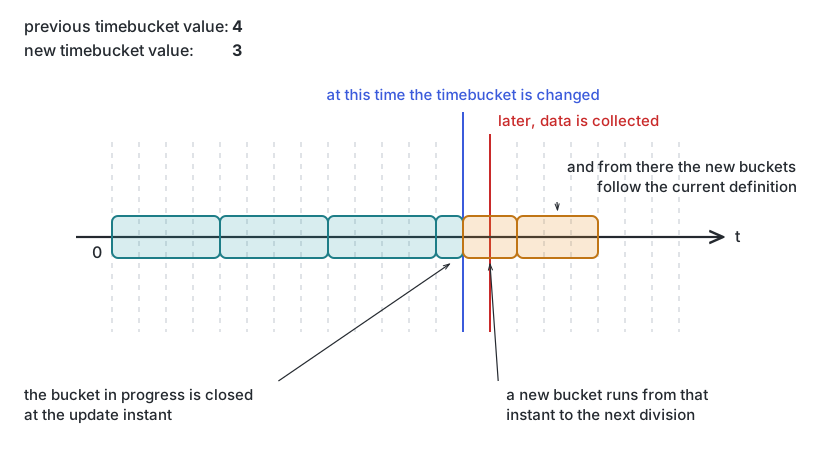
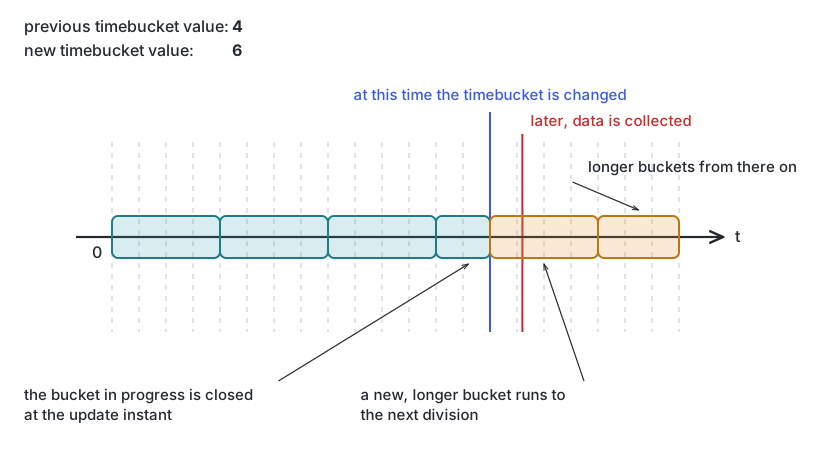
Changing the time bucket
Buckets have a fixed length, so changing timeBucket changes the length of new ones. As a precaution,
buckets in the future are deleted when you do this. The situations below are the edge cases worth
understanding before you change it on a live time series.
Buckets that started before the change and end after it
The engine closes them at the instant of the update, and if needed the next bucket starts at that same
instant and runs until the following one would start according to the new definition.
Changing the time bucket to a lower value
Changing the time bucket to a bigger value
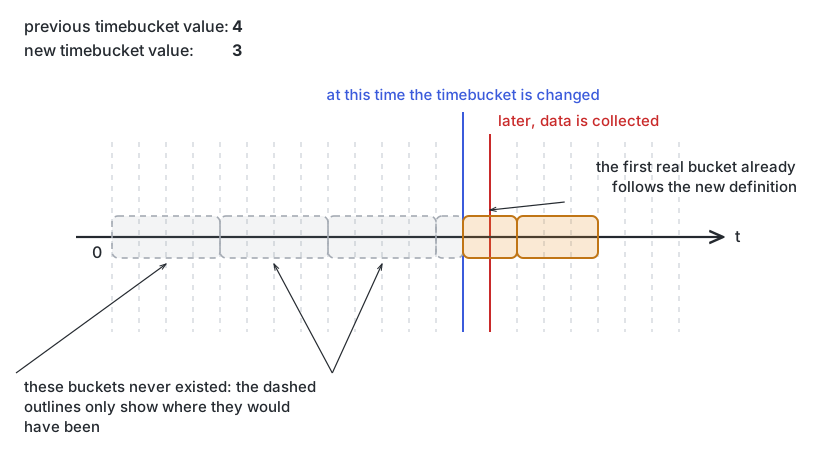
Devices with no buckets yet
Adaptation only applies to devices that collected data before the change. A device whose first data arrives
after the update simply gets a bucket following the new definition.
Changing the time bucket before the first data collection of a device
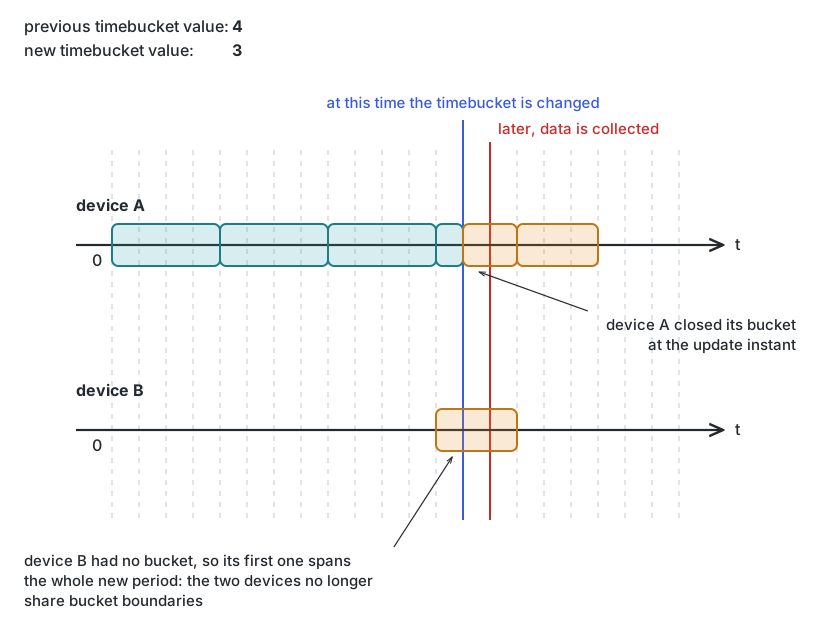
Both at once
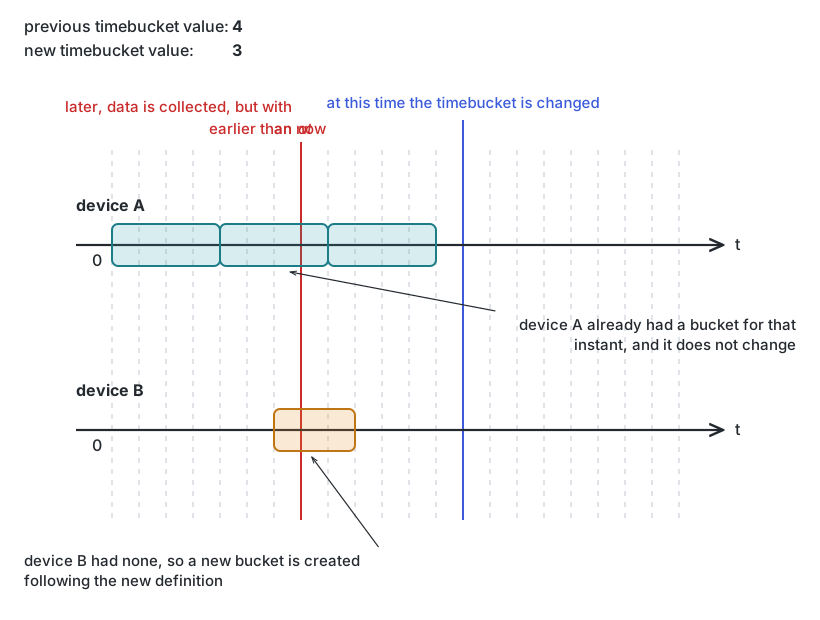
Combine the two and different devices end up with buckets that do not line up with each other. A device can
also collect data belonging to a bucket in the past: if that bucket exists the engine uses it as is,
otherwise it creates a new one following the new definition. Both are the price of changing the bucket
length.
Two devices with different buckets after changing the time bucket
Two devices with different buckets in the past after changing the time bucket
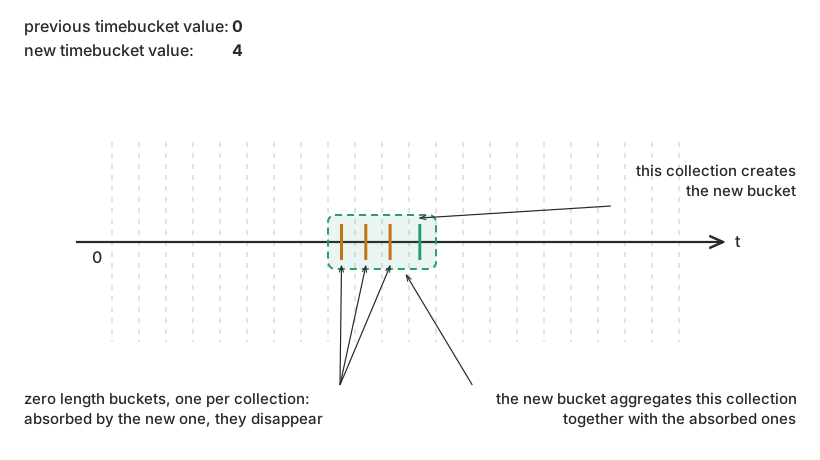
From zero to a higher value
Going from timeBucket: 0 to a real length means each collection now creates a bucket of the new length.
Zero-length buckets that the new bucket would overlap are absorbed rather than left behind, and their
values feed the aggregation functions of each column.
Changing the time bucket from zero to a higher value
The standard operators, keyed by bucketColumn, identifierColumn, columns.name or context.name
sort
A string: the identifier of one of the sorts declared in the time series, not a list of fields
select
The same keys as filter
limit
start and size, as everywhere else
Two things differ from a plain Data Lake search, and both come from the time series being pre-computed:
you can only filter on columns declared filterable, and you can only sort by sorts declared in the
definition. See Defining a time series for how those are declared, and
Query dialects for the full comparison.
Column order when you omit select
columns tells you the order, so read values off it rather than hardcoding positions. If you do depend on
the order, it is:
The bucketColumn, holding the end date of the bucket
The identifierColumn, holding provision.administration.identifier._current.value
The context columns
The aggregated columns
Asking for a sort
You do not compose an ordering in the request. You name one that already exists:
{ "filter": {}, "sort": "bucket_id_desc" }
Valid values are the identifier of any sort in the time series definition, plus the automatically
exposed reverse of each one. So a definition declaring bucket_id_desc gives you both directions without
declaring the second.
Read the definition to see what is available — GET the time series, or use expand=sorts, and the sorts
list comes back with the derived ones included. There is no fixed limit on how many sorts a definition can
hold; the constraint is the optimization unit budget, described in
Defining a time series.
Pagination and CSV
The response format changes what limit means, which catches people out:
CSV retrieval also turns sorting off, deliberately, so that large exports stay fast. If you need ordered
output, sort downstream or read JSON.
Complete retrieval is expensive
Omitting limit in CSV mode downloads the whole time series. Page it unless you truly want everything.
The CSV formatting itself — quoting character, escape character, end-of-line sequence and how nulls are
represented — is set through HTTP header options, and you are responsible for the result being well-formed.
The exact header names are not currently published, so ask your platform contact for them.
Aggregated read: one row per device
Besides reading buckets, you can collapse every bucket of a device into a single row:
POST /north/v80/timeseries/provision/organizations/{organizationName}/{identifier}/dataset
Here select.columns describes the output variables, each with the source column, an alias for the
output name, and the aggregation function to apply across buckets:
filter and limit behave as above, and CSV output is available too. Two rules are specific to this
endpoint:
The output is always sorted ascending by identifierColumn.
The identifierColumn is always included, added as the first column if you did not ask for it.
Parquet export
For bulk analytical work, a time series can be exported to a Parquet file:
POST /north/v80/timeseries/provision/organizations/{organizationName}/{identifier}/export
GET  /north/v80/timeseries/provision/organizations/{organizationName}/{identifier}/export
POST starts the export, GET reports the state of the current one. The output order is decided
internally and cannot be changed.
Time Series Functions
Limited access
This feature is only available to root and super_admin_domain profiles. Ask your administrator for proper user role profiling.
Introduction
The objective of custom time series functions is to augment the capabilities of the default functions (see Common Platform Functions) through the addition of bespoke functions written in JavaScript. These functions will be managed through the creation of a catalogue tailored to the specific requirements of each organisation.
Common Platform Functions
A common catalogue will be established for all organisations, comprising default platform time series functions. The following functions have been defined:
FIRST: Please note that the engine will store only the first received value per time bucket. Consequently, the collection engine will ignore the following values obtained in the same time bucket.
LAST: Please note that the engine will store only the last received value per time bucket, overwriting the previous ones.
AVG: The engine will calculate the arithmetic mean of all values received within the specified time interval. This feature is only available for numeric values.
MAX: The engine will save the maximum value of all received values within the configured time frame. Please note that this feature is only available for numeric values.
MIN: The engine will save the lowest value of all received values within the configured time frame. This feature is only available for numeric values.
SUM: The engine will accumulate the total of all received values within the specified time interval. This feature is only available for numeric values.
COUNT: The engine will record the total number of values received in each time bucket for subsequent analysis.
MEDIAN: The engine will calculate the median of all received values within the configured time bucket. Please note that this feature is only available for numeric values.
GEO_AVG: The engine will calculate the geometric average of all received values within the configured time bucket. Please note that this feature is only available for numeric values.
VARIANCE: The engine will calculate the variance of all received values within the configured time bucket. Please note that this feature is only available for numeric values.
STD_DEVIATION: The engine will calculate the standard deviation of all received values within the configured time bucket. Please note that this feature is only available for numeric values.
Note
Please note that these functions will be available for querying with the API defined below. However, please be aware that it will not be possible to modify or delete them.
Custom Catalog
Each organisation will have access to a custom time series functions catalogue, which will enable them to manage their functions effectively. These functions can be used to define time series columns, which can then be referenced in the aggregationFunction field. The following example illustrates this process:
The defined API enables the modification of the script for the custom aggregation function. It should be noted that such modifications may result in changes to the aggregated data. Consequently, there is a possibility of inconsistencies between the new aggregated data and the previous values.
Note
The defined API permits the deletion of a custom aggregation function, provided that it is not utilised in any time series.
Custom Time series Function script
Considerations when developing Custom Aggregation Function:
The following are the code’s implicit input parameters:
receivedValues: an array of new values to be used for the final value calculation.
currentValue: the column’s current value.
extra: JSON object containing the current extra variables for the column, used for the value calculation.
The code should utilise implicit input values to calculate the final value and subsequently construct the result object.
It will be possible to use helper functions defined in the JS API.
The code must return a JSON with three specific properties:
executionResult: If the execution was completed successfully, the OK value must be returned. If not, an error description must be provided.
Any datetime values included in the ‘receivedValues’ input parameter will be formatted as an ISO string.
Note
For further details on how to implement custom aggregation functions, please refer to the JavaScript API documentation, specifically the section on aggregation functions.
Functions values types
To confirm that a time series function can be assigned to a time series column, the valueTypes field will be used. This field is an array of strings that accepts the following values:
integer
number
string
boolean
date-time
These types are the same as those specified for time series column type fields. When assigning a time series function to a specific column, the system will verify that the time series function in the array matches the type specified for that column.
Note
Please note that this field is not mandatory. If it is not defined by default, it will be set to an empty array.
In the event that the time series function has empty valueTypes, no validation will be carried out when assigning to a column.
Note
Please note that it will not be possible to update the time series function and remove one of the ‘valueTypes’ if the function is being used by some column whose type is the removed value. However, if all valueTypes are removed, this should not cause any issues.
Comprehensive API actions
Existing Timeseries Functions List
Getting custom timeserie functions full catalog
In both instances, only the metadata will be retrieved (no script) from both the organisations’ custom timeseries functions and the platform timeseries functions.
Usage examples
Get the full time series functions catalog (organization custom functions plus platform functions, metadata only):
curl --request GET \
--header "X-ApiKey: <your-api-key>"\
https://api.opengate.es/north/v80/timeseries/provision/organizations/{organizationName}/catalog
Trimmed JSON response:
[
  {
    "id": "01234567890abcdeffffffff",
    "name": "customAvg",
    "description": "Custom implementation for avg function.",
    "valueType": ["integer", "number"],
    "catalog": "ORGANIZATION"
  },
  {
    "id": "AVG",
    "name": "AVG",
    "description": "The engine will calculate the arithmetic average of all received values in the configured time bucket. Only available in numeric values.",
    "valueType": ["integer", "number"],
    "catalog": "PLATFORM"
  }
]
Create a new custom function (multipart request with a metadata JSON part and a script plain text part):
curl --request POST \
--header "X-ApiKey: <your-api-key>"\
--form 'metadata={"name": "customAvg", "description": "Custom implementation for avg function."};type=application/json'\
--form 'script=@custom_avg.js;type=text/plain'\
https://api.opengate.es/north/v80/timeseries/provision/organizations/{organizationName}/catalog
API specification
Subsections of Time Series Functions
JavaScript API
Timeseries functions JS API guide
This guide describes how to write Custom Timeseries Functions and the contents of the JS API.
The API contains both the implementation of some predefined timeseries functions and some useful functions that can be used when writing Custom Aggregation Functions.
Writing Custom Aggregation Function
Input parameters
All functions will have three implicit input parameters that must be used for value calculation.
receivedValues: Array of Json of collected values. Each value will have two fields:
value: collected value. value type depends on Column’s datastream type (please note that any datetime value will be formatted as an ISO string).
at: datetime of collected value. This value will be defined in ISO string.
currentValue: Columns current aggregated value. The type depends on aggregation function behavior.
extra: Json with useful data for aggregated value updating. In some cases, when aggregated value must be updated, some previous auxiliary data must be used to calculate new values. The fields and their format will be defined taking into account the requirements of the function. For example, if an average data must be updated, previously received number of elements and their sum are necessary to calculate correctly new average value.
There is an auxiliary function that takes value and extra fields as parameters and returns the json with correct format. For further description of this function check documentation.
Result example using auxiliary function:
returnresult.ok(5, {"sum":30}, {"count":6});
If some timeserie function execution throws an exception it will be internally caught. In this case result object will be like this:
The engine will store only the first received value per time bucket. The collection engine ignores the following values obtained in the same time bucket.
Kind: global function Returns: Object - Json with result.
Param
Type
Description
receivedValues
Array
Array of objects with new values to be used for final value calculation.
currentValue
any
Column’s current value.
extra
Object
JSON with auxiliary parameters for final value calculation.
This feature is only available to root and super_admin_domain profiles. Ask your administrator for proper user role profiling.
Analytic tasks
An analytic task is a JSON document that describes an analysis over your stored data. The platform turns
that document into the query it runs against the data store, so the task is a declaration of what to compute
rather than code you write. Some of its fields are mandatory.
Where analytics actually happens
Analytics in OpenGate spans more than this API, and the working documentation lives elsewhere:
To
Go to
Write and run analysis interactively, in Jupyter Lab
If you are looking for how to analyse your data, the Datalab how-to and the notebook scheduler are the
practical route. This page covers only the analytic task API object.
Specification not currently published
The API specification for analytic tasks is not shipped with the documentation at the moment, so the endpoint
reference is unavailable here. Ask your platform contact for the endpoint details in the meantime.
Notebook scheduler
Limited access
This feature is only available to root and super_admin_domain profiles. Ask your administrator for proper user role profiling.
What it is for
The notebooks you write in the OpenGate Data Lab are interactive by nature: you open Jupyter Lab, run cells,
look at results. The notebook scheduler takes a notebook out of that interactive loop and runs it
unattended — once, or on a repeating schedule — with parameters supplied from outside and an optional report
kept for a number of days.
That turns a notebook into a scheduled job: a nightly aggregation, a weekly report, a periodic model
retraining. See the Analytics and Datalab how-to for writing the
notebooks themselves.
Each scheduled execution becomes a cron job in the platform’s Kubernetes cluster, which is why the API talks
about cron jobs and cron patterns.
Endpoints
Authentication uses the Authorization header, not X-ApiKey.
To
Call
List the notebooks available to you
GET /planner/notebooks
Run one notebook now
POST /planner/notebooks/{notebookId}/execute
Schedule a notebook
POST /planner/schedulers
List your scheduled executions
GET /planner/schedulers
Delete a scheduled execution
DELETE /planner/schedulers/{cronjobId}
Check the service is up
GET /planner/health-check
Read the service version
GET /planner/nsversion
Running a notebook once
The body carries the parameters the notebook needs and what to do with its report:
 Changing the time bucket to a lower value
 Changing the time bucket to a bigger value
 Changing the time bucket before the first data collection of a device
 Two devices with different buckets after changing the time bucket
 Two devices with different buckets in the past after changing the time bucket
 Changing the time bucket from zero to a higher value