Management

Introduction to Management in OpenGate REST API

The Management section of the OpenGate REST API, an essential part of Amplía Soluciones’ OpenGate IoT platform, is designed to facilitate comprehensive and efficient management of IoT resources and configurations. It encompasses a broad array of functionalities that cater to various aspects of IoT management:

  • Organizations: This is the core where you can manage Channels and Entities, including entity types, statuses, devices, subscriptions, and more. It provides tools for Bulk Provisioning, both classic and using provision functions with a JavaScript API, along with Rules management including a default rules catalog.

  • Work Groups: Critical for team collaboration, it includes managing work group relations, geo-clusters, bundles, and users, along with user login and profile settings.

  • Geo-Areas, Data Models, and Tags: These features allow for geo-spatial organization, data structuring, and categorization of IoT elements.

  • Tickets: Handle customer service and operational issues efficiently.

  • Manufacturers & Models: Manage and catalog various manufacturers and their respective models.

  • Usage Plans and Certificates: Essential for securing and governing the use of IoT devices.

  • Mobile Operators: This includes management of APNs and GGSNs, crucial for cellular network-based IoT devices.

This section of the API is geared towards providing administrators and developers with the tools needed for detailed and organized management of IoT infrastructure and services, ensuring smooth operation and effective utilization of IoT resources.

Index of OpenGate management APIs


Subsections of Management

Organizations

Introduction

This document presents a comprehensive overview of the OpenGate Organization API, a pivotal component of the OpenGate IoT platform. As defined in the OpenAPI 3.0.0 specification, this API plays a crucial role in the holistic management of OpenGate organizations, which represent the highest-level and most crucial entities within the OpenGate platform.

The Role of Organizations in OpenGate

  • Foundation of the IoT Ecosystem: In the OpenGate system, an organisation is the fundamental unit from which all other entities are derived. The aforementioned entities comprise users, devices, assets, channels (i.e., device groups), work groups, and sub-organizations.
  • Central Control and Coordination Point: The utilisation of this API enables the effective control and coordination of the entire spectrum of an organisation’s IoT infrastructure within the OpenGate ecosystem.

Organizations

Key Functionalities

  • Comprehensive API Endpoints
    • /north/v80/search/organizations: Facilitates organization searches with customizable formats and filters.
    • /north/v80/search/organizations/summary: Offers summarised data about organisations for quick overviews.
    • /north/v80/provision/organizations: Enables the creation of new organisations with detailed JSON requests.
    • /north/v80/provision/organizations/{organizationId}: Manages specific organisation details, including retrieval, updates, and deletion.

Security and Access

  • Secured Access: Employs the use of “ApiKeyAmplia” and “BearerAuthJWT” for the purpose of ensuring secure interactions with the API, thereby guaranteeing the integrity and confidentiality of the data.
  • Consistent Endpoint: The API services are accessible at https://api.opengate.es, providing a stable and efficient gateway for organizational management.

This application programming interface (API) serves as the central nervous system of the OpenGate platform, offering sophisticated tools and interfaces for the administration of organisations. By mastering this API, users can effectively orchestrate the diverse components of their Internet of Things (IoT) solutions, ensuring seamless integration and optimal performance of their IoT ecosystem.

Plan feature

The Plan feature is a fundamental component of OpenGate, the function of which is to define the organisational usage limits. Each organization will have a specific plan setting, which may take the following forms:

  • The maximum number of devices, gateways or assets the organization can have.
  • The maximum time the collected data will be stored until it is evicted.
  • The maximum number of events collected by the platform in a period.

Comprehensive API actions

Updating an organization

It should be noted that the domain is not an updatable field; therefore, its inclusion in the put will result in an error.

Searching organizations summary

In its default state, the summary displays the total counter, the counter for the organisational grouping, and the counter for the channel grouping.

API specification

Subsections of Organizations

Channels - Device Groups

Introduction

The OpenGate API provides a solution for the management and organisation of Internet of Things (IoT) devices and assets. At the core of this organisational structure are the channels, which are a vital component of an efficient device and asset management system, enabling streamlined operations and enhanced oversight.

Understanding OpenGate Channels

The Channels feature of the OpenGate group unifies the categorisation of devices and assets, thereby simplifying the management of complex systems and providing a powerful tool for the application of policies, the execution of commands and the analysis of data across a fleet of devices. The use of Channels allows for the straightforward management and interaction with devices that share common characteristics or are part of a specific project or geographic location.

Key Benefits of Using Channels

  • Simplified Management: Organise devices and assets into manageable groups.
  • Targeted Operations: Execute commands and policies on a specific group of devices efficiently.
  • Enhanced Analytics: Analysing data at the group level allows you to gain insights that may otherwise be overlooked when looking at the data individually.

Importance of User and Work Group Assignments

In order to gain access to and assume control of channels, it is necessary for the user account associated with OpenGate to be incorporated into a workgroup. This method of access control, which is based on a multi-layered structure, guarantees that only those individuals who have been duly authorised will be able to interact with the devices and assets within a given channel. This approach ensures that the environment is secure and under the control of the relevant authorities.

How to Assign Work Groups to Channels

  1. Access the OpenGate User Management interface.
  2. Select the workgroup to be assigned to a Channel.
  3. Specify the Channels to which the workgroup is to be granted access.
  4. Save the changes to implement the new access permissions.

By meticulously assigning work groups to channels, it is possible to maintain a high level of security and ensure that users only have access to the devices and assets that are relevant to their role or of interest to them.

Comprehensive API actions

Updating a channel

The channel name field can’t be updated

API specification

Subsections of Channels - Device Groups

Entities

Entities provisioning

Entity object structure

In the context of the Internet of Things (IoT), an entity represents any monitoring element.

OpenGate offers four types of entities: asset, device, subscription, and subscriber. The resourceType field is used to set the entity type. The following table illustrates the process for setting each entity type:

Entity ResourceType attribute Description Provision
Asset entity.asset The software enables users to create new entities that are distinct from the device environment. see provision of assets
Device entity.device This is a hardware unit. see provision of devices
Subscription entity.subscription This section stores information regarding the contracts with your communication operators. see provision of subscriptions
Subscriber entity.subscriber It is used to store information regarding a specific communication channel. see provision of subscribers

Common objects and attributes

All the entities have several attributes, objects, and arrays in common. The following sections provide further details on these shared objects.

{
  "provision": {
    "administration": {
      "channel": {
        "_current": {
          "value": "wind_farm_channel"
        }
      },
      "organization": {
        "_current": {
          "value": "wind_farm_organization"
        }
      },
      "serviceGroup": {
        "_current": {
          "value": "emptyServiceGroup"
        }
      }
    },
    "device": {
      "identifier": {
        "_current": {
          "value": "wind_mill_id"
        }
      }
    }
  }
}

Identifier attributes

OpenGate supports a variety of entities, each of which is identified by a unique identifier.

Administrative data attributes

  • id: Each Internet of Things (IoT) entity on the platform is assigned a unique identifier automatically by the platform.
  • provision.device.identifier: The customer-generated ID is a string that identifies a device in a specific organisation. HTTP/1.1 201 Created Location: http://api.opengate.es/north/v80/provision/organizations/{organizationName}/devices/device_1 It is imperative that you use this identifier as a URL suffix when you wish to retrieve, update or delete your device.
  • provision.device.communicationModules[].identifier: The customer-generated ID is a string that identifies a communication module.
  • provision.device.communicationModules[].subscription.identifier: It is a customer-generated identifier comprising a string that identifies a subscription.
  • provision.device.communicationModules[].subscriber.identifier: It is a customer-generated identifier comprising a string that identifies a subscriber.

Administration object attributes

It is a requirement for all OpenGate entities to operate within an administrative context.

Attributes

  • organization: the organization that owns the entity.
    • Forbidden in entity update operation
    • Required in entity insert operation
    • Constraints: [a-zA-Z0-9] max 50 chars
  • channel: an administrative grouping method for your entities.
    • Required in entity insert operation.
    • Constraints: [a-zA-Z0-9] max 50 chars
  • administrativeState: see administrativeState values
Organization ID as URL parameter

In entity POST and PUT operations, OpenGate ignores the organisation field because its value is mandatory in the URL.

  • serviceGroup: Service configuration: configuration of services, operations available, etc.
    • Constraints: [a-zA-Z0-9] max 50 chars
    • Forbidden in bundle operations.
  • workgroup: the workgroup is the way to establish the relationships between devices and users. It’s used, for example, when you want to create software bundles.
    • Constraints: [a-zA-Z0-9] max 50 chars
    • This field only applies to OpenGate users.
  • plan (optional): an administrative concept that allows limiting the number of events sent by the device. This concept only applies to devices.
    • Constraints: [a-zA-Z0-9] max 50 chars
    • Forbidden in bundle operations.
    • Optional in entity insert and update operation.
Click to show administrative data as JSON document into a device entity…
{
  "provision": {
    "administration": {
      "channel": {
        "_current": {
          "value": "YOUR_CHANNEL_NAME"
        }
      },
      "organization": {
        "_current": {
          "value": "YOUR_ORGANIZATION_NAME"
        }
      },
      "serviceGroup": {
        "_current": {
          "value": "SERVICE_GROUP_FOR_THE_ENTITY"
        }
      },
      "plan": {
        "_current": {
          "value": "FLOW_RATE_100"
        }
      }
    }
  }
}

Service group

It is of the utmost importance to select the correct entity service group. The service group you choose will determine how OpenGate behaves when managing your devices in the following ways:

  • Permitted operations.
  • This document outlines the process by which the platform transmits scheduled operations to devices.
    • Always: This type is designed for devices that are continuously connected. In this scenario, OpenGate will initiate operations on the devices in accordance with the pre-defined schedule. In the event that the target device is not connected, the operation will be cancelled and an error message will be generated.
    • On-session-connection: In this instance, the platform saves operations for subsequent use. Upon establishing a connection with the platform, the device will be notified of any pending operations and these will be sent to the device. This mode is applicable to devices utilising web sockets or MQTT connectors.
    • On-demand: In this instance, the device will request any outstanding operations. This approach enables devices to conserve battery power and retrieve pending operations when active.
Details

Should you wish for your devices to request all pending operations, you may utilise MQTT connections with the on-demand configuration.

  • Trusted boot: It is a requirement that all messages received by the platform include a field with the trusted boot value. In the absence of this field, OpenGate will reject the message.
  • Device security mode: This option allows you to select the desired security level for communications between the device and platform. The available options are:
    • None: communications are not encrypted.
    • Level 1: One-way authentication (or platform authentication). The platform is the sole entity responsible for authenticating itself to the client. It issues the client a certificate to confirm the platform’s authenticity.
    • At Level 2, both the client and the server authenticate themselves to each other, ensuring the veracity of the certificate presented by the platform.
    • At Level 3, both the client and the server authenticate themselves to each other, confirming the availability of the platform’s device certificate.

Service groups available on OpenGate cloud instance

Name Entity Type Operation Group Operation on Demand Security Mode Trusted Boot
emptyServiceGroup Asset, Gateway, Communications Module, Subscriber, Subscription emptyServiceGroup Send Always None disabled
emptyServiceGroup onDemand Asset, Gateway emptyServiceGroup Send On Demand None disabled
emptyServiceGroup onSession Asset, Gateway emptyServiceGroup Send On Session Connection None disabled
level1SecurityServiceGroup Asset, Gateway emptyServiceGroup Send Always Level1 disabled
level2SecurityServiceGroup Asset, Gateway emptyServiceGroup Send Always Level2 disabled
level3SecurityServiceGroup Asset, Gateway emptyServiceGroup Send Always Level3 disabled
noUpdate Asset, Gateway, Communications Module noUpdate Send Always None disabled
trustedLevel1SecurityServiceGroup Asset, Gateway emptyServiceGroup Send Always Level1 enabled
trustedLevel2SecurityServiceGroup Asset, Gateway emptyServiceGroup Send Always Level2 enabled
trustedLevel3SecurityServiceGroup Asset, Gateway emptyServiceGroup Send Always Level3 enabled
trustedNoneSecurityServiceGroup Asset, Gateway emptyServiceGroup Send Always None enabled
trustedNoneSecurityServiceGroup_onDemand Asset, Gateway emptyServiceGroup Send On Demand None enabled

Plan feature

As outlined in the organization’s plan, usage limits are to be established for the OpenGate platform. In the case of entities, if your organization has not defined a collection event limit, it must be set at the time of entity creation.

Flattened format

It is possible to create and search for data stream values (see default data models) using the flat format. This format is the same as that used on the South API. To indicate if data streams are in a flattened form, use the Boolean parameter ‘flattened’ in the URL.

The format is:

{
  "parameter1_id": {
    "_value": {
      "_current": {
        "value": "value1"
      }
    }
  },
  "parameter2_id": {
    "_value": {
      "_current": {
        "value": "value2"
      }
    }
  },
  ...
  "parameterN_id": {
    "_value": {
      "_current": {
        "value": "valueN"
      }
    }
  }
}

The following examples demonstrate the process of transforming a hierarchical JSON format into a flattened JSON format. There are two types of values: simple and complex.

Simple values

The hierarchical JSON format is:

{
  "provision": {
    "administration": {
      "identifier": {
        "_current": {
          "value": "device_battery"
        }
      }
    }
  }
}

The flattened JSON format is:

{
  "provision.administration.identifier": {
    "_value": {
      "_current": {
        "value": "device_battery"
      }
    }
  }
}

Complex values

To illustrate this concept, we will examine two contrasting examples.

The hierarchical JSON format is:

{
  "provision": {
    "device": {
      "location": {
        "_current": {
          "value": {
            "position": {
              "type": "Point",
              "coordinates": [-3.7028, 40.41675]
            },
            "postal": "28013"
          }
        }
      }
    }
  }
}

The flattened JSON format is:

{
  "provision.device.location": {
    "_value": {
      "_current": {
        "value": {
          "position": {
            "type": "Point",
            "coordinates": [-3.7028, 40.41675]
          },
          "postal": "28013"
        }
      }
    }
  }
}

Another example:

The hierarchical JSON format is:

{
  "provision": {
    "device": {
      "communicationModules": [
        {
          "identifier": {
            "_current": {
              "value": "commsMod_battery_id"
            }
          },
          "name": {
            "_current": {
              "value": "commsMod_battery_name"
            }
          }
        }
      ]
    }
  }
}

In the context of creative operations, the flattened JSON format is as follows:

{
  "provision.device.communicationModules[].identifier": [
    {
      "_index": {
        "value": "commsMod_battery_id"
      },
      "_value": {
        "_current": {
          "value": "commsMod_battery_id"
        }
      }
    }
  ],
  "provision.device.communicationModules[].name": [
    {
      "_index": {
        "value": "commsMod_battery_id"
      },
      "_value": {
        "_current": {
          "value": "commsMod_battery_name"
        }
      }
    }
  ]
}

In the case of a reading operation, the flattened JSON format is as follows:

{
  "provision.device.communicationModules[].identifier": [
    {
      "_index": {
        "path": "provision.device.communicationModules[].identifier",
        "value": {
          "_current": {
            "value": "commsMod_battery_id",
            "provType": "MONITORING",
            "date": "2017-09-25T09:34:32.119Z"
          }
        }
      },
      "_value": {
        "_current": {
          "value": "commsMod_battery_id",
          "provType": "MONITORING",
          "date": "2017-09-25T09:34:32.119Z"
        }
      }
    }
  ],
  "provision.device.communicationModules[].name": [
    {
      "_index": {
        "path": "provision.device.communicationModules[].identifier",
        "value": {
          "_current": {
            "value": "commsMod_battery_id",
            "provType": "MONITORING",
            "date": "2017-09-25T09:34:32.119Z"
          }
        }
      },
      "_value": {
        "_current": {
          "value": "commsMod_battery_name",
          "provType": "MONITORING",
          "date": "2017-09-25T09:34:32.169Z"
        }
      }
    }
  ]
}

We will also demonstrate how to transform the existing normalised/flattened JSON examples into CSV format. The above examples will be joined together in a single CSV file comprising three lines, one for each example (a straightforward example and two complex examples).

Transforming the flattened format into CSV format is a relatively straightforward process, as the CSV file’s content adheres to the same guidelines as the flattened format. The first line (header) contains the name of the data stream, separated by “;”, and the following lines represent the different entities, with the field value of the data stream separated by “;” in the same order as the first line.

The following lines illustrate the format of a CSV file.

provision.administration.identifier;provision.device.location;provision.device.communicationModules[].identifier;provision.device.communicationModules[].name
device_battery;;;
;"{"position":{"type":"Point","coordinates":[-3.7028,40.41675]},"postal":"28013"}";;
;;commsMod_battery_id;commsMod_battery_name

In the event that an entity contains a unique communication module, it is possible to indicate the name without the use of square brackets and without the inclusion of an identifier. In light of this, it can be seen that the two strings in question, namely [commsMod_battery_name(commsMod_battery_id)] and commsMod_battery_name, are identical.

Comprehensive API actions

Searching entities

This API enables the retrieval of a comprehensive list of entities, offering a multitude of options for:

  • Filtering (see Specific Filter Fields)
  • Sorting (see Sorting)
  • Selecting Required Fields (see Selecting)
  • Summarising (see Summary)

The results can be obtained in two distinct formats:

  • JSON Format (Default)
  • CSV Format

Additionally, the results can be obtained in a flattened format through the use of flattened parameters.

API specification

Subsections of Entities

Entity types & statuses

Entity type list

  • GATEWAY: M2M device like a concentrator or smart router, modem or gateway, etc.
  • ASSET: Business entity, usually have one or more devices connected.
  • COMMUNICATIONS_MODULE: Internal modem or interface for communications.
  • SUBSCRIPTION: Logical identifier for a communication channel as a GMS line.
  • SUBSCRIBER: Physical device associated with a Logical subscription.

Default device administrative statuses

  • REQUESTED: Entity requested to the supplier
  • READY: Entity ready for installation
  • REPAIR: Entity under repair
  • TESTING: Entity in tests
  • ACTIVE: Entity deployed on field
  • SUSPEND: Suspended its operation
  • DELETED: Entity removed from available stock
  • RETIRED: Entity retired from field
  • BANNED: Entity banned, no data is going to be collected for devices with this status

Alarms for BANNED entities

The default rules catalog has an automation rule to elevate an alarm when a BANNED device shows activity. Besides that, you can run a job or schedule a task over entities with a BANNED administrative state.

Device operational statuses

  • UNKNOWN: Not known
  • NORMAL: Normal Operation
  • ALARM: The device has active alarms
  • TESTING: The device is under test. Could be running but it is not performing its normal operation.
  • DOWN: The device is not operative. Could be running but it is not performing its operation.
  • SAFE_MODE: The device is in Safe Mode (Sleeping, etc.)
  • TAMPER: The device was tampered
  • TEST: The device is working in test mode

Communication modules operational status

  • UNKNOWN: The module status is not known
  • STOPPED: The module is not working
  • STARTING: The module is booting
  • RUNNING: The module is working
  • STOPPING: The module is shutting down
  • ERROR: The module has an error

Devices

Introduction

A device represents the physical element (communications devices, concentrators, machines, sensors, etc.) through which data is collected.

Relation between devices and assets

A device can be linked to an asset through the provision.device.related data stream, which must contain the identifier of the asset in question.

When these entities are related, the asset is able to collect data from the related device. In order to do this, it is necessary to define an available data model for the Devices and Assets resources, and then define all the data streams that you want to copy from the device. Once this has been done, the asset will then automatically start collecting these values from the device.

Comprehensive API actions

Creating a device

New devices can be created by sending a POST request that includes a correctly formatted JSON document in the body.

A device may contain or not contain subscriptions and subscribers. Furthermore, these can exist independently (please refer to create subscriptions or create subscribers for more information).

It is essential that the subscription or subscriber is located within the communication modules on the device. Consequently, there are various use cases for managing device relations, depending on whether there are existing subscriptions or subscribers.

The following options are available for creating a device:

  1. Create a device without subscriptions or subscribers.
  2. Create a device with subscriptions or subscribers that do not exist in the platform.
  3. Create a device with subscriptions or subscribers that exist in the platform. In this instance, the following steps must be completed:
  • A device must be created (please refer to the ‘Create a device without subscriptions or subscribers’ section below for further details).
  • The device must then be updated with the relevant subscriptions or subscribers that are already present on the platform (please refer to the ‘Associate a subscription or subscriber to the device’ section below for further details).

Furthermore, a device can be linked to an asset. Please refer to the section entitled Relation between devices and assets for additional details.

Updating a device

Updates can be made to the following:

  • Device data
  • Device subscription or subscriber associations
  • Device subscription or subscriber disassociations

The JSON object passed will vary depending on the desired update.

Patching a device

It is possible to patch the following:

  • Only the device data
  • Associate a subscription or subscriber to the device The JSON object passed will be different depending on the desired patch. Furthermore, a device can be related to an asset. Please refer to the section entitled ‘Relation between devices and assets’ for more information.

Deleting a device

To delete a complete device with all associated subscriptions, send a DELETE request using the provided URL. The request should include a Boolean parameter, “full,” to indicate that you wish to delete the entire device.

Note

The default value of the field ‘full’ is set to ‘false’. In this case, if a device with a subscription or subscriber is deleted, only the device will be removed. Neither the subscription nor the subscriber will be deleted. After this, they will exist on the platform independently, without being associated with a device.

Searching device

This API enables the retrieval of a comprehensive list of devices, offering a multitude of options for:

  • Filter (See Specific Filter Fields)
  • Order (see Sorting)
  • Select Required Fields (see Selecting)
  • Summary (see Summary)

The results can be obtained in two different formats, as detailed in the HTTP Header Options.

  • JSON Format (Default)
  • CSV Format

As an alternative, the result can be obtained in a flattened format thanks to the flattened parameter (see device parameters).

API specification

Subscriptions

Introduction

A subscription stores information regarding the contracts with your communication operators. It can exist as a standalone entity or integrated within the device.

Comprehensive API actions

Patching a subscription

  • Please note that the administration channel value is mandatory for securitisation purposes in patch operation.
  • In the event of patching complex objects, any non-passed object attributes will be patched as non-existent. Therefore, it is advisable to include previous unchanged values to avoid any loss of data.

Searching subscriptions

The results can be obtained in two different formats, as detailed in the HTTP Header Options:

  • JSON Format (the default)
  • CSV Format

Searching subscriptions summary

The summary will always display the total counter, the organisation grouping counter and the channel grouping counter by default.

API specification

Subscribers

Introduction

The Subscriber Entity Store contains information regarding a specific communication channel. It can exist independently or within the device.

Comprehensive API actions

Patching a subscriber

  • Please note that the administration channel value is mandatory for securitisation purposes in patch operation.
  • In the event of patching complex objects, any non-passed object attributes will be patched as non-existent. Therefore, it is advisable to include previous unchanged values to avoid any loss of data.

Searching subscribers

The results can be obtained in two different formats, as detailed in the HTTP Header Options:

  • JSON Format (the default)
  • CSV Format

Searching subscribers summary

The summary will always display the total counter, the organisation grouping counter and the channel grouping counter by default.

API specification

Assets

Introduction

The software enables the creation of entities that are not devices, allowing users to emulate any type of entity they require, such as a worker or a spool.

Concurrently, a device may be associated with an asset. To illustrate, a worker may utilise a device that monitors a range of parameters.

These devices can take the form of a bracelet that monitors battery levels, pulse rate, temperature and position, or a vest that measures a range of other parameters.

An asset is able to identify its associated devices through the provision.asset.related data stream. This data contains an array of identifiers for the associated devices.

Should you wish to receive all information pertaining to the device in the asset, you must add a data model with dual data streams. Once both are related in this way, the assets will be able to receive all common data streams from the device. This ensures that all datastreams and data points collected will be in the cycle of life for both.

The platform is set up by default to offer the Entity data model, which contains two dual data streams: ’entity.location’ and ’entity.areas’. Please refer to the Default Datamodels section for more information.

Asset object structure

An asset is a repository of information about the new entity created by the user.

In regard to provisioned data, the following attributes are applicable:

  • Minimum attributes:
    • provision.administration.
    • provision.asset.identifier.
    • resourceType.
  • Recommended attributes by OpenGate:
    • provision.asset.administrativeState.
    • provision.asset.specificType.
    • provision.asset.name.
    • provision.asset.description.
  • Extended attributes:
    • provision.asset.location.
    • Defined attributes in human datamodel.
    • Defined by the user in his new datamodels. For example photo, position
Note

The specificType field is used to differentiate new entities. For instance, a worker is classified as an entity.asset with the specificType WORKER.

Comprehensive API actions

Creating an asset

New assets can be created by sending a POST request, including a correctly formatted JSON document in the POST body using the generic URL for entities

  • Please be advised that there is no requirement to include an organisation field in the JSON, as this information is already available in the URL.

It is not possible to create a list of devices associated with an asset. These must be added from the Devices section.

Updating an asset

Please be advised that an asset can be modified by sending a PATCH request using the generic URL for entities.

It is necessary to replace {identifier} with the identifier of the asset you wish to modify. Additionally, a boolean parameter, flattened, must be included to enable the sending of a flattened JSON format.

Warning
  • Please be advised that it is not possible to patch the list of devices associated with the asset. The devices must be patched from the list.
  • When patching complex object values, non-passed object attributes will be patched as non-existent. Therefore, it is advisable to include previous unchanged values to avoid any loss of data.
  • Please note that the Resource Type and Administration Channel values are mandatory in asset patch operations for securitisation purposes.

Deleting an asset

Note that it is not possible to delete the list of devices associated with an asset. Instead, you will need to delete them from the devices list.

Please be advised that an asset can be deleted by sending a DELETE request using the generic URL for entities.

API specification

Subsections of Bulk provisioning

Classic bulk provisioning

Introduction

The bulk function enables the provisioning of a list of entities or tickets in a single operation, in either synchronous or asynchronous mode.

Bulk Object Structure

Bulk requests and responses can be formatted in four different ways, which can be selected through the Content-Type HTTP header. The default format is JSON, but the other formats are also available:

  • CSV format
  • XLS Excel format
  • XLSX Excel format

Attaching Files as Multipart

The Async API enables the creation of multipart files. In this instance, the Content-Type HTTP header will be multipart/form-data, and the file type will be indicated in the attached content.

HTTP Header Options

The API enables the indication of the format in which the request content is to be sent, either JSON or CSV, via the HTTP header option “Content-Type”. Similarly, the API allows the indication of the format in which the response content is to be received, either JSON or CSV, via the HTTP header option “Accept”.

It is possible to send a request and receive a response in different formats. For example, a request sent in JSON format can be received in CSV format.

Content-type header

The bulk input can be provided in different formats, depending on the file type. The Content-Type header should indicate the format of the input data. The following formats are supported for both synchronous and asynchronous operations:

  • application/json: json
  • text/plain: csv
  • application/vnd.ms-excel: xls
  • application/vnd.openxmlformats-officedocument.spreadsheetml.sheet: xlsx

Accept Header

Please be advised that the bulk processing results will be created in the format indicated in the ACCEPT header of the POST call, for both synchronous and asynchronous operations. To achieve the desired result with the GET call, it is essential to ensure that the ACCEPT header is identical to that used in the POST call.

In the event that the POST is not completed with the correct MIME type in the ACCEPT header, an error message will be displayed. Similarly, if the GET is not completed with the correct MIME type in the ACCEPT header, the same error message will be displayed.

Comprehensive API actions

Synchronous bulk

Creating a synchronous bulk for entities

The Synchronous Bulk Creation process allows you to create multiple entities in a single request. This bulk operation applies to the following entities:

  • Assets
  • Devices
  • Subscriptions
  • Subscribers

Creating a synchronous bulk for tickets

The Synchronous Bulk Creation process for tickets allows you to create multiple ticket records in a single request.

Asynchronous bulk

Creating an Asynchronous bulk for entities

In the case of asynchronous calls, the POST method will return an empty body and the URL of the created bulk process in the Location header. To monitor the progress and outcome, a GET request should be made to the URL returned by the POST method.

Asynchronous searching

A comprehensive search is being conducted across all previously created bulk processes, whether completed or still in progress.

API specification

Provision functions for bulk provisioning

Limited access API

Limited access

Please note that the provision API of this feature is only available to the root profile. Similarly, the execution API (plan or bulk) of this feature is only available to the following profiles: root, admin, admin_domain, advanced and super_admin_domain. In contrast, the searching API is accessible to all users. Should you require further information, please consult your administrator.

Introduction

This API enables users to perform bulk provisioning using Provision Processors. These processors allow users to define their own Excel formatting using a JavaScript script, which adapts the formatting to align with the OpenGate APIs.

Provision Processor object structure

A Provision Processor will include a JSON object with a script field, which contains the JavaScript code responsible for processing inbound data and determining the appropriate actions for provisioning the relevant entities, such as JSON objects, devices, subscriptions and subscribers. When creating or updating a Provision Processor, only minimal parsing of the script will be performed.

Comprehensive API actions

Provision processors

Creating a provision processor

Please note that the Accept field should be set to application/JSON.

Updating a provision processor

All actions are based on application/JSON data formats.

Searching provision processors

Please search for all completed and ongoing bulk processes.

Executing provision processors

Executing plan from selected provision processor

  • As with the Bulk creation process, files will be attached as multipart, with only XLS and XLSX formats permitted.
  • In this instance, the Accept header must be set to application/JSON.

Rather than creating a bulk process, it would be more efficient to return the provision process planning for specified entries. This is a synchronisation process that does not result in changes to the database.

Executing bulk from selected provision processor

  • Files used for bulk processing will be attached to the request as multipart.
  • The attached file must contain a specific Content-Type property to indicate the format of the file.
  • Only XLS and XLSX formats are permitted.
  • The Accept header must match the attached file’s Content-Type.

Reading the bulk summary

Please note that the Accept field should be set to application/JSON.

Reading the bulk details from selected bulk

Please note that the Accept field should be the same used in the bulk creation request.

API specification

Subsections of Provision functions for bulk provisioning

JavaScript API

Introduction to provision processors

This API’s purpose is to facilitate the development of Provision Processors in the simplest possible way.

The API is divided into several modules/scripts:

  • Provision_Processor / provision_processor.js: This is the entry point from Java. It defines a template for Provision Processor execution.
  • Entities_Utils / provision_entity_utils.js: Utility class to facilitate the entities building.
  • Action_Utils / provision_actions_utils.js: Utility functions to create the actions to be returned to Java process.
  • V8_Api / provision_JavaV8_api.js: Functions used to invoke Java V8 methods.
  • V8_Utils / provision_JavaV8_utils.js: Some generic functions to use V8_API. When developing a new Provision Processor, instead of calling directly V8_Api functions is better to use the methods defined here.
  • Error_Api: Facility class to manage and transform caught OpenGate provision error.

Provision Processor

One Provision Processor is a script that, using Provision Javascript API, implements the business logic to transform inbound data into several actions to be done by Java to do correct provisioning actions.

How to Implement Provision Processor

When implementing a Provision Processor it is mandatory to implement two specific functions. These functions are called from Provision_Processor.processRow function:

  • normalizeRowMap(rawObject): This function receives a map with the data to be processed. For example, a map with the data read from an excel file. It takes the inbound parameter and transforms it into an object to be used to calculate and build the actions for this row. In this function, values validation and transformation should be done.
    • Input parameter: JSON object with raw keys and values.
    • Output: JSON object with the desired structure.
  • actionsPlanning(normalizedObject): Takes the result from normalizeRowMap function and calculates the actions to be done in Java.
    • Input parameter: Normalized object.
    • Output: Array of Actions.

It is possible to define extra functions to manage and transform provision errors. This function will be called from Main_Module.transformErrorMessage:

  • customErrorTransformer(errorManager): This function will be called when some provision error is caught (for example: duplicated entity). The goal is to create a customized error message for the Excel row update. This function is not mandatory, and if it is not defined, a default message will be returned by Main_Module.transformErrorMessage.
    • Input parameter: Object with error information (caught exception, failed action specification, and default message) and useful methods to manage this information.
    • Output: This function must return a String with the customized message.

Example of Provision Processor for creating devices and assets with some fields. It uses the functions and classes defined in Provision Javascript API.

   /* *******************
      MANDATORY FUNCTIONS 
      ******************* */

   function normalizeRawObject(rawObject) {

      try {
         var normalizedObject = {
            /* 
            In this case, raw object data comes from an excel
            and to specify the full key, we use the header name and column letter
            */
            organization: readMapValue(rawObject, 'Organization', '', 'A'),
            channel: readMapValue(rawObject, 'Channel Name', '', 'B'),

            /* maybe some values can be defined in the script as constants */
            service_group: 'emptyServiceGroup',

            /* We can do values validation and transformations. For example remove blanks from the value. */
            device_identifier: readMapValue(rawObject, 'Serial number', '', 'D').replace(/\s/g, ''),
            asset_identifier: readMapValue(rawObject, 'Asset Id', '', 'C').replace(/\s/g, '')
         };
         return normalizedObject;
      } catch (e) {
         printLog('>> normalizeRawObject(): exception: ' + e);
         throw e;
      }
   }


   function actionsPlanning(normalizedObject) {
      var actions = [];

      /* 
         In this case, we will create an asset and a device. 
         In the case of the device, if it exists, we are going to update it.
      */

      /* we check if the asset exists before creating it. */
      var assetExist = checkAsset(normalizedObject.asset_identifier);
      if(!assetExist){
         var assetEntity = generateAssetEntity(normalizedObject)
         actions.push(CREATE_ASSET_ACTION(assetEntity));
      }

      /* we check if the device exists. */
      var deviceExist = checkDevice(normalizedObject.device_identifier);
      var deviceEntity = generateDeviceEntity(normalizedObject)
      if(!deviceExist){
         actions.push(CREATE_DEVICE_ACTION(deviceEntity));
      }else{
         actions.push(UPDATE_DEVICE_ACTION(deviceEntity));
      }

      return actions;
   }


   /* ******************************************
      OPTIONAL FUNCTION for error transformation 
      ****************************************** */

   /* This function will be called when a provision exception is caught to get a customized message for excel row update */

   function customErrorTransformer(errorManager) {
      return 'This is customized message for error code: ' + errorManager.getFirstErrorCode() + ' and message: ' + errorManager.getFirstErrorMessage();
   }


   /* *************************
      Other auxiliary functions 
      ************************* */

   function generateDeviceEntity(normalizedObject) {
      try {
         var deviceEntity = new Entity()
               .addDatastream('provision.administration.channel', normalizedObject.channel)
               .addDatastream('provision.administration.serviceGroup', normalizedObject.service_group)
               .addDatastream('provision.administration.organization', normalizedObject.organization)
               .addDatastream('provision.administration.identifier', normalizedObject.device_identifier)
               .addDatastream('provision.device.related', normalizedObject.asset_identifier);

         return deviceEntity.entityJson;
      } catch (e) {
         printLog('>> generateDeviceEntity: Exception: ' + e);
         throw e;
      }
   }


   function generateAssetEntity(normalizedObject) {
      try {
         var assetEntity = new Entity()
               .addDatastream('resourceType', 'entity.asset')
               .addDatastream('provision.administration.channel', normalizedObject.channel)
               .addDatastream('provision.administration.serviceGroup', normalizedObject.service_group)
               .addDatastream('provision.administration.organization', normalizedObject.organization)
               .addDatastream('provision.administration.identifier', normalizedObject.asset_identifier);
         return assetEntity.entityJson;
      } catch (e) {
         printLog('>> generateAssetEntity: Exception: ' + e);
         throw e;
      }

   }
Important tips when writing a Provision Processor script

To add the script to Provision Processor JSON, it is necessary to take into these rules:

  • For strings, use single quotes (’) instead of double quotes (")
  • Use block comments (/**/) instead of line comments (//)
  • Format the script in a unique line script.

Action format

actionsPlanning returns an array of objects specifying the action to be done. Actions must be built with the functions defined in Action_Utils. Just to see the output format and following the previous example:

[
   {
      "action": "POST",
      "resourceType": "entity.asset",
      "actionDescription": "Create Asset",
      "json": {
         "resourceType": {
            "_value": {
               "_current": {
               "value": "entity.asset"
               }
            }
         },
         "provision.administration.channel": {
            "_value": {
               "_current": {
               "value": "some_channel"
               }
            }
         },
         "provision.administration.serviceGroup": {
            "_value": {
               "_current": {
               "value": "some_service_group"
               }
            }
         },
         "provision.administration.organization": {
            "_value": {
               "_current": {
               "value": "some_organization"
               }
            }
         },
         "provision.asset.identifier": {
            "_value": {
               "_current": {
               "value": "some_asset_identifier"
               }
            }
         }
      },
      "full": false
   },
   {
      "action": "POST",
      "entityType": "device",
      "actionDescription": "Create Device without Subscription",
      "json": {
         "resourceType": {
            "_value": {
               "_current": {
               "value": "entity.device"
               }
            }
         },
         "provision.administration.organization": {
            "_value": {
               "_current": {
               "value": "some_organization"
               }
            }
         },
         "provision.administration.channel": {
            "_value": {
               "_current": {
               "value": "some_channel"
               }
            }
         },
         "provision.administration.serviceGroup": {
            "_value": {
               "_current": {
               "value": "some_service_group"
               }
            }
         },
         "provision.device.identifier": {
            "_value": {
               "_current": {
               "value": "some_device_identifier"
               }
            }
         },
         "provision.device.related": {
            "_value": {
               "_current": {
               "value": "some_asset_identifier"
               }
            }
         }
      },
      "full": false
   }
]

Error management

Sometimes, it could be necessary to stop processing and abort all provision processes. For example, because some validation is not passed. In that case, an error must be thrown with a descriptive message. For example:

function actionsPlanning(normalizedObject) {
   var actions = [];

   ...

   if(! someValidation(normalizedObject)){
      throw new Error("Provision Processor Error: some validation not passed");
   }

   ...

   return actions;
}

Main Module

Main Module

Main Script: Defines Provision Processor template to be called from Java

Main_Module~globalParams

Global parameter with a received map of params from the java process. This parameter is set at the beginning of processRow and it can be used in any function in the script.

Kind: inner property of Main_Module

Main_Module~processRow(rawObject, processorParamsMap)

This is the function that will be called from the Java process.

To work correctly this function, it is mandatory to implement in the provision processor script the following functions:

  • normalizeRowMap(rawObject): This function will read and transform inbound rawObject and transform to normalizedObject object that will be used in actionsPlanning() function.
  • actionsPlanning(normalizedObject): This function has to apply business rules and calculate the actions array to be done by the Java process.

Kind: inner method of Main_Module
Returns: String - Json with following properties:

  • scriptDirectResult: OK or descriptive error text,
  • actionsToDo: Array with the list of Actions to be done in Java Process. This array can be empty.
Param Type Description
rawObject Object Json with excel row data
processorParamsMap Object Processor extra params map: can contain necessary parameters for odm api calls (key, organization) or useful parameters to define specific behaviors

Return Example

   {
      "scriptDirectResult": "OK",
      "actionsToDo":[
            {
               "action": "POST",
               "json": {...},
               "actionDescription": "Create Asset",
               "full": false,
               "resourceType": "entity.asset"
            },
            {
               "action": "PUT",
               "json": {...},
               "actionDescription": "Update Device",
               "full": false,
               "resourceType": "entity.device"
            }   
      ]
   }

Main_Module~_testTemplateImplementation()

Auxiliary function to check if main functions are implemented.

Kind: inner method of Main_Module
Throws:

  • Error if the main methods (normalizeRawObject and actionsPlanning) are not correctly defined as functions

Entities Utils

Entities_Utils

This module contains Entity class specifications and other useful functions to convert processor script inbound data to ODM Entities.

Entity

Class used to build Entity Jsons. It contains the necessary properties and methods to build any entity JSON.

  • entityJson: this property contains the Entity JSON.
  • addDatastream: this is the main method to be used to add or update desired datastreams to the Entity
  • deleteDatastream: this is the main method to be used to remove some datastream from Entity
  • getDatastream: this is the main method to be used get the value from specific datastream in the Entity
  • Other internal methods should not be necessary to call them.

Kind: inner class of Entities_Utils

Entity(entityIdentifier)

Init entityJson property with an entity identifier. Use new Entity(entityIdentifier) to create a new Entity.

Param Type Description
entityIdentifier String identifier for current entity.

Example of use:

const entity = new Entity("entityIdentifier");

entity.withPrefix(prefixToBeUsed)

Define the prefix of the datastreams to be used by addDatastream method. Adding a new prefix will override the previously added one. Use this method with an empty or undefined parameter to stop using any prefix.

Kind: instance method of Entity
Returns: Entity - Current Entity instance

Param Type Description
prefixToBeUsed String The prefix that will be used in next addDatastream calls. If it is empty the prefix will be removed.

Example of use:

entity.withPrefix("prefix");

entity.getDatastream(datastream, _index)

Search specified datastream and returns value. This function requires always complete datastream (ignores withPrefix functions calls).

Kind: instance method of Entity
Returns: * - Found datastream’s value, it can be complex. Null if not found.

Param Type Description
datastream String Datastream complete flattened name.
_index String If datastream is an array, index should be provided, if not, first element will be returned.

Example of use:

entity.getDatastream("datastream");

entity.deleteDatastream(datastream, _index)

Delete specified datastream. This function requires always complete datastream (ignores withPrefix functions calls).

Kind: instance method of Entity
Returns: * - Found datastream’s value, it can be complex. Null if not found.

Param Type Description
datastream String Datastream complete flattened name.
_index String If datastream is an array, index should be provided, if not, first element will be returned.

Example of use:

entity.deleteDatastream("datastream");

entity.addDatastream(datastream, value, _index)

Method to be used to add datastreams to current entity. Calling this method more than one time for the same datastream will have two different behaviors:

  • If _index parameter is defined, a new value will be added or updated to the array.
  • If _index parameter is not defined, the previous datastream will be overridden.

Kind: instance method of Entity
Returns: Entity - Current Entity instance

Param Type Description
datastream String Datastream flattened name.
value String Value for the datastream.
_index String If provided, it will create special indexed datastream (for communicationModules[] datastreams).

Example of use:

entity.addDatastream("datastream", "value");

entity._addToEntity(datastream)

Internal method. Attach provided datastream to current Entity’s JSON.

Kind: instance method of Entity
Returns: Entity - Current Entity instance.

Param Type Description
datastream Object Object to be attached to current Entity.

Example of use:

entity._addToEntity({ datastream: "value" });

entity._generateDatastreamJsonWithArray(datastream, valuesArray)

Internal method. Generates an object with datastream as field and provided array as value. This method is helpful for communicationModules[] datastreams.

Internally calls _cleanArray method to add good array.

Kind: instance method of Entity
Returns: Object - Json object with built datastream.

Param Type Description
datastream String Datastream flattened name.
valuesArray Array Array of objects for the datastream.

Example of use:

entity._generateDatastreamJsonWithArray("datastream", ["value"]);

entity._generateDatastreamWithJson(datastream, value)

Internal method. Generates an object with datastream as field and provided value. In this case, value can be a plain value (for example, String) or a complex JSON

Internally calls _generateJsonCurrentValue to build basic json structure.

Kind: instance method of Entity
Returns: Object - Json object with built datastream.

Param Type Description
datastream String Datastream flattened name.
value Object Json object with datastream value.

Example of use:

entity._generateDatastreamWithJson("datastream", { value: "value" });

entity._generateIndexedJson(index, value)

Internal method. Generates a json with provided index and value. This method will be used when creating datastreams with communicationModules[].

Kind: instance method of Entity
Returns: Object - Json object with indexed value structure.

Param Type Description
index String Identifier for _index value.
value * It can be plain value (String,…) or complex Json.

Example of use:

entity._generateIndexedJson("index", "value");

entity._generateJsonCurrentValue(value)

Internal method. Generates a JSON with basic structure datastream value.

Kind: instance method of Entity
Returns: Object - Json object with basic value structure.

Param Type Description
value * It can be plain value (String,…) or complex Json

Example of use:

entity._generateJsonCurrentValue("value");

Return example:

{
    "_value":{
        "_current":{
            "value": value
        }
    }
}

entity._cleanArray(valuesArray)

Internal method. Auxiliary method to clean empty ("", null, undefined) elements from provided array.

Kind: instance method of Entity
Returns: Array - New array without empty elements. null if the array is empty.

Param Type Description
valuesArray Array Array to be checked.

Example of use:

entity._cleanArray(["value", "", null, undefined]);

entity._generateDatastreamEntry(datastream, dsJson)

Internal method. Auxiliary method to build an object with datastream as field and provided JSON as value.

Kind: instance method of Entity
Returns: Object - Json object with built datastream.

Param Type Description
datastream String Datastream flattened name.
dsJson Object Json value for the datastream.

Example of use

entity._generateDatastreamEntry("datastream", { value: "value" });

Return examples:

{
    "datastream.name": {...}
}

or

{
    "datastream.name": [...]
}

readMapValue(map, headerName, defaultValue, headerColumn)

Auxiliary method to read values from the specified map.

A key will be created with headerName and headerColumn and the value for this key will be retrieved. If there is no entry for this key or the value is empty or undefined, defaultValue will be returned.

If headerColumn is null, only headerName will be used as the key.

Kind: inner method of Entities_Utils
Returns: * - Obtained value for specified header name and column or at least defined default value.

Param Type Description
map Object map from which to read values.
headerName String Header name for mapped row.
defaultValue * If no value is read or it is empty or undefined, default value will be returned.
headerColumn String Header column letter for mapped row (if null, only headerName will be used as key).

Example of use:

readMapValue(map, "headerName", "defaultValue", "headerColumn");

newEntityBuilder(fromEntityJson)

Creates Entity class object with specified entity json.

Kind: inner method of Entities_Utils
Returns: Entity - Entity Class instance

Param Type Description
fromEntityJson Object Json with Opengate flattened entity

Example of use:

var entity = newEntityBuilder(fromEntityJson);

Actions Utils

Action_Utils

Functions for building ODM Actions.

Action structure example:

{
   "action": "POST",
   "entityType": "device",
   "actionDescription": "Create Simple Device",
   "json": {...},
   "full": false
}

CREATE_ASSET_ACTION(entityJson, description)

Builds Create Asset action with provided JSON.

Kind: inner method of Action_Utils
Returns: Object - Created action.

Param Type Description
entityJson Object Asset Entity Json to be created.
description String Action short description.

Example of use:

const assetJson = {
    "name": "asset1",
    "description": "asset1",
    "type": "asset"
}
const action = CREATE_ASSET_ACTION(assetJson, "Create Asset");

UPDATE_ASSET_ACTION(entityJson, description)

Builds Update Asset action with provided JSON.

Kind: inner method of Action_Utils
Returns: Object - Created action.

Param Type Description
entityJson Object Asset Entity Json to be updated.
description String Action short description.

Example of use:

const assetJson = {
    "name": "asset1",
    "description": "asset1",
    "type": "asset"
}
const action = UPDATE_ASSET_ACTION(assetJson, "Update Asset");

PATCH_ASSET_ACTION(entityJson, description)

Builds Patch Asset action with provided JSON.

Kind: inner method of Action_Utils
Returns: Object - Created action.

Param Type Description
entityJson Object Asset Entity Json to be updated.
description String Action short description.

Example of use:

const assetJson = {
    "name": "asset1",
    "description": "asset1",
    "type": "asset"
}
const action = PATCH_ASSET_ACTION(assetJson, "Patch Asset");

DELETE_ASSET_ACTION(entityJson, description)

Builds Delete Asset action with provided JSON.

Kind: inner method of Action_Utils
Returns: Object - Created action.

Param Type Description
entityJson Object Asset Entity Json to be deleted.
description String Action short description.

Example of use:

const assetJson = {
    "name": "asset1",
    "description": "asset1",
    "type": "asset"
}
const action = DELETE_ASSET_ACTION(assetJson, "Delete Asset");

CREATE_DEVICE_ACTION(entityJson, description)

Builds Create Device action with provided JSON.

Kind: inner method of Action_Utils
Returns: Object - Created action.

Param Type Description
entityJson Object Device Entity Json to be created.
description String Action short description.

Example of use:

const deviceJson = {
    "name": "device1",
    "description": "device1",
    "type": "device"
}
const action = CREATE_DEVICE_ACTION(deviceJson, "Create Device");

UPDATE_DEVICE_ACTION(entityJson, description)

Builds Update Device action with provided JSON.

Kind: inner method of Action_Utils
Returns: Object - Created action.

Param Type Description
entityJson Object Device Entity Json to be updated.
description String Action short description.

Example of use:

const deviceJson = {
    "name": "device1",
    "description": "device1",
    "type": "device"
}
const action = UPDATE_DEVICE_ACTION(deviceJson, "Update Device");

PATCH_DEVICE_ACTION(entityJson, description)

Builds Patch DEVICE action with provided JSON.

Kind: inner method of Action_Utils
Returns: Object - Created action.

Param Type Description
entityJson Object Device Entity Json to be updated.
description String Action short description.

Example of use:

const deviceJson = {
    "name": "device1",
    "description": "device1",
    "type": "device"
}
const action = PATCH_DEVICE_ACTION(deviceJson, "Patch Device");

DELETE_DEVICE_ACTION(entityJson, full, description)

Builds Delete Device action with provided JSON.

Kind: inner method of Action_Utils
Returns: Object - Created action.

Param Type Description
entityJson Object Device Entity Json to be deleted.
full boolean true to delete also related Subscriptions and Subscribers.
description String Action short description.

Example of use:

const deviceJson = {
    "name": "device1",
    "description": "device1",
    "type": "device"
}
const action = DELETE_DEVICE_ACTION(deviceJson, true, "Delete Device");

CREATE_SUBSCRIPTION_ACTION(entityJson, description)

Builds Create Subscription action with provided JSON.

Kind: inner method of Action_Utils
Returns: Object - Created action.

Param Type Description
entityJson Object Subscription Entity Json to be created.
description String Action short description.

Example of use:

const subscriptionJson = {
    "name": "subscription1",
    "description": "subscription1",
    "type": "subscription"
}
const action = CREATE_SUBSCRIPTION_ACTION(subscriptionJson, "Create Subscription");

UPDATE_SUBSCRIPTION_ACTION(entityJson, description)

Builds Update Subscription action with provided JSON.

Kind: inner method of Action_Utils
Returns: Object - Created action.

Param Type Description
entityJson Object Subscription Entity Json to be updated.
description String Action short description.

Example of use:

const subscriptionJson = {
    "name": "subscription1",
    "description": "subscription1",
    "type": "subscription"
}
const action = UPDATE_SUBSCRIPTION_ACTION(subscriptionJson, "Update Subscription");

PATCH_SUBSCRIPTION_ACTION(entityJson, description)

Builds Patch Subscription action with provided JSON.

Kind: inner method of Action_Utils
Returns: Object - Created action.

Param Type Description
entityJson Object Subscription Entity Json to be updated.
description String Action short description.

Example of use:

const subscriptionJson = {
    "name": "subscription1",
    "description": "subscription1",
    "type": "subscription"
}
const action = PATCH_SUBSCRIPTION_ACTION(subscriptionJson, "Patch Subscription");

DELETE_SUBSCRIPTION_ACTION(entityJson, description)

Builds Delete Subscription action with provided JSON.

Kind: inner method of Action_Utils
Returns: Object - Created action.

Param Type Description
entityJson Object Subscription Entity Json to be deleted.
description String Action short description.

Example of use:

const subscriptionJson = {
    "name": "subscription1",
    "description": "subscription1",
    "type": "subscription"
}
const action = DELETE_SUBSCRIPTION_ACTION(subscriptionJson, "Delete Subscription");

CREATE_SUBSCRIBER_ACTION(entityJson, description)

Builds Create Subscriber action with provided JSON.

Kind: inner method of Action_Utils
Returns: Object - Created action.

Param Type Description
entityJson Object Subscriber Entity Json to be created.
description String Action short description.

Example of use:

const subscriberJson = {
    "name": "subscriber1",
    "description": "subscriber1",
    "type": "subscriber"
}
const action = CREATE_SUBSCRIBER_ACTION(subscriberJson, "Create Subscriber");

UPDATE_SUBSCRIBER_ACTION(entityJson, description)

Builds Update Subscriber action with provided JSON.

Kind: inner method of Action_Utils
Returns: Object - Created action.

Param Type Description
entityJson Object Subscriber Entity Json to be updated.
description String Action short description.

Example of use:

const subscriberJson = {
    "name": "subscriber1",
    "description": "subscriber1",
    "type": "subscriber"
}
const action = UPDATE_SUBSCRIBER_ACTION(subscriberJson, "Update Subscriber");

PATCH_SUBSCRIBER_ACTION(entityJson, description)

Builds Patch Subscriber action with provided JSON.

Kind: inner method of Action_Utils
Returns: Object - Created action.

Param Type Description
entityJson Object Subscriber Entity Json to be updated.
description String Action short description.

Example of use:

const subscriberJson = {
    "name": "subscriber1",
    "description": "subscriber1",
    "type": "subscriber"
}
const action = PATCH_SUBSCRIBER_ACTION(subscriberJson, "Patch Subscriber");

DELETE_SUBSCRIBER_ACTION(entityJson, description)

Builds Delete Subscriber action with provided JSON.

Kind: inner method of Action_Utils
Returns: Object - Created action.

Param Type Description
entityJson Object Subscriber Entity Json to be deleted.
description String Action short description.

Example of use:

const subscriberJson = {
    "name": "subscriber1",
    "description": "subscriber1",
    "type": "subscriber"
}
const action = DELETE_SUBSCRIBER_ACTION(subscriberJson, "Delete Subscriber");

_createAction(action, entityJson, entityType, full, description)

Internal method. Builds an action object with specified parameters.

Kind: inner method of Action_Utils
Returns: Object - Action object with provided parameters.

Param Type Description
action String Action to be done.
entityJson Object Entity JSON to be processed.
entityType String Entity type to be processed.
full Boolean Only for DELETE device. true to delete also related Subscriptions and Subscribers.
description String Action short description.

Example of use:

const action = _createAction("CREATE", deviceJson, "device", false, "Create Device");

V8 Utils API

V8_Api

Java V8 API: Functions encapsulate the logic for calling Java V8 Methods.

Java V8 Methods are defined in: es.amplia.odm.frontend.ws.provision.bulk.bulkProcessor.jsEngine.ProvisionProcessorScriptExecutor

These are the methods defined:

  • printLogInternal (printLog): writes INFO log messages.
    • params:
      • String msg: message to be printed.
  • getEntityInternal (getEntity): gets specific Entity for provided id.
    • params:
      • String provisionType: it should be always ‘ENTITY’.
      • String resourceType: the entity type to be retrieved.
      • String entityId: entity to be retrieved.
      • Map javaParams: mandatory params to configure the query (api key, organization id…).
    • return:
      • String: Entity json.
  • genericSearchInternal (genericSearch): searches entities with provided filter.
    • params:
      • String searchTypeValue: What kind of elements must be search.
      • String searchQueryValue: Json format filter.
      • Map javaParams: mandatory params to configure the query (api key, organization id…).
    • return:
      • String: Json with found elements and page information.

printLog(msg)

Invokes Java V8 printLogInternal method.

Kind: inner method of V8_Api

Param Type Description
msg String String to be printed in Java logs

Example of use:

printLog('Provision processor started');

getEntity(entityId, resourceType, queryContextParams)

Invokes Java V8 getEntityInternal method.

Use queryContextParams parameter to specify query behavior. It is a JSON with next properties:

  • utc: used to format datetime fields. Default value: false.
  • flattened: used to specify if entity must be returned flattened or not. Default value: true.

Kind: inner method of V8_Api
Returns: Object - Entity Json. null if no entity is found

Param Type Description
entityId String Id of the entity to be retrieved
resourceType String Parameter used to specify the entity type to be retrieved
queryContextParams Object Parameters for query. Not mandatory

Example of use:

var assetEntity = getEntity(normalizedObject.asset_identifier, 'entity.asset');

entitiesGenericSearch(searchFilter, queryContextParams)

Invokes Java V8 genericSearchInternal method for ENTITIES.

Use queryContextParams parameter to specify query behavior. It is a JSON with next properties:

  • utc: used to format datetime fields. Default value: false.
  • flattened: used to specify if entity must be returned flattened or not. Default value: true.
  • defaultSorted: specifies if result must be sorted by default field. Default value: false.

Kind: inner method of V8_Api
Returns: Object - Search result json. null if no result is found.

Param Type Description
searchFilter String json search filter
queryContextParams Object Parameters for query. Not mandatory

Example of use:

var assetEntity = entitiesGenericSearch(normalizedObject.asset_identifier, 'entity.asset');

_minJavaParams(queryContextParams)

Auxiliary method to build params maps for Java Queries

Kind: inner method of V8_Api
Returns: Object - Json object

Param Type Description
queryContextParams Object parameters for query. Not mandatory.

Example of use:

var javaParams = _minJavaParams({ utc: true });

V8_Utils

Java V8 Utils: Some predefined functions for Java V8 calls. These functions internally call V8_Api functions.

checkAsset(id)

Check if an Asset exists for specified id.

Kind: inner method of V8_Utils
Returns: boolean - If the asset exists.

Param Type Description
id String asset identifier.

Example of use:

if (checkAsset(normalizedObject.asset_identifier)) {
  printLog('Check returned true');
}

checkDevice(id)

Check if a Device exists for specified id.

Kind: inner method of V8_Utils
Returns: boolean - If the Device exists.

Param Type Description
id String Device identifier.

Example of use:

if (checkDevice(normalizedObject.device_identifier)) {
  printLog('Check returned true');
}

checkSubscription(id)

Check if a Subscription exists for specified id.

Kind: inner method of V8_Utils
Returns: boolean - If the Subscription exists.

Param Type Description
id String Subscription identifier.

Example of use:

if (checkSubscription(normalizedObject.subscription_identifier)) {
  printLog('Check returned true');
}

checkSubscriber(id)

Check if a Subscriber exists for specified id.

Kind: inner method of V8_Utils
Returns: boolean - If the Subscriber exists.

Param Type Description
id String Subscriber identifier.

Example of use:

if (checkSubscriber(normalizedObject.subscriber_identifier)) {
  printLog('Check returned true');
}

getAssetEntity(id)

Gets specific Asset for specified id.

Kind: inner method of V8_Utils
Returns: Object - Asset entity, null if the Asset does not exist.

Param Type Description
id String Asset identifier.

Example of use:

var assetEntity = getAssetEntity(normalizedObject.asset_identifier);

getDeviceEntity(id)

Gets specific Device for specified id.

Kind: inner method of V8_Utils
Returns: Object - Device entity, null if the Device does not exist.

Param Type Description
id String Device identifier.

Example of use:

var deviceEntity = getDeviceEntity(normalizedObject.device_identifier);

getSubscriptionEntity(id)

Gets specific Subscription for specified id.

Kind: inner method of V8_Utils
Returns: Object - Subscription entity, null if the Subscription does not exist.

Param Type Description
id String Subscription identifier.

Example of use:

var subscriptionEntity = getSubscriptionEntity(normalizedObject.subscription_identifier);

getSubscriberEntity(id)

Gets specific Subscriber for specified id.

Kind: inner method of V8_Utils
Returns: Object - Subscriber entity, null if the Subscriber does not exist.

Param Type Description
id String Subscriber identifier.

Example of use:

var subscriberEntity = getSubscriberEntity(normalizedObject.subscriber_identifier);

duplicatedDsInSubscriptions(currentSubscriptionId, …datastreamsToCheck)

Searches for duplicated datastreams in other Subscriptions (other than currentSubscriptionId).

Kind: inner method of V8_Utils
Returns: boolean - If some Subscription has been found with some of duplicated datastreams.

Param Type Description
currentSubscriptionId String The Subscription id with the datastreams to be checked.
…datastreamsToCheck Object Datastreams to be checked if they are duplicated. Each datastream must be defined as {“datastreamId”: “datastreamValue”}.

Example of use:

if (duplicatedDsInSubscriptions(normalizedObject.subscription_identifier, normalizedObject.datastreams)) {
  printLog('Check returned true');
}

duplicatedDsInSubscribers(currentSubscriberId, …datastreamsToCheck)

Searches for duplicated datastreams in other Subscribers (other than currentSubscriberId).

Kind: inner method of V8_Utils
Returns: boolean - If some Subscriber has been found with some of duplicated datastreams

Param Type Description
currentSubscriberId String The Subscriber id with the datastreams to be checked.
…datastreamsToCheck Object Datastreams to be checked if they are duplicated. Each datastream is defined as a pair {“datastreamId”: “datastreamValue”}.

Example of use:

if (duplicatedDsInSubscribers(normalizedObject.subscriber_identifier, normalizedObject.datastreams)) {
  printLog('Check returned true');
}

duplicatedDsInDevices(currentDeviceId, …datastreamsToCheck)

Searches for duplicated datastreams in other Devices (other than currentDeviceId).

Kind: inner method of V8_Utils
Returns: boolean - If some Device has been found with some of duplicated datastreams.

Param Type Description
currentDeviceId String The Device id with the datastreams to be checked.
…datastreamsToCheck Object Datastreams to be checked if they are duplicated. Each datastream is defined as a pair {“datastreamId”: “datastreamValue”}.

Example of use:

if (duplicatedDsInDevices(normalizedObject.device_identifier, normalizedObject.datastreams)) {
  printLog('Check returned true');
}

duplicatedDsInAssets(currentAssetId, …datastreamsToCheck)

Searches for duplicated datastreams in other Assets (other than currentAssetId).

Kind: inner method of V8_Utils
Returns: boolean - If some Asset has been found with some of duplicated datastreams.

Param Type Description
currentAssetId String The Asset id with the datastreams to be checked.
…datastreamsToCheck Object Datastreams to be checked if they are duplicated. Each datastream is defined as a pair {“datastreamId”: “datastreamValue”}.

Example of use:

if (duplicatedDsInAssets(normalizedObject.asset_identifier, normalizedObject.datastreams)) {
  printLog('Check returned true');
}

_checkEntity(id, resourceType)

Internal method. Check if an ENTITY exists for the specified id and resource type.

Kind: inner method of V8_Utils
Returns: boolean - If the ENTITY exists.

Param Type Description
id String Entity id to be checked.
resourceType String Entity type to be checked.

Example of use:

if (_checkEntity(normalizedObject.asset_identifier, 'asset')) {
  printLog('Check returned true');
}

_checkDuplicatedDS(currentEntityIdentifierDatastream, currentEntityIdentifierValue, …datastreamsToCheck)

Internal method. Searches for duplicated datastreams in other entities than the specified one.

Kind: inner method of V8_Utils
Returns: boolean - If duplicated Datasteams are found in other entities.

Param Type Description
currentEntityIdentifierDatastream String Datastream used to specify the Entity id with the datastreams to be checked.
currentEntityIdentifierValue String Value for currentEntityIdentifierDatastream field.
…datastreamsToCheck Object Datastreams to be checked if they are duplicated. Each datastream is defined as a pair {“datastreamId”: “datastreamValue”}.

Example of use:

if (_checkDuplicatedDS(normalizedObject.subscription_identifier, normalizedObject.subscription_identifier, normalizedObject.datastreams)) {
  printLog('Check returned true');
}

Error API

Error_Api

This module contains ErrorManager class specification.

ErrorManager

Class used to manage and extract information from caught provision action exception. Internally contains following objects:

  • platformErrors: list of ApiPlatformError representation.
  • actionObject: OdmProvisionAction representation.
  • defaultErrorMessage: default error message string.

Kind: inner class of Error_Api

ErrorManager(platformErrors, actionObject, defaultErrorMessage)

Initialize ErrorManager entity. Use new keyword to create an instance of ErrorManager.

Param Type Description
platformErrors Object list of ApiPlatformError representation.
actionObject Object OdmProvisionAction representation.
defaultErrorMessage String default error message.

Example of use:

var errorManager = new ErrorManager(platformErrors, actionObject, defaultErrorMessage);

errorManager.getDefaultMessage()

Kind: instance method of ErrorManager
Returns: string - initialized default message

Example of use:

var defaultMessage = errorManager.getDefaultMessage();

errorManager.getFirstError()

Returns first error object.

Kind: instance method of ErrorManager
Returns: Object - first error. It can be undefined or null.

Example of use:

var firstError = errorManager.getFirstError();

errorManager.getFirstErrorAsString()

Returns first error object as string

Kind: instance method of ErrorManager
Returns: string - first error as string. It can be undefined or null.

Example of use:

var firstErrorAsString = errorManager.getFirstErrorAsString();

errorManager.getFirstErrorMessage()

Returns first error’s message property.

Kind: instance method of ErrorManager
Returns: String - message property value. It can be undefined or null.

Example of use:

var firstErrorMessage = errorManager.getFirstErrorMessage();

errorManager.getFirstErrorCode()

Returns first error’s code property.

Kind: instance method of ErrorManager
Returns: String - code property value. It can be undefined or null.

Example of use:

var firstErrorCode = errorManager.getFirstErrorCode();

errorManager.getFirstErrorContextArray()

Returns first error’s context property.

Kind: instance method of ErrorManager
Returns: array - context property value as array. It can be undefined or null.

Example of use:

var firstErrorContextArray = errorManager.getFirstErrorContextArray();

errorManager.getFirstErrorContextArrayAsString()

Returns first error’s context property.

Kind: instance method of ErrorManager
Returns: string - context property value as string. It can be undefined or null.

Example of use:

var firstErrorContextArrayAsString = errorManager.getFirstErrorContextArrayAsString();

errorManager.getFirstContextName()

Returns first error’s first context’s name property.

Kind: instance method of ErrorManager
Returns: string - context name property value. It can be undefined or null.

Example of use:

var firstContextName = errorManager.getFirstContextName();

errorManager.getFirstContextValue()

Returns first error’s first context’s value property.

Kind: instance method of ErrorManager
Returns: string - context value property value. It can be undefined or null.

Example of use:

var firstContextValue = errorManager.getFirstContextValue();

errorManager.getFirstContext()

Returns first error’s first context object.

Kind: instance method of ErrorManager
Returns: Object - context object. It can be undefined or null.

Example of use:

var firstContext = errorManager.getFirstContext();

errorManager.getFirstContextAsString()

Returns first error’s first context object as string.

Kind: instance method of ErrorManager
Returns: string - context object as string. It can be undefined or null.

Example of use:

var firstContextAsString = errorManager.getFirstContextAsString();

errorManager.getErrorsSize()

Returns number of errors contained.

Kind: instance method of ErrorManager
Returns: number - size of contained errors.

Example of use:

var errorsSize = errorManager.getErrorsSize();

errorManager.getSpecificErrorObject(index)

Returns specific error object

Kind: instance method of ErrorManager
Returns: Object - error object. It can be undefined or null.

Param Type Description
index number error index in errors list

Example of use:

var specificErrorObject = errorManager.getSpecificErrorObject(0);

errorManager.getSpecificErrorObjectAsString(index)

Returns specific error object as a string

Kind: instance method of ErrorManager
Returns: string - error object as string. It can be undefined or null.

Param Type Description
index number error index in errors list

Example of use:

var specificErrorObjectAsString = errorManager.getSpecificErrorObjectAsString(0);

errorManager.getSpecificErrorMessage(index)

Returns specific error’s message

Kind: instance method of ErrorManager
Returns: String - message property value for specified error. It can be undefined or null.

Param Type Description
index number error index in errors list

Example of use:

var specificErrorMessage = errorManager.getSpecificErrorMessage(0);

errorManager.getSpecificErrorCode(index)

Returns specific error’s code

Kind: instance method of ErrorManager
Returns: String - code property value for specified error. It can be undefined or null.

Param Type Description
index number error index in errors list

Example of use:

var specificErrorCode = errorManager.getSpecificErrorCode(0);

errorManager.getSpecificErrorContextArray(index)

Returns specific error’s context property as array.

Kind: instance method of ErrorManager
Returns: array - context property value as array. It can be undefined or null.

Param Type Description
index number error index in errors list

Example of use:

var specificErrorContextArray = errorManager.getSpecificErrorContextArray(0);

errorManager.getSpecificErrorContextArrayAsString(index)

Returns specific error’s context property as string.

Kind: instance method of ErrorManager
Returns: string - context property value for specified error. It can be undefined or null.

Param Type Description
index number error index in errors list

Example of use:

var specificErrorContextArrayAsString = errorManager.getSpecificErrorContextArrayAsString(0);

errorManager.getSpecificContext(errorIndex, contextIndex)

Returns specific context in specific error.

Kind: instance method of ErrorManager
Returns: Object - context object. It can be undefined or null.

Param Type Description
errorIndex number error index in errors list
contextIndex number context index in specified error

Example of use:

var specificContext = errorManager.getSpecificContext(0, 0);

errorManager.getSpecificContextAsString(errorIndex, contextIndex)

Returns specific context in specific error as string.

Kind: instance method of ErrorManager
Returns: string - context object. It can be undefined or null.

Param Type Description
errorIndex number error index in errors list
contextIndex number context index in specified error

Example of use:

var specificContextAsString = errorManager.getSpecificContextAsString(0, 0);

errorManager.getSpecificContextName(errorIndex, contextIndex)

Returns specific context’s name in specific error.

Kind: instance method of ErrorManager
Returns: string - name property value for specified context. It can be undefined or null.

Param Type Description
errorIndex number error index in errors list
contextIndex number context index in specified error

Example of use:

var specificContextName = errorManager.getSpecificContextName(0, 0);

errorManager.getSpecificContextValue(errorIndex, contextIndex)

Returns specific context’s value in specific error.

Kind: instance method of ErrorManager
Returns: string - value property value for specified context. It can be undefined or null.

Param Type Description
errorIndex number error index in errors list
contextIndex number context index in specified error

Example of use:

var specificContextValue = errorManager.getSpecificContextValue(0, 0);

errorManager.getAdministrationIdentifier()

Returns entity administration identifier.

Kind: instance method of ErrorManager
Returns: string - It can be undefined or null.

Example of use:

var administrationIdentifier = errorManager.getAdministrationIdentifier();

errorManager.getDatastreamValue(index)

Returns from entity (in OdmProvisionAction) specific datastream value (datastream._value._current.value). It can be an object or plain string.

Kind: instance method of ErrorManager
Returns: Object - Object with specific datastream. It can be undefined or null.

Param Type Description
index number error index in errors list

Example of use:

var datastreamValue = errorManager.getDatastreamValue(0);

errorManager.getDatastreamValueAsString(index)

Returns from entity (in OdmProvisionAction) specific datastream value (datastream._value._current.value). It can be a json string.

Kind: instance method of ErrorManager
Returns: string - String with specific datastream. It can be undefined or null.

Param Type Description
index number error index in errors list

Example of use:

var datastreamValueAsString = errorManager.getDatastreamValueAsString(0);

errorManager.getAction()

Returns provision action type (POST, PUT, PATCH, DELETE) from OdmProvisionAction

Kind: instance method of ErrorManager
Returns: string - It can be undefined or null.

Example of use:

var action = errorManager.getAction();

errorManager.isPost()

Kind: instance method of ErrorManager
Returns: boolean - true if provision action is POST.

Example of use:

var isPost = errorManager.isPost();

errorManager.isPut()

Kind: instance method of ErrorManager
Returns: boolean - true if provision action is PUT.

Example of use:

var isPut = errorManager.isPut();

errorManager.isPatch()

Kind: instance method of ErrorManager
Returns: boolean - true if provision action is PATCH.

Example of use:

var isPatch = errorManager.isPatch();

errorManager.isDelete()

Kind: instance method of ErrorManager
Returns: boolean - true if provision action is DELETE.

Example of use:

var isDelete = errorManager.isDelete();

errorManager.getEntityType()

Returns provision entity type (asset, device, subscription, subscriber) from OdmProvisionAction

Kind: instance method of ErrorManager
Returns: string - It can be undefined or null.

Example of use:

var entityType = errorManager.getEntityType();

errorManager.isSubscription()

Kind: instance method of ErrorManager
Returns: boolean - true if provision entity is subscription.

Example of use:

var isSubscription = errorManager.isSubscription();

errorManager.isSubscriber()

Kind: instance method of ErrorManager
Returns: boolean - true if provision entity is subscriber.

Example of use:

var isSubscriber = errorManager.isSubscriber();

errorManager.isDevice()

Kind: instance method of ErrorManager
Returns: boolean - true if provision entity is device.

Example of use:

var isDevice = errorManager.isDevice();

errorManager.isAsset()

Kind: instance method of ErrorManager
Returns: boolean - true if provision entity is asset.

Example of use:

var isAsset = errorManager.isAsset();

Rules

Introduction

A rule is primarily composed of conditions and actions. When a rule is defined, a rule type can be specified, which determines the structure of the rule.

  • DATASTREAM: This type of rule would be evaluated if data were collected in the South API.
  • OPERATION: This type of rule would be evaluated if an operation were executed on the Opengate platform.
  • EVENT: This type of rule would be evaluated if an event were sent to the Opengate platform.

Automation rules

The set of conditions and actions can be defined in EASY mode using a JSON structure, or alternatively, an advanced rule can be written in JavaScript code.

Easy mode

The “easy mode” allows users to define new rules using the JSON format. Firstly, the rule type must be specified, as this will determine the structure of the rule.

  • Data stream: If this option is selected, the rules engine will evaluate data stream rules if an entity is modified using the north OpenGate API or when OpenGate collects data through any of the south connectors. In this case, the data streams that the rule will use must be configured in the condition.
  • Operation: If this option is selected, the rules engine will evaluate operation responses after they have been managed by the OpenGate operations engine.

Configure data stream and parameters in the rule

It is possible to utilise data streams and parameter values within the configuration of rules. This can be done in a number of ways, including in conditions and some attributes in rule actions.

  • datastream: $datastream:<id_datastream>
  • parameter: $parameter:<id_parameter>

Example:

  • datastream: $datastream:device.identifier._current.value
  • parameter: $parameter:threshnew

Further examples can be found in the schemas’ objects.

Comprehensive API actions

Updating a rule

All fields may be updated in accordance with the same validations as a POST request, with the exception of identifier, organisation and channel. Furthermore, an ADVANCED rule cannot be changed to EASY mode.

API specification

Subsections of Rules

Advanced Rules Mode

Rules in Advanced Mode

In advanced rules, you can write conditions and actions in javascript language.

In this javascript code, it is possible to call some defined functions to execute the same actions that you can do in easy mode. On the other hand, we also have some help functions. We will explain them below.

The main function will receive a flattened entity representation, adding the _received and _previous values to each datastream. The _received field is a simple object in provision datastreams and an array object in any other case.

We will use the following entity as an example:

entity = {
  "provision.administration.channel": {
    "_value": {
      "_current": {
        "value": "battery_channel",
        "date": "2017-12-01T08:52:37.563Z",
        "at": "2017-12-01T08:52:37.563Z"
      },
      "_previous": {
        "value": "battery_channel",
        "date": "2017-12-01T08:52:37.563Z",
        "at": "2017-12-01T08:52:37.563Z"
      }
    }
  },
  "provision.administration.identifier": {
    "_value": {
      "_current": {
        "value": "device_battery_id",
        "provType": "MONITORING",
        "date": "2017-12-01T08:52:37.57Z",
        "at": "2017-12-01T08:52:37.57Z"
      },
      "_previous": {
        "value": "battery_organization",
        "provType": "MONITORING",
        "date": "2017-12-01T08:52:37.566Z",
        "at": "2017-12-01T08:52:37.566Z"
      }
    }
  },
  "provision.administration.organization": {
    "_value": {
      "_current": {
        "value": "battery_organization",
        "provType": "MONITORING",
        "date": "2017-12-01T08:52:37.566Z",
        "at": "2017-12-01T08:52:37.566Z"
      },
      "_previous": {
        "value": "battery_organization",
        "provType": "MONITORING",
        "date": "2017-12-01T08:52:37.566Z",
        "at": "2017-12-01T08:52:37.566Z"
      }
    }
  },
  "provision.administration.plan": {
    "_value": {
      "_current": {
        "value": "FLOW_RATE_100",
        "provType": "MONITORING",
        "date": "2017-12-01T08:52:37.565Z",
        "at": "2017-12-01T08:52:37.565Z"
      },
      "_previous": {
        "value": "FLOW_RATE_100",
        "provType": "MONITORING",
        "date": "2017-12-01T08:52:37.565Z",
        "at": "2017-12-01T08:52:37.565Z"
      }
    }
  },
  "provision.administration.serviceGroup": {
    "_value": {
      "_current": {
        "value": "emptyServiceGroup",
        "provType": "MONITORING",
        "date": "2017-12-01T08:52:37.561Z",
        "at": "2017-12-01T08:52:37.561Z"
      },
      "_previous": {
        "value": "emptyServiceGroup",
        "provType": "MONITORING",
        "date": "2017-12-01T08:52:37.561Z",
        "at": "2017-12-01T08:52:37.561Z"
      }
    }
  },
  "provision.device.communicationModules[].identifier": [
    {
      "_index": {
        "path": "provision.device.communicationModules[].identifier",
        "value": {
          "_current": {
            "value": "commsMod_battery_id",
            "provType": "MONITORING",
            "date": "2017-12-01T08:52:37.577Z",
            "at": "2017-12-01T08:52:37.577Z"
          }
        }
      },
      "_value": {
        "_current": {
          "value": "commsMod_battery_id",
          "provType": "MONITORING",
          "date": "2017-12-01T08:52:37.577Z",
          "at": "2017-12-01T08:52:37.577Z"
        },
        "_previous": {
          "value": "commsMod_battery_id",
          "provType": "MONITORING",
          "date": "2017-12-01T08:52:37.577Z",
          "at": "2017-12-01T08:52:37.577Z"
        }
      }
    }
  ],
  "provision.device.communicationModules[].subscription.address": [
    {
      "_index": {
        "path": "provision.device.communicationModules[].identifier",
        "value": {
          "_current": {
            "value": "commsMod_battery_id",
            "provType": "MONITORING",
            "date": "2017-12-01T08:52:37.577Z",
            "at": "2017-12-01T08:52:37.577Z"
          }
        }
      },
      "_value": {
        "_current": {
          "value": {
            "type": "IPV4",
            "value": "99.1.1.71",
            "apn": "myapnprov.es"
          },
          "provType": "REFERENCE",
          "date": "2017-12-01T08:52:37.624Z",
          "at": "2017-12-01T08:52:37.624Z"
        },
        "_previous": {
          "value": {
            "type": "IPV4",
            "value": "99.1.1.71",
            "apn": "myapnprov.es"
          },
          "provType": "REFERENCE",
          "date": "2017-12-01T08:52:37.624Z",
          "at": "2017-12-01T08:52:37.624Z"
        }
      }
    }
  ],
  "provision.device.communicationModules[].subscription.identifier": [
    {
      "_index": {
        "path": "provision.device.communicationModules[].identifier",
        "value": {
          "_current": {
            "value": "commsMod_battery_id",
            "provType": "MONITORING",
            "date": "2017-12-01T08:52:37.577Z",
            "at": "2017-12-01T08:52:37.577Z"
          }
        }
      },
      "_value": {
        "_current": {
          "value": "subscription_battery_id",
          "provType": "MONITORING",
          "date": "2017-12-01T08:52:37.626Z",
          "at": "2017-12-01T08:52:37.626Z"
        },
        "_previous": {
          "value": "subscription_battery_id",
          "provType": "MONITORING",
          "date": "2017-12-01T08:52:37.626Z",
          "at": "2017-12-01T08:52:37.626Z"
        }
      }
    }
  ],
  "provision.device.identifier": {
    "_value": {
      "_current": {
        "value": "device_battery_id",
        "provType": "MONITORING",
        "date": "2017-12-01T08:52:37.636Z",
        "at": "2017-12-01T08:52:37.636Z"
      },
      "_previous": {
        "value": "device_battery_id",
        "provType": "MONITORING",
        "date": "2017-12-01T08:52:37.636Z",
        "at": "2017-12-01T08:52:37.636Z"
      }
    }
  },
  "provision.device.location": {
    "_value": {
      "_current": {
        "value": {
          "position": {
            "type": "Point",
            "coordinates": [
              -3.7028,
              40.41675
            ]
          },
          "postal": "28013"
        },
        "provType": "MONITORING",
        "date": "2017-12-01T08:52:37.64Z",
        "at": "2017-12-01T08:52:37.64Z"
      },
      "_previous": {
        "value": {
          "position": {
            "type": "Point",
            "coordinates": [
              -3.7028,
              40.41675
            ]
          },
          "postal": "28013"
        },
        "provType": "MONITORING",
        "date": "2017-12-01T08:52:37.64Z",
        "at": "2017-12-01T08:52:37.64Z"
      }
    }
  },
  "resourceType": {
    "_value": {
      "_current": {
        "value": "entity.device",
        "provType": "IDENTIFIER",
        "date": "2017-12-01T08:52:37.643Z",
        "at": "2017-12-01T08:52:37.643Z"
      },
      "_previous": {
        "value": "entity.device",
        "provType": "IDENTIFIER",
        "date": "2017-12-01T08:52:37.643Z",
        "at": "2017-12-01T08:52:37.643Z"
      }
    }
  },
  "device.communicationModules[].identifier": [
    {
      "_index": {
        "path": "device.communicationModules[].identifier",
        "value": {
          "_current": {
            "value": "commsMod_battery_id",
            "date": "2017-12-01T08:52:37.577Z",
            "at": "2017-12-01T08:52:37.577Z"
          }
        }
      },
      "_value": {
        "_current": {
          "value": "commsMod_battery_id",
          "date": "2017-12-01T08:52:37.577Z",
          "at": "2017-12-01T08:52:37.577Z"
        },
        "_previous": {
          "value": "commsMod_battery_id",
          "date": "2017-12-01T08:52:37.577Z",
          "at": "2017-12-01T08:52:37.577Z"
        }
      }
    }
  ],
  "device.communicationModules[].subscription.address": [
    {
      "_index": {
        "path": "device.communicationModules[].identifier",
        "value": {
          "_current": {
            "value": "commsMod_battery_id",
            "date": "2017-12-01T08:52:37.577Z",
            "at": "2017-12-01T08:52:37.577Z"
          }
        }
      },
      "_value": {
        "_current": {
          "value": {
            "type": "IPV4",
            "value": "99.1.1.71",
            "apn": "myapn.es"
          },
          "date": "2017-12-01T08:52:37.624Z",
          "at": "2017-12-01T08:52:37.624Z",
          "source": "DEVICE_OPENGATE_HTTP",
          "sourceInfo": "IoT Data Message Received"
        },
        "_previous": {
          "value": {
            "type": "IPV4",
            "value": "99.1.1.71",
            "apn": "myapn.es"
          },
          "date": "2017-12-01T08:52:37.624Z",
          "at": "2017-12-01T08:52:37.624Z",
          "source": "DEVICE_OPENGATE_HTTP",
          "sourceInfo": "IoT Data Message Received"
        }
      }
    }
  ],
  "device.communicationModules[].subscription.identifier": [
    {
      "_index": {
        "path": "device.communicationModules[].identifier",
        "value": {
          "_current": {
            "value": "commsMod_battery_id",
            "date": "2017-12-01T08:52:37.577Z",
            "at": "2017-12-01T08:52:37.577Z"
          }
        }
      },
      "_value": {
        "_current": {
          "value": "subscription_battery_id",
          "date": "2017-12-01T08:52:37.626Z",
          "at": "2017-12-01T08:52:37.626Z",
          "source": "DEVICE_OPENGATE_HTTP",
          "sourceInfo": "IoT Data Message Received"
        },
        "_previous": {
          "value": "subscription_battery_id",
          "date": "2017-12-01T08:52:37.626Z",
          "at": "2017-12-01T08:52:37.626Z",
          "source": "DEVICE_OPENGATE_HTTP",
          "sourceInfo": "IoT Data Message Received"
        }
      }
    }
  ],
  "device.identifier": {
    "_value": {
      "_received": [{
        "value": "device_battery_id",
        "date": "2017-12-01T08:52:37.636Z",
        "at": "2017-12-01T08:52:37.636Z",
        "source": "DEVICE_OPENGATE_HTTP",
        "sourceInfo": "IoT Data Message Received"
      }],
      "_current": {
        "value": "device_battery_id",
        "date": "2017-12-01T08:52:37.636Z",
        "at": "2017-12-01T08:52:37.636Z",
        "source": "DEVICE_OPENGATE_HTTP",
        "sourceInfo": "IoT Data Message Received"
      },
      "_previous": {
        "value": "device_battery_id",
        "date": "2017-12-01T08:52:37.636Z",
        "at": "2017-12-01T08:52:37.636Z",
        "source": "DEVICE_OPENGATE_HTTP",
        "sourceInfo": "IoT Data Message Received"
      }
    }
  },
  "device.temperature.value": {
    "_value": {
      "_received": [{
        "value": 25.3,
        "date": "2017-12-01T08:52:37.64Z",
        "at": "2017-12-01T08:52:37.64Z",
        "source": "DEVICE_OPENGATE_HTTP",
        "sourceInfo": "IoT Data Message Received"
      }],
      "_current": {
        "value": 25.3,
        "date": "2017-12-01T08:52:37.64Z",
        "at": "2017-12-01T08:52:37.64Z",
        "source": "DEVICE_OPENGATE_HTTP",
        "sourceInfo": "IoT Data Message Received"
      },
      "_previous": {
        "value": 23.3,
        "date": "2017-12-01T05:52:37.64Z",
        "at": "2017-12-01T05:52:37.64Z",
        "source": "DEVICE_OPENGATE_HTTP",
        "sourceInfo": "IoT Data Message Received"
      }
    }
  }
}
  

Executing Actions

Executing actions

openAlarm(subEntityIdentifier, alarmName, ruleName, severity, priority, alarmDescription, extraInfo)

Deprecated: Use alarm object functions instead.

Opens an alarm for the selected entity.

Kind: global function
Returns: void

Param Type Description
subEntityIdentifier String You can open an alarm on device, subscription or subscriber identifier. With subEntityIdentifier you define selected identifier. If is undefined it will open on provision.administration.identifier identifier.
alarmName String Name that you want to see in opened alarm
ruleName String Name of rule that produce opening of alarm.
severity String Alarm severity. Values can be INFORMATIVE, URGENT or CRITICAL.
priority String Alarm priority. Values can be LOW, MEDIUM or HIGH.
alarmDescription String Alarm description.
extraInfo String Extra information.

Examples of use This example open alarm apnMismatch to subscription.

openAlarm('subscription_battery_id', 'apnMismatch' , 'apnMismatchRule', 'URGENT', 'MEDIUM', 'APN mismatch with provisioned value')

And this example open alarm highTemperature to device.

openAlarm(undefined, 'highTemperature' , 'highTemperatureRule', 'URGENT', 'MEDIUM', 'Device temperature is high')

closeAlarmByRuleName(entityIdDatastream, ruleName)

Deprecated: Use alarm object functions instead.

Closes an alarm for the selected entity using rule name.

Kind: global function
Returns: void

Param Type Description
entityIdDatastream String You can close an alarm on device, subscription or subscriber identifier. With entityIdDatastream you define selected identifier. If is undefined it will close on provision.administration.identifier identifier.
ruleName String Name of rule that open alarm.

Example of use:

closeAlarmByRuleName(undefined, 'highTemperatureRule')

closeAlarmByAlarmName(entityIdDatastream, alarmName)

Deprecated: Use alarm object functions instead.

Closes an alarm for the selected entity using alarm name.

Kind: global function
Returns: void

Param Type Description
entityIdDatastream String You can close an alarm on device, subscription or subscriber identifier. With entityIdDatastream you define selected identifier. If is undefined it will close on provision.administration.identifier identifier.
alarmName String Name of alarm to close.

Example of use:

closeAlarmByAlarmName(undefined, 'alarm name')

addEmailNotification(recipients, notificationName, notificationBody, ruleName, mailParameters)

Deprecated: Use notification object functions instead.

Sends email notification to defined recipients.

Kind: global function
Returns: void

Param Type Description
recipients Array Array of recipients to send email. This param has same format as defined in easy mode.
notificationName String Name of notification that will be received in subject field.
notificationBody String Mustache template with email’s body
ruleName String Name of rule that launch email request.
mailParameters Object Json object with key-value pairs that will be replaces in mustache evaluation.

Example of use:

The example send email to example@recipient.es with highTemperature notification.

parameters = {};
parameters['deviceIdentifier'] = getDatastreamFromEntity('device.identifier')._current.value;
parameters['deviceTemperature'] = getDatastreamFromEntity('device.temperature')._current.value;
addEmailNotification(['example@recipient.es'], 'highTemperature', 'Received high temperature from {{deviceIdentifier}} with value {{deviceTemperature}}', 'highTemperatureRule', parameters);

addTrapNotification(recipients, variables, notificationName, trapOID, enterpriseOID, ruleName)

Deprecated: Use notification object functions instead.

Sends trap notification to defined recipients.

Kind: global function
Returns: void

Param Type Description
recipients Array Array of recipients (<ip>:<port>) to send trap. This param has same format as defined in easy mode.
variables Object Map of variables. Each pair defines OID variable and sent value for this OID.
notificationName String Name of notification
trapOID String OID of trap
enterpriseOID String OID of enterprise
ruleName String Name of rule

Example of use:

The example send trap to 25.35.98.5:8585 with highTemperature notification.

var recipients = ['25.35.98.5:8585'];
var trapVariables = {
  '1.1.1': entity['provision.administration.organization']._value._current.value,
  '1.1.2': entity['provision.administration.channel']._value._current.value,
  '1.1.3': entity['provision.administration.identifier']._value._current.value,
  '1.1.4': entity['device.temperature']._value._current.value,
  '1.1.5': entity['device.temperature']._value._previous.value,
  '1.1.6': Date.now()
};         

addTrapNotification(recipients, trapVariables, 'highTemperature', '1.100.1', '1.2.7.3.1.2.25841', 'highTemperatureRule');

sendHttp(httpJson)

Deprecated: Use notification object functions instead.

Sends http notification to defined recipients.

Kind: global function
Returns: void

Param Type Description
httpJson Object Same json that easy mode.

Example of use:

The example send http request to http://myService/request with highTemperature notification.

httpJson = {
  'url': 'http://myService/request',
  'method' : 'POST',
  'headers': {
    'Content-type': 'application/json'
  },
  'queryParams' : {
    'deviceId' : entity['provision.device.identifier']._value._current.value
  },
  'body' : 'New alert received by high temperature received. Current value: ' + entity['device.temperature']._value._current.value
};
sendHttp(httpJson);

executeOperation(subEntityIdentifier, operationType, operationTimeout, jobUser, retries, ackTimeout, retriesDelay, stopValue, stopMode, parameters, callback)

Deprecated: Use operation object functions instead.

Executes selected operation to received identifier.

Kind: global function
Returns: void

Param Type Description
subEntityIdentifier String You can execute operation on device, subscription or subscriber identifier. With subEntityIdentifier you define selected identifier. If is undefined it will open on provision.administration.identifier identifier.
operationType String Operation Identifier. You can get this values getting operation catalog. Mandatory field. The rule will be created, but the operation will not.
operationTimeout Number Operation timeout in milliseconds. Default: 60000 milliseconds
jobUser String User apiKey that launch this operation. Mandatory field. The rule will be created, but the operation will not.
retries Number Operation retries number. Default: 0.
ackTimeout Number ACK timeout in milliseconds. Default: null.
retriesDelay Number Delay in seconds between retries. Default: null.
stopValue Number Stop value, this value depends of stop mode selected. Default: Operation timeout + 5000.
stopMode String Stop mode. Default: delayed. Possible values: date (stop value is a date in YYYY-MM-DDThh:mm:ssTZD format) and delayed (stop value is a time defined in milliseconds).
parameters Object This value is a json with accepted value in selected operation. You can see parameters getting operation catalog.
callback String URI where the result of the operation execution is received.

NOTE: The Job of the operation will be created with an active status by default.

Example of use:

The example execute REFRESH_PRESENCE operation to received device.

apiKey = getVariableValue(parameters['apiKey']);
parameters = {
  'active': false
};
executeOperation(entity['provision.administration.identifier']._value._current.value, 'REFRESH_PRESENCE', 20000, apiKey, 0, null, null, 25000, 'delayed', parameters, callback);

cancelDelay(ruleName)

Deprecated: Use utils object functions instead.

Cancels active delayed action produced by another rule activation.

Kind: global function
Returns: void

Param Type Description
ruleName String Name of rule that produce delayed actions.

Example of use:

The example cancel delay of ‘highTemperatureRule’ rule.

cancelDelay('highTemperatureRule');

Alarm utils

Alarm

The alarm object is the main object for managing alarms.

alarm.open(alarmConfig)

Opens an alarm.

Returns: void

This function takes as parameter an object with the following fields:

Property Type Default Mandatory Description
subEntityIdentifier String entityId No You can open an alarm on device, subscription or subscriber identifier. With subEntityIdentifier you define selected identifier. If is undefined it will open on provision.administration.identifier identifier
alarmName String No Name that you want to see in opened alarm
ruleName String No Name of rule that produce opening of alarm
severity String ‘INFORMATIVE’ No Severity of alarm. Values can be INFORMATIVE, URGENT or CRITICAL
priority String ‘LOW’ No Priority of alarm. Values can be LOW, MEDIUM or HIGH
description String No Alarm description
extraInfo String No Extra information.

Example of use:

This example open alarm apnMismatch to subscription.

alarmConfig = {
    subEntityIdentifier: "id",
    alarmName: "apnMismatch",
    ruleName: "apnMismatchRule",
    severity: "URGENT",
    priority: "MEDIUM",
    description: "APN mismatch with provisioned value",
    extraInfo: "Extra information"
}
  
alarm.open(alarmConfig);

And this example open alarm highTemperature to device.

alarmConfigDevice = {
    alarmName: "highTemperature",
    ruleName: "highTemperatureRule",
    severity: "URGENT",
    priority: "MEDIUM",
    description: "Device temperature is high"
}

alarm.open(alarmConfigDevice);

alarm.closeByRuleName(closeByRuleConfig)

Closes alarm by rule name.

Returns: void

This function takes as parameter an object with the following fields:

Property Type Default Mandatory Description
ruleName String Yes Rule name that open alarm.
entityIdDatastream String No You can close an alarm on device, subscription or subscriber identifier. With entityIdDatastream you define selected identifier. If is undefined it will close on provision.administration.identifier identifier.

Example of use:

The example close alarm generated by highTemperatureRule to device.

closeByRuleConfig = {
    ruleName: "highTemperatureRule"
}

alarm.closeByRuleName(closeByRuleConfig);

alarm.closeByAlarmName(closeByNameConfig)

Closes alarm by alarm name.

Returns: void

This function takes as parameter an object with the following fields:

Property Type Default Mandatory Description
alarmName String Yes Opened alarm name.
entityIdDatastream String No You can close an alarm on device, subscription or subscriber identifier. With entityIdDatastream you define selected identifier. If is undefined it will close on provision.administration.identifier identifier.

Example of use:

The example close opened alarm apnMismatch to device.

closeByNameConfig = {
    alarmName: "highTemperatureRule"
}

alarm.closeByAlarmName(closeByNameConfig);

Notifications utils

Notification

The notification object is the main object for managing notifications.

notification.addEmailNotification(emailConfig)

Sends an email notification to defined recipients.

Returns: void

This function takes as parameter an object with the following fields:

Property Type Default Mandatory Description
jsRecipients List Yes Array of recipients to send email. This param has same format as defined in easy mode
notificationName String Yes Name of notification that will be received in subject field
notificationBody String Yes Mustache template with email’s body
ruleName String Yes Name of rule that launch email request
mailParameters Object No Json object with key-value pairs that will be replaces in mustache evaluation

Example of use:

The example send email to example@recipient.es with highTemperature notification.

emailNotifConfig = {
    jsRecipients: ['example@recipient.es'],
    notificationName: 'highTemperature',
    notificationBody: 'Received high temperature from {{deviceIdentifier}} with value {{deviceTemperature}}',
    ruleName: 'highTemperatureRule',
    mailParameters: {
        deviceIdentifier: getDatastreamFromEntity('device.identifier')._current.value,
        deviceTemperature: getDatastreamFromEntity('device.temperature')._current.value
    }
}
    
notification.addEmailNotification(emailNotifConfig);

notification.addTrapNotification(trapConfig)

Sends an SNMP trap notification to defined recipients.

This function takes as parameter an object with the following fields:

Property Type Default Mandatory Description
jsRecipients List Yes Array of recipients (<ip>:<port>) to send trap. This param has same format as defined in easy mode
jsVariables Object Yes Map of variables. Each pair defines OID variable and sent value for this OID
notificationName String Yes Name of notification
trapOID String Yes OID of trap
enterpriseOID String Yes OID of enterprise
ruleName String Yes Name of rule

Example of use:

The example send trap to 25.35.98.5:8585 with highTemperature notification.

trapNotifConfig = {
    jsRecipients: ['25.35.98.5:8585'],
    jsVariables: {
      '1.1.1': entity['provision.administration.organization']._value._current.value,
      '1.1.2': entity['provision.administration.channel']._value._current.value,
      '1.1.3': entity['provision.administration.identifier']._value._current.value,
      '1.1.4': entity['device.temperature']._value._current.value,
      '1.1.5': entity['device.temperature']._value._previous.value,
      '1.1.6': Date.now()
    },
    notificationName: 'highTemperature',
    trapOID: '1.100.1',
    enterpriseOID: '1.2.7.3.1.2.25841',
    ruleName: 'highTemperatureRule'
}

notification.addTrapNotification(trapNotifConfig);

notification.sendHttp(httpConfig)

Sends an HTTP request notification to a specified URL.

Returns: void

This function takes as parameter an object with the following fields:

Property Type Default Mandatory Description
url String Yes URL to which the HTTP request will be sent
method String Yes HTTP method to be used for the request
headers Object No Key-value pairs representing HTTP headers
queryParams Object No Key-value pairs representing query parameters
body String No Body of the HTTP request

Example of use:

The example sends http request to http://myService/request with highTemperature notification.

httpJson = {
  'url': 'http://myService/request',
  'method' : 'POST',
  'headers': {
    'Content-type': 'application/json'
  },
  'queryParams' : {
    'deviceId' : entity['provision.device.identifier']._value._current.value
  },
  'body' : 'New alert received by high temperature received. Current value: ' + entity['device.temperature']._value._current.value
};

notification.sendHttp(httpJson);

Operation utils

Operation

The operation object is the main object for executing operations.

operation.execute(operationConfig)

Execute selected operation to received identifier.

Returns: void

This function takes as parameter an object with the following fields:

Property Type Default Mandatory Description
subEntityIdentifier String No You can execute operation on device, subscription or subscriber identifier. With subEntityIdentifier you define selected identifier. Default: If is undefined it will open on provision.administration.identifier identifier.
operationType String Yes Operation Identifier. You can get this values getting operation catalog. Mandatory field. The rule will be created, but the operation will not.
operationTimeout Number 60000 No Operation timeout in milliseconds.
jobUser String Yes User apiKey that launch this operation. Mandatory field. The rule will be created, but the operation will not.
retries Number 0 No Operation retries number.
ackTimeout Number null No ACK timeout in milliseconds.
retriesDelay Number 0 No Delay in seconds between retries.
stopValue String operationTimeout + 5000 No Stop value, this value depends of stop mode selected.
stopMode String delayed No Stop mode. Possible values are: date: If this mode is selected, stop value is a date in YYYY-MM-DDThh:mm:ssTZD format. delayed: If this mode is selected, stop value is a time defined in milliseconds.
parameters Object {} No This value is a json with accepted value in selected operation. You can see parameters getting operation catalog.
callback String null No URI where the result of the operation execution is received.

NOTE: The Job of the operation will be created with an active status by default.

Example of use:

The example execute ADMINISTRATIVE_STATUS_CHANGE operation to received device.

operationConfig = {
    subEntityIdentifier: entity['provision.administration.identifier']._value._current.value,
    operationType: 'ADMINISTRATIVE_STATUS_CHANGE',     
    operationTimeout: 20000,   
    jobUser: apiKey,           
    retries: 1,            
    ackTimeout: 5000,        
    retriesDelay: 0,      
    stopValue: '25000',         
    stopMode: 'delayed',
    callback: 'http://127.0.0.1:7070/directory',
    parameters: {
        admsts: 'BANNED'
    }
}

operation.execute(operationConfig);

Another example with stopMode = date

operationConfig = {
    subEntityIdentifier: entity['provision.administration.identifier']._value._current.value,
    operationType: 'REFRESH_PRESENCE',     
    operationTimeout: 20000,   
    jobUser: apiKey,           
    retries: 1,            
    ackTimeout: 5000,        
    retriesDelay: 0,      
    stopMode: 'date',
    stopValue: '2045-11-08T08:30:00+02:00',
    callback: 'http://127.0.0.1:7070/directory',
    parameters: {}
}

operation.execute(operationConfig);

Provision utils

Provision

The provision object is the main object for changing provision data.

provision.datastreams(provisionConfig)

Returns: void

This function takes as parameter an object with the following fields:

Property Type Mandatory Description
datastreams Object Yes Map where key is datastreamId and value is value to set in provision.
apiKey String Yes User apiKey that launches this provision.

Example of use:

var provisionConfig = {
    datastreams: {'datastream1':'value1','datastreamN':'valueN'},
    apiKey: 'the_api_key'
}

provision.datastreams(provisionConfig);

Datastreams and values

Getting and formatting datastreams and values

getVariableValue(variable)

This method reads a variable value.

Kind: global function
Returns: The read value, or undefined if the variable is not found.

Param Type Description
variable String Variable to obtain value.

Examples of use:

var myVar = undefined;
var finalVar = getVariableValue(myVar);

Result is ‘’;

This function returns the same value

var myVar = 2;
var finalVar = getVariableValue(myVar);

Result is 2;

getDatastreamFromEntity(datastreamId)

This method returns completed datastream of received entity.

Kind: global function
Returns: Completed datastream or undefined if the datastream is not found.

Param Type Description
datastreamId String Datastream to obtain value.

Example of use:

var deviceTemperature = getDatastreamFromEntity('device.temperature');

Result:

{
  "_received": [
    {
      "value": 25.3,
      "date": "2017-12-01T08:52:37.64Z",
      "at": "2017-12-01T08:52:37.64Z",
      "source": "DEVICE_OPENGATE_HTTP",
      "sourceInfo": "IoT Data Message Received"
    }
  ],
  "_current": {
    "value": 25.3,
    "date": "2017-12-01T08:52:37.64Z",
    "at": "2017-12-01T08:52:37.64Z",
    "source": "DEVICE_OPENGATE_HTTP",
    "sourceInfo": "IoT Data Message Received"
  },
  "_previous": {
    "value": 23.3,
    "date": "2017-12-01T05:52:37.64Z",
    "at": "2017-12-01T05:52:37.64Z",
    "source": "DEVICE_OPENGATE_HTTP",
    "sourceInfo": "IoT Data Message Received"
  }
}

getDatastreamValueFromEntity(datastreamObject)

Returns _value._current._value from datastream object

Kind: global function
Returns: Value object from datastream object.

Param Type Description
datastreamObject Object Datastream object.

Example of use:

var deviceTemperature = getDatastreamFromEntity('device.temperature');
var deviceTemperatureValue = getDatastreamValueFromEntity(deviceTemperature);

Result:

{
  "value": 25.3,
  "date": "2017-12-01T08:52:37.64Z",
  "at": "2017-12-01T08:52:37.64Z",
  "source": "DEVICE_OPENGATE_HTTP",
  "sourceInfo": "IoT Data Message Received"
}

getCommsDatastreamFromEntity(datastreamId, commsId)

Returns complete datastream in selected communication module of received entity.

Kind: global function
Returns: Complete datastream or undefined if the datastream is not found.

Param Type Description
datastreamId String Datastream to obtain value.
commsId String Communication module identifier.

Example of use:

datastream = getCommsDatastreamFromEntity('device.communicationModules[].subscription.address', 'commsMod_battery_id');

Result:

{
  "_current": {
    "value": {
      "type": "IPV4",
      "value": "99.1.1.71",
      "apn": "myapn.es"
    },
    "date": "2017-12-01T08:52:37.624Z",
    "at": "2017-12-01T08:52:37.624Z",
    "source": "DEVICE_OPENGATE_HTTP",
    "sourceInfo": "IoT Data Message Received"
  },
  "_previous": {
    "value": {
      "type": "IPV4",
      "value": "99.1.1.71",
      "apn": "myapn.es"
    },
    "date": "2017-12-01T08:52:37.624Z",
    "at": "2017-12-01T08:52:37.624Z",
    "source": "DEVICE_OPENGATE_HTTP",
    "sourceInfo": "IoT Data Message Received"
  }
}

getCounterValue(datastreamValue, incValue, resetDate)

Obtains incValue if datastreamValue date is before than resetDate or increments received value in datastream to incValue if the date is after.

Kind: global function
Returns: Incremented value or reset value.

Param Type Description
datastreamValue Object Datastream value.
incValue Number Value to increment.
resetDate Date Date of reset.

Example of use:

var datastream = {'value':3, 'date': toDate('2021-06-30T11:20:21.352Z')}
var resetDate = toDate('2021-06-30T00:00:0.000Z');
var counter = getCounterValue(datastream, 1, resetDate); 

Result: 4

This example get reseted daily counter to myCounterDatastream datastream:

var datastream = {'value':3, 'date': toDate('2021-06-29T11:20:21.352Z')}
var resetDate = toDate('2021-06-30T00:00:0.000Z');
var counter = getCounterValue(datastream, 1, resetDate); 

Result: 1

Dates manipulation

Dates manipulation

toDate(localDateTime)

Obtain date type from string date representation with format YYYY-MM-DDThh:mm:ssTZD.

Kind: global function
Returns: Date

Param Type Description
localDateTime string Date string representation with format YYYY-MM-DDThh:mm:ssTZD.

Example of use:

var date = toDate('2021-06-30T10:10:23.256Z');

getDailyResetDate()

Obtains date to reset daily counters.

This function returns date with current date, but with 00:00:00 hours.

Kind: global function
Returns: Date

Example of use:

var date = getDailyResetDate();

getDailyResetDateWithZuluHour(hour)

Obtains date to reset daily counters with defined hour in gmt+0.

Kind: global function
Returns: Date

Param Type Description
hour string Hour in format HH:mm:ss.

Example of use:

var date = getDailyResetDateWithZuluHour('02:00:00');

This function returns date with current date, but with 2:00:00 hours. For example, if current day is 2021-06-30, the returned date in previously called function is 2021-06-30T02:00:00Z

getMonthlyResetDate()

Obtains date to reset monthly counters.

This function returns date with first day of current month and 00:00:00 hours.

Kind: global function
Returns: Date

Example of use:

var date = getMonthlyResetDate();

getMonthlyResetDateWithZuluHour(hour)

Obtains date to reset monthly counters with defined hour in gmt+0.

Kind: global function
Returns: Date

Param Type Description
hour string Hour in format HH:mm:ss.
var date = getMonthlyResetDateWithZuluHour('02:00:00');

This function returns date with first day of current month, but with 2:00:00 hours. For example, if current day is 2021-06-30, the returned date in previously called function is 2021-06-01T02:00:00Z

getMonthlyResetDateWithZuluHourAndDayOfMonth(hour, dayOfMonth)

Obtains date to reset monthly counters with defined hour in gmt+0.

Kind: global function
Returns: Date

Param Type Description
hour string Hour in format HH:mm:ss.
dayOfMonth number Day of Month.
var date = getMonthlyResetDateWithZuluHourAndDayOfMonth('02:00:00', 21);

This function returns date of the day 21 of current month, but with 2:00:00 hours, when day of the month is null, then return first day of the month. For example, the returned date in previously called function is 2023-02-21T02:00:00Z

Logging utils

Logging

The logger object is the main object for logging functions.

logger.trace(…msg)

Creates TRACE level logging messages. It concatenates msg parameters to compound message to be logged.

Returns: void

Param Type Description
msg string list of elements to be concatenated to generate the string message to be printed.

Example of use:

logger.trace('Operation sent to', host_var, ' and port ', port_var, '. Operation content: ', operation_var);

logger.debug(…msg)

Creates DEBUG level logging messages. It concatenates msg parameters to compound message to be logged.

Returns: void

Param Type Description
msg string list of elements to be concatenated to generate the string message to be printed.

Example of use:

logger.debug('Operation sent to', host_var, ' and port ', port_var, '. Operation content: ', operation_var);

logger.info(…msg)

Creates INFO level logging messages. It concatenates msg parameters to compound message to be logged.

Returns: void

Param Type Description
msg string list of elements to be concatenated to generate the string message to be printed.

Example of use:

logger.info('Operation sent to', host_var, ' and port ', port_var, '. Operation content: ', operation_var);

logger.warn(…msg)

Creates WARN level logging messages. It concatenates msg parameters to compound message to be logged.

Returns: void

Param Type Description
msg string list of elements to be concatenated to generate the string message to be printed.

Example of use:

logger.warn('Operation sent to', host_var, ' and port ', port_var, '. Operation content: ', operation_var);

logger.error(…msg)

Creates ERROR level logging messages. It concatenates msg parameters to compound message to be logged.

Returns: void

Param Type Description
msg string list of elements to be concatenated to generate the string message to be printed.

Example of use:

logger.error('Error connecting to host ', host_var, ' and port ', port_var, '. Stop processing');

Cypher utils

String utils

encryptString(originalValue, datastreamId, organization)

Deprecated: Use utils object functions instead.

Encrypt an original string with the configuration established by the datastream of the organization

Kind: global function
Returns: String

Param Type Description
originalValue string The original value to encrypt.
datastreamId string The datastream of provision type, of the datamodel that define this value.
organization string The organization name to which the datamodel belongs.

Example of use:

var encryptedValue = encryptString('text to encrypt', 'provision.data.encrypt', 'organization_name');

decryptString(encryptedValue, datastreamId, organization)

Deprecated: Use utils object functions instead.

Decrypt an encrypted string with the configuration established by the datastream of the organization

Kind: global function
Returns: String

Param Type Description
encryptedValue string The encrypted value to decrypt.
datastreamId string The datastream of provision type, of the datamodel that define this value.
organization string The organization name to which the datamodel belongs.

Example of use:

var decryptedValue = decryptString('text to decrypt', 'provision.data.encrypt', 'organization_name');

Utils

Utils

The utils object is the main object for utilities.

utils.cancelDelay(ruleName)

Cancels an active delayed action produced by another rule activation.

Returns: void

This function takes as parameter an object with the following fields:

Property Type Default Mandatory Description
ruleName String Yes Name of rule that produce delayed actions.

Example of use:

The example cancels delay of ‘highTemperatureRule’ rule.

utils.cancelDelay('highTemperatureRule');

utils.encryptString(encryptConfig)

Encrypt a value.

Returns: String

This function takes as parameter an object with the following fields:

Property Type Default Mandatory Description
originalValue String Yes The value to encrypt
datastreamId String Yes The datastream of provision type, of datamodel that define this value
organization String Yes The organization name to which the datamodel belongs

Example of use:

encryptConfig = {
    originalValue: 'text to encrypt',
    datastreamId: 'provision.data.encrypt',
    organization: 'organization_name'
}

var encryptedValue = utils.encryptString(encryptConfig);

utils.decryptString(decryptConfig)

Decrypt a value.

Returns: String

This function takes as parameter an object with the following fields:

Property Type Default Mandatory Description
encryptedValue String Yes The value to decrypt
datastreamId String Yes The datastream of provision type, of datamodel that define this value
organization String Yes The organization name to which the datamodel belongs

Example of use:

decryptConfig = {
    encryptedValue: 'text to decrypt',
    datastreamId: 'provision.data.encrypt',
    organization: 'organization_name'
}

var decryptedValue = utils.decryptString(decryptConfig);

Default rules catalog

Name Rule Type Mode Active Description
activityForbiddenDatastream DATASTREAM ADVANCED false Activity detected for an entity with administrative state disabled
activityForbiddenOperation OPERATION ADVANCED false Activity detected for an entity with administrative state disabled
areaInputWithParameter DATASTREAM ADVANCED false Checks if an entity has entered in a geofence
areaOutputWithParameter DATASTREAM ADVANCED false Checks if an entity has exitted of a geofence
batteryThreshold DATASTREAM EASY false Current value of datastream has an unusual value
cancelBatteryThreshold DATASTREAM EASY false Current value of datastream has is returned to usual value
changeCommsModuleOperationalStatusByNokPing DATASTREAM ADVANCED false Put selected operational status to communication module if consecutive NOK Ping reach selected value
changeCommsModuleOperationalStatusByOkPing DATASTREAM ADVANCED false Put selected operational status to communication module if OK Ping received
checkDistance DATASTREAM ADVANCED false Checks if entity is farther than a defined distance
collectAreas DATASTREAM ADVANCED false Calculate entity.area datastream (and its derivatives) based on entity.location datastream
countAccountingStart DATASTREAM ADVANCED false Count accounting start in subscription
countPings DATASTREAM ADVANCED false Count number of ping [OK/NOK/NOK consecutives] to get information in mobile net
diagnosticFailed OPERATION EASY false Diagnostic with error in some operation
messageFlowRateExceeded EVENT EASY false Message flow rate exceeded, not process message
mobileICCMismatch DATASTREAM EASY false Collected ICC does not match with provisioned
mobileICCValueChanged DATASTREAM EASY false Compare current with previous values of one datastream
presenceReachableAllInterfaces DATASTREAM ADVANCED true Current value of datastream has an unusual value with margen temporal or no
presenceUnreachableAllInterfaces DATASTREAM ADVANCED true Current value of datastream has an unusual value with margen temporal or no
receivedBanned DATASTREAM EASY false Received data for a banned entity
securityConfigMismatch EVENT EASY false Security error validate, device validation failedSecurity error validate, device validation failed
subscriptionActivation DATASTREAM ADVANCED false Check if subscription is administrativeState = ACTIVE for a configured operator
subscriptionSuspension DATASTREAM ADVANCED false Check if subscription is administrativeState = SUSPENSION for a configured operator
sumSessionBytes DATASTREAM ADVANCED true Sum traffic bytes can get information in mobile net

Work groups

Introduction

The workgroup entity is employed for the purpose of consolidating users who occupy identical roles within the specified organisation.

API specification

Subsections of Work groups

Work groups relations

Introduction

The workgroup entity enables the consolidation of disparate channels, thereby conferring management permissions upon distinct user roles.

API specification

Geo-clusters

Limited access

This feature is only available to root and super_admin_domain profiles. Ask your administrator for proper user role profiling.

Introduction

A geo-cluster is defined as a grouping of devices belonging to multiple organisations, which are related to work groups.

API specification

Users

Introduction

  • For further details regarding role permissions, please refer to the section on user profiles.

  • For further details regarding the login process in OpenGate, please refer to the user LOG-IN section.

Two-Factor Authentication (2FA)

Two-Factor Authentication (2FA) can be configured at the user level.

The only possible value is “TOTP”. (Time-Based On-Time) as defined in [RFC-6238] (https://www.rfc-editor.org/rfc/rfc6238).

By default, this field will be set to “NONE”. If you wish to deactivate the 2FA, please set the property 2FaType to NONE and perform a PUT on the user.

Please refer to the schema for each attribute used.

Log in with Two-Factor Authentication (2FA)

In the event that two-factor authentication (2FA) has been enabled for a particular user, it is necessary to incorporate the code generated by the associated application into the “2FaCode” attribute of the JSON.

Configure your application

Upon initial login following the configuration of two-factor authentication (2FA), the LOGIN service will respond with a URL location in the headers containing the configuration parameters. These parameters should be used to configure your application to generate the codes.

The URL will be as follows: otpauth://totp/2FA?secret=CAX3VP5O7GWZXUDWQOK4267DGXXSFIDQ&issuer=OpenGate&algorithm=SHA1&digits=6&period=30

Description of the attributes of the URL

  • secret: Contains the secret key to generate codes.
  • period: Defines the time validation period of the code.
  • digits: Defines the length of the generated code.
  • algorithm: Defines the algorithm used to generate the codes.
  • issuer: Defines the subject, the name of the server.

Some applications only require the secret field, while others may need all parameters.

Comprehensive API actions

Reading a user

Please replace {id} with the email address of the user you wish to retrieve. There are two ways to use the GET method:

  1. Administrative: This is the standard use of the GET method as defined in HTTP. In this case, you use GET with the Apikey.
  2. Login: You can use the method GET to log in, adding the password in the field of the header X-ApiPass. The Apikey is not necessary.

Updating a user

An administrator is able to modify another user’s API key or password, update their own API key, or update their own password.

To update the ApiKey or password of another user by an administrator

Any user with administration role is allowed to change the ApiKey / password of any managed user (excluding himself), the same way as any other user’s field.

In this case, the ApiKey or password will be considered as any other basic user data. In this case, it’s allowed to change the ApiKey or password with any other user’s field. If the administrator needs to change his own ApiKey/password, it must be done as explained bellow.

To update your own ApiKey

Any user with an administrative role is permitted to modify the ApiKey/password of any managed user (excluding themselves), in a manner consistent with the process for modifying any other user’s field.

In this instance, the ApiKey or password will be treated in the same way as any other basic user data. It is therefore permitted to change the ApiKey or password with any other user’s field. If the administrator wishes to change their own ApiKey/password, this must be done in accordance with the instructions set out below.

To update your own password

As with updating your own ApiKey, any user is able to change their own password. This is the only method available, regardless of whether the user has an administration profile. In this case, the current user’s password must be included in the X-ApiPass field of the REQUEST HEADERS section (the X-ApiKey field is not required). Additionally, the JSON of the REQUEST BODY should include only the new password as shown in the “Change the user’s own password” option. Please note that it is not permitted to change any other user’s field.

When setting a password…

The password must meet the following criteria for both creating and updating users:

  • It must be between 12 and 25 characters long.
  • It must include upper case letters.
  • It must include lowercase letters.
  • It must include numbers.
  • It must include special characters: !"#$%&’()*+,-./:;<=>?@[]^_`{|}~

The password will have an expiration time of 6 months, by default.

Logging in OpenGate platform.

Note

It is not a requisite to include an API key or JWT token in the header of the request.

The JWT token will be validated by OpenGate under the following conditions:

  1. The JWT token will have an expiration time, typically 24 hours.
  2. The JWT token will be signed with an OpenGate encrypted key. If the token received is not signed with the same encrypted key or has been modified, it will be rejected.

API specification

Subsections of Users

User login

For you are authenticate in OpenGate you have to do LOG-IN to obtain a token JWT or an ApiKey:

Do login

Basic login

Do you need an email and password.

flowchart TD
    CU["CREATE User"] --> V{"Valid User"}
    V -- No --> E400["ERROR 400<br>Json malformed"]
    V -- "Yes, LOG-IN" --> LOGIN["Do LOG-IN<br>email and password"]
    LOGIN --> VC{"Valid<br>email and password"}
    VC -- No --> E401["ERROR 401<br>Bad credentials"]
    VC -- Yes --> OK["Return: 200 OK<br>Return data (JWT and ApiKey)"]

    classDef error fill:#f9d0d0,stroke:#c85a5a,color:#000
    classDef ok fill:#a8ecd0,stroke:#2b9c6e,color:#000
    class E400,E401 error
    class OK ok

Login with Two Factor Authentication

Do you need an email, password and an 2FA Code generated.

How can you generate the 2FA code?

First, you have to configure your application to generate codes.

Configure your application

When you do login in OpenGate, the first time after configuring 2FA, the LOG-IN service responds with an error code 401, but in the headers contains an URL in the attribute location with the parameters of configuration.

You have to use this parameters to configure your application to generate the codes.

The URL of location will be like this otpauth://totp/2FA?secret=CAX3VP5O7GWZXUDWQOK4267DGXXSFIDQ&issuer=OpenGate&algorithm=SHA1&digits=6&period=30

Description of the attributes of the URL:

  • secret: contain the secret key to generate codes.
  • period: define the time of validation of the code.
  • digits: define the length of the code generated.
  • algorithm: define the Algorithm used to generate the codes.
  • issuer: define the subject, the name of the server.

Some applications only need the secret field, and others need all parameters.

You can see the flow of this process in follow diagram:

flowchart TD
    CU["CREATE or UPDATE USER<br>with 2FA"] --> V{"Valid User<br>with 2FA type"}
    V -- No --> E400["ERROR 400<br>Json malformed"]
    V -- "Yes, LOG-IN" --> LOGIN["Do LOG-IN<br>without 2FA Code"]
    LOGIN --> FIRST{"First time"}
    FIRST -- No --> E401A["ERROR 401<br>Bad Credentials<br>or Bad 2Fa Code sent"]
    FIRST -- Yes --> HDR["Return: ERROR 401<br>Headers with URL 2FA"]
    HDR --> APP["With URL - Configure APP"]
    APP --> GEN["Generate 2FA code<br>with the application"]
    GEN --> LOGIN2["Do LOG-IN with 2FA"]
    LOGIN2 --> VC{"Valid<br>email and password"}
    VC -- No --> E401B["ERROR 401<br>Bad Credentials"]
    VC -- Yes --> EXP{"Code expired<br>Code invalid"}
    EXP -- No --> OK["Return 200 OK<br>Return data (JWT and ApiKey)"]
    EXP -- Yes --> E401C["401 ERROR<br>Invalid Code"]

    classDef error fill:#f9d0d0,stroke:#c85a5a,color:#000
    classDef ok fill:#a8ecd0,stroke:#2b9c6e,color:#000
    classDef step fill:#addcf8,stroke:#2b7cb8,color:#000
    class E400,E401A,E401B,E401C,HDR error
    class OK ok
    class LOGIN,APP,GEN,LOGIN2 step

2FA error responses

Every 2FA failure returns 401 Unauthorized, so the error code is what tells the cases apart:

Code Situation Context
0x000065 First login after configuring 2FA. Read the location header to configure your application. 2FA
0x000065 2FA is configured but no code was sent. 2FaCode is null
0x000066 The code sent is invalid or expired. 2FaCode
0x000067 A code was sent but the user has no 2FA configured. Log in without the TOTP code. 2FaCode

An expired password is a different case: it returns 403 with code 0x010063.

User profiles

OpenGate by default incorporates a set of user profiles which is listed below:

New adhoc user profiles can be added to adapt to specific needs.

Profiles

  • root
  • super_admin_domain
  • admin_domain
  • admin
  • advanced
  • viewer

root

Total control for managing all resources in the platform

super_admin_domain

super_admin_domain access to the Provision API

  • Domains (create, update, delete)
  • Subdomains (create and update)
  • Organizations (create, update, delete)
  • Work groups (create, update, delete)
  • Channels (create, update, delete)
  • Users (create, update, delete)
  • Certificates (create, update, delete, download)
  • Data models (create, update, delete)
  • Areas (create, read, update, delete)
  • Bulk of Assets, Devices, subscriptions (create, update, delete)
  • Assets entities (create, read, update, delete)
  • Devices entities (create, read, update, delete)
  • Subscriptions entities (create, read, update, delete)
  • Subscribers entities (create, read, update, delete)
  • APNs (create)
  • Radius Clients (create)
  • Tags (create)
  • Tickets (create, read, update, delete)
  • Manufacturers (create, read, update, delete)
  • Models (create, read, update, delete)
  • Datasets (create, read, update, delete)
  • Provision processors (create, read, update, delete)
  • Timeseries (create, read, update, delete)
  • Artificial Intelligence (create, read, update, delete)

super_admin_domain access to the Search API

Full access.

super_admin_domain access to the Operation API

  • Jobs (create, read, update, delete)
  • Tasks (create, read, update, delete)
  • Alarms (read, attend, close)
  • Rules (read, update, clone, delete)
  • Bundles (create, read, update, delete, execute)
  • Download csv

admin_domain

admin_domain access to the Provision API

  • Domains (create, update, delete)
  • Subdomains (create and update)
  • Organizations (create, update, delete)
  • Work groups (create, update, delete)
  • Channels (create, update, delete)
  • Users (create, update, delete)
  • Certificates (create, update, delete, download)
  • Data models (create, update, delete)
  • Areas (create, read, update, delete)
  • Bulk of Assets, Devices, subscriptions (create, update, delete)
  • Assets entities (create, read, update, delete)
  • Devices entities (create, read, update, delete)
  • Subscriptions entities (create, read, update, delete)
  • Subscribers entities (create, read, update, delete)
  • APNs (create)
  • Radius Clients (create)
  • Tags (create)
  • Tickets (create, read, update, delete)
  • Artificial Intelligence (read)

admin_domain access to the Search API

Full access.

admin_domain access to the Operation API

  • Jobs (create, read, update, delete)
  • Tasks (create, read, update, delete)
  • Alarms (read, attend, close)
  • Rules (read, update, clone, delete)
  • Bundles (create, read, update, delete, execute)
  • Download csv

admin

admin access to the Provision API

  • Work groups (create, update, delete)
  • Channels (create, update, delete)
  • Users (create, update, delete)
  • Certificates (create, update, delete, download)
  • Data models (create, update, delete)
  • Areas (create, read, update, delete)
  • Bulk of Assets, Devices, subscriptions (create, update, delete)
  • Assets entities (create, read, update, delete)
  • Devices entities (create, read, update, delete)
  • Subscriptions entities (create, read, update, delete)
  • Subscribers entities (create, read, update, delete)
  • APNs (create)
  • Radius Clients (create)
  • Tags (create)
  • Tickets (create, read, update, delete)
  • Artificial Intelligence (read)

admin access to the Search APIs

Full access.

admin access to the Operation API

  • Jobs (create, read, update, delete)
  • Tasks (create, read, update, delete)
  • Alarms (read, attend, close)
  • Rules (read, update, clone, delete)
  • Bundles (create, read, update, delete, execute)
  • Download csv

advanced

advanced access to the Provision API

  • Users (update yourself)
  • Certificates (download)
  • Areas (create, read, update, delete)
  • Bulk of Assets, Devices, subscriptions (create, update, delete)
  • Assets entities (create, read, update, delete)
  • Devices entities (create, read, update, delete)
  • Subscriptions entities (create, read, update, delete)
  • Subscribers entities (create, read, update, delete)
  • Tags (create)
  • Tickets (create, read, update, delete)
  • Artificial Intelligence (read)

advanced access to the Search API

Full access.

advanced access to the Operation API

  • Jobs (create, read, update, delete)
  • Tasks (create, read, update, delete)
  • Alarms (read, attend, close)
  • Rules (read, update, clone, delete)
  • Bundles (create, read, update, delete, execute)
  • Download csv

viewer

viewer access to the Provision API

  • Users (update yourself)
  • Certificates (download)
  • Areas (read)
  • Assets entities (read)
  • Devices entities (read)
  • Subscriptions entities (read)
  • Subscribers entities (read)
  • Tickets (read)
  • Artificial Intelligence (read)

viewer access to the Search API

Full access.

viewer access to the Operation API

  • Jobs (read)
  • Tasks (read)
  • Alarms (read)
  • Rules (read)
  • Bundles (read)
  • Download csv

Software and configuration bundles

Software, firmware, configuration. You can rely on OpenGate to update the software, the firmware, or the configuration files of your remote devices.

The updates can be executed using the operations API, but first of all, OpenGate must know the structure of your update bundles.

The following sections show you how to feed OpenGate with your software, firmware, and configuration files.

Bundle object structure

A bundle is a group of deployment elements you want to deploy in a remote device. A bundle can contain four file types:

  1. SOFTWARE
  2. FIRMWARE
  3. CONFIGURATION
  4. PARAMETERS

See Bundle Object

Bundle management workflow

flowchart TD
    START(("Start")) --> B["POST bundle"]
    B --> DE["POST deployment element<br>to the bundle"]
    DE --> Q{"Should the bundle have<br>more deployment elements?"}
    Q -- Yes --> DE
    Q -- No --> END(("End"))

    classDef step fill:#addcf8,stroke:#2b7cb8,color:#000
    classDef terminal fill:#a8ecd0,stroke:#2b9c6e,color:#000
    class B,DE step
    class START,END terminal

We want to make sure you understand the bundle management workflow, because the update operations will use your bundles.

First of all, you must POST a bundle.

Then you must upload, i.e. POST, as many deployment elements as the bundle should have.

Finally, you must set up the state bundle attribute to ACTIVE.

Deployment element

What is a deployment element? A bundle is formed by deployment elements, each of these elements can have files associated or not, depending on the operation associated with the deployment element. In a bundle, through the deployment elements, you can define different actions that you want to perform in the device, such as installing software, updating it, and more.

The operations allowed for a deployment element are:

  1. Install - With this operation, you are trying to include a new deployment (of any type) in the device.
  2. Uninstall - With this operation, you are trying to uninstall a deployment element in the device.
  3. Upgrade - With this operation, you are trying to change the version of a deployment element.

See the structure of a deployment element object at Deployment Element

Attach deployment elements

In order to attach a deployment element to a bundle in the OpenGate API, you must replace {bundle_name} and {version_name} with the identifiers of the bundle and version you want to attach the deployment element to. Because deployment elements need to be uploaded, this POST request differs from others in the OpenGate API. The request must be encoded according to RFC 1867, “Form-based File Upload in HTML”, which OpenGate can parse to “attach” the deployment element to the bundle.

When creating a deployment element, you have three options for attaching a file:

  1. Filling only the downloadUrl field: In this case, the file will be located at the path provided in the downloadUrl field.

  2. Attaching a file without filling the downloadUrl field: Here, the file is uploaded, and the downloadUrl field is automatically populated with the URL of the OpenGate internal file repository.

  3. Attaching a file and filling the downloadUrl field: This option combines the previous two; the file is uploaded to the default path, and the device downloads the file from the path specified in the downloadUrl field.

Important

You must upload at least one deployment element, or your bundle cannot be activated.

Additionally, there is an optional parameter called FileValidationRequired, which forces the platform to validate the file’s integrity. This parameter is only relevant when a valid validator parameter is passed within the accompanying JSON file.

Note that the deployment element file has a maximum size, which can be configured administratively. By default, this limit is set to 22,020,096 bytes.

For the POST request, you must include either the downloadUrl parameter, the associated file, or both.

Comprehensive API actions

Creating a bundle

There are two different ways for creating a bundle:

  • Step by step creating in the first step the bundle and after that creating the different deployment elements included in the bundle
  • Introducing in the post request a zip file with the complete structure of the bundle.

The zip file will have the next content:

  • A file called “manifest.txt” where the content of the bundle is explained
  • The files that will become deployment elements within the bundle.

Updating a bundle

You must replace {bundle_name} with the identifier of the bundle you want to update and {version_name} with the selected version to be updated.

Note

You cannot update a bundle using the file option available in the create option.

You cannot update all the fields of a bundle. The following fields are allowed:

  • description
  • preaction
  • postaction
  • userNotes
  • active
  • Some fields of the deployments elements
Important

If a bundle has been used in an update operation, you can only update the following fields:

  • description
  • userNotes
  • active

Software, firmware, configuration. You can rely on OpenGate to update the software, the firmware, or the configuration files of your remote devices.

The updates can be executed using the operations API, but first of all, OpenGate must know the structure of your update bundles.

The following sections show you how to feed OpenGate with your software, firmware, and configuration files.

Deleting a bundle

Important

If a bundle has been used in an update operation, it can’t be deleted.

API specification

Geo-areas

Introduction

A geographical area is defined as a geographic zone delineated by a GeoJSON. The detection of device entry or exit at a specific location can be facilitated through the utilisation of these areas. Furthermore, automation rules can be devised to generate alerts when a device enters or exits a designated area.

Comprehensive API actions

Creating an area

An area can be created based on the methodology by which the geographic zone is determined: either by a GeoJSON or a group of devices. Subsequently, the option to retrieve information from both (GeoJSON and device group) is provided. Further details can be found in the section on creating an area specification.

Updating an area

It is permissible to modify all of the fields, with the exception of the identifier.

Searching areas

The OpenGate API query enables the retrieval of various platform areas, contingent on the user’s visualization capacity for their respective organization.

API specification

Manufacturers & Models

Each organization has its own hardware manufacturers and model catalogue. This information can be related to entities like devices.

Limited access API

Limited access

The provisioning API of this feature is only available to admin_domain and super_admin_domain profiles; on the other hand, anyone can use the searching API. Ask your administrator for proper user role profiling.

Some information of interest

Unique manufacturer name restriction

When a manufacturer is created, this can be assigned to entities in the same organization, including this one’s children; the non-name repeating restriction applies to the entire tree where that organization is located.

Hardware models and their relationships with entities

Entities such as devices can have their hardware model stored as part of their information. These models will be the ones belonging to the manufacturers available for the organization where the entity is.

When you edit or delete manufacturers’ or models’ information, you can choose whether you want this reflected in the entity’s information.

Follow the following links to check out the OpenAPI specs:

Subsections of Manufacturers & Models

Manufacturers

This is an API that allow to provide and manage the list of hardware models and manufacturers used in an organization. Here you can register manufacturers and models data to be referenced in devices information.

See Manufacturer object bellow on schemas.

Comprehensive API actions

Updating a manufacturer

‘UpdateDevices’ parameter

It is possible that entities may contain references to models that were previously manufactured by a now-deleted manufacturer. Consequently, deleting the manufacturer may result in a new discrepancy between its information and that of the entities. The updateDevices parameter allows the user to choose whether this action should be reflected or not. However, this only affects the manufacturer’s information; models remain unaffected.

Deleting Manufacturer

Warning

In the event that a manufacturer has already deployed models within the OpenGate framework, it is not possible to remove them.

‘UpdateDevices’ parameter

It is possible that entities may contain references to models that were previously manufactured by a now-deleted manufacturer. Consequently, deleting the manufacturer may result in a new discrepancy between its information and that of the entities. The updateDevices parameter allows the user to choose whether this action should be reflected or not. However, this only affects the manufacturer’s information; models remain unaffected.

Reading the organization manufacturer list

Visibility parameter

There are multiple methods for retrieving manufacturer lists, which are controlled by the “visibility” parameter. This parameter has the following possible values:

  • default: In the event that the aforementioned parameter is not transmitted, or if it is transmitted with the default value, the list of manufacturers that are part of the specified organisation, as indicated in the URL, will be returned.
  • assignable: The aforementioned value will yield a list of manufacturers that can be assigned to entities within the specified organisational structure, as indicated by the URL. This list comprises the manufacturers within the aforementioned organisational structure, along with their respective parents.
  • administrable: Upon transmission of this value, a list of manufacturers that can be managed will be returned. In the event that permissions are lacking for the specified action, or if the manufacturer is part of the organisation indicated in the URL and its subsidiaries, the list will be empty.

API specification

Models

Introduction

This API enables the provisioning and management of hardware models that are utilized to associate with the entities within an organizational structure.

Comprehensive API actions

Reading a model

It is possible that entities may contain references to models that were previously manufactured by a now-deleted manufacturer. Consequently, deleting the manufacturer may result in a new discrepancy between its information and that of the entities. The updateDevices parameter allows the user to choose whether this action should be reflected or not. However, this only affects the manufacturer’s information; models remain unaffected.

Deleting a model

It is possible that entities may contain references to models that were previously manufactured by a now-deleted manufacturer. Consequently, deleting the manufacturer may result in a new discrepancy between its information and that of the entities. The updateDevices parameter allows the user to choose whether this action should be reflected or not. However, this only affects the manufacturer’s information; models remain unaffected.

API specification

Data models

Introduction

A data model can be defined as a set of data stream templates. It defines all the variables associated with a device or type of entity for its management and monitoring. These variables represent the information about an individual “measure” that evolves over time, and thus define the main features of a data stream. Further details on this concept can be found in the default data model catalogue. This API enables the management of data models.

Comprehensive API actions

Updating a datamodel

Regarding the datastream (templates), the behavior of this request is:

  • All new data streams are incorporated into the existing data model.
  • For all existing data streams that have been provisioned and are included in the JSON request, all fields can be modified except for the identifier.
  • Please note that all datastreams that have already been provisioned and are not present in the JSON request will be removed. This is only the case if they have not previously been collected as datapoint instances. In the event that at least one datastream with previously collected datapoints is not present in the put option, an error is returned for the entire request.

Default data model catalog edition

Although the above fields are restricted from modification, the following fields of the data model can be adjusted:

  • datamodel.description
  • datamodel.category.datastream.description
  • datamodel.category.datastream.storage
  • datamodel.category.datastream.tags
  • datamodel.category.datastream.unit
  • datamodel.category.datastream.qrating
  • datamodel.category.datastream.views
  • datamodel.category.datastream.icon

The datamodel.category.datastream.schema field can also be modified, but only for the next datastreams:

  • provision.device.specificType
  • provision.device.communicationModules[].specificType
  • provision.device.communicationModules[].subscription.specificType
  • provision.device.communicationModules[].subscriber.specificType
  • provision.asset.specificType
  • device.specificType
  • device.communicationModules[].specificType
  • device.communicationModules[].subscription.specificType
  • device.communicationModules[].subscriber.specificType

This is an example of how to modify the schema field of the datastream provision.device.specificType:

{
   "identifier":"provision.device.specificType",
   "name":"Prov. Specific type",
   "period":"PULSE",
   "access":"READ",
   "schema":{
      "type":"string",
      "enum":[
         "BLOODPRESSURE_SENSOR",
         "COMHUB",
         "CONCENTRATOR"
      ]
   }
}

Deleting a datamodel

It is not possible to delete a data stream if it contains data points that have already been collected.

API specification

Subsections of Data models

Default data models

Introduction

The following list shows all the data models available in the default OpenGate’s catalog.

See data models to learn how to create a new data model for your IoT solution.

Data model catalog

collectionAsset

  • Identifier: collectionAsset
  • Version: 8.0.0.0
  • Description: Specific Datamodel to asset branch
  • Allowed resource types:
    • entity.asset
  • Categories:
    • assetCollectedInfo
      • Data streams:
        • Identifier
          • Identifier: asset.identifier
          • Unit: basicSI
          • Period: PULSE
          • Storage: NEVER
          • Tags: dmm
        • Specific type
          • Identifier: asset.specificType
          • Unit: basicSI
          • Period: PULSE
          • Storage: NEVER
          • Tags: dmm | collection
        • Name
          • Identifier: asset.name
          • Unit: basicSI
          • Period: PULSE
          • Storage: NEVER
          • Tags: dmm | collection
        • Description
          • Identifier: asset.description
          • Unit: basicSI
          • Period: PULSE
          • Storage: NEVER
          • Tags: dmm | collection

provisionAsset

  • Identifier: provisionAsset
  • Version: 8.0.0.0
  • Description: Specific Datamodel to provision asset branch
  • Allowed resource types:
    • entity.asset
  • Categories:
    • assetProvisionedInfo
      • Data streams:
        • Prov. Identifier
          • Identifier: provision.asset.identifier
          • Unit: basicSI
          • Period: PULSE
          • Storage: NEVER
          • Tags: dmm | provision
        • Prov. Specific type
          • Identifier: provision.asset.specificType
          • Unit: basicSI
          • Period: PULSE
          • Storage: NEVER
          • Tags: dmm | provision
        • Prov. Administrative state
          • Identifier: provision.asset.administrativeState
          • Unit: basicSI
          • Period: PULSE
          • Storage:
          • Tags: dmm | provision
        • Prov. Name
          • Identifier: provision.asset.name
          • Unit: basicSI
          • Period: PULSE
          • Storage: NEVER
          • Tags: dmm | provision
        • Prov. Description
          • Identifier: provision.asset.description
          • Unit: basicSI
          • Period: PULSE
          • Storage: NEVER
          • Tags: dmm | provision
        • Prov. Location
          • Identifier: provision.asset.location
          • Unit: basicSI
          • Period: INSTANT
          • Storage:
          • Tags: dmm | provision
        • Prov. Image
          • Identifier: provision.asset.image
          • Unit: basicSI
          • Period: PULSE
          • Storage:
          • Tags: dmm | provision
        • Prov. Related
          • Identifier: provision.asset.related
          • Unit: basicSI
          • Period: PULSE
          • Storage:
          • Tags: dmm | provision

bts

  • Identifier: bts
  • Version: 8.0.32.0
  • Description: BTS Datamodel
  • Allowed resource types:
    • entity.asset
  • Categories:
    • btsProvisionedInfo
      • Data streams:
        • btsOperator
          • Identifier: provision.btsOperator
          • Unit: basicSI
          • Period: PULSE
          • Storage:
          • Tags: dmm | provision
    • btsCollectedInfo
      • Data streams:
        • btsIpPercentage
          • Identifier: btsIpPercentage
          • Unit: basicSI
          • Period: PULSE
          • Storage:
          • Tags: analytics | bts
        • btsDataContextPercentage
          • Identifier: btsDataContextPercentage
          • Unit: basicSI
          • Period: PULSE
          • Storage:
          • Tags: analytics | collection
        • btsUnknownPercentage
          • Identifier: btsUnknownPercentage
          • Unit: basicSI
          • Period: PULSE
          • Storage:
          • Tags: analytics | collection
        • btsGsmPercentage
          • Identifier: btsGsmPercentage
          • Unit: basicSI
          • Period: PULSE
          • Storage:
          • Tags: analytics | collection

collectionChannel

  • Identifier: collectionChannel
  • Version: 8.0.2.0
  • Description: Specific Datamodel to collected channel info
  • Allowed resource types:
    • channel
  • Categories:
    • channelCollectedInfo
      • Data streams:
        • Identifier
          • Identifier: channel.identifier
          • Unit: basicSI
          • Period: PULSE
          • Storage: NEVER
          • Tags: channel

provisionChannel

  • Identifier: provisionChannel
  • Version: 8.0.2.0
  • Description: Specific Datamodel to provision a channel
  • Allowed resource types:
    • channel
  • Categories:
    • channelProvisionInfo
      • Data streams:
        • Prov. Identifier
          • Identifier: provision.channel.identifier
          • Unit: basicSI
          • Period: PULSE
          • Storage: NEVER
          • Tags: channel
        • Prov. Removable
          • Identifier: provision.channel.removable
          • Unit: basicSI
          • Period: PULSE
          • Storage: NEVER
          • Tags: channel
        • Description
          • Identifier: provision.channel.description
          • Unit: basicSI
          • Period: PULSE
          • Storage: NEVER
          • Tags: channel
        • Prov. Certificates
          • Identifier: provision.channel.certificates
          • Unit: basicSI
          • Period: PULSE
          • Storage: NEVER
          • Tags: dmm | provision

collectionDevice

  • Identifier: collectionDevice
  • Version: 8.0.0.0
  • Description: Specific Datamodel to device branch
  • Allowed resource types:
    • entity.device
  • Categories:
    • deviceCollectedInfo
      • Data streams:
        • Identifier
          • Identifier: device.identifier
          • Unit: basicSI
          • Period: PULSE
          • Storage: NEVER
          • Tags: dmm
        • Specific type
          • Identifier: device.specificType
          • Unit: basicSI
          • Period: PULSE
          • Storage: NEVER
          • Tags: dmm | collection
        • Name
          • Identifier: device.name
          • Unit: basicSI
          • Period: PULSE
          • Storage: NEVER
          • Tags: dmm | collection
        • Description
          • Identifier: device.description
          • Unit: basicSI
          • Period: PULSE
          • Storage: NEVER
          • Tags: dmm | collection
        • Birthdate
          • Identifier: device.birthDate
          • Unit: basicSI
          • Period: PULSE
          • Storage: NEVER
          • Tags: dmm | collection
        • Serial number
          • Identifier: device.serialNumber
          • Unit: basicSI
          • Period: PULSE
          • Storage: NEVER
          • Tags: dmm | collection
        • Model
          • Identifier: device.model
          • Unit: basicSI
          • Period: PULSE
          • Storage: NEVER
          • Tags: dmm | collection
        • Software
          • Identifier: device.software
          • Unit: basicSI
          • Period: PULSE
          • Storage:
          • Tags: dmm | collection
        • Operational status
          • Identifier: device.operationalStatus
          • Unit: basicSI
          • Period: PULSE
          • Storage:
          • Tags: dmm | collection
        • Administrative state
          • Identifier: device.administrativeState
          • Unit: basicSI
          • Period: PULSE
          • Storage:
          • Tags: dmm | provision
        • Path
          • Identifier: device.topology.path
          • Unit: basicSI
          • Period: PULSE
          • Storage:
          • Tags: dmm | collection
        • Trusted boot
          • Identifier: device.trustedBoot
          • Unit: basicSI
          • Period: INSTANT
          • Storage:
          • Tags: dmm | collection
        • Up time
          • Identifier: device.upTime
          • Unit: basicSI seconds
          • Period: CUMULATIVE
          • Storage:
          • Tags: dmm | status
        • Clock
          • Identifier: device.clock
          • Unit: basicSI
          • Period: INSTANT
          • Storage:
          • Tags: dmm | status
        • Session type
          • Identifier: device.session.type
          • Unit: basicSI
          • Period: PULSE
          • Storage: NEVER
          • Tags: dmm | collection
        • Session connector UUID
          • Identifier: device.session.connectorUuid
          • Unit: basicSI
          • Period: PULSE
          • Storage: NEVER
          • Tags: dmm | collection
    • devicePerformanceCollectedInfo
      • Data streams:
        • Performance
          • Identifier: device.performance
          • Unit: basicSI
          • Period: PULSE
          • Storage: NEVER
          • Tags: dmm | collection
    • deviceCpuCollectedInfo
      • Data streams:
        • CPU status
          • Identifier: device.cpu.status
          • Unit: basicSI
          • Period: INSTANT
          • Storage:
          • Tags: dmm | cpu
        • CPU usage
          • Identifier: device.cpu.usage
          • Unit: basicSI
          • Period: INSTANT
          • Storage:
          • Tags: dmm | cpu
        • CPU total
          • Identifier: device.cpu.total
          • Unit: basicSI
          • Period: INSTANT
          • Storage:
          • Tags: dmm | cpu
    • deviceTemperatureCollectedInfo
      • Data streams:
        • Temperature
          • Identifier: device.temperature.value
          • Unit: basicSI degress
          • Period: INSTANT
          • Storage:
          • Tags: dmm | temperature | degrees
        • Temperature status
          • Identifier: device.temperature.status
          • Unit: basicSI
          • Period: INSTANT
          • Storage:
          • Tags: dmm | temperature | status
    • devicePowerSupplyCollectedInfo
      • Data streams:
        • Powersupply status
          • Identifier: device.powersupply.status
          • Unit: basicSI
          • Period: INSTANT
          • Storage:
          • Tags: dmm | power | status
        • Powersupply source
          • Identifier: device.powersupply.source
          • Unit: basicSI
          • Period: INSTANT
          • Storage:
          • Tags: dmm | power | source
        • Powersupply battery status
          • Identifier: device.powersupply.battery.status
          • Unit: basicSI Volts
          • Period: INSTANT
          • Storage:
          • Tags: dmm | power | battery | voltage
        • Powersupply battery charge
          • Identifier: device.powersupply.battery.charge
          • Unit: basicSI percentage
          • Period: INSTANT
          • Storage:
          • Tags: dmm | power | percentage
        • Powersupply battery voltage
          • Identifier: device.powersupply.battery.voltage
          • Unit: basicSI milli Volts
          • Period: INSTANT
          • Storage:
          • Tags: dmm | power | battery | status
        • Powersupply battery
          • Identifier: device.powersupply.battery.current
          • Unit: basicSI Amps
          • Period: INSTANT
          • Storage:
          • Tags: dmm | power | battery | status
        • Powersupply outage
          • Identifier: device.powersupply.outage
          • Unit: basicSI date
          • Period: INSTANT
          • Storage:
          • Tags: dmm | power | outage
    • deviceMemoryCollectedInfo
      • Data streams:
        • RAM usage
          • Identifier: device.ram.usage
          • Unit: basicSI percentage
          • Period: INSTANT
          • Storage:
          • Tags: dmm | ram | memory | percentage
        • RAM total
          • Identifier: device.ram.total
          • Unit: basicSI megabytes
          • Period: INSTANT
          • Storage:
          • Tags: dmm | ram | memory | status
    • deviceRamDiskStorageCollectedInfo
      • Data streams:
        • RAM disk usage
          • Identifier: device.storage.ramDisk.usage
          • Unit: basicSI percentage
          • Period: INSTANT
          • Storage:
          • Tags: dmm | ramDisk | storage | percentage
        • RAM disk total
          • Identifier: device.storage.ramDisk.total
          • Unit: basicSI
          • Period: INSTANT
          • Storage:
          • Tags: dmm | ramDisk | storage | total
    • deviceDiskStorageCollectedInfo
      • Data streams:
        • Disk usage
          • Identifier: device.storage.disk.usage
          • Unit: basicSI percentage
          • Period: INSTANT
          • Storage:
          • Tags: dmm | disk | storage
        • Disk total
          • Identifier: device.storage.disk.total
          • Unit: basicSI megabytes
          • Period: INSTANT
          • Storage:
          • Tags: dmm | disk | total
    • commsModuleCollectedInfo
      • Data streams:
        • CM identifier
          • Identifier: device.communicationModules[].identifier
          • Unit: basicSI
          • Period: PULSE
          • Storage: NEVER
          • Tags: dmm | provision
        • CM specific type
          • Identifier: device.communicationModules[].specificType
          • Unit: basicSI
          • Period: PULSE
          • Storage: NEVER
          • Tags: dmm | collection
        • CM name
          • Identifier: device.communicationModules[].name
          • Unit: basicSI
          • Period: PULSE
          • Storage: NEVER
          • Tags: dmm | collection
        • CM description
          • Identifier: device.communicationModules[].description
          • Unit: basicSI
          • Period: PULSE
          • Storage: NEVER
          • Tags: dmm | collection
        • CM serial number
          • Identifier: device.communicationModules[].serialNumber
          • Unit: basicSI
          • Period: PULSE
          • Storage: NEVER
          • Tags: dmm | collection
        • CM model
          • Identifier: device.communicationModules[].model
          • Unit: basicSI
          • Period: PULSE
          • Storage: NEVER
          • Tags: dmm | collection
        • CM operational status
          • Identifier: device.communicationModules[].operationalStatus
          • Unit: basicSI
          • Period: PULSE
          • Storage:
          • Tags: dmm | status
        • CM software
          • Identifier: device.communicationModules[].software
          • Unit: basicSI
          • Period: PULSE
          • Storage: NEVER
          • Tags: dmm | collection
        • CM IMEI
          • Identifier: device.communicationModules[].mobile.imei
          • Unit: basicSI
          • Period: PULSE
          • Storage: NEVER
          • Tags: dmm | collection
    • commsModuleRadioCollectedInfo
      • Data streams:
        • CM frequency band
          • Identifier: device.communicationModules[].mobile.frequencyBand
          • Unit: basicSI Hz
          • Period: PULSE
          • Storage:
          • Tags: dmm | status
        • CM antenna status
          • Identifier: device.communicationModules[].mobile.antenna.status
          • Unit: basicSI
          • Period: PULSE
          • Storage:
          • Tags: dmm | status
    • deviceCountersInfo
      • Data streams:
        • Accounting start last day counter
          • Identifier: device.counters.presence.accountingStartLastDay
          • Unit: basicSI bytes
          • Period: CUMULATIVE
          • Storage: NEVER
          • Tags: dmm | counters
        • Total used bytes last day counter
          • Identifier: device.counters.totalBytesLastDay
          • Unit: basicSI bytes
          • Period: CUMULATIVE
          • Storage: NEVER
          • Tags: dmm | counters
        • Total used bytes last month counter
          • Identifier: device.counters.totalBytesLastMonth
          • Unit: basicSI bytes
          • Period: CUMULATIVE
          • Storage: NEVER
          • Tags: dmm | counters
        • Total sent bytes last day counter
          • Identifier: device.counters.sentBytesLastDay
          • Unit: basicSI bytes
          • Period: CUMULATIVE
          • Storage: NEVER
          • Tags: dmm | counters
        • Total sent bytes last month counter
          • Identifier: device.counters.sentBytesLastMonth
          • Unit: basicSI bytes
          • Period: CUMULATIVE
          • Storage: NEVER
          • Tags: dmm | counters
        • Total received bytes last day counter
          • Identifier: device.counters.receivedBytesLastDay
          • Unit: basicSI bytes
          • Period: CUMULATIVE
          • Storage: NEVER
          • Tags: dmm | counters
        • Total received bytes last month counter
          • Identifier: device.counters.receivedBytesLastMonth
          • Unit: basicSI bytes
          • Period: CUMULATIVE
          • Storage: NEVER
          • Tags: dmm | counters
        • Total ping ok operations last day counter
          • Identifier: device.counters.presence.pingOKLastDay
          • Unit: basicSI bytes
          • Period: CUMULATIVE
          • Storage: NEVER
          • Tags: dmm | counters
        • Total ping nok operations last day counter
          • Identifier: device.counters.presence.pingNOKLastDay
          • Unit: basicSI bytes
          • Period: CUMULATIVE
          • Storage: NEVER
          • Tags: dmm | counters
        • Percentage ping ok operations last day counter
          • Identifier: device.counters.availabilityLastDay
          • Unit: basicSI bytes
          • Period: CUMULATIVE
          • Storage: NEVER
          • Tags: dmm | counters
        • Total consecutive ping nok operations per month counter
          • Identifier: device.counters.presence.consecutivePingNOK
          • Unit: basicSI bytes
          • Period: CUMULATIVE
          • Storage: NEVER
          • Tags: dmm | counters
    • deviceIdentificationUndeterminedInfo
      • Data streams:
        • Identification unknown
          • Identifier: device.identification.unknown
          • Unit: basicSI
          • Period: PULSE
          • Storage:
          • Tags: device | identification | unknown
        • Identification conflict
          • Identifier: device.identification.conflict
          • Unit: basicSI
          • Period: PULSE
          • Storage:
          • Tags: device | identification | conflict

provisionDevice

  • Identifier: provisionDevice
  • Version: 8.0.0.0
  • Description: Specific Datamodel to provision device branch
  • Allowed resource types:
    • entity.device
  • Categories:
    • deviceProvisionedInfo
      • Data streams:
        • Prov. Identifier
          • Identifier: provision.device.identifier
          • Unit: basicSI
          • Period: PULSE
          • Storage: NEVER
          • Tags: dmm | provision
        • Prov. Certificates
          • Identifier: provision.device.certificates
          • Unit: basicSI
          • Period: INSTANT
          • Storage: NEVER
          • Tags: dmm | provision
        • Prov. Specific type
          • Identifier: provision.device.specificType
          • Unit: basicSI
          • Period: PULSE
          • Storage: NEVER
          • Tags: dmm | provision
        • Prov. Name
          • Identifier: provision.device.name
          • Unit: basicSI
          • Period: PULSE
          • Storage: NEVER
          • Tags: dmm | provision
        • Prov. Description
          • Identifier: provision.device.description
          • Unit: basicSI
          • Period: PULSE
          • Storage: NEVER
          • Tags: dmm | provision
        • Prov. Administrative state
          • Identifier: provision.device.administrativeState
          • Unit: basicSI
          • Period: PULSE
          • Storage:
          • Tags: dmm | provision
        • Prov. Serial number
          • Identifier: provision.device.serialNumber
          • Unit: basicSI
          • Period: PULSE
          • Storage: NEVER
          • Tags: dmm | provision
        • Prov. Operational status
          • Identifier: provision.device.operationalStatus
          • Unit: basicSI
          • Period: PULSE
          • Storage:
          • Tags: dmm | provision
        • Prov. Model
          • Identifier: provision.device.model
          • Unit: basicSI
          • Period: PULSE
          • Storage: NEVER
          • Tags: dmm | provision
        • Prov. Software
          • Identifier: provision.device.software
          • Unit: basicSI
          • Period: PULSE
          • Storage: NEVER
          • Tags: dmm | provision
        • Prov. Path
          • Identifier: provision.device.topology.path
          • Unit: basicSI
          • Period: PULSE
          • Storage:
          • Tags: dmm | provision
        • Prov. Location
          • Identifier: provision.device.location
          • Unit: basicSI
          • Period: INSTANT
          • Storage:
          • Tags: dmm | provision
        • Prov. Trusted boot
          • Identifier: provision.device.trustedBoot
          • Unit: basicSI
          • Period: INSTANT
          • Storage:
          • Tags: dmm | provision
        • Prov. Clock
          • Identifier: provision.device.clock
          • Unit: basicSI
          • Period: INSTANT
          • Storage:
          • Tags: dmm | provision
        • Prov. Related
          • Identifier: provision.device.related
          • Unit: basicSI
          • Period: PULSE
          • Storage: NEVER
          • Tags: dmm | provision
        • Prov. Image
          • Identifier: provision.device.image
          • Unit: basicSI
          • Period: PULSE
          • Storage:
          • Tags: dmm | provision
        • Prov. connector Id
          • Identifier: provision.device.connectorId
          • Unit:
          • Period: INSTANT
          • Storage:
          • Tags: connector | provision
    • commsModuleProvisionedInfo
      • Data streams:
        • Prov. CM identifier
          • Identifier: provision.device.communicationModules[].identifier
          • Unit: basicSI
          • Period: PULSE
          • Storage: NEVER
          • Tags: dmm | provision
        • Prov. CM specific type
          • Identifier: provision.device.communicationModules[].specificType
          • Unit: basicSI
          • Period: PULSE
          • Storage: NEVER
          • Tags: dmm | provision
        • Prov. CM name
          • Identifier: provision.device.communicationModules[].name
          • Unit: basicSI
          • Period: PULSE
          • Storage: NEVER
          • Tags: dmm | provision
        • Prov. CM description
          • Identifier: provision.device.communicationModules[].description
          • Unit: basicSI
          • Period: PULSE
          • Storage: NEVER
          • Tags: dmm | provision
        • Prov. CM serial number
          • Identifier: provision.device.communicationModules[].serialNumber
          • Unit: basicSI
          • Period: PULSE
          • Storage: NEVER
          • Tags: dmm | provision
        • Prov. CM model
          • Identifier: provision.device.communicationModules[].model
          • Unit: basicSI
          • Period: PULSE
          • Storage: NEVER
          • Tags: dmm | provision
        • Prov. CM operational status
          • Identifier: provision.device.communicationModules[].operationalStatus
          • Unit: basicSI
          • Period: PULSE
          • Storage:
          • Tags: dmm | provision
        • Prov. CM software
          • Identifier: provision.device.communicationModules[].software
          • Unit: basicSI
          • Period: PULSE
          • Storage: NEVER
          • Tags: dmm | provision
        • Prov. CM IMEI
          • Identifier: provision.device.communicationModules[].mobile.imei
          • Unit: basicSI
          • Period: PULSE
          • Storage: NEVER
          • Tags: dmm | provision

entity

  • Identifier: entity
  • Version: 8.0.0.0
  • Description: Specific Datamodel to entity
  • Allowed resource types:
    • entity.device
    • entity.asset
  • Categories:
    • entity
      • Data streams:
        • entity.areas
          • Identifier: entity.areas
          • Unit: basicSI
          • Period: PULSE
          • Storage:
          • Tags: dmm
        • entity.location
          • Identifier: entity.location
          • Unit: basicSI
          • Period: INSTANT
          • Storage:
          • Tags: dmm | collection
        • entity.alarms
          • Identifier: entity.alarms
          • Unit: basicSI
          • Period: INSTANT
          • Storage: NEVER
          • Tags: dmm | collection

provisionGeneric

  • Identifier: provisionGeneric
  • Version: 8.0.2.0
  • Description: Define part of generic provision structure (serviceGroup, plan, defaultFeed)
  • Allowed resource types:
    • entity.asset
    • entity.device
    • entity.subscriber
    • entity.subscription
  • Categories:
    • provisionAdministrationFields
      • Data streams:
        • Service group
          • Identifier: provision.administration.serviceGroup
          • Unit: basicSI
          • Period: PULSE
          • Storage: NEVER
          • Tags: dmm | provision
        • Plan
          • Identifier: provision.administration.plan
          • Unit: basicSI
          • Period: PULSE
          • Storage: NEVER
          • Tags: dmm | provision
        • Default feed
          • Identifier: provision.administration.defaultFeed
          • Unit: basicSI
          • Period: PULSE
          • Storage: NEVER
          • Tags: dmm | provision
        • Username for SSH
          • Identifier: provision.administration.connection.ssh.username
          • Unit: basicSI
          • Period: PULSE
          • Storage: NEVER
          • Tags: dmm | provision
        • Password for SSH
          • Identifier: provision.administration.connection.ssh.password
          • Unit: basicSI
          • Period: PULSE
          • Storage: NEVER
          • Tags: dmm | provision
        • Port for SSH
          • Identifier: provision.administration.connection.ssh.port
          • Unit: basicSI
          • Period: PULSE
          • Storage: NEVER
          • Tags: dmm | provision
        • Transport protocol used in DLMS
          • Identifier: provision.administration.connection.dlms.connectionType
          • Unit: basicSI
          • Period: PULSE
          • Storage: NEVER
          • Tags: dmm | provision
        • TCP or UDP port for DLMS
          • Identifier: provision.administration.connection.dlms.port
          • Unit: basicSI
          • Period: PULSE
          • Storage: NEVER
          • Tags: dmm | provision
        • Client transport wrapper port for DLMS
          • Identifier: provision.administration.connection.dlms.cwport
          • Unit: basicSI
          • Period: PULSE
          • Storage: NEVER
          • Tags: dmm | provision
        • Server transport wrapper port for DLMS
          • Identifier: provision.administration.connection.dlms.swport
          • Unit: basicSI
          • Period: PULSE
          • Storage: NEVER
          • Tags: dmm | provision
        • Authentication algorithm for DLMS
          • Identifier: provision.administration.connection.dlms.authentication
          • Unit: basicSI
          • Period: PULSE
          • Storage: NEVER
          • Tags: dmm | provision
        • Authentication password for DLMS
          • Identifier: provision.administration.connection.dlms.password
          • Unit: basicSI
          • Period: PULSE
          • Storage: NEVER
          • Tags: dmm | provision
        • Security for DLMS
          • Identifier: provision.administration.connection.dlms.security
          • Unit: basicSI
          • Period: PULSE
          • Storage: NEVER
          • Tags: dmm | provision
        • SecuritySuite for DLMS
          • Identifier: provision.administration.connection.dlms.securitySuite
          • Unit: basicSI
          • Period: PULSE
          • Storage: NEVER
          • Tags: dmm | provision
        • AuthenticationKey for DLMS
          • Identifier: provision.administration.connection.dlms.authenticationKey
          • Unit: basicSI
          • Period: PULSE
          • Storage: NEVER
          • Tags: dmm | provision
        • BlockCipherKey for DLMS
          • Identifier: provision.administration.connection.dlms.blockCipherKey
          • Unit: basicSI
          • Period: PULSE
          • Storage: NEVER
          • Tags: dmm | provision
        • Certificate for Kite
          • Identifier: provision.administration.connection.kite.certificate
          • Unit: basicSI
          • Period: PULSE
          • Storage: NEVER
          • Tags: kite | provision
        • Private key for Kite
          • Identifier: provision.administration.connection.kite.privateKey
          • Unit: basicSI
          • Period: PULSE
          • Storage: NEVER
          • Tags: kite | provision
        • Api key for organization
          • Identifier: provision.administration.apiKey
          • Unit: basicSI
          • Period: INSTANT
          • Storage: NEVER
          • Tags: provision

provisionGenericChannel

  • Identifier: provisionGenericChannel
  • Version: 8.0.2.0
  • Description: Define part of generic provision structure (channel)
  • Allowed resource types:
    • entity.asset
    • entity.device
    • entity.subscriber
    • entity.subscription
  • Categories:
    • provisionAdministrationChannel
      • Data streams:
        • Prov. Channel
          • Identifier: provision.administration.channel
          • Unit: basicSI
          • Period: PULSE
          • Storage: NEVER
          • Tags: dmm | provision

provisionGenericIdentifier

  • Identifier: provisionGenericIdentifier
  • Version: 8.0.2.0
  • Description: Define part of generic provision structure (identifier)
  • Allowed resource types:
    • entity.asset
    • entity.device
    • entity.subscriber
    • entity.subscription
    • ticket
    • organization
    • channel
  • Categories:
    • provisionAdministrationIdentifier
      • Data streams:
        • Prov. Identifier
          • Identifier: provision.administration.identifier
          • Unit: basicSI
          • Period: PULSE
          • Storage: NEVER
          • Tags: ticket | dmm | provision

provisionGenericOrganization

  • Identifier: provisionGenericOrganization
  • Version: 8.0.2.0
  • Description: Define part of generic provision structure (organization)
  • Allowed resource types:
    • entity.asset
    • entity.device
    • entity.subscriber
    • entity.subscription
    • ticket
    • channel
  • Categories:
    • provisionAdministrationOrganization
      • Data streams:
        • Prov. Organization
          • Identifier: provision.administration.organization
          • Unit: basicSI
          • Period: PULSE
          • Storage: NEVER
          • Tags: ticket | dmm | provision

human

  • Identifier: human
  • Version: 8.0.21.0
  • Description: Human Provisioned and Collected Datamodel
  • Allowed resource types:
    • entity.asset
  • Categories:
    • humanProvisionedInfo
      • Data streams:
        • Identifier
          • Identifier: provision.human.identifier
          • Unit: basiSI
          • Period: PULSE
          • Storage: NEVER
          • Tags: human | collection
        • Name
          • Identifier: provision.human.name
          • Unit: basiSI
          • Period: PULSE
          • Storage: NEVER
          • Tags: human | collection
        • Surname
          • Identifier: provision.human.surname
          • Unit: basiSI
          • Period: PULSE
          • Storage: NEVER
          • Tags: human | collection
        • Surname2
          • Identifier: provision.human.surname2
          • Unit: basiSI
          • Period: PULSE
          • Storage: NEVER
          • Tags: human | collection
        • Birthdate
          • Identifier: provision.human.birthdate
          • Unit: basiSI
          • Period: PULSE
          • Storage: NEVER
          • Tags: human | collection
        • Image
          • Identifier: provision.human.image
          • Unit: basiSI
          • Period: PULSE
          • Storage:
          • Tags: human | collection
        • Email
          • Identifier: provision.human.email
          • Unit: basiSI
          • Period: PULSE
          • Storage: NEVER
          • Tags: human | collection
        • Telephone
          • Identifier: provision.human.telephone
          • Unit: basiSI
          • Period: PULSE
          • Storage: NEVER
          • Tags: human | collection

  • Identifier:
  • Version:
  • Description:
  • Allowed resource types:
  • Categories:

og.electricity

  • Identifier: ogElectricity
  • Version: 3.5
  • Description: Specific Datamodel to OpenGate electricity
  • Allowed resource types:
    • entity.device
    • entity.asset
  • Categories:
    • electricityEnergy
      • Data streams:
        • Absolute imported active energy diary summary
          • Identifier: eImpActTotDia
          • Unit: SI kilo Watt/hour
          • Period: INSTANT
          • Storage:
          • Tags: electricity | imported
        • Absolute exported active energy diary summary
          • Identifier: eExpActTotDia
          • Unit: SI kilo Watt/hour
          • Period: INSTANT
          • Storage:
          • Tags: electricity | exported
        • Absolute quadrant I reactive energy diary summary
          • Identifier: eImpReQ1TotDia
          • Unit: SI kilo Volt Ampere Reactive/hour
          • Period: INSTANT
          • Storage:
          • Tags: electricity | imported
        • Absolute quadrant II reactive energy diary summary
          • Identifier: eImpReQ2TotDia
          • Unit: SI kilo Volt Ampere Reactive/hour
          • Period: INSTANT
          • Storage:
          • Tags: electricity | imported
        • Absolute quadrant III reactive energy diary summary
          • Identifier: eImpReQ3TotDia
          • Unit: SI kilo Volt Ampere Reactive/hour
          • Period: INSTANT
          • Storage:
          • Tags: electricity | imported
        • Absolute quadrant IV reactive energy diary summary
          • Identifier: eImpReQ4TotDia
          • Unit: SI kilo Volt Ampere Reactive/hour
          • Period: INSTANT
          • Storage:
          • Tags: electricity | imported
        • Absolute imported active energy
          • Identifier: eImpActTot
          • Unit: SI kilo Watt/hour
          • Period: INSTANT
          • Storage:
          • Tags: electricity | imported
        • Absolute exported active energy
          • Identifier: eExpActTot
          • Unit: SI kilo Watt/hour
          • Period: INSTANT
          • Storage:
          • Tags: electricity | exported
        • Absolute quadrant I reactive energy
          • Identifier: eImpReQ1Tot
          • Unit: SI kilo Volt Ampere Reactive/hour
          • Period: INSTANT
          • Storage:
          • Tags: electricity | imported
        • Absolute quadrant II reactive energy
          • Identifier: eImpReQ2Tot
          • Unit: SI kilo Volt Ampere Reactive/hour
          • Period: INSTANT
          • Storage:
          • Tags: electricity | imported
        • Absolute quadrant III reactive energy
          • Identifier: eImpReQ3Tot
          • Unit: SI kilo Volt Ampere Reactive/hour
          • Period: INSTANT
          • Storage:
          • Tags: electricity | imported
        • Absolute quadrant IV reactive energy
          • Identifier: eImpReQ4Tot
          • Unit: SI kilo Volt Ampere Reactive/hour
          • Period: INSTANT
          • Storage:
          • Tags: electricity | imported
        • Array de energía activa importada absoluto
          • Identifier: eImpActTotArray
          • Unit:
          • Period: INSTANT
          • Storage:
          • Tags: electricity | imported
        • Increment imported active energy diary summary
          • Identifier: eImpActIncDia
          • Unit: SI kilo Watt/hour
          • Period: PULSE
          • Storage:
          • Tags: electricity | imported
        • Increment exported active energy diary summary
          • Identifier: eExpActIncDia
          • Unit: SI kilo Watt/hour
          • Period: PULSE
          • Storage:
          • Tags: electricity | exported
        • Increment quadrant I reactive energy diary summary
          • Identifier: eImpReQ1IncDia
          • Unit: SI kilo Volt Ampere Reactive/hour
          • Period: PULSE
          • Storage:
          • Tags: electricity | imported
        • Increment quadrant II reactive energy diary summary
          • Identifier: eImpReQ2IncDia
          • Unit: SI kilo Volt Ampere Reactive/hour
          • Period: PULSE
          • Storage:
          • Tags: electricity | imported
        • Increment quadrant III reactive energy diary summary
          • Identifier: eImpReQ3IncDia
          • Unit: SI kilo Volt Ampere Reactive/hour
          • Period: PULSE
          • Storage:
          • Tags: electricity | imported
        • Increment quadrant IV reactive energy diary summary
          • Identifier: eImpReQ4IncDia
          • Unit: SI kilo Volt Ampere Reactive/hour
          • Period: PULSE
          • Storage:
          • Tags: electricity | imported
        • Increment imported active energy
          • Identifier: eImpActInc
          • Unit: SI kilo Watt/hour
          • Period: PULSE
          • Storage:
          • Tags: electricity | imported
        • Increment exported active energy
          • Identifier: eExpActInc
          • Unit: SI kilo Watt/hour
          • Period: PULSE
          • Storage:
          • Tags: electricity | exported
        • Increment quadrant I reactive energy
          • Identifier: eImpReQ1Inc
          • Unit: SI kilo Volt Ampere Reactive/hour
          • Period: PULSE
          • Storage:
          • Tags: electricity | imported
        • Increment quadrant II reactive energy
          • Identifier: eImpReQ2Inc
          • Unit: SI kilo Volt Ampere Reactive/hour
          • Period: PULSE
          • Storage:
          • Tags: electricity | imported
        • Increment quadrant III reactive energy
          • Identifier: eImpReQ3Inc
          • Unit: SI kilo Volt Ampere Reactive/hour
          • Period: PULSE
          • Storage:
          • Tags: electricity | imported
        • Increment quadrant IV reactive energy
          • Identifier: eImpReQ4Inc
          • Unit: SI kilo Volt Ampere Reactive/hour
          • Period: PULSE
          • Storage:
          • Tags: electricity | imported
        • Array de energía activa importada incremental
          • Identifier: eImpActIncArray
          • Unit:
          • Period: INSTANT
          • Storage:
          • Tags: electricity | imported
    • electricity.device
      • Data streams:
        • Manufacturer Code
          • Identifier: manufacturerCode
          • Unit: SI
          • Period: INSTANT
          • Storage:
          • Tags: electricity | device
        • Meter identifier
          • Identifier: contIdentifier
          • Unit: SI
          • Period: INSTANT
          • Storage:
          • Tags: electricity | device
        • Serial port 1 speed
          • Identifier: serialPort1Speed
          • Unit: SI
          • Period: INSTANT
          • Storage:
          • Tags: electricity | device
        • Serial port 1 configuration (data bits/parity/stop bits)
          • Identifier: serialPort1Conf
          • Unit: SI
          • Period: INSTANT
          • Storage:
          • Tags: electricity | device
        • Sending mode of the initialization string of the modem by serial port 1
          • Identifier: serialPort1ShipMode
          • Unit: SI
          • Period: INSTANT
          • Storage:
          • Tags: electricity | device
        • Ascii string to send via serial port 1
          • Identifier: serialPort1AsciiString
          • Unit: SI
          • Period: INSTANT
          • Storage:
          • Tags: electricity | device
        • Serial port 2 speed
          • Identifier: serialPort2Speed
          • Unit: SI
          • Period: INSTANT
          • Storage:
          • Tags: electricity | device
        • Serial port 2 configuration (data bits/parity/stop bits)
          • Identifier: serialPort2Conf
          • Unit: SI
          • Period: INSTANT
          • Storage:
          • Tags: electricity | device
        • Link address
          • Identifier: elinkAddress
          • Unit: SI
          • Period: INSTANT
          • Storage:
          • Tags: electricity | device
        • Measure points quantity
          • Identifier: measurePointsQuantity
          • Unit: SI
          • Period: INSTANT
          • Storage:
          • Tags: electricity | device
        • Measure point
          • Identifier: measurePoint
          • Unit: SI
          • Period: INSTANT
          • Storage:
          • Tags: electricity | device
        • Access password
          • Identifier: accessPass
          • Unit: SI
          • Period: INSTANT
          • Storage:
          • Tags: electricity | device
        • Integration period
          • Identifier: intPeriod
          • Unit: SI
          • Period: INSTANT
          • Storage:
          • Tags: electricity | device
        • Registry depth
          • Identifier: regDepth
          • Unit: SI
          • Period: INSTANT
          • Storage:
          • Tags: electricity | device
    • deviceReading
      • Data streams:
        • Reading state
          • Identifier: readingState
          • Unit: SI
          • Period: INSTANT
          • Storage:
          • Tags: electricity | device
    • electricity.voltage
      • Data streams:
        • Value in volts * 10 V primary
          • Identifier: voltPrim
          • Unit: SI Volts
          • Period: INSTANT
          • Storage:
          • Tags: electricity | voltage
        • Value in voltios * 10 V secondary
          • Identifier: voltSec
          • Unit: SI Volts
          • Period: INSTANT
          • Storage:
          • Tags: electricity | voltage
    • electricity.intensity
      • Data streams:
        • Value in amperes * 10 V primary
          • Identifier: intenPrim
          • Unit: SI Ampere
          • Period: INSTANT
          • Storage:
          • Tags: electricity | intensity
        • Value in amperes * 10 V secondary
          • Identifier: intenSec
          • Unit: SI Ampere
          • Period: INSTANT
          • Storage:
          • Tags: electricity | intensity
    • electricity.integration
      • Data streams:
        • Integration period in minutes of the 1st load curve
          • Identifier: IntPerLoadCurve1
          • Unit: SI
          • Period: INSTANT
          • Storage:
          • Tags: electricity | integration period
        • Integration period in minutes of the 2nd load curve
          • Identifier: IntPerLoadCurve2
          • Unit: SI
          • Period: INSTANT
          • Storage:
          • Tags: electricity | integration period
        • Integration period in minutes of the 3rd load curve
          • Identifier: IntPerLoadCurve3
          • Unit: SI
          • Period: INSTANT
          • Storage:
          • Tags: electricity | integration period
    • electricity.contract
      • Data streams:
        • Type of contract
          • Identifier: contractType
          • Unit: SI
          • Period: INSTANT
          • Storage:
          • Tags: electricity | contract
        • State of contract
          • Identifier: contractState
          • Unit: SI
          • Period: INSTANT
          • Storage:
          • Tags: electricity | contract
    • electricity.protocol
      • Data streams:
        • Standard date
          • Identifier: protocolDate
          • Unit: SI
          • Period: INSTANT
          • Storage:
          • Tags: electricity | protocol
        • Date of the version of this protocol
          • Identifier: protocolRevDate
          • Unit: SI
          • Period: INSTANT
          • Storage:
          • Tags: electricity | protocol
    • rate1Current
      • Data streams:
        • Current absolute energy in tariff period 1
          • Identifier: eRate1ActTotCur
          • Unit: SI kilo Watt/hour
          • Period: INSTANT
          • Storage:
          • Tags: electricity | tariff 1 | current
        • Current increment energy in tariff period 1
          • Identifier: eRate1ActIncCur
          • Unit: SI kilo Watt/hour
          • Period: PULSE
          • Storage:
          • Tags: electricity | tariff 1 | current
        • Current absolute inductive reactive energy in tariff period 1
          • Identifier: eRate1ReIndTotCur
          • Unit: SI kilo Volt Ampere Reactive/hour
          • Period: INSTANT
          • Storage:
          • Tags: electricity | tariff 1 | current
        • Current increment inductive reactive energy in tariff period 1
          • Identifier: eRate1ReIndIncCur
          • Unit: SI kilo Volt Ampere Reactive/hour
          • Period: PULSE
          • Storage:
          • Tags: electricity | tariff 1 | current
        • Current absolute capacitive reactive energy in tariff period 1
          • Identifier: eRate1ReCapTotCur
          • Unit: SI kilo Volt Ampere Reactive/hour
          • Period: INSTANT
          • Storage:
          • Tags: electricity | tariff 1 | current
        • Current increment capacitive reactive energy in tariff period 1
          • Identifier: eRate1ReCapIncCur
          • Unit: SI kilo Volt Ampere Reactive/hour
          • Period: PULSE
          • Storage:
          • Tags: electricity | tariff 1 | current
        • Current maximum power in tariff period 1
          • Identifier: rate1PowerMaxValCur
          • Unit: SI kilo Watt
          • Period: INSTANT
          • Storage:
          • Tags: electricity | tariff 1 | current
        • Current excess power in tariff period 1
          • Identifier: rate1PowerExValCur
          • Unit: SI kilo Watt
          • Period: INSTANT
          • Storage:
          • Tags: electricity | tariff 1 | current
        • Current init period in tariff period 1
          • Identifier: rate1PricInitPeriCur
          • Unit: SI
          • Period: INSTANT
          • Storage:
          • Tags: electricity | tariff 1 | current
        • Current end period in tariff period 1
          • Identifier: rate1PricEndPeriCur
          • Unit: SI
          • Period: INSTANT
          • Storage:
          • Tags: electricity | tariff 1 | current
        • Total current r.s
          • Identifier: eRate1ActTotArrayCur
          • Unit: SI
          • Period: INSTANT
          • Storage:
          • Tags: electricity | tariff 1 | current
    • rate1Memory
      • Data streams:
        • Memory absolute energy in tariff period 1
          • Identifier: eRate1ActTotMem
          • Unit: SI kilo Watt/hour
          • Period: INSTANT
          • Storage:
          • Tags: electricity | tariff 1 | memory
        • Memory increment energy in tariff period 1
          • Identifier: eRate1ActIncMem
          • Unit: SI kilo Watt/hour
          • Period: PULSE
          • Storage:
          • Tags: electricity | tariff 1 | memory
        • Memory absolute inductive reactive energy in tariff period 1
          • Identifier: eRate1ReIndTotMem
          • Unit: SI kilo Volt Ampere Reactive/hour
          • Period: INSTANT
          • Storage:
          • Tags: electricity | tariff 1 | memory
        • Memory increment inductive reactive energy in tariff period 1
          • Identifier: eRate1ReIndIncMem
          • Unit: SI kilo Volt Ampere Reactive/hour
          • Period: PULSE
          • Storage:
          • Tags: electricity | tariff 1 | memory
        • Memory absolute capacitive reactive energy in tariff period 1
          • Identifier: eRate1ReCapTotMem
          • Unit: SI kilo Volt Ampere Reactive/hour
          • Period: INSTANT
          • Storage:
          • Tags: electricity | tariff 1 | memory
        • Memory increment capacitive reactive energy in tariff period 1
          • Identifier: eRate1ReCapIncMem
          • Unit: SI kilo Volt Ampere Reactive/hour
          • Period: PULSE
          • Storage:
          • Tags: electricity | tariff 1 | memory
        • Memory maximum power in tariff period 1
          • Identifier: rate1PowerMaxValMem
          • Unit: SI kilo Watt
          • Period: INSTANT
          • Storage:
          • Tags: electricity | tariff 1 | memory
        • Memory excess power in tariff period 1
          • Identifier: rate1PowerExValMem
          • Unit: SI kilo Watt
          • Period: INSTANT
          • Storage:
          • Tags: electricity | tariff 1 | memory
        • Memory init period in tariff period 1
          • Identifier: rate1PricInitPeriMem
          • Unit: SI
          • Period: INSTANT
          • Storage:
          • Tags: electricity | tariff 1 | memory
        • Memory end period in tariff period 1
          • Identifier: rate1PricEndPeriMem
          • Unit: SI
          • Period: INSTANT
          • Storage:
          • Tags: electricity | tariff 1 | memory
        • Total memory r.s
          • Identifier: eRate1ActTotArrayMem
          • Unit: SI
          • Period: INSTANT
          • Storage:
          • Tags: electricity | tariff 1 | current
    • rate2Current
      • Data streams:
        • Current absolute energy in tariff period 2
          • Identifier: eRate2ActTotCur
          • Unit: SI kilo Watt/hour
          • Period: INSTANT
          • Storage:
          • Tags: electricity | tariff 2 | current
        • Current increment energy in tariff period 2
          • Identifier: eRate2ActIncCur
          • Unit: SI kilo Watt/hour
          • Period: PULSE
          • Storage:
          • Tags: electricity | tariff 2 | current
        • Current absolute inductive reactive energy in tariff period 2
          • Identifier: eRate2ReIndTotCur
          • Unit: SI kilo Volt Ampere Reactive/hour
          • Period: INSTANT
          • Storage:
          • Tags: electricity | tariff 2 | current
        • Current increment inductive reactive energy in tariff period 2
          • Identifier: eRate2ReIndIncCur
          • Unit: SI kilo Volt Ampere Reactive/hour
          • Period: PULSE
          • Storage:
          • Tags: electricity | tariff 2 | current
        • Current absolute capacitive reactive energy in tariff period 2
          • Identifier: eRate2ReCapTotCur
          • Unit: SI kilo Volt Ampere Reactive/hour
          • Period: INSTANT
          • Storage:
          • Tags: electricity | tariff 2 | current
        • Current increment capacitive reactive energy in tariff period 2
          • Identifier: eRate2ReCapIncCur
          • Unit: SI kilo Volt Ampere Reactive/hour
          • Period: PULSE
          • Storage:
          • Tags: electricity | tariff 2 | current
        • Current maximum power in tariff period 2
          • Identifier: rate2PowerMaxValCur
          • Unit: SI kilo Watt
          • Period: INSTANT
          • Storage:
          • Tags: electricity | tariff 2 | current
        • Current excess power in tariff period 2
          • Identifier: rate2PowerExValCur
          • Unit: SI kilo Watt
          • Period: INSTANT
          • Storage:
          • Tags: electricity | tariff 2 | current
        • Current init period in tariff period 2
          • Identifier: rate2PricInitPeriCur
          • Unit: SI
          • Period: INSTANT
          • Storage:
          • Tags: electricity | tariff 2 | current
        • Current end period in tariff period 2
          • Identifier: rate2PricEndPeriCur
          • Unit: SI
          • Period: INSTANT
          • Storage:
          • Tags: electricity | tariff 2 | current
    • rate2Memory
      • Data streams:
        • Memory absolute energy in tariff period 2
          • Identifier: eRate2ActTotMem
          • Unit: SI kilo Watt/hour
          • Period: INSTANT
          • Storage:
          • Tags: electricity | tariff 2 | memory
        • Memory increment energy in tariff period 2
          • Identifier: eRate2ActIncMem
          • Unit: SI kilo Watt/hour
          • Period: PULSE
          • Storage:
          • Tags: electricity | tariff 2 | memory
        • Memory absolute inductive reactive energy in tariff period 2
          • Identifier: eRate2ReIndTotMem
          • Unit: SI kilo Volt Ampere Reactive/hour
          • Period: INSTANT
          • Storage:
          • Tags: electricity | tariff 2 | memory
        • Memory increment inductive reactive energy in tariff period 2
          • Identifier: eRate2ReIndIncMem
          • Unit: SI kilo Volt Ampere Reactive/hour
          • Period: PULSE
          • Storage:
          • Tags: electricity | tariff 2 | memory
        • Memory absolute capacitive reactive energy in tariff period 2
          • Identifier: eRate2ReCapTotMem
          • Unit: SI kilo Volt Ampere Reactive/hour
          • Period: INSTANT
          • Storage:
          • Tags: electricity | tariff 2 | memory
        • Memory increment capacitive reactive energy in tariff period 2
          • Identifier: eRate2ReCapIncMem
          • Unit: SI kilo Volt Ampere Reactive/hour
          • Period: PULSE
          • Storage:
          • Tags: electricity | tariff 2 | memory
        • Memory maximum power in tariff period 2
          • Identifier: rate2PowerMaxValMem
          • Unit: SI kilo Watt
          • Period: INSTANT
          • Storage:
          • Tags: electricity | tariff 2 | memory
        • Memory excess power in tariff period 2
          • Identifier: rate2PowerExValMem
          • Unit: SI kilo Watt
          • Period: INSTANT
          • Storage:
          • Tags: electricity | tariff 2 | memory
        • Memory init period in tariff period 2
          • Identifier: rate2PricInitPeriMem
          • Unit: SI
          • Period: INSTANT
          • Storage:
          • Tags: electricity | tariff 2 | memory
        • Memory end period in tariff period 2
          • Identifier: rate2PricEndPeriMem
          • Unit: SI
          • Period: INSTANT
          • Storage:
          • Tags: electricity | tariff 2 | memory
    • rate3Current
      • Data streams:
        • Current absolute energy in tariff period 3
          • Identifier: eRate3ActTotCur
          • Unit: SI kilo Watt/hour
          • Period: INSTANT
          • Storage:
          • Tags: electricity | tariff 3 | current
        • Current increment energy in tariff period 3
          • Identifier: eRate3ActIncCur
          • Unit: SI kilo Watt/hour
          • Period: PULSE
          • Storage:
          • Tags: electricity | tariff 3 | current
        • Current absolute inductive reactive energy in tariff period 3
          • Identifier: eRate3ReIndTotCur
          • Unit: SI kilo Volt Ampere Reactive/hour
          • Period: INSTANT
          • Storage:
          • Tags: electricity | tariff 3 | current
        • Current increment inductive reactive energy in tariff period 3
          • Identifier: eRate3ReIndIncCur
          • Unit: SI kilo Volt Ampere Reactive/hour
          • Period: PULSE
          • Storage:
          • Tags: electricity | tariff 3 | current
        • Current absolute capacitive reactive energy in tariff period 3
          • Identifier: eRate3ReCapTotCur
          • Unit: SI kilo Volt Ampere Reactive/hour
          • Period: INSTANT
          • Storage:
          • Tags: electricity | tariff 3 | current
        • Current increment capacitive reactive energy in tariff period 3
          • Identifier: eRate3ReCapIncCur
          • Unit: SI kilo Volt Ampere Reactive/hour
          • Period: PULSE
          • Storage:
          • Tags: electricity | tariff 3 | current
        • Current maximum power in tariff period 3
          • Identifier: rate3PowerMaxValCur
          • Unit: SI kilo Watt
          • Period: INSTANT
          • Storage:
          • Tags: electricity | tariff 3 | current
        • Current excess power in tariff period 3
          • Identifier: rate3PowerExValCur
          • Unit: SI kilo Watt
          • Period: INSTANT
          • Storage:
          • Tags: electricity | tariff 3 | current
        • Current init period in tariff period 3
          • Identifier: rate3PricInitPeriCur
          • Unit: SI
          • Period: INSTANT
          • Storage:
          • Tags: electricity | tariff 3 | current
        • Current end period in tariff period 3
          • Identifier: rate3PricEndPeriCur
          • Unit: SI
          • Period: INSTANT
          • Storage:
          • Tags: electricity | tariff 3 | current
    • rate3Memory
      • Data streams:
        • Memory absolute energy in tariff period 3
          • Identifier: eRate3ActTotMem
          • Unit: SI kilo Watt/hour
          • Period: INSTANT
          • Storage:
          • Tags: electricity | tariff 3 | memory
        • Memory increment energy in tariff period 3
          • Identifier: eRate3ActIncMem
          • Unit: SI kilo Watt/hour
          • Period: PULSE
          • Storage:
          • Tags: electricity | tariff 3 | memory
        • Memory absolute inductive reactive energy in tariff period 3
          • Identifier: eRate3ReIndTotMem
          • Unit: SI kilo Volt Ampere Reactive/hour
          • Period: INSTANT
          • Storage:
          • Tags: electricity | tariff 3 | memory
        • Memory increment inductive reactive energy in tariff period 3
          • Identifier: eRate3ReIndIncMem
          • Unit: SI kilo Volt Ampere Reactive/hour
          • Period: PULSE
          • Storage:
          • Tags: electricity | tariff 3 | memory
        • Memory absolute capacitive reactive energy in tariff period 3
          • Identifier: eRate3ReCapTotMem
          • Unit: SI kilo Volt Ampere Reactive/hour
          • Period: INSTANT
          • Storage:
          • Tags: electricity | tariff 3 | memory
        • Memory increment capacitive reactive energy in tariff period 3
          • Identifier: eRate3ReCapIncMem
          • Unit: SI kilo Volt Ampere Reactive/hour
          • Period: PULSE
          • Storage:
          • Tags: electricity | tariff 3 | memory
        • Memory maximum power in tariff period 3
          • Identifier: rate3PowerMaxValMem
          • Unit: SI kilo Watt
          • Period: INSTANT
          • Storage:
          • Tags: electricity | tariff 3 | memory
        • Memory excess power in tariff period 3
          • Identifier: rate3PowerExValMem
          • Unit: SI kilo Watt
          • Period: INSTANT
          • Storage:
          • Tags: electricity | tariff 3 | memory
        • Memory init period in tariff period 3
          • Identifier: rate3PricInitPeriMem
          • Unit: SI
          • Period: INSTANT
          • Storage:
          • Tags: electricity | tariff 3 | memory
        • Memory end period in tariff period 3
          • Identifier: rate3PricEndPeriMem
          • Unit: SI
          • Period: INSTANT
          • Storage:
          • Tags: electricity | tariff 3 | memory
    • rate4Current
      • Data streams:
        • Current absolute energy in tariff period 4
          • Identifier: eRate4ActTotCur
          • Unit: SI kilo Watt/hour
          • Period: INSTANT
          • Storage:
          • Tags: electricity | tariff 4 | current
        • Current increment energy in tariff period 4
          • Identifier: eRate4ActIncCur
          • Unit: SI kilo Watt/hour
          • Period: PULSE
          • Storage:
          • Tags: electricity | tariff 4 | current
        • Current absolute inductive reactive energy in tariff period 4
          • Identifier: eRate4ReIndTotCur
          • Unit: SI kilo Volt Ampere Reactive/hour
          • Period: INSTANT
          • Storage:
          • Tags: electricity | tariff 4 | current
        • Current increment inductive reactive energy in tariff period 4
          • Identifier: eRate4ReIndIncCur
          • Unit: SI kilo Volt Ampere Reactive/hour
          • Period: PULSE
          • Storage:
          • Tags: electricity | tariff 4 | current
        • Current absolute capacitive reactive energy in tariff period 4
          • Identifier: eRate4ReCapTotCur
          • Unit: SI kilo Volt Ampere Reactive/hour
          • Period: INSTANT
          • Storage:
          • Tags: electricity | tariff 4 | current
        • Current increment capacitive reactive energy in tariff period 4
          • Identifier: eRate4ReCapIncCur
          • Unit: SI kilo Volt Ampere Reactive/hour
          • Period: PULSE
          • Storage:
          • Tags: electricity | tariff 4 | current
        • Current maximum power in tariff period 4
          • Identifier: rate4PowerMaxValCur
          • Unit: SI kilo Watt
          • Period: INSTANT
          • Storage:
          • Tags: electricity | tariff 4 | current
        • Current excess power in tariff period 4
          • Identifier: rate4PowerExValCur
          • Unit: SI kilo Watt
          • Period: INSTANT
          • Storage:
          • Tags: electricity | tariff 4 | current
        • Current init period in tariff period 4
          • Identifier: rate4PricInitPeriCur
          • Unit: SI
          • Period: INSTANT
          • Storage:
          • Tags: electricity | tariff 4 | current
        • Current end period in tariff period 4
          • Identifier: rate4PricEndPeriCur
          • Unit: SI
          • Period: INSTANT
          • Storage:
          • Tags: electricity | tariff 4 | current
    • rate4Memory
      • Data streams:
        • Memory absolute energy in tariff period 4
          • Identifier: eRate4ActTotMem
          • Unit: SI kilo Watt/hour
          • Period: INSTANT
          • Storage:
          • Tags: electricity | tariff 4 | memory
        • Memory increment energy in tariff period 4
          • Identifier: eRate4ActIncMem
          • Unit: SI kilo Watt/hour
          • Period: PULSE
          • Storage:
          • Tags: electricity | tariff 4 | memory
        • Memory absolute inductive reactive energy in tariff period 4
          • Identifier: eRate4ReIndTotMem
          • Unit: SI kilo Volt Ampere Reactive/hour
          • Period: INSTANT
          • Storage:
          • Tags: electricity | tariff 4 | memory
        • Memory increment inductive reactive energy in tariff period 4
          • Identifier: eRate4ReIndIncMem
          • Unit: SI kilo Volt Ampere Reactive/hour
          • Period: PULSE
          • Storage:
          • Tags: electricity | tariff 4 | memory
        • Memory absolute capacitive reactive energy in tariff period 4
          • Identifier: eRate4ReCapTotMem
          • Unit: SI kilo Volt Ampere Reactive/hour
          • Period: INSTANT
          • Storage:
          • Tags: electricity | tariff 4 | memory
        • Memory increment capacitive reactive energy in tariff period 4
          • Identifier: eRate4ReCapIncMem
          • Unit: SI kilo Volt Ampere Reactive/hour
          • Period: PULSE
          • Storage:
          • Tags: electricity | tariff 4 | memory
        • Memory maximum power in tariff period 4
          • Identifier: rate4PowerMaxValMem
          • Unit: SI kilo Watt
          • Period: INSTANT
          • Storage:
          • Tags: electricity | tariff 4 | memory
        • Memory excess power in tariff period 4
          • Identifier: rate4PowerExValMem
          • Unit: SI kilo Watt
          • Period: INSTANT
          • Storage:
          • Tags: electricity | tariff 4 | memory
        • Memory init period in tariff period 4
          • Identifier: rate4PricInitPeriMem
          • Unit: SI
          • Period: INSTANT
          • Storage:
          • Tags: electricity | tariff 4 | memory
        • Memory end period in tariff period 4
          • Identifier: rate4PricEndPeriMem
          • Unit: SI
          • Period: INSTANT
          • Storage:
          • Tags: electricity | tariff 4 | memory
    • rate5Current
      • Data streams:
        • Current absolute energy in tariff period 5
          • Identifier: eRate5ActTotCur
          • Unit: SI kilo Watt/hour
          • Period: INSTANT
          • Storage:
          • Tags: electricity | tariff 5 | current
        • Current increment energy in tariff period 5
          • Identifier: eRate5ActIncCur
          • Unit: SI kilo Watt/hour
          • Period: PULSE
          • Storage:
          • Tags: electricity | tariff 5 | current
        • Current absolute inductive reactive energy in tariff period 5
          • Identifier: eRate5ReIndTotCur
          • Unit: SI kilo Volt Ampere Reactive/hour
          • Period: INSTANT
          • Storage:
          • Tags: electricity | tariff 5 | current
        • Current increment inductive reactive energy in tariff period 5
          • Identifier: eRate5ReIndIncCur
          • Unit: SI kilo Volt Ampere Reactive/hour
          • Period: PULSE
          • Storage:
          • Tags: electricity | tariff 5 | current
        • Current absolute capacitive reactive energy in tariff period 5
          • Identifier: eRate5ReCapTotCur
          • Unit: SI kilo Volt Ampere Reactive/hour
          • Period: INSTANT
          • Storage:
          • Tags: electricity | tariff 5 | current
        • Current increment capacitive reactive energy in tariff period 5
          • Identifier: eRate5ReCapIncCur
          • Unit: SI kilo Volt Ampere Reactive/hour
          • Period: PULSE
          • Storage:
          • Tags: electricity | tariff 5 | current
        • Current maximum power in tariff period 5
          • Identifier: rate5PowerMaxValCur
          • Unit: SI kilo Watt
          • Period: INSTANT
          • Storage:
          • Tags: electricity | tariff 5 | current
        • Current excess power in tariff period 5
          • Identifier: rate5PowerExValCur
          • Unit: SI kilo Watt
          • Period: INSTANT
          • Storage:
          • Tags: electricity | tariff 5 | current
        • Current init period in tariff period 5
          • Identifier: rate5PricInitPeriCur
          • Unit: SI
          • Period: INSTANT
          • Storage:
          • Tags: electricity | tariff 5 | current
        • Current end period in tariff period 5
          • Identifier: rate5PricEndPeriCur
          • Unit: SI
          • Period: INSTANT
          • Storage:
          • Tags: electricity | tariff 5 | current
    • rate5Memory
      • Data streams:
        • Memory absolute energy in tariff period 5
          • Identifier: eRate5ActTotMem
          • Unit: SI kilo Watt/hour
          • Period: INSTANT
          • Storage:
          • Tags: electricity | tariff 5 | memory
        • Memory increment energy in tariff period 5
          • Identifier: eRate5ActIncMem
          • Unit: SI kilo Watt/hour
          • Period: PULSE
          • Storage:
          • Tags: electricity | tariff 5 | memory
        • Memory absolute inductive reactive energy in tariff period 5
          • Identifier: eRate5ReIndTotMem
          • Unit: SI kilo Volt Ampere Reactive/hour
          • Period: INSTANT
          • Storage:
          • Tags: electricity | tariff 5 | memory
        • Memory increment inductive reactive energy in tariff period 5
          • Identifier: eRate5ReIndIncMem
          • Unit: SI kilo Volt Ampere Reactive/hour
          • Period: PULSE
          • Storage:
          • Tags: electricity | tariff 5 | memory
        • Memory absolute capacitive reactive energy in tariff period 5
          • Identifier: eRate5ReCapTotMem
          • Unit: SI kilo Volt Ampere Reactive/hour
          • Period: INSTANT
          • Storage:
          • Tags: electricity | tariff 5 | memory
        • Memory increment capacitive reactive energy in tariff period 5
          • Identifier: eRate5ReCapIncMem
          • Unit: SI kilo Volt Ampere Reactive/hour
          • Period: PULSE
          • Storage:
          • Tags: electricity | tariff 5 | memory
        • Memory maximum power in tariff period 5
          • Identifier: rate5PowerMaxValMem
          • Unit: SI kilo Watt
          • Period: INSTANT
          • Storage:
          • Tags: electricity | tariff 5 | memory
        • Memory excess power in tariff period 5
          • Identifier: rate5PowerExValMem
          • Unit: SI kilo Watt
          • Period: INSTANT
          • Storage:
          • Tags: electricity | tariff 5 | memory
        • Memory init period in tariff period 5
          • Identifier: rate5PricInitPeriMem
          • Unit: SI
          • Period: INSTANT
          • Storage:
          • Tags: electricity | tariff 5 | memory
        • Memory end period in tariff period 5
          • Identifier: rate5PricEndPeriMem
          • Unit: SI
          • Period: INSTANT
          • Storage:
          • Tags: electricity | tariff 5 | memory
    • rate6Current
      • Data streams:
        • Current absolute energy in tariff period 6
          • Identifier: eRate6ActTotCur
          • Unit: SI kilo Watt/hour
          • Period: INSTANT
          • Storage:
          • Tags: electricity | tariff 6 | current
        • Current increment energy in tariff period 6
          • Identifier: eRate6ActIncCur
          • Unit: SI kilo Watt/hour
          • Period: PULSE
          • Storage:
          • Tags: electricity | tariff 6 | current
        • Current absolute inductive reactive energy in tariff period 6
          • Identifier: eRate6ReIndTotCur
          • Unit: SI kilo Volt Ampere Reactive/hour
          • Period: INSTANT
          • Storage:
          • Tags: electricity | tariff 6 | current
        • Current increment inductive reactive energy in tariff period 6
          • Identifier: eRate6ReIndIncCur
          • Unit: SI kilo Volt Ampere Reactive/hour
          • Period: PULSE
          • Storage:
          • Tags: electricity | tariff 6 | current
        • Current absolute capacitive reactive energy in tariff period 6
          • Identifier: eRate6ReCapTotCur
          • Unit: SI kilo Volt Ampere Reactive/hour
          • Period: INSTANT
          • Storage:
          • Tags: electricity | tariff 6 | current
        • Current increment capacitive reactive energy in tariff period 6
          • Identifier: eRate6ReCapIncCur
          • Unit: SI kilo Volt Ampere Reactive/hour
          • Period: PULSE
          • Storage:
          • Tags: electricity | tariff 6 | current
        • Current maximum power in tariff period 6
          • Identifier: rate6PowerMaxValCur
          • Unit: SI kilo Watt
          • Period: INSTANT
          • Storage:
          • Tags: electricity | tariff 6 | current
        • Current excess power in tariff period 6
          • Identifier: rate6PowerExValCur
          • Unit: SI kilo Watt
          • Period: INSTANT
          • Storage:
          • Tags: electricity | tariff 6 | current
        • Current init period in tariff period 6
          • Identifier: rate6PricInitPeriCur
          • Unit: SI
          • Period: INSTANT
          • Storage:
          • Tags: electricity | tariff 6 | current
        • Current end period in tariff period 6
          • Identifier: rate6PricEndPeriCur
          • Unit: SI
          • Period: INSTANT
          • Storage:
          • Tags: electricity | tariff 6 | current
    • rate6Memory
      • Data streams:
        • Memory absolute energy in tariff period 6
          • Identifier: eRate6ActTotMem
          • Unit: SI kilo Watt/hour
          • Period: INSTANT
          • Storage:
          • Tags: electricity | tariff 6 | memory
        • Memory increment energy in tariff period 6
          • Identifier: eRate6ActIncMem
          • Unit: SI kilo Watt/hour
          • Period: PULSE
          • Storage:
          • Tags: electricity | tariff 6 | memory
        • Memory absolute inductive reactive energy in tariff period 6
          • Identifier: eRate6ReIndTotMem
          • Unit: SI kilo Volt Ampere Reactive/hour
          • Period: INSTANT
          • Storage:
          • Tags: electricity | tariff 6 | memory
        • Memory increment inductive reactive energy in tariff period 6
          • Identifier: eRate6ReIndIncMem
          • Unit: SI kilo Volt Ampere Reactive/hour
          • Period: PULSE
          • Storage:
          • Tags: electricity | tariff 6 | memory
        • Memory absolute capacitive reactive energy in tariff period 6
          • Identifier: eRate6ReCapTotMem
          • Unit: SI kilo Volt Ampere Reactive/hour
          • Period: INSTANT
          • Storage:
          • Tags: electricity | tariff 6 | memory
        • Memory increment capacitive reactive energy in tariff period 6
          • Identifier: eRate6ReCapIncMem
          • Unit: SI kilo Volt Ampere Reactive/hour
          • Period: PULSE
          • Storage:
          • Tags: electricity | tariff 6 | memory
        • Memory maximum power in tariff period 6
          • Identifier: rate6PowerMaxValMem
          • Unit: SI kilo Watt
          • Period: INSTANT
          • Storage:
          • Tags: electricity | tariff 6 | memory
        • Memory excess power in tariff period 6
          • Identifier: rate6PowerExValMem
          • Unit: SI kilo Watt
          • Period: INSTANT
          • Storage:
          • Tags: electricity | tariff 6 | memory
        • Memory init period in tariff period 6
          • Identifier: rate6PricInitPeriMem
          • Unit: SI
          • Period: INSTANT
          • Storage:
          • Tags: electricity | tariff 6 | memory
        • Memory end period in tariff period 6
          • Identifier: rate6PricEndPeriMem
          • Unit: SI
          • Period: INSTANT
          • Storage:
          • Tags: electricity | tariff 6 | memory
    • rateTotalCurrent
      • Data streams:
        • Current absolute energy in tariff period total
          • Identifier: eRateTotActTotCur
          • Unit: SI kilo Watt/hour
          • Period: INSTANT
          • Storage:
          • Tags: electricity | tariff total | current
        • Current increment energy in tariff period total
          • Identifier: eRateTotActIncCur
          • Unit: SI kilo Watt/hour
          • Period: PULSE
          • Storage:
          • Tags: electricity | tariff total | current
        • Current absolute inductive reactive energy in tariff period total
          • Identifier: eRateTotReIndTotCur
          • Unit: SI kilo Volt Ampere Reactive/hour
          • Period: INSTANT
          • Storage:
          • Tags: electricity | tariff total | current
        • Current increment inductive reactive energy in tariff period total
          • Identifier: eRateTotReIndIncCur
          • Unit: SI kilo Volt Ampere Reactive/hour
          • Period: PULSE
          • Storage:
          • Tags: electricity | tariff total | current
        • Current absolute capacitive reactive energy in tariff period total
          • Identifier: eRateTotReCapTotCur
          • Unit: SI kilo Volt Ampere Reactive/hour
          • Period: INSTANT
          • Storage:
          • Tags: electricity | tariff total | current
        • Current increment capacitive reactive energy in tariff period total
          • Identifier: eRateTotReCapIncCur
          • Unit: SI kilo Volt Ampere Reactive/hour
          • Period: PULSE
          • Storage:
          • Tags: electricity | tariff total | current
        • Current maximum power in tariff period total
          • Identifier: rateTotPowerMaxValCur
          • Unit: SI kilo Watt
          • Period: INSTANT
          • Storage:
          • Tags: electricity | tariff total | current
        • Current excess power in tariff period total
          • Identifier: rateTotPowerExValCur
          • Unit: SI kilo Watt
          • Period: INSTANT
          • Storage:
          • Tags: electricity | tariff total | current
        • Current init period in tariff period total
          • Identifier: rateTotPricInitPeriCur
          • Unit: SI
          • Period: INSTANT
          • Storage:
          • Tags: electricity | tariff total | current
        • Current end period in tariff period total
          • Identifier: rateTotPricEndPeriCur
          • Unit: SI
          • Period: INSTANT
          • Storage:
          • Tags: electricity | tariff total | current
    • rateTotalMemory
      • Data streams:
        • Memory absolute energy in tariff period total
          • Identifier: eRateTotActTotMem
          • Unit: SI kilo Watt/hour
          • Period: INSTANT
          • Storage:
          • Tags: electricity | tariff total | memory
        • Memory increment energy in tariff period total
          • Identifier: eRateTotActIncMem
          • Unit: SI kilo Watt/hour
          • Period: PULSE
          • Storage:
          • Tags: electricity | tariff total | memory
        • Memory absolute inductive reactive energy in tariff period total
          • Identifier: eRateTotReIndTotMem
          • Unit: SI kilo Volt Ampere Reactive/hour
          • Period: INSTANT
          • Storage:
          • Tags: electricity | tariff total | memory
        • Memory increment inductive reactive energy in tariff period total
          • Identifier: eRateTotReIndIncMem
          • Unit: SI kilo Volt Ampere Reactive/hour
          • Period: PULSE
          • Storage:
          • Tags: electricity | tariff total | memory
        • Memory absolute capacitive reactive energy in tariff period total
          • Identifier: eRateTotReCapTotMem
          • Unit: SI kilo Volt Ampere Reactive/hour
          • Period: INSTANT
          • Storage:
          • Tags: electricity | tariff total | memory
        • Memory increment capacitive reactive energy in tariff period total
          • Identifier: eRateTotReCapIncMem
          • Unit: SI kilo Volt Ampere Reactive/hour
          • Period: PULSE
          • Storage:
          • Tags: electricity | tariff total | memory
        • Memory maximum power in tariff period total
          • Identifier: rateTotPowerMaxValMem
          • Unit: SI kilo Watt
          • Period: INSTANT
          • Storage:
          • Tags: electricity | tariff total | memory
        • Memory excess power in tariff period total
          • Identifier: rateTotPowerExValMem
          • Unit: SI kilo Watt
          • Period: INSTANT
          • Storage:
          • Tags: electricity | tariff total | memory
        • Memory init period in tariff period total
          • Identifier: rateTotPricInitPeriMem
          • Unit: SI
          • Period: INSTANT
          • Storage:
          • Tags: electricity | tariff total | memory
        • Memory end period in tariff period total
          • Identifier: rateTotPricEndPeriMem
          • Unit: SI
          • Period: INSTANT
          • Storage:
          • Tags: electricity | tariff total | memory
    • PrimeConcentratorState
      • Data streams:
        • S24 state
          • Identifier: cS24State
          • Unit: SI
          • Period: INSTANT
          • Storage:
          • Tags: electricity | Concentrator | PRIME
        • S11 state
          • Identifier: cS11State
          • Unit: SI
          • Period: INSTANT
          • Storage:
          • Tags: electricity | Concentrator | PRIME
        • S02 state
          • Identifier: cS02State
          • Unit: SI
          • Period: INSTANT
          • Storage:
          • Tags: electricity | Concentrator | PRIME
        • S03 state
          • Identifier: cS03State
          • Unit: SI
          • Period: INSTANT
          • Storage:
          • Tags: electricity | Concentrator | PRIME
        • S09 state
          • Identifier: cS09State
          • Unit: SI
          • Period: INSTANT
          • Storage:
          • Tags: electricity | Concentrator | PRIME
        • S18 state
          • Identifier: cS18State
          • Unit: SI
          • Period: INSTANT
          • Storage:
          • Tags: electricity | Concentrator | PRIME
        • S23 state
          • Identifier: cS23State
          • Unit: SI
          • Period: INSTANT
          • Storage:
          • Tags: electricity | Concentrator | PRIME
        • Protocol version
          • Identifier: protVersion
          • Unit: SI
          • Period: INSTANT
          • Storage:
          • Tags: electricity | Concentrator | PRIME
    • PrimeConcentratorBaseNodePLC_S11
      • Data streams:
        • MacSNA
          • Identifier: macSNA
          • Unit: SI
          • Period: INSTANT
          • Storage:
          • Tags: electricity | Concentrator | PRIME
        • macBeaconsPerFrame
          • Identifier: macBeaconsPerFrame
          • Unit: SI
          • Period: INSTANT
          • Storage:
          • Tags: electricity | Concentrator | PRIME
        • MacState
          • Identifier: macState
          • Unit: SI
          • Period: INSTANT
          • Storage:
          • Tags: electricity | Concentrator | PRIME
        • MacSCPLength
          • Identifier: macSCPLength
          • Unit: SI
          • Period: INSTANT
          • Storage:
          • Tags: electricity | Concentrator | PRIME
        • MacNodeHierarchyLevel
          • Identifier: macNodeHierarchyLevel
          • Unit: SI
          • Period: INSTANT
          • Storage:
          • Tags: electricity | Concentrator | PRIME
        • MacBeaconSlotCount
          • Identifier: macBeaconSlotCount
          • Unit: SI
          • Period: INSTANT
          • Storage:
          • Tags: electricity | Concentrator | PRIME
        • MacBeaconTxSlot
          • Identifier: macBeaconTxSlot
          • Unit: SI
          • Period: INSTANT
          • Storage:
          • Tags: electricity | Concentrator | PRIME
        • MacBeaconTxFrequency
          • Identifier: macBeaconTxFrequency
          • Unit: SI
          • Period: INSTANT
          • Storage:
          • Tags: electricity | Concentrator | PRIME
        • MacCSMAChBusyCount
          • Identifier: macCSMAChBusyCount
          • Unit: SI
          • Period: INSTANT
          • Storage:
          • Tags: electricity | Concentrator | PRIME
    • PrimeConcentratorMacList_S11
      • Data streams:
        • macListRegDevices
          • Identifier: macListRegDevices
          • Unit: SI
          • Period: INSTANT
          • Storage:
          • Tags: electricity | Concentrator | PRIME
        • macListActiveConn
          • Identifier: macListActiveConn
          • Unit: SI
          • Period: INSTANT
          • Storage:
          • Tags: electricity | Concentrator | PRIME
        • macListMcastEntries
          • Identifier: macListMcastEntries
          • Unit: SI
          • Period: INSTANT
          • Storage:
          • Tags: electricity | Concentrator | PRIME
        • macListSwitchTable
          • Identifier: macListSwitchTable
          • Unit: SI
          • Period: INSTANT
          • Storage:
          • Tags: electricity | Concentrator | PRIME
        • macListDirectConn
          • Identifier: macListDirectConn
          • Unit: SI
          • Period: INSTANT
          • Storage:
          • Tags: electricity | Concentrator | PRIME
        • macListDirectTable
          • Identifier: macListDirectTable
          • Unit: SI
          • Period: INSTANT
          • Storage:
          • Tags: electricity | Concentrator | PRIME
        • macListAvailableSwitches
          • Identifier: macListAvailablesSwitches
          • Unit: SI
          • Period: INSTANT
          • Storage:
          • Tags: electricity | Concentrator | PRIME
    • PrimeMeter
      • Data streams:
        • comStatus
          • Identifier: meterComState
          • Unit: SI
          • Period: INSTANT
          • Storage:
          • Tags: electricity | Meter | PRIME
        • Date
          • Identifier: lastAcDCtoMeter
          • Unit: SI
          • Period: INSTANT
          • Storage:
          • Tags: electricity | Meter | PRIME
        • Active
          • Identifier: DCActive
          • Unit: SI
          • Period: INSTANT
          • Storage:
          • Tags: electricity | Meter | PRIME
        • Meter state
          • Identifier: MeterState
          • Unit: SI
          • Period: INSTANT
          • Storage:
          • Tags: electricity | Meter | PRIME
        • Meter event
          • Identifier: MeterEvent
          • Unit: SI
          • Period: INSTANT
          • Storage:
          • Tags: electricity | Meter | PRIME
        • resOperation
          • Identifier: resOperation
          • Unit: SI
          • Period: INSTANT
          • Storage:
          • Tags: electricity | meter | PRIME
    • provisionDevice
      • Data streams:
        • IP
          • Identifier: provision.ip
          • Unit: basicSI
          • Period: INSTANT
          • Storage:
          • Tags:
        • Port
          • Identifier: provision.port
          • Unit: basicSI
          • Period: INSTANT
          • Storage:
          • Tags:
        • User
          • Identifier: provision.user
          • Unit: basicSI
          • Period: INSTANT
          • Storage:
          • Tags:
        • Password
          • Identifier: provision.password
          • Unit: basicSI
          • Period: INSTANT
          • Storage:
          • Tags:
        • Port config
          • Identifier: provision.portConfig
          • Unit: basicSI
          • Period: INSTANT
          • Storage:
          • Tags:
        • Speed
          • Identifier: provision.speed
          • Unit: basicSI Baudios
          • Period: INSTANT
          • Storage:
          • Tags:
        • Parity
          • Identifier: provision.parity
          • Unit: basicSI
          • Period: INSTANT
          • Storage:
          • Tags:
        • Stop bits
          • Identifier: provision.stopBits
          • Unit: basicSI
          • Period: INSTANT
          • Storage:
          • Tags:
        • Data bits
          • Identifier: provision.dataBits
          • Unit: basicSI
          • Period: INSTANT
          • Storage:
          • Tags:
        • Control flow
          • Identifier: provision.flowControl
          • Unit: basicSI
          • Period: INSTANT
          • Storage:
          • Tags:
        • Hardware control flow
          • Identifier: provision.hwFlowControl
          • Unit: basicSI
          • Period: INSTANT
          • Storage:
          • Tags:
    • provisionSmartMeter
      • Data streams:
        • Type of meter
          • Identifier: provision.type
          • Unit: SI
          • Period: INSTANT
          • Storage:
          • Tags: electricity | type
        • Distributor name
          • Identifier: provision.distributorName
          • Unit: SI
          • Period: INSTANT
          • Storage:
          • Tags: electricity
        • Link address
          • Identifier: provision.linkAddress
          • Unit: basicSI
          • Period: INSTANT
          • Storage:
          • Tags:
        • Measure point
          • Identifier: provision.measurePoint
          • Unit: basicSI
          • Period: INSTANT
          • Storage:
          • Tags:
        • Password access
          • Identifier: provision.passwordAccess
          • Unit: basicSI
          • Period: INSTANT
          • Storage:
          • Tags:
        • IEC102 connection timeout
          • Identifier: provision.timeoutIEC102
          • Unit: basicSI
          • Period: INSTANT
          • Storage:
          • Tags:
        • Password write
          • Identifier: provision.passwordWrite
          • Unit: basicSI
          • Period: INSTANT
          • Storage:
          • Tags:
        • CUPS
          • Identifier: provision.cups
          • Unit: basicSI
          • Period: INSTANT
          • Storage:
          • Tags:
        • Rate
          • Identifier: provision.rate
          • Unit: basicSI
          • Period: INSTANT
          • Storage:
          • Tags:
        • Backoffice code
          • Identifier: provision.backofficeCode
          • Unit: basicSI
          • Period: INSTANT
          • Storage:
          • Tags:
        • Start date
          • Identifier: provision.startDate
          • Unit: basicSI
          • Period: INSTANT
          • Storage:
          • Tags:
        • End date
          • Identifier: provision.endDate
          • Unit: basicSI
          • Period: INSTANT
          • Storage:
          • Tags:
        • Telemetry signature
          • Identifier: provision.telemetrySigned
          • Unit: basicSI
          • Period: INSTANT
          • Storage:
          • Tags:
        • Activation date
          • Identifier: provision.activationDate
          • Unit: basicSI
          • Period: INSTANT
          • Storage:
          • Tags:
        • Meter owner
          • Identifier: provision.meterOwner
          • Unit: basicSI
          • Period: INSTANT
          • Storage:
          • Tags:
        • Customer name
          • Identifier: provision.customerName
          • Unit: basicSI
          • Period: INSTANT
          • Storage:
          • Tags:
    • provisionPrimeRequestTypeConcentrator
      • Data streams:
        • Type of request S24
          • Identifier: provision.requestTypeS24
          • Unit: SI
          • Period: INSTANT
          • Storage:
          • Tags: electricity | Concentrator | PRIME
        • Type of request S11
          • Identifier: provision.requestTypeS11
          • Unit: SI
          • Period: INSTANT
          • Storage:
          • Tags: electricity | Concentrator | PRIME
        • Type of request S02
          • Identifier: provision.requestTypeS02
          • Unit: SI
          • Period: INSTANT
          • Storage:
          • Tags: electricity | Concentrator | PRIME
        • Type of request S03
          • Identifier: provision.requestTypeS03
          • Unit: SI
          • Period: INSTANT
          • Storage:
          • Tags: electricity | Concentrator | PRIME
        • Type of request S09
          • Identifier: provision.requestTypeS09
          • Unit: SI
          • Period: INSTANT
          • Storage:
          • Tags: electricity | Concentrator | PRIME
        • Type of request S18
          • Identifier: provision.requestTypeS18
          • Unit: SI
          • Period: INSTANT
          • Storage:
          • Tags: electricity | Concentrator | PRIME
        • Type of request S23
          • Identifier: provision.requestTypeS23
          • Unit: SI
          • Period: INSTANT
          • Storage:
          • Tags: electricity | Concentrator | PRIME
        • Type of request B03
          • Identifier: provision.requestTypeB03
          • Unit: SI
          • Period: INSTANT
          • Storage:
          • Tags: electricity | Concentrator | PRIME
        • Type of request B02
          • Identifier: provision.requestTypeB02
          • Unit: SI
          • Period: INSTANT
          • Storage:
          • Tags: electricity | Concentrator | PRIME
        • Protocol version
          • Identifier: provision.protVersion
          • Unit: SI
          • Period: INSTANT
          • Storage:
          • Tags: electricity | Concentrator | PRIME
    • provisionPrimeFtpConcentrator
      • Data streams:
        • FTP user
          • Identifier: provision.ftpUser
          • Unit: SI
          • Period: INSTANT
          • Storage:
          • Tags: electricity | Concentrator | PRIME
        • FTP password
          • Identifier: provision.ftpPass
          • Unit: SI
          • Period: INSTANT
          • Storage:
          • Tags: electricity | Concentrator | PRIME
        • FTP IP
          • Identifier: provision.ftpIp
          • Unit: SI
          • Period: INSTANT
          • Storage:
          • Tags: electricity | Concentrator | PRIME
        • FTP port
          • Identifier: provision.ftpPort
          • Unit: SI
          • Period: INSTANT
          • Storage:
          • Tags: electricity | Concentrator | PRIME
        • FTP path
          • Identifier: provision.ftpPath
          • Unit: SI
          • Period: INSTANT
          • Storage:
          • Tags: electricity | Concentrator | PRIME
        • Soap port
          • Identifier: provision.soapPort
          • Unit: SI
          • Period: INSTANT
          • Storage:
          • Tags: electricity | Concentrator | PRIME
        • Soap IP
          • Identifier: provision.soapIp
          • Unit: SI
          • Period: INSTANT
          • Storage:
          • Tags: electricity | Concentrator | PRIME
    • S18
      • Data streams:
        • Order Execution Time
          • Identifier: orderExecutionTime
          • Unit: SI
          • Period: INSTANT
          • Storage:
          • Tags: electricity | Meter | PRIME
        • Executed Order
          • Identifier: executedOrder
          • Unit: SI
          • Period: INSTANT
          • Storage:
          • Tags: electricity | Concentrator | meter | PRIME
    • S23
      • Data streams:
        • Present Contract Power Activation Date
          • Identifier: presentContPowerActDate
          • Unit: SI
          • Period: INSTANT
          • Storage:
          • Tags: electricity | Meter | PRIME
        • Potencia Contrato 1 periodo de tarificación 1
          • Identifier: pCr1Tr1
          • Unit: SI
          • Period: INSTANT
          • Storage:
          • Tags: electricity | Meter | PRIME
        • Potencia Contrato 1 periodo de tarificación 2
          • Identifier: pCr1Tr2
          • Unit: SI
          • Period: INSTANT
          • Storage:
          • Tags: electricity | Meter | PRIME
        • Potencia Contrato 1 periodo de tarificación 3
          • Identifier: pCr1Tr3
          • Unit: SI
          • Period: INSTANT
          • Storage:
          • Tags: electricity | Meter | PRIME
        • Potencia Contrato 1 periodo de tarificación 4
          • Identifier: pCr1Tr4
          • Unit: SI
          • Period: INSTANT
          • Storage:
          • Tags: electricity | Meter | PRIME
        • Potencia Contrato 1 periodo de tarificación 5
          • Identifier: pCr1Tr5
          • Unit: SI
          • Period: INSTANT
          • Storage:
          • Tags: electricity | Meter | PRIME
        • Potencia Contrato 1 periodo de tarificación 6
          • Identifier: pCr1Tr6
          • Unit: SI
          • Period: INSTANT
          • Storage:
          • Tags: electricity | Meter | PRIME
        • Potencia residual Contrato 1 periodo de tarificación 1
          • Identifier: pResTr1
          • Unit: SI
          • Period: INSTANT
          • Storage:
          • Tags: electricity | Meter | PRIME
        • Potencia residual Contrato 1 periodo de tarificación 2
          • Identifier: pResTr2
          • Unit: SI
          • Period: INSTANT
          • Storage:
          • Tags: electricity | Meter | PRIME
        • Potencia residual Contrato 1 periodo de tarificación 3
          • Identifier: pResTr3
          • Unit: SI
          • Period: INSTANT
          • Storage:
          • Tags: electricity | Meter | PRIME
        • Potencia residual Contrato 1 periodo de tarificación 4
          • Identifier: pResTr4
          • Unit: SI
          • Period: INSTANT
          • Storage:
          • Tags: electricity | Meter | PRIME
        • Potencia residual Contrato 1 periodo de tarificación 5
          • Identifier: pResTr5
          • Unit: SI
          • Period: INSTANT
          • Storage:
          • Tags: electricity | Meter | PRIME
        • Potencia residual Contrato 1 periodo de tarificación 6
          • Identifier: pResTr6
          • Unit: SI
          • Period: INSTANT
          • Storage:
          • Tags: electricity | Meter | PRIME

collectionOrganization

  • Identifier: collectionOrganization
  • Version: 8.0.2.0
  • Description: Specific Datamodel to collected organization info
  • Allowed resource types:
    • organization
  • Categories:
    • organizationCollectedInfo
      • Data streams:
        • Identifier
          • Identifier: organization.identifier
          • Unit: basicSI
          • Period: PULSE
          • Storage: NEVER
          • Tags: organization

provisionOrganization

  • Identifier: provisionOrganization
  • Version: 8.0.1.0
  • Description: Specific Datamodel to provision an organization
  • Allowed resource types:
    • organization
  • Categories:
    • organizationProvisionedInfo
      • Data streams:
        • Prov. Identifier
          • Identifier: provision.organization.identifier
          • Unit: basicSI
          • Period: PULSE
          • Storage: NEVER
          • Tags: organization
        • Prov. Description
          • Identifier: provision.organization.description
          • Unit: basicSI
          • Period: PULSE
          • Storage: NEVER
          • Tags: organization
        • Prov. Country code
          • Identifier: provision.organization.countryCode
          • Unit: basicSI
          • Period: PULSE
          • Storage: NEVER
          • Tags: organization
        • Prov. Lang code
          • Identifier: provision.organization.langCode
          • Unit: basicSI
          • Period: PULSE
          • Storage: NEVER
          • Tags: organization
        • Prov. Timezone
          • Identifier: provision.organization.timezone
          • Unit: basicSI
          • Period: PULSE
          • Storage: NEVER
          • Tags: organization
        • Prov. Domain
          • Identifier: provision.organization.domain
          • Unit: basicSI
          • Period: PULSE
          • Storage:
          • Tags: organization
        • Map
          • Identifier: provision.organization.mapDefault
          • Unit: basicSI
          • Period: PULSE
          • Storage: NEVER
          • Tags: organization
        • Prov. Plan
          • Identifier: provision.organization.plan
          • Unit: basicSI
          • Period: PULSE
          • Storage: NEVER
          • Tags: organization
        • Prov. Assigned certificates
          • Identifier: provision.organization.onlyAssignedDomainCertificates
          • Unit: basicSI
          • Period: PULSE
          • Storage:
          • Tags: organization

collectionSubscriber

  • Identifier: collectionSubscriber
  • Version: 8.0.0.0
  • Description: Specific Datamodel to subscriber branch
  • Allowed resource types:
    • entity.device
    • entity.subscriber
  • Categories:
    • subscriberCollectedInfo
      • Data streams:
        • Identifier
          • Identifier: device.communicationModules[].subscriber.identifier
          • Unit: basicSI
          • Period: PULSE
          • Storage: NEVER
          • Tags: dmm | provision
        • Specific type
          • Identifier: device.communicationModules[].subscriber.specificType
          • Unit: basicSI
          • Period: PULSE
          • Storage: NEVER
          • Tags: dmm | collection
        • Name
          • Identifier: device.communicationModules[].subscriber.name
          • Unit: basicSI
          • Period: PULSE
          • Storage: NEVER
          • Tags: dmm | collection
        • Description
          • Identifier: device.communicationModules[].subscriber.description
          • Unit: basicSI
          • Period: PULSE
          • Storage: NEVER
          • Tags: dmm | collection
        • Serial number
          • Identifier: device.communicationModules[].subscriber.serialNumber
          • Unit: basicSI
          • Period: PULSE
          • Storage: NEVER
          • Tags: dmm | collection
        • Model
          • Identifier: device.communicationModules[].subscriber.model
          • Unit: basicSI
          • Period: PULSE
          • Storage: NEVER
          • Tags: dmm | collection
        • Software
          • Identifier: device.communicationModules[].subscriber.software
          • Unit: basicSI
          • Period: PULSE
          • Storage: NEVER
          • Tags: dmm | collection
        • Administrative state
          • Identifier: device.communicationModules[].subscriber.administrativeState
          • Unit: basicSI
          • Period: PULSE
          • Storage:
          • Tags: dmm | provision
        • ICC
          • Identifier: device.communicationModules[].subscriber.mobile.icc
          • Unit: basicSI
          • Period: PULSE
          • Storage: NEVER
          • Tags: dmm | collection
        • EIS availableForProfiles
          • Identifier: device.communicationModules[].subscriber.eis.availableForProfiles
          • Unit: basicSI
          • Period: PULSE
          • Storage: NEVER
          • Tags: dmm | collection
        • EIS eid
          • Identifier: device.communicationModules[].subscriber.eis.eid
          • Unit: basicSI
          • Period: PULSE
          • Storage: NEVER
          • Tags: dmm | collection
        • EIS cattpSupport
          • Identifier: device.communicationModules[].subscriber.eis.euiccCapabilities.cattpSupport
          • Unit: basicSI
          • Period: PULSE
          • Storage: NEVER
          • Tags: dmm | collection
        • EIS httpSupport
          • Identifier: device.communicationModules[].subscriber.eis.euiccCapabilities.httpSupport
          • Unit: basicSI
          • Period: PULSE
          • Storage: NEVER
          • Tags: dmm | collection
        • EIS httpVersion
          • Identifier: device.communicationModules[].subscriber.eis.euiccCapabilities.httpVersion
          • Unit: basicSI
          • Period: PULSE
          • Storage: NEVER
          • Tags: dmm | collection
        • EIS remoteProvisioningVersion
          • Identifier: device.communicationModules[].subscriber.eis.euiccCapabilities.remoteProvisioningVersion
          • Unit: basicSI
          • Period: PULSE
          • Storage: NEVER
          • Tags: dmm | collection
        • EIS securePacketVersion
          • Identifier: device.communicationModules[].subscriber.eis.euiccCapabilities.securePacketVersion
          • Unit: basicSI
          • Period: PULSE
          • Storage: NEVER
          • Tags: dmm | collection
        • EIS eumCertificateId
          • Identifier: device.communicationModules[].subscriber.eis.eumCertificateId
          • Unit: basicSI
          • Period: PULSE
          • Storage: NEVER
          • Tags: dmm | collection
        • EIS eumId
          • Identifier: device.communicationModules[].subscriber.eis.eumId
          • Unit: basicSI
          • Period: PULSE
          • Storage: NEVER
          • Tags: dmm | collection
        • EIS isdpLoadfileAid
          • Identifier: device.communicationModules[].subscriber.eis.isdpLoadfileAid
          • Unit: basicSI
          • Period: PULSE
          • Storage: NEVER
          • Tags: dmm | collection
        • EIS isdpModuleAid
          • Identifier: device.communicationModules[].subscriber.eis.isdpModuleAid
          • Unit: basicSI
          • Period: PULSE
          • Storage: NEVER
          • Tags: dmm | collection
        • EIS platformType
          • Identifier: device.communicationModules[].subscriber.eis.platformType
          • Unit: basicSI
          • Period: PULSE
          • Storage: NEVER
          • Tags: dmm | collection
        • EIS platformVersion
          • Identifier: device.communicationModules[].subscriber.eis.platformVersion
          • Unit: basicSI
          • Period: PULSE
          • Storage: NEVER
          • Tags: dmm | collection
        • EIS productionDate
          • Identifier: device.communicationModules[].subscriber.eis.productionDate
          • Unit: basicSI
          • Period: PULSE
          • Storage: NEVER
          • Tags: dmm | collection
        • EIS remainingMemory
          • Identifier: device.communicationModules[].subscriber.eis.remainingMemory
          • Unit: basicSI
          • Period: PULSE
          • Storage: NEVER
          • Tags: dmm | collection
        • EIS signature
          • Identifier: device.communicationModules[].subscriber.eis.signature
          • Unit: basicSI
          • Period: PULSE
          • Storage: NEVER
          • Tags: dmm | collection
        • EIS signatureAlgorithm
          • Identifier: device.communicationModules[].subscriber.eis.signatureAlgorithm
          • Unit: basicSI
          • Period: PULSE
          • Storage: NEVER
          • Tags: dmm | collection
        • EIS smsrId
          • Identifier: device.communicationModules[].subscriber.eis.smsrId
          • Unit: basicSI
          • Period: PULSE
          • Storage: NEVER
          • Tags: dmm | collection
        • EIS lastOperationDate
          • Identifier: device.communicationModules[].subscriber.eis.lastOperationDate
          • Unit: basicSI
          • Period: PULSE
          • Storage: NEVER
          • Tags: dmm | collection
        • EIS lastOperationStatus
          • Identifier: device.communicationModules[].subscriber.eis.lastOperationStatus
          • Unit: basicSI
          • Period: PULSE
          • Storage: NEVER
          • Tags: dmm | collection
        • EIS lastSMTransactionStatus
          • Identifier: device.communicationModules[].subscriber.eis.lastSMTransactionStatus
          • Unit: basicSI
          • Period: PULSE
          • Storage: NEVER
          • Tags: dmm | collection
        • EIS status
          • Identifier: device.communicationModules[].subscriber.eis.status
          • Unit: basicSI
          • Period: PULSE
          • Storage: NEVER
          • Tags: dmm | collection
        • EIS cardGroupId
          • Identifier: device.communicationModules[].subscriber.eis.cardGroupId
          • Unit: basicSI
          • Period: PULSE
          • Storage: NEVER
          • Tags: dmm | collection
        • EIS currentSubscription
          • Identifier: device.communicationModules[].subscriber.eis.currentSubscription
          • Unit: basicSI
          • Period: PULSE
          • Storage: NEVER
          • Tags: dmm | collection
        • EIS profileList
          • Identifier: device.communicationModules[].subscriber.eis.profileList
          • Unit: basicSI
          • Period: PULSE
          • Storage: NEVER
          • Tags: dmm | collection
        • device.communicationModules[].subscriber.alarms
          • Identifier: device.communicationModules[].subscriber.alarms
          • Unit: basicSI
          • Period: INSTANT
          • Storage: NEVER
          • Tags: dmm | collection

provisionSubscriber

  • Identifier: provisionSubscriber
  • Version: 8.0.0.0
  • Description: Specific Datamodel to provision subscriber branch
  • Allowed resource types:
    • entity.device
    • entity.subscriber
  • Categories:
    • subscriberProvisionedInfo
      • Data streams:
        • Prov. Identifier
          • Identifier: provision.device.communicationModules[].subscriber.identifier
          • Unit: basicSI
          • Period: PULSE
          • Storage: NEVER
          • Tags: dmm | provision
        • Prov. Specific type
          • Identifier: provision.device.communicationModules[].subscriber.specificType
          • Unit: basicSI
          • Period: PULSE
          • Storage: NEVER
          • Tags: dmm | provision
        • Prov. Name
          • Identifier: provision.device.communicationModules[].subscriber.name
          • Unit: basicSI
          • Period: PULSE
          • Storage: NEVER
          • Tags: dmm | provision
        • Prov. Description
          • Identifier: provision.device.communicationModules[].subscriber.description
          • Unit: basicSI
          • Period: PULSE
          • Storage: NEVER
          • Tags: dmm | provision
        • Prov. Administrative state
          • Identifier: provision.device.communicationModules[].subscriber.administrativeState
          • Unit: basicSI
          • Period: PULSE
          • Storage:
          • Tags: dmm | provision
        • Prov. Serial number
          • Identifier: provision.device.communicationModules[].subscriber.serialNumber
          • Unit: basicSI
          • Period: PULSE
          • Storage: NEVER
          • Tags: dmm | provision
        • Prov. Model
          • Identifier: provision.device.communicationModules[].subscriber.model
          • Unit: basicSI
          • Period: PULSE
          • Storage: NEVER
          • Tags: dmm | provision
        • Prov. Software
          • Identifier: provision.device.communicationModules[].subscriber.software
          • Unit: basicSI
          • Period: PULSE
          • Storage: NEVER
          • Tags: dmm | provision
        • Prov. ICC
          • Identifier: provision.device.communicationModules[].subscriber.mobile.icc
          • Unit: basicSI
          • Period: PULSE
          • Storage: NEVER
          • Tags: dmm | provision
        • Prov. EIS availableForProfiles
          • Identifier: provision.device.communicationModules[].subscriber.eis.availableForProfiles
          • Unit: basicSI
          • Period: PULSE
          • Storage: NEVER
          • Tags: dmm | provision
        • Prov. EIS eid
          • Identifier: provision.device.communicationModules[].subscriber.eis.eid
          • Unit: basicSI
          • Period: PULSE
          • Storage: NEVER
          • Tags: dmm | provision
        • Prov. EIS cattpSupport
          • Identifier: provision.device.communicationModules[].subscriber.eis.euiccCapabilities.cattpSupport
          • Unit: basicSI
          • Period: PULSE
          • Storage: NEVER
          • Tags: dmm | provision
        • Prov. EIS httpSupport
          • Identifier: provision.device.communicationModules[].subscriber.eis.euiccCapabilities.httpSupport
          • Unit: basicSI
          • Period: PULSE
          • Storage: NEVER
          • Tags: dmm | provision
        • Prov. EIS httpVersion
          • Identifier: provision.device.communicationModules[].subscriber.eis.euiccCapabilities.httpVersion
          • Unit: basicSI
          • Period: PULSE
          • Storage: NEVER
          • Tags: dmm | provision
        • Prov. EIS remoteProvisioningVersion
          • Identifier: provision.device.communicationModules[].subscriber.eis.euiccCapabilities.remoteProvisioningVersion
          • Unit: basicSI
          • Period: PULSE
          • Storage: NEVER
          • Tags: dmm | provision
        • Prov. EIS securePacketVersion
          • Identifier: provision.device.communicationModules[].subscriber.eis.euiccCapabilities.securePacketVersion
          • Unit: basicSI
          • Period: PULSE
          • Storage: NEVER
          • Tags: dmm | provision
        • Prov. EIS eumCertificateId
          • Identifier: provision.device.communicationModules[].subscriber.eis.eumCertificateId
          • Unit: basicSI
          • Period: PULSE
          • Storage: NEVER
          • Tags: dmm | provision
        • Prov. EIS eumId
          • Identifier: provision.device.communicationModules[].subscriber.eis.eumId
          • Unit: basicSI
          • Period: PULSE
          • Storage: NEVER
          • Tags: dmm | provision
        • Prov. EIS isdpLoadfileAid
          • Identifier: provision.device.communicationModules[].subscriber.eis.isdpLoadfileAid
          • Unit: basicSI
          • Period: PULSE
          • Storage: NEVER
          • Tags: dmm | provision
        • Prov. EIS isdpModuleAid
          • Identifier: provision.device.communicationModules[].subscriber.eis.isdpModuleAid
          • Unit: basicSI
          • Period: PULSE
          • Storage: NEVER
          • Tags: dmm | provision
        • Prov. EIS platformType
          • Identifier: provision.device.communicationModules[].subscriber.eis.platformType
          • Unit: basicSI
          • Period: PULSE
          • Storage: NEVER
          • Tags: dmm | provision
        • Prov. EIS platformVersion
          • Identifier: provision.device.communicationModules[].subscriber.eis.platformVersion
          • Unit: basicSI
          • Period: PULSE
          • Storage: NEVER
          • Tags: dmm | provision
        • Prov. EIS productionDate
          • Identifier: provision.device.communicationModules[].subscriber.eis.productionDate
          • Unit: basicSI
          • Period: PULSE
          • Storage: NEVER
          • Tags: dmm | provision
        • Prov. EIS remainingMemory
          • Identifier: provision.device.communicationModules[].subscriber.eis.remainingMemory
          • Unit: basicSI
          • Period: PULSE
          • Storage: NEVER
          • Tags: dmm | provision
        • Prov. EIS signature
          • Identifier: provision.device.communicationModules[].subscriber.eis.signature
          • Unit: basicSI
          • Period: PULSE
          • Storage: NEVER
          • Tags: dmm | provision
        • Prov. EIS signatureAlgorithm
          • Identifier: provision.device.communicationModules[].subscriber.eis.signatureAlgorithm
          • Unit: basicSI
          • Period: PULSE
          • Storage: NEVER
          • Tags: dmm | provision
        • Prov. EIS smsrId
          • Identifier: provision.device.communicationModules[].subscriber.eis.smsrId
          • Unit: basicSI
          • Period: PULSE
          • Storage: NEVER
          • Tags: dmm | provision
        • Prov. EIS lastOperationDate
          • Identifier: provision.device.communicationModules[].subscriber.eis.lastOperationDate
          • Unit: basicSI
          • Period: PULSE
          • Storage: NEVER
          • Tags: dmm | provision
        • Prov. EIS lastOperationStatus
          • Identifier: provision.device.communicationModules[].subscriber.eis.lastOperationStatus
          • Unit: basicSI
          • Period: PULSE
          • Storage: NEVER
          • Tags: dmm | provision
        • Prov. EIS lastSMTransactionStatus
          • Identifier: provision.device.communicationModules[].subscriber.eis.lastSMTransactionStatus
          • Unit: basicSI
          • Period: PULSE
          • Storage: NEVER
          • Tags: dmm | provision
        • Prov. EIS status
          • Identifier: provision.device.communicationModules[].subscriber.eis.status
          • Unit: basicSI
          • Period: PULSE
          • Storage: NEVER
          • Tags: dmm | provision
        • Prov. EIS cardGroupId
          • Identifier: provision.device.communicationModules[].subscriber.eis.cardGroupId
          • Unit: basicSI
          • Period: PULSE
          • Storage: NEVER
          • Tags: dmm | provision
        • Prov. EIS currentSubscription
          • Identifier: provision.device.communicationModules[].subscriber.eis.currentSubscription
          • Unit: basicSI
          • Period: PULSE
          • Storage: NEVER
          • Tags: dmm | provision
        • Prov. EIS profileList
          • Identifier: provision.device.communicationModules[].subscriber.eis.profileList
          • Unit: basicSI
          • Period: PULSE
          • Storage: NEVER
          • Tags: dmm | provision

collectionSubscription

  • Identifier: collectionSubscription
  • Version: 8.0.21.0
  • Description: Specific Datamodel to subscription branch
  • Allowed resource types:
    • entity.device
    • entity.subscription
  • Categories:
    • subscriptionCollectedInfo
      • Data streams:
        • Identifier
          • Identifier: device.communicationModules[].subscription.identifier
          • Unit: basicSI
          • Period: PULSE
          • Storage: NEVER
          • Tags: dmm | collection
        • Administrative state
          • Identifier: device.communicationModules[].subscription.administrativeState
          • Unit: basicSI
          • Period: PULSE
          • Storage:
          • Tags: dmm | collection
        • Specific type
          • Identifier: device.communicationModules[].subscription.specificType
          • Unit: basicSI
          • Period: PULSE
          • Storage: NEVER
          • Tags: dmm | collection
        • Name
          • Identifier: device.communicationModules[].subscription.name
          • Unit: basicSI
          • Period: PULSE
          • Storage: NEVER
          • Tags: dmm | collection
        • Description
          • Identifier: device.communicationModules[].subscription.description
          • Unit: basicSI
          • Period: PULSE
          • Storage: NEVER
          • Tags: dmm | collection
        • IMSI
          • Identifier: device.communicationModules[].subscription.mobile.imsi
          • Unit: basicSI
          • Period: PULSE
          • Storage: NEVER
          • Tags: dmm | collection
        • Home PLMN
          • Identifier: device.communicationModules[].subscription.mobile.homePlmn
          • Unit: basicSI
          • Period: PULSE
          • Storage: NEVER
          • Tags: dmm | collection
        • Home operator
          • Identifier: device.communicationModules[].subscription.mobile.homeOperator
          • Unit: basicSI
          • Period: PULSE
          • Storage: NEVER
          • Tags: dmm | collection
        • MSISDN
          • Identifier: device.communicationModules[].subscription.mobile.msisdn
          • Unit: basicSI
          • Period: PULSE
          • Storage: NEVER
          • Tags: dmm | collection
        • Voice MSISDN
          • Identifier: device.communicationModules[].subscription.mobile.voice.msisdn
          • Unit: basicSI
          • Period: PULSE
          • Storage: NEVER
          • Tags: dmm | collection
        • Address
          • Identifier: device.communicationModules[].subscription.address
          • Unit: basicSI
          • Period: PULSE
          • Storage:
          • Tags: dmm | collection
        • device.communicationModules[].subscription.alarms
          • Identifier: device.communicationModules[].subscription.alarms
          • Unit: basicSI
          • Period: INSTANT
          • Storage: NEVER
          • Tags: dmm | collection
    • subscriptionNetworkCollectedInfo
      • Data streams:
        • Rat type
          • Identifier: device.communicationModules[].subscription.mobile.ratType
          • Unit: basicSI
          • Period: PULSE
          • Storage:
          • Tags: dmm | mobile
        • VLR
          • Identifier: device.communicationModules[].subscription.mobile.vlr.globalTitle
          • Unit: basicSI
          • Period: PULSE
          • Storage:
          • Tags: dmm | mobile
        • VLR PLMN
          • Identifier: device.communicationModules[].subscription.mobile.vlr.plmn
          • Unit: basicSI
          • Period: PULSE
          • Storage:
          • Tags: dmm | mobile
        • VLR IP
          • Identifier: device.communicationModules[].subscription.mobile.vlr.ipAddress
          • Unit: basicSI
          • Period: PULSE
          • Storage:
          • Tags: dmm | mobile
        • VLR operator
          • Identifier: device.communicationModules[].subscription.mobile.vlr.operatorName
          • Unit: basicSI
          • Period: PULSE
          • Storage:
          • Tags: dmm | mobile
        • VLR country name
          • Identifier: device.communicationModules[].subscription.mobile.vlr.countryName
          • Unit: basicSI
          • Period: PULSE
          • Storage:
          • Tags: dmm | mobile
        • VLR country code
          • Identifier: device.communicationModules[].subscription.mobile.vlr.countryCode
          • Unit: basicSI
          • Period: PULSE
          • Storage:
          • Tags: dmm | mobile
        • MSC
          • Identifier: device.communicationModules[].subscription.mobile.msc.globalTitle
          • Unit: basicSI
          • Period: PULSE
          • Storage:
          • Tags: dmm | mobile
        • MSC PLMN
          • Identifier: device.communicationModules[].subscription.mobile.msc.plmn
          • Unit: basicSI
          • Period: PULSE
          • Storage:
          • Tags: dmm | mobile
        • MSC IP
          • Identifier: device.communicationModules[].subscription.mobile.msc.ipAddress
          • Unit: basicSI
          • Period: PULSE
          • Storage:
          • Tags: dmm | mobile
        • MSC operator
          • Identifier: device.communicationModules[].subscription.mobile.msc.operatorName
          • Unit: basicSI
          • Period: PULSE
          • Storage:
          • Tags: dmm | mobile
        • MSC country name
          • Identifier: device.communicationModules[].subscription.mobile.msc.countryName
          • Unit: basicSI
          • Period: PULSE
          • Storage:
          • Tags: dmm | mobile
        • MSC country code
          • Identifier: device.communicationModules[].subscription.mobile.msc.countryCode
          • Unit: basicSI
          • Period: PULSE
          • Storage:
          • Tags: dmm | mobile
        • SGSN
          • Identifier: device.communicationModules[].subscription.mobile.sgsn.globalTitle
          • Unit: basicSI
          • Period: PULSE
          • Storage:
          • Tags: dmm | mobile
        • SGSN PLMN
          • Identifier: device.communicationModules[].subscription.mobile.sgsn.plmn
          • Unit: basicSI
          • Period: PULSE
          • Storage:
          • Tags: dmm | mobile
        • SGSN IP
          • Identifier: device.communicationModules[].subscription.mobile.sgsn.ipAddress
          • Unit: basicSI
          • Period: PULSE
          • Storage:
          • Tags: dmm | mobile
        • SGSN operator
          • Identifier: device.communicationModules[].subscription.mobile.sgsn.operatorName
          • Unit: basicSI
          • Period: PULSE
          • Storage:
          • Tags: dmm | mobile
        • SGSN country name
          • Identifier: device.communicationModules[].subscription.mobile.sgsn.countryName
          • Unit: basicSI
          • Period: PULSE
          • Storage:
          • Tags: dmm | mobile
        • SGSN country code
          • Identifier: device.communicationModules[].subscription.mobile.sgsn.countryCode
          • Unit: basicSI
          • Period: PULSE
          • Storage:
          • Tags: dmm | mobile
        • GGSN
          • Identifier: device.communicationModules[].subscription.mobile.ggsn.globalTitle
          • Unit: basicSI
          • Period: PULSE
          • Storage:
          • Tags: dmm | mobile
        • GGSN PLMN
          • Identifier: device.communicationModules[].subscription.mobile.ggsn.plmn
          • Unit: basicSI
          • Period: PULSE
          • Storage:
          • Tags: dmm | mobile
        • GGSN IP
          • Identifier: device.communicationModules[].subscription.mobile.ggsn.ipAddress
          • Unit: basicSI
          • Period: PULSE
          • Storage:
          • Tags: dmm | mobile
        • GGSN operator
          • Identifier: device.communicationModules[].subscription.mobile.ggsn.operatorName
          • Unit: basicSI
          • Period: PULSE
          • Storage:
          • Tags: dmm | mobile
        • GGSN country name
          • Identifier: device.communicationModules[].subscription.mobile.ggsn.countryName
          • Unit: basicSI
          • Period: PULSE
          • Storage:
          • Tags: dmm | mobile
        • GGSN country code
          • Identifier: device.communicationModules[].subscription.mobile.ggsn.countryCode
          • Unit: basicSI
          • Period: PULSE
          • Storage:
          • Tags: dmm | mobile
    • subscriptionMobileCellCollectedInfo
      • Data streams:
        • Registered MCC
          • Identifier: device.communicationModules[].subscription.mobile.registeredMcc
          • Unit: basicSI
          • Period: INSTANT
          • Storage:
          • Tags: dmm | mcc
        • Registered MNC
          • Identifier: device.communicationModules[].subscription.mobile.registeredMnc
          • Unit: basicSI
          • Period: INSTANT
          • Storage:
          • Tags: dmm | mnc
        • Registered PLMN
          • Identifier: device.communicationModules[].subscription.mobile.registeredPlmn
          • Unit: basicSI
          • Period: INSTANT
          • Storage:
          • Tags: dmm | plmn
        • LAC
          • Identifier: device.communicationModules[].subscription.mobile.registeredLac
          • Unit: basicSI
          • Period: INSTANT
          • Storage:
          • Tags: dmm | lac
        • Registered operator
          • Identifier: device.communicationModules[].subscription.mobile.registeredOperator
          • Unit: basicSI
          • Period: INSTANT
          • Storage:
          • Tags: dmm | operator
        • ULI cellId
          • Identifier: device.communicationModules[].subscription.mobile.uli.cellId
          • Unit: basicSI
          • Period: INSTANT
          • Storage:
          • Tags: dmm | cell
        • ULI rac
          • Identifier: device.communicationModules[].subscription.mobile.uli.rac
          • Unit: basicSI
          • Period: INSTANT
          • Storage:
          • Tags: dmm | cell
        • ULI eci
          • Identifier: device.communicationModules[].subscription.mobile.uli.eci
          • Unit: basicSI
          • Period: INSTANT
          • Storage:
          • Tags: dmm | cell
        • ULI cgi
          • Identifier: device.communicationModules[].subscription.mobile.uli.cgi
          • Unit: basicSI
          • Period: INSTANT
          • Storage:
          • Tags: dmm | cell
        • ULI cgiLac
          • Identifier: device.communicationModules[].subscription.mobile.uli.cgiLac
          • Unit: basicSI
          • Period: INSTANT
          • Storage:
          • Tags: dmm | cell
        • ULI SAI
          • Identifier: device.communicationModules[].subscription.mobile.uli.sai
          • Unit: basicSI
          • Period: INSTANT
          • Storage:
          • Tags: dmm | cell
        • ULI saiLac
          • Identifier: device.communicationModules[].subscription.mobile.uli.saiLac
          • Unit: basicSI
          • Period: INSTANT
          • Storage:
          • Tags: dmm | cell
        • ULI saiSac
          • Identifier: device.communicationModules[].subscription.mobile.uli.saiSac
          • Unit: basicSI
          • Period: INSTANT
          • Storage:
          • Tags: dmm | cell
        • ULI RAI
          • Identifier: device.communicationModules[].subscription.mobile.uli.rai
          • Unit: basicSI
          • Period: INSTANT
          • Storage:
          • Tags: dmm | cell
        • ULI raiLac
          • Identifier: device.communicationModules[].subscription.mobile.uli.raiLac
          • Unit: basicSI
          • Period: INSTANT
          • Storage:
          • Tags: dmm | cell
        • ULI raiRac
          • Identifier: device.communicationModules[].subscription.mobile.uli.raiRac
          • Unit: basicSI
          • Period: INSTANT
          • Storage:
          • Tags: dmm | cell
        • ULI tai
          • Identifier: device.communicationModules[].subscription.mobile.uli.tai
          • Unit: basicSI
          • Period: INSTANT
          • Storage:
          • Tags: dmm | cell
        • ULI taiTac
          • Identifier: device.communicationModules[].subscription.mobile.uli.taiTac
          • Unit: basicSI
          • Period: INSTANT
          • Storage:
          • Tags: dmm | cell
        • ULI ecgi
          • Identifier: device.communicationModules[].subscription.mobile.uli.ecgi
          • Unit: basicSI
          • Period: INSTANT
          • Storage:
          • Tags: dmm | cell
        • ULI ecgiEci
          • Identifier: device.communicationModules[].subscription.mobile.uli.ecgiEci
          • Unit: basicSI
          • Period: INSTANT
          • Storage:
          • Tags: dmm | cell
        • MR
          • Identifier: device.communicationModules[].subscription.mobile.mr
          • Unit: basicSI
          • Period: INSTANT
          • Storage:
          • Tags: dmm | cell
        • BCCH
          • Identifier: device.communicationModules[].subscription.mobile.bcch
          • Unit: basicSI
          • Period: INSTANT
          • Storage:
          • Tags: dmm | cell
        • Timing advance
          • Identifier: device.communicationModules[].subscription.mobile.timingAdvance
          • Unit: basicSI
          • Period: INSTANT
          • Storage:
          • Tags: dmm | cell
    • subscriptionMobileNetworkSignalCollectedInfo
      • Data streams:
        • Signal strength
          • Identifier: device.communicationModules[].subscription.mobile.signalStrength
          • Unit: basicSI Dbm
          • Period: INSTANT
          • Storage:
          • Tags: dmm | dbm | total
        • Signal strength status
          • Identifier: device.communicationModules[].subscription.mobile.signalStrengthStatus
          • Unit: basicSI
          • Period: INSTANT
          • Storage:
          • Tags: dmm | dbm | status
        • Signal quality
          • Identifier: device.communicationModules[].subscription.mobile.signalQuality
          • Unit: basicSI percentage
          • Period: INSTANT
          • Storage:
          • Tags: dmm | signal | percentage
        • Signal quality status
          • Identifier: device.communicationModules[].subscription.mobile.signalQualityStatus
          • Unit: basicSI
          • Period: INSTANT
          • Storage:
          • Tags: dmm | signal | status
    • subscriptionMobilePresenceCollectedInfo
      • Data streams:
        • GSM presence
          • Identifier: device.communicationModules[].subscription.mobile.presence.gsm
          • Unit: basicSI
          • Period: PULSE
          • Storage:
          • Tags: dmm | presence
        • GPRS presence
          • Identifier: device.communicationModules[].subscription.mobile.presence.gprs
          • Unit: basicSI
          • Period: PULSE
          • Storage:
          • Tags: dmm | presence
        • IP presence
          • Identifier: device.communicationModules[].subscription.presence.ip
          • Unit: basicSI
          • Period: PULSE
          • Storage:
          • Tags: dmm | presence | ip
        • IP RTT presence
          • Identifier: device.communicationModules[].subscription.presence.ipRtt
          • Unit: basicSI milliseconds
          • Period: INSTANT
          • Storage:
          • Tags: dmm | presence | ip
        • Unified presence
          • Identifier: device.communicationModules[].subscription.presence.unifiedPresence
          • Unit: basicSI
          • Period: PULSE
          • Storage:
          • Tags: dmm | presence
    • subscriptionTrafficCollectedInfo
      • Data streams:
        • Sent bytes
          • Identifier: device.communicationModules[].subscription.traffic.sentBytes
          • Unit: basicSI bytes
          • Period: INSTANT
          • Storage:
          • Tags: dmm | traffic
        • Received bytes
          • Identifier: device.communicationModules[].subscription.traffic.receivedBytes
          • Unit: basicSI bytes
          • Period: INSTANT
          • Storage:
          • Tags: dmm | traffic
        • Sent packets
          • Identifier: device.communicationModules[].subscription.traffic.sentPackets
          • Unit: basicSI bytes
          • Period: INSTANT
          • Storage:
          • Tags: dmm | traffic
        • Received packets
          • Identifier: device.communicationModules[].subscription.traffic.receivedPackets
          • Unit: basicSI bytes
          • Period: INSTANT
          • Storage:
          • Tags: dmm | traffic
        • Session
          • Identifier: device.communicationModules[].subscription.session
          • Unit: basicSI
          • Period: INSTANT
          • Storage:
          • Tags: dmm | traffic
        • ICC
          • Identifier: device.communicationModules[].subscription.mobile.icc
          • Unit: basicSI
          • Period: PULSE
          • Storage: NEVER
          • Tags: dmm | collection
        • Radius user name
          • Identifier: device.communicationModules[].subscription.mobile.radius.userName
          • Unit: basicSI
          • Period: PULSE
          • Storage:
          • Tags: radius | collection
        • Radius user password
          • Identifier: device.communicationModules[].subscription.mobile.radius.userPassword
          • Unit: basicSI
          • Period: PULSE
          • Storage:
          • Tags: radius | collection
        • Radius frame Ip netmask
          • Identifier: device.communicationModules[].subscription.mobile.radius.framedIpNetmask
          • Unit: basicSI
          • Period: PULSE
          • Storage:
          • Tags: radius | collection
        • Radius activation
          • Identifier: device.communicationModules[].subscription.mobile.radius.activation
          • Unit: basicSI
          • Period: PULSE
          • Storage:
          • Tags: radius | collection
    • subscriptionCountersInfo
      • Data streams:
        • Accounting start last day counter by subscription
          • Identifier: device.communicationModules[].subscription.counters.presence.accountingStartLastDay
          • Unit: basicSI bytes
          • Period: CUMULATIVE
          • Storage: NEVER
          • Tags: dmm | counters
        • Total used bytes last day counter by subscription
          • Identifier: device.communicationModules[].subscription.counters.totalBytesLastDay
          • Unit: basicSI bytes
          • Period: CUMULATIVE
          • Storage: NEVER
          • Tags: dmm | counters
        • Total used bytes last month counter by subscription
          • Identifier: device.communicationModules[].subscription.counters.totalBytesLastMonth
          • Unit: basicSI bytes
          • Period: CUMULATIVE
          • Storage: NEVER
          • Tags: dmm | counters
        • Total received bytes last day counter by subscription
          • Identifier: device.communicationModules[].subscription.counters.receivedBytesLastDay
          • Unit: basicSI bytes
          • Period: CUMULATIVE
          • Storage: NEVER
          • Tags: dmm | counters
        • Total received bytes last month counter by subscription
          • Identifier: device.communicationModules[].subscription.counters.receivedBytesLastMonth
          • Unit: basicSI bytes
          • Period: CUMULATIVE
          • Storage: NEVER
          • Tags: dmm | counters
        • Total sent bytes last day counter by subscription
          • Identifier: device.communicationModules[].subscription.counters.sentBytesLastDay
          • Unit: basicSI bytes
          • Period: CUMULATIVE
          • Storage: NEVER
          • Tags: dmm | counters
        • Total sent bytes last month counter by subscription
          • Identifier: device.communicationModules[].subscription.counters.sentBytesLastMonth
          • Unit: basicSI bytes
          • Period: CUMULATIVE
          • Storage: NEVER
          • Tags: dmm | counters
        • Ping OK executions counter
          • Identifier: device.communicationModules[].subscription.counters.presence.pingOKLastDay
          • Unit: basicSI bytes
          • Period: CUMULATIVE
          • Storage: NEVER
          • Tags: dmm | counters
        • Ping non OK executions counter
          • Identifier: device.communicationModules[].subscription.counters.presence.pingNOKLastDay
          • Unit: basicSI bytes
          • Period: CUMULATIVE
          • Storage: NEVER
          • Tags: dmm | integer
        • Consecutive ping non OK executions counter
          • Identifier: device.communicationModules[].subscription.counters.presence.consecutivePingNOK
          • Unit: basicSI
          • Period: CUMULATIVE
          • Storage: NEVER
          • Tags: dmm | counters
        • Percentage ping OK executions counter
          • Identifier: device.communicationModules[].subscription.counters.availabilityLastDay
          • Unit: basicSI
          • Period: CUMULATIVE
          • Storage: NEVER
          • Tags: dmm | counters
        • EIS allocatedMemory
          • Identifier: device.communicationModules[].subscription.eis.allocatedMemory
          • Unit: basicSI
          • Period: PULSE
          • Storage: NEVER
          • Tags: dmm | collection
        • EIS dpId
          • Identifier: device.communicationModules[].subscription.eis.dpId
          • Unit: basicSI
          • Period: PULSE
          • Storage: NEVER
          • Tags: dmm | collection
        • EIS fallback
          • Identifier: device.communicationModules[].subscription.eis.fallback
          • Unit: basicSI
          • Period: PULSE
          • Storage: NEVER
          • Tags: dmm | collection
        • EIS freeMemory
          • Identifier: device.communicationModules[].subscription.eis.freeMemory
          • Unit: basicSI
          • Period: PULSE
          • Storage: NEVER
          • Tags: dmm | collection
        • EIS isdpAid
          • Identifier: device.communicationModules[].subscription.eis.isdpAid
          • Unit: basicSI
          • Period: PULSE
          • Storage: NEVER
          • Tags: dmm | collection
        • EIS profileType
          • Identifier: device.communicationModules[].subscription.eis.profileType
          • Unit: basicSI
          • Period: PULSE
          • Storage: NEVER
          • Tags: dmm | collection
        • EIS status
          • Identifier: device.communicationModules[].subscription.eis.status
          • Unit: basicSI
          • Period: PULSE
          • Storage: NEVER
          • Tags: dmm | collection

provisionSubscription

  • Identifier: provisionSubscription
  • Version: 8.0.21.0
  • Description: Specific Datamodel to provision subscription branch
  • Allowed resource types:
    • entity.device
    • entity.subscription
  • Categories:
    • subscriptionProvisionedInfo
      • Data streams:
        • Prov. Identifier
          • Identifier: provision.device.communicationModules[].subscription.identifier
          • Unit: basicSI
          • Period: PULSE
          • Storage: NEVER
          • Tags: dmm | provision
        • Prov. Specific type
          • Identifier: provision.device.communicationModules[].subscription.specificType
          • Unit: basicSI
          • Period: PULSE
          • Storage: NEVER
          • Tags: dmm | provision
        • Prov. Name
          • Identifier: provision.device.communicationModules[].subscription.name
          • Unit: basicSI
          • Period: PULSE
          • Storage: NEVER
          • Tags: dmm | provision
        • Prov. Description
          • Identifier: provision.device.communicationModules[].subscription.description
          • Unit: basicSI
          • Period: PULSE
          • Storage: NEVER
          • Tags: dmm | provision
        • Prov. Administrative state
          • Identifier: provision.device.communicationModules[].subscription.administrativeState
          • Unit: basicSI
          • Period: PULSE
          • Storage:
          • Tags: dmm | provision
        • Prov. Ticket ID
          • Identifier: provision.device.communicationModules[].subscription.ticketId
          • Unit: basicSI
          • Period: PULSE
          • Storage:
          • Tags: dmm | provision
        • Prov. IMSI
          • Identifier: provision.device.communicationModules[].subscription.mobile.imsi
          • Unit: basicSI
          • Period: PULSE
          • Storage: NEVER
          • Tags: dmm | provision
        • Prov. MSISDN
          • Identifier: provision.device.communicationModules[].subscription.mobile.msisdn
          • Unit: basicSI
          • Period: PULSE
          • Storage: NEVER
          • Tags: dmm | provision
        • Prov. Voice MSISDN
          • Identifier: provision.device.communicationModules[].subscription.mobile.voice.msisdn
          • Unit: basicSI
          • Period: PULSE
          • Storage: NEVER
          • Tags: dmm | provision
        • Prov. Address
          • Identifier: provision.device.communicationModules[].subscription.address
          • Unit: basicSI
          • Period: PULSE
          • Storage:
          • Tags: dmm | provision
        • Prov. Home operator
          • Identifier: provision.device.communicationModules[].subscription.mobile.homeOperator
          • Unit: basicSI
          • Period: PULSE
          • Storage:
          • Tags: dmm | provision
        • Prov. Registered operator
          • Identifier: provision.device.communicationModules[].subscription.mobile.registeredOperator
          • Unit: basicSI
          • Period: PULSE
          • Storage: NEVER
          • Tags: dmm | provision
        • Prov. ICC
          • Identifier: provision.device.communicationModules[].subscription.mobile.icc
          • Unit: basicSI
          • Period: PULSE
          • Storage: NEVER
          • Tags: dmm | provision
        • Prov. Radius user name
          • Identifier: provision.device.communicationModules[].subscription.mobile.radius.userName
          • Unit: basicSI
          • Period: PULSE
          • Storage:
          • Tags: radius | collection
        • Prov. Radius user password
          • Identifier: provision.device.communicationModules[].subscription.mobile.radius.userPassword
          • Unit: basicSI
          • Period: PULSE
          • Storage:
          • Tags: radius | collection
        • Prov. Radius frame Ip netmask
          • Identifier: provision.device.communicationModules[].subscription.mobile.radius.framedIpNetmask
          • Unit: basicSI
          • Period: PULSE
          • Storage:
          • Tags: radius | collection
        • Prov. EIS allocatedMemory
          • Identifier: provision.device.communicationModules[].subscription.eis.allocatedMemory
          • Unit: basicSI
          • Period: PULSE
          • Storage: NEVER
          • Tags: dmm | provision
        • Prov. EIS dpId
          • Identifier: provision.device.communicationModules[].subscription.eis.dpId
          • Unit: basicSI
          • Period: PULSE
          • Storage: NEVER
          • Tags: dmm | provision
        • Prov. EIS fallback
          • Identifier: provision.device.communicationModules[].subscription.eis.fallback
          • Unit: basicSI
          • Period: PULSE
          • Storage: NEVER
          • Tags: dmm | provision
        • Prov. EIS freeMemory
          • Identifier: provision.device.communicationModules[].subscription.eis.freeMemory
          • Unit: basicSI
          • Period: PULSE
          • Storage: NEVER
          • Tags: dmm | provision
        • Prov. EIS isdpAid
          • Identifier: provision.device.communicationModules[].subscription.eis.isdpAid
          • Unit: basicSI
          • Period: PULSE
          • Storage: NEVER
          • Tags: dmm | provision
        • Prov. EIS profileType
          • Identifier: provision.device.communicationModules[].subscription.eis.profileType
          • Unit: basicSI
          • Period: PULSE
          • Storage: NEVER
          • Tags: dmm | provision
        • Prov. EIS status
          • Identifier: provision.device.communicationModules[].subscription.eis.status
          • Unit: basicSI
          • Period: PULSE
          • Storage: NEVER
          • Tags: dmm | provision

ticket

  • Identifier: ticket
  • Version: 8.0.21.0
  • Description: Specific Datamodel to provision a ticket
  • Allowed resource types:
    • ticket
  • Categories:
    • ticketInfo
      • Data streams:
        • Identifier
          • Identifier: provision.ticket.identifier
          • Unit: basicSI
          • Period: PULSE
          • Storage: NEVER
          • Tags: ticket
        • Name
          • Identifier: provision.ticket.name
          • Unit: basicSI
          • Period: PULSE
          • Storage: NEVER
          • Tags: ticket
        • Description
          • Identifier: provision.ticket.description
          • Unit: basicSI
          • Period: PULSE
          • Storage: NEVER
          • Tags: ticket
        • Location
          • Identifier: provision.ticket.location
          • Unit: basicSI
          • Period: INSTANT
          • Storage:
          • Tags: dmm | provision
        • Label
          • Identifier: provision.ticket.label
          • Unit: basicSI
          • Period: PULSE
          • Storage: NEVER
          • Tags: ticket
        • Type
          • Identifier: provision.ticket.type
          • Unit: basicSI
          • Period: PULSE
          • Storage: NEVER
          • Tags: ticket
        • Severity
          • Identifier: provision.ticket.severity
          • Unit: basicSI
          • Period: PULSE
          • Storage:
          • Tags: ticket
        • Priority
          • Identifier: provision.ticket.priority
          • Unit: basicSI
          • Period: PULSE
          • Storage:
          • Tags: ticket
        • Reporter
          • Identifier: provision.ticket.reporter
          • Unit: basicSI
          • Period: PULSE
          • Storage: NEVER
          • Tags: ticket
        • Owner
          • Identifier: provision.ticket.owner
          • Unit: basicSI
          • Period: PULSE
          • Storage:
          • Tags: ticket
        • Assignee
          • Identifier: provision.ticket.assignee
          • Unit: basicSI
          • Period: PULSE
          • Storage:
          • Tags: ticket
        • Status
          • Identifier: provision.ticket.status
          • Unit: basicSI
          • Period: PULSE
          • Storage:
          • Tags: ticket
        • Specific type
          • Identifier: provision.ticket.specificType
          • Unit: basicSI
          • Period: PULSE
          • Storage:
          • Tags: ticket
        • Section
          • Identifier: provision.ticket.section
          • Unit: basicSI
          • Period: PULSE
          • Storage: NEVER
          • Tags: ticket
        • Entity
          • Identifier: provision.ticket.entity
          • Unit: basicSI
          • Period: PULSE
          • Storage:
          • Tags: ticket
        • Creation date
          • Identifier: provision.ticket.creationDate
          • Unit: basicSI
          • Period: INSTANT
          • Storage: NEVER
          • Tags: ticket
        • Reporter date
          • Identifier: provision.ticket.reporterDate
          • Unit: basicSI
          • Period: INSTANT
          • Storage: NEVER
          • Tags: ticket
        • Assigned date
          • Identifier: provision.ticket.assignedDate
          • Unit: basicSI
          • Period: INSTANT
          • Storage:
          • Tags: ticket
        • Answered date
          • Identifier: provision.ticket.answeredDate
          • Unit: basicSI
          • Period: INSTANT
          • Storage:
          • Tags: ticket
        • Updated date
          • Identifier: provision.ticket.updatedDate
          • Unit: basicSI
          • Period: INSTANT
          • Storage:
          • Tags: ticket
        • Restoration date
          • Identifier: provision.ticket.restorationDate
          • Unit: basicSI
          • Period: INSTANT
          • Storage:
          • Tags: ticket
        • Resolution date
          • Identifier: provision.ticket.resolutionDate
          • Unit: basicSI
          • Period: INSTANT
          • Storage:
          • Tags: ticket
        • Closed date
          • Identifier: provision.ticket.closedDate
          • Unit: basicSI
          • Period: INSTANT
          • Storage: NEVER
          • Tags: ticket
        • Parent ticket
          • Identifier: provision.ticket.parentTicket
          • Unit: basicSI
          • Period: PULSE
          • Storage: NEVER
          • Tags: ticket
        • Identifier
          • Identifier: provision.ticket.isOnSLA
          • Unit: basicSI
          • Period: PULSE
          • Storage: NEVER
          • Tags: ticket
        • Assignation time
          • Identifier: provision.ticket.assignationTime
          • Unit: basicSI
          • Period: INSTANT
          • Storage: NEVER
          • Tags: ticket
        • Answering time
          • Identifier: provision.ticket.answeringTime
          • Unit: basicSI
          • Period: INSTANT
          • Storage: NEVER
          • Tags: ticket
        • Restoration time
          • Identifier: provision.ticket.restorationTime
          • Unit: basicSI
          • Period: INSTANT
          • Storage: NEVER
          • Tags: ticket
        • Resolution time
          • Identifier: provision.ticket.resolutionTime
          • Unit: basicSI
          • Period: INSTANT
          • Storage: NEVER
          • Tags: ticket
        • Confirmation time
          • Identifier: provision.ticket.confirmationTime
          • Unit: basicSI
          • Period: INSTANT
          • Storage: NEVER
          • Tags: ticket
        • Closed time
          • Identifier: provision.ticket.closedTime
          • Unit: basicSI
          • Period: INSTANT
          • Storage: NEVER
          • Tags: ticket

Data streams default schemas

It is possible to utilise the predefined types (JSON schemas) for custom OpenGate data streams.

Tags

Tag entity object structure

In certain instances, it may be desirable to execute the same operation on a multitude of devices simultaneously.

The question then arises as to how one might select all the target devices. In this context, the answer lies in the use of tags.

It is possible to tag all the devices and other entities that are to be included in the operation, and then to execute it. The tag is employed as the target. This section will demonstrate the process of creating tags and applying them to OpenGate entities. The provisioning API.

Further information on the utilisation of tags can be found in the operations section.

Comprehensive API actions

Creating a tag

There are two alternatives to include entities in a tag:

  • Choose a specific list of entities
  • Using a previously created tag.
Warning

In regard to operational issues, the service is constrained by a limitation in the array size of the JSON. The aforementioned limit may be configured at the administrative level. The default limit is 5,000 elements in the array. It is recommended that you consult with your administrator to ascertain the configured limit. In order to ascertain the configured limit, it is necessary to consult with the administrator.

In the event that a large number of entities must be operated upon, the recommended course of action is to utilise the updating function. A PUT operation may be employed to append new entities to the target, taking the aforementioned limit into accoun

It is not possible for a user to include entities that are not in the same workgroup as themselves in the label that they create.

API specification

Tickets

Introduction

A ticket is a resource type on the platform. It allows users to register and track on-field deployments, incidents or requests (required needs).

Comprehensive API actions

Updating a ticket

Please note that the following fields cannot be modified:

  • identifier
  • type
  • reporter
  • entity: If the ticket does not contain the entity, it can be updated.

Please be advised that the dates will be updated by the platform internally, depending on the status of the ticket. Please note that these dates cannot be modified.

  • creationDate
  • assignedDate
  • answeredDate
  • updatedDate
  • restorationDate
  • resolutionDate
  • closedDate

Searching tickets

The OpenGate API query enables the retrieval of the list of tickets.

The results can be obtained in two different formats, as detailed in the HTTP Header Options:

  • JSON Format (default)
  • CSV Format

API specification

Manufacturer & Model Catalog

OpenGate has its own hardware manufacturers and models catalog, available for being queried by users. You are allowed to use this information to extend your organization’s catalog.

Limited access API

Limited access

The provision API of this feature is only available to root profile, on the other hand, anyone can use the searching API. Ask your administrator for proper user role profiling.

Catalog Provision

API specification

Search the global hardware catalog (manufacturers and models) and get a summary count of results.

Subsections of Manufacturer & Model Catalog

Manufacturers catalog API Spec

Introduction

The application programming interface (API) permits the provision of hardware manufacturers as a foundation for organisational catalogues. Images can be associated with the manufacturers as logos or documentation.

Manufacturer Media Files

A media file is defined as a file that is associated with a particular manufacturer, typically through the use of a manufacturer logo. There is no limit to the number of files that can be added, and the process is straightforward. For further details on the structure of a media object, please refer to the relevant schemas.

Comprehensive API actions

Reading a single media file element

The process of downloading a previously uploaded media file is a relatively straightforward one. In order to do so, it is simply necessary to send the same GET request that was used to extract the media file meta-information, with the addition of a format parameter equal to raw.

Updating a manufacturer

It is possible to update all manufacturer fields, with the exception of the identifier field.

API specification

Models catalog API Spec

Introduction

The application programming interface (API) permits the provision of hardware manufacturers as a foundation for organisational catalogues. Images can be associated with the manufacturers as logos or documentation.

Comprehensive API actions

mediaTypes

Reading a single media file element

The process of downloading a previously uploaded media file is a relatively straightforward one. In order to do so, it is simply necessary to send the same GET request that was used to extract the media file meta-information, with the addition of a format parameter equal to raw.

Models

Updating a model

With the exception of the Identifier field, all model fields may be updated.

API specification

Usage plans

Introduction

The OpenGate API query enables the retrieval of the available plans that have been provisioned under the domain of the user who has initiated the request.

API specification

Certificates

Introduction

The application programming interface (API) enables the administration of security certificates, which may be utilised for a variety of purposes, including file signing validation, communication encryption, access control, and others.

Supported File Types

  • type: PEM
  • mime-type: x-pem-file
  • file extension: .pem

How trustChains parameter works

The trustChains parameter represents an array of trust chains. The initial array comprises a series of string arrays, arranged from left to right, which collectively represent the path traversed by a certificate’s parents from the root or self-signed certificate to the certificate’s immediate parent.

To illustrate, if a certificate C is signed by a certificate B, which in turn is signed by a certificate A, the path will be A→B→C. The trustChain will contain the identifier of the certificate A in the initial position of the array, followed by the identifier of the certificate B in the subsequent position. Please refer to the example below, which assumes that:

  • Identifier of A: 1427353136
  • Identifier of B: 1427353426

trustChains parameter single path example “trustChains” : [ [ “1427353136”, “1427353426” ] ]

In the aforementioned example, if the same C certificate is present but with an alternative trust chain, namely A→B2→C,

  • Identifier of B2: 1427353447

trustChains parameter multiple path example “trustChains” : [ [ “1427353136”, “1427353426” ], [ “1427353136”, “1427353447” ] ]

Comprehensive API actions

It is possible for devices to establish a connection with OpenGate through the utilisation of an authentication system based on a Public Key Infrastructure (PKI). The Certificate Provision API facilitates the administration of certificates.

Creating a certificate

Warning

It is necessary to upload the files (JSON request and certificate) with the content-type header as multipart/form-data. For further information regarding supported file types, please refer to the Supported File Types section.

In order to create new certificates, it is first necessary to be aware of the following tips:

  • A user is permitted to upload a certificate to the platform, which may be in their own domain or in any of the domains with a low hierarchy that are managed by the user.
  • A certificate can only be signed by a certificate uploaded to the platform with the usage code CERT_SIGN. Furthermore, the aforementioned certificate must be in the same domain or in a domain with a visible upper hierarchy.
  • It is permissible to upload the same certificate to the platform on numerous occasions, provided that the identification data is different on each occasion.
  • In the event of a change to the domain of a certificate, the trust chain will be updated in a manner that is consistent with the principle of least privilege. This entails the inclusion of only those certificates that are associated with visible domains within the new domain.

Reading a certificate

A user is only permitted to access the certificates in their possession.

Deleting a certificate

A user is only permitted to remove certificates in respect of which they are the owner.

Searching certificates

Fetch parameter

The fetch parameter in the URL request, /north/v80/search/certificates?fetch={value}, enables the retrieval of different response objects. The value of this parameter can be any of the following:

  • 0: In the absence of the aforementioned parameter, the default value is as stated. The result is delineated in the section pertaining to the Certificate object structure.

  • 1: A comprehensive account of the data pertaining to the certificates exhibited in the “trust chains” object, inclusive of the “entities” object.

Visibility parameter

The utilisation of the visibility parameter within the URL request, /north/v80/search/certificates?visibility={value}, enables the retrieval of disparate response objects. The value of the parameter, {value}, can be:

  • assignable: In this instance, the relevant certificates will be issued, which can then be assigned to domains, channels and devices. It should be noted that these certificates are associated with the user’s domain or, where applicable, the user’s domain or domains with a visible upper hierarchy.

  • administrable: In the absence of the parameter, the default value is returned. Consequently, the user will receive the certificates that can be administered, that is to say, the certificates that can be managed, including the option to update or delete them. The certificate in question belongs to the user’s domain or to domains with a low hierarchy managed by the user.

Note

It is anticipated that the option with a summary will be available in future versions.

API specification

Subsections of Mobile operators

APN

Limited access

This feature is only available to root and super_admin_domain profiles. Ask your administrator for proper user role profiling.

Introduction

An APN (Access Point Name) functions as a conduit between a mobile network and the Internet. The APN entity stores information pertaining to the access point names of M2M networks, which devices utilise to establish a connection with IoT applications.

API specification

GGSN

Limited access

This feature is only available to root and super_admin_domain profiles. Ask your administrator for proper user role profiling.

Introduction

The OpenGate platform has the capacity to receive information regarding the operational status of M2M communications networks from either the Remote Access Servers or delegated Radius Servers.

These diverse types of nodes are able to relay Radius information to the platform, specifically Radius Accounting packets.

GGSN - RADIUS clients

Gateway GPRS support nodes are integral components of the mobile operator’s network, possessing the capability to forward RADIUS requests.
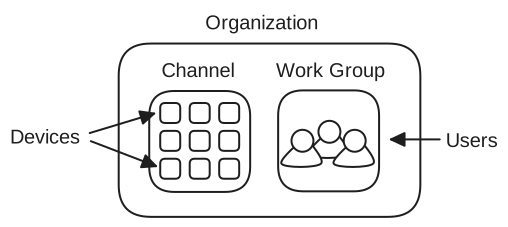
API specification