Custom Widget

This widget allows to create a full widget by using the van js templating system and echarts

How it Works
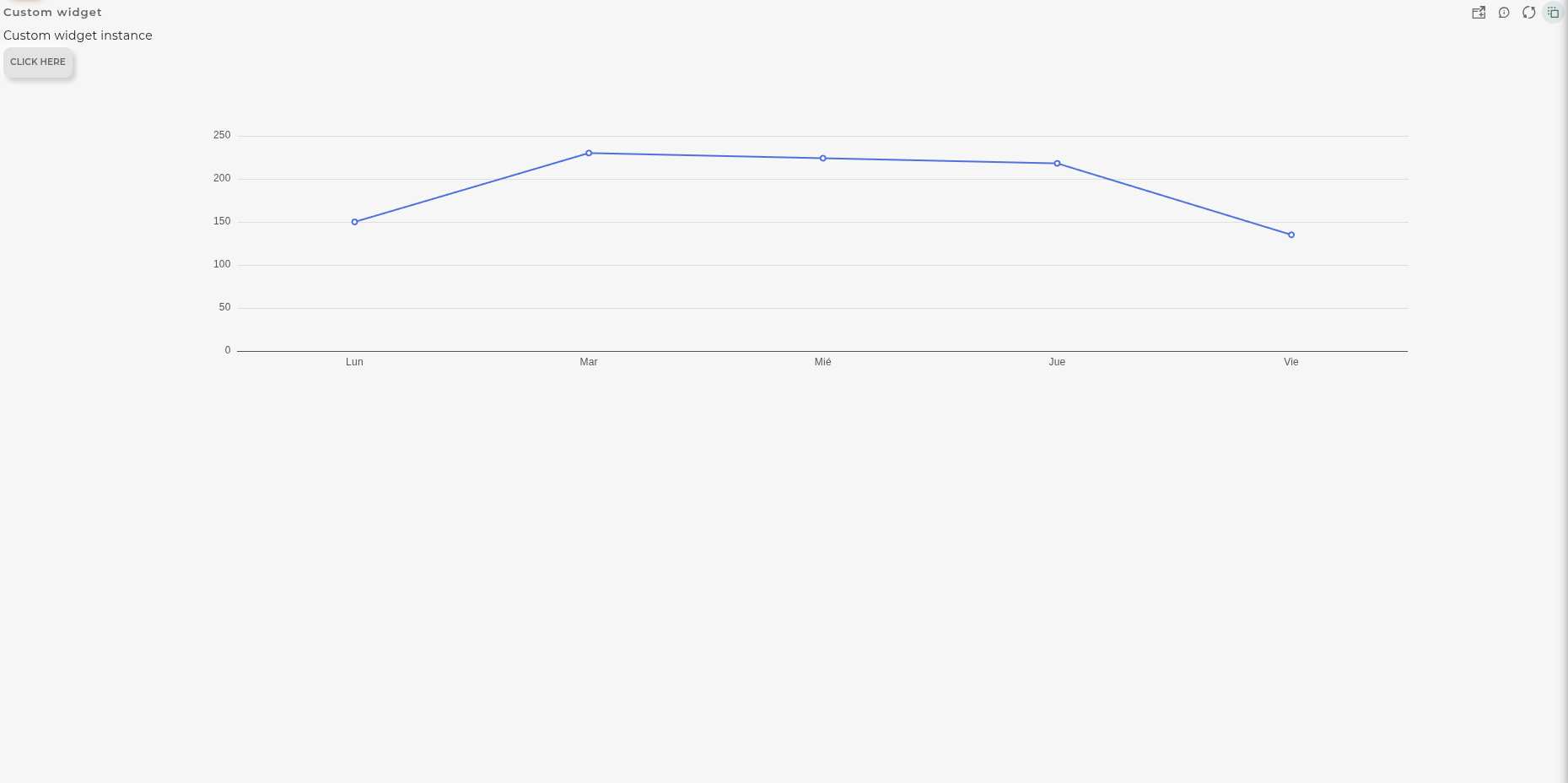
Custom widget

Once the code is entered, the coded form will be displayed on the widget.

This widget is compatible with eCharts library version 6. Multiple examples can be accessed via the following link: eCharts

Configuration

General

  • Boxed: widget will be displayed with background in dahsboard.
  • About: widget description in Markdown format.
  • Title: widget title. It can be configured to remain fixed in the widget or only be displayed when it receives focus.
  • Toolbar: configures the behavior of the widget bar on the dashboard, allowing you to hide it, hide it when not in use, or leave it always visible.
  • Refresh Frequency: allows configuring the data refresh frequency displayed in the list.
  • Extra actions: allows user to add new specific actions to the widget with your own code.
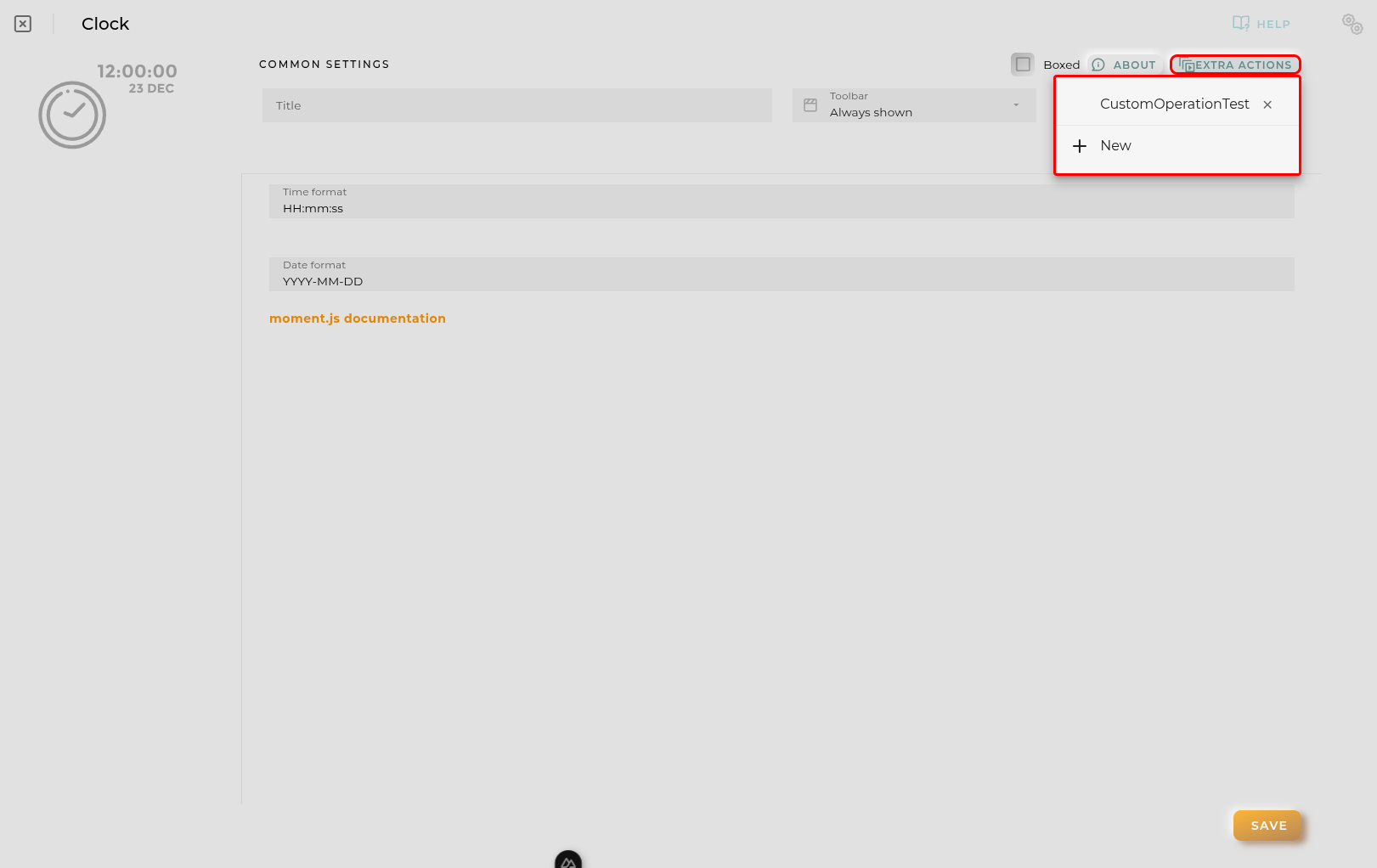
Extra action config

You can add a new one by pressing the New button.

Once you added a custom action it can be modified later by pressing the name in the list.

In order to remove the custom action click the delete icon button on the right.

In extra actions you can write your own code were you can open other dashboards, entities dashboards or execute wizards.
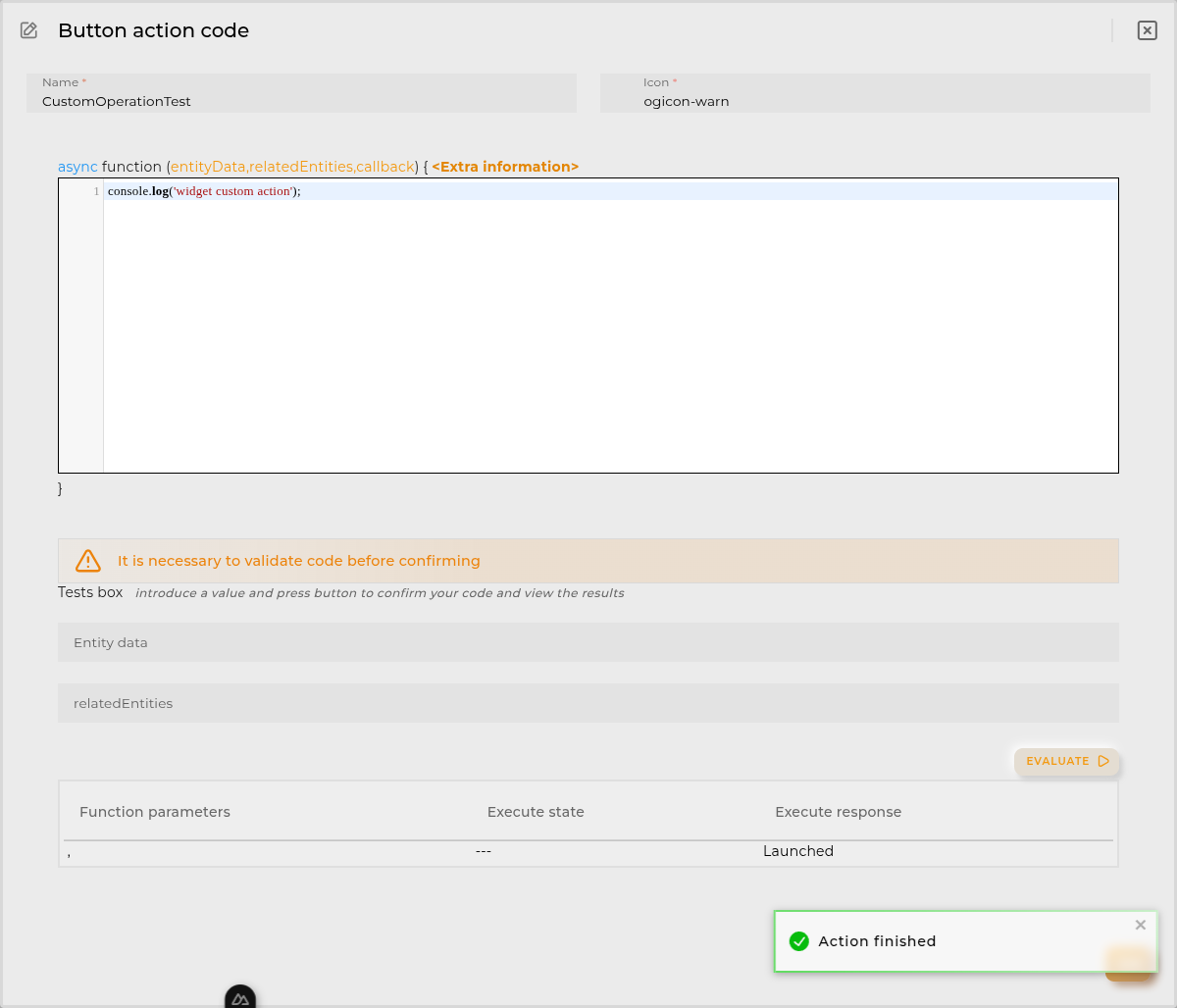
Extra action code

You can find all available functions and methods in Extra Information
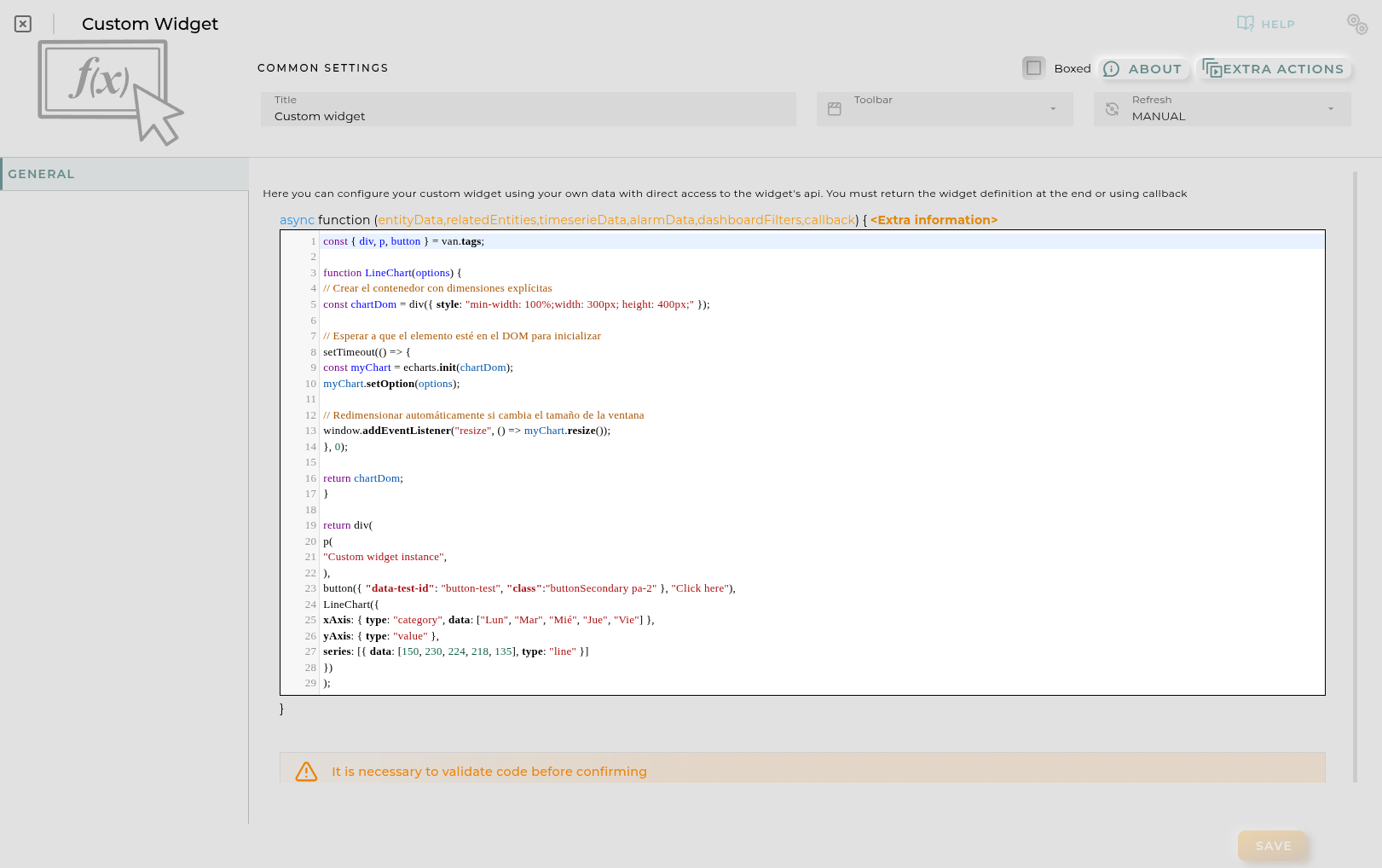
Custom widget configuration

Here, you input the necessary code to obtain the information to be displayed.

The function must always return a van ui object.

Every time the code is updated, it must be evaluated where a preview of the result can be seen.
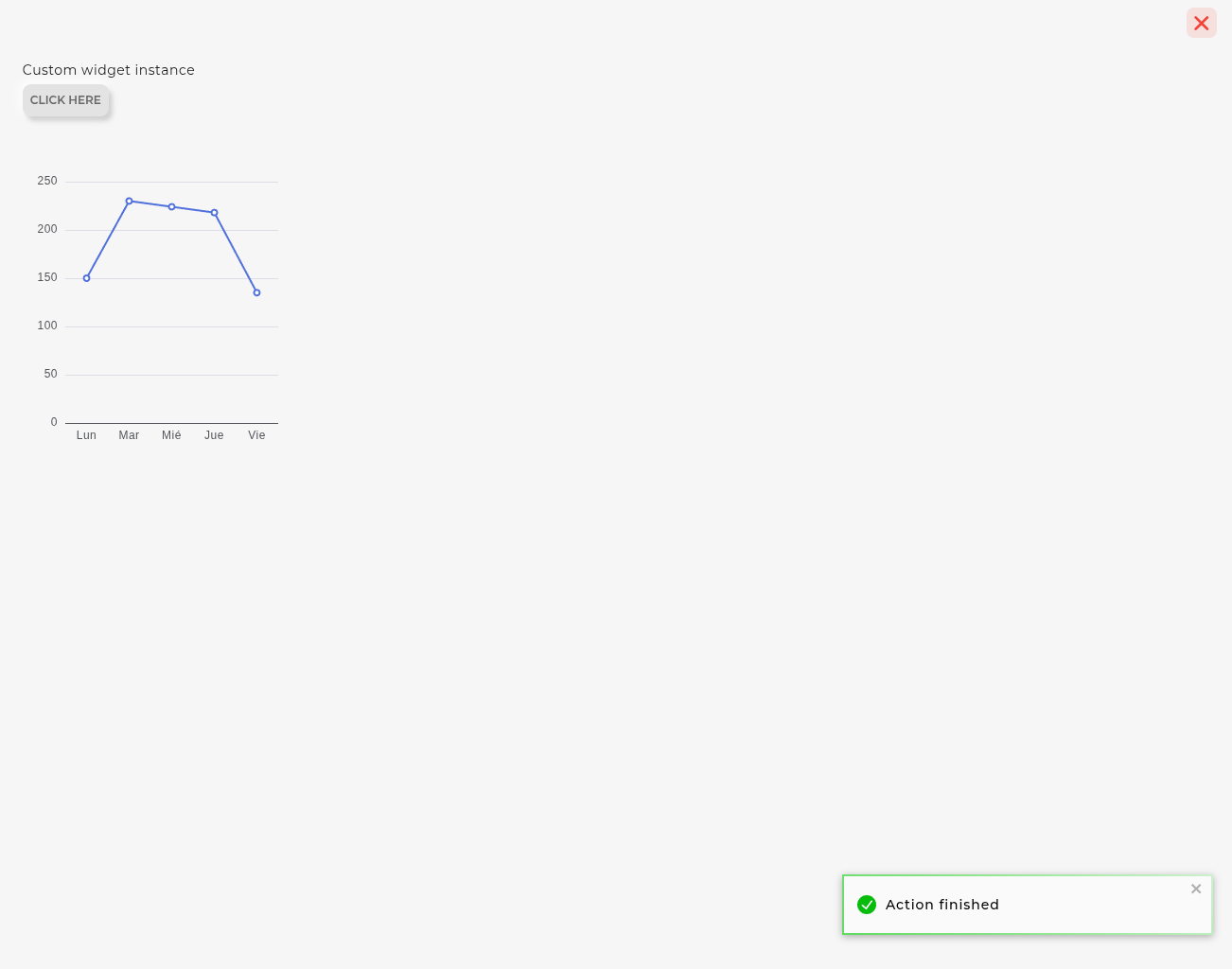
Custom widget evaluate code

Function

Depending of the configuration receives the following parameters:

  • entityData contains the data of the opened entity NOTE: only available when the user opens an entity dashboard template

Example:

{
  "provision.administration.identifier": {
    "_value": {
      "_current": {
        "value": "device_1"
      }
    }
  },
  "provision.administration.organization": {
    "_value": {
      "_current": {
        "value": "organization_name"
      }
    }
  },
  "provision.administration.channel": {
    "_value": {
      "_current": {
        "value": "channel_name"
      }
    }
  },
  "provision.administration.serviceGroup": {
    "_value": {
      "_current": {
        "value": "service_group_name"
      }
    }
  }
}
  • relatedEntities contains an array of entities related to the entity selected. NOTE: only available when the user opens an entity dashboard template

Example:

[{
  "provision.administration.identifier": {
    "_value": {
      "_current": {
        "value": "related_1"
      }
    }
  },
  "provision.administration.organization": {
    "_value": {
      "_current": {
        "value": "organization_name"
      }
    }
  },
  "provision.administration.channel": {
    "_value": {
      "_current": {
        "value": "channel_name"
      }
    }
  },
  "provision.administration.serviceGroup": {
    "_value": {
      "_current": {
        "value": "service_group_name"
      }
    }
  }
}]
  • timeserieData contains info about the timeserie opened by the user
    • config timeserie configuration
    • data timeserie row selected

NOTE: only available when the user opens an entity dashboard template from timeserie table widget

An example:

{
  "config": {
    "identifier": "69281dc43545e97df66c42a1",
    "name": "Battery charge history",
    "timeBucket": 3600,
    "bucketColumn": "bucketEnd",
    "bucketInitColumn": "bucketInit",
    "identifierColumn": "EntityID",
    "retention": 2592000,
    "origin": "2025-11-26T23:00:00Z",
    "context": [
      {
        "path": "provision.device.administrativeState",
        "name": "Administrative state",
        "sort": "true",
        "filter": "YES",
        "type": "string"
      }
    ],
    "columns": [
      {
        "path": "device.powersupply.battery.charge._current.value",
        "name": "Powersupply battery charge Current Value",
        "filter": "NO",
        "type": "number",
        "sort": false,
        "aggregationFunction": "FIRST"
      }
    ]
  },
  "data": {
    "bucketEnd": "2025-12-11T13:00:00+01:00",
    "bucketInit": "2025-12-11T12:00:00+01:00",
    "EntityID": "entity_1",
    "Powersupply battery charge Current Value": 34
  }
}
  • alarmData contains the data of the alarm opened in template
{
  "identifier": "270dd9f9-1396-4660-bb5f-8d8b471e1dcd",
  "name": "activityForbidden",
  "rule": "activityForbidden",
  "description": "Activity detected for an entity with administrative state disabled",
  "severity": "INFORMATIVE",
  "priority": "LOW",
  "organization": "organization_name",
  "channel": "default_channel",
  "entityIdentifier": "A_WORKER_1",
  "subEntityIdentifier": "A_WORKER_1",
  "resourceType": "ENTITY_ASSET",
  "status": "CLOSED",
  "openingDate": "2019-06-27T08:57:36+02:00",
  "closureDate": "2019-06-27T08:57:51+02:00"
}
  • dashboardFilters contains an object with the selected filters in the dashboard. Each property is related to a widget filter-property.

tasksSelected contains a list with tasks selected.

jobsSelected contains a list with jobs selected.

operationNameSelected contains a list with operation names selected.

operationStatusSelected contains a list with operation statuses selected.

operationResultSelected contains a list with operation results selected.

alarmNameSelected contains a list with alarm names selected.

ruleNameSelected contains a list with rule names selected.

alarmSeveritySelected contains a list with alarm severities selected.

alarmStatusSelected contains a list with alarm statuses selected.

Example:

{
  "tasksSelected": [],
  "jobsSelected": [],
  "operationNameSelected": [],
  "operationStatusSelected": [],
  "operationResultSelected": [],
  "alarmNameSelected": [],
  "ruleNameSelected": [],
  "alarmSeveritySelected": [],
  "alarmStatusSelected": []
}
  • callback (optional) function used to send chart data (only when the api/http petitions are promised, use return instead)
callback(van.tags('Custom widget')());

or

return van.tags('Custom widget')({});

Available utils

$api -> use it to create http petitions to OpenGate Api Rest doc

$user -> Logged user

Example:

{
    "email": "email@amplia.es",
    "workgroup": "workgroup",
    "domain": "domain",
    "profile": "profile",
    "countryCode": "ES",
    "langCode": "en",
    "timezone": "Europe/Madrid"
}

$moment -> use it to format date doc

console -> display messages in navigator console

Promise -> allows easy execution of multiple promises

http -> javascript encapsulation of useFetch (Nuxt 4) library doc

van -> vanjs

vanui -> vanjs

echarts -> echarts core library

ecStat -> echarts stats library

openWidget -> (widgetId[, entityKey, title, extraConf]) -> Opens the selected widget in a modal panel

openDashboard -> (workspaceId, dashboardId, newPage) -> Opens the selected dashboard in selected workspace

openEntityDashboard -> (entityIdentifier[, organization[user if empty], resourceType[’entity.device’ if empty] , newPage]) -> Opens the entity’s temporary dashboard

openWizard -> (wizardId[, wizardData, isEdit]) -> Opens the selected wizard in a modal panel. A list of available wizards will be available to use directly.

Final code structure build by the application

async function main(entityData,relatedEntities,timeserieData,alarmData,dashboardFilters,callback) {
  // YOUR CODE HERE WITH RETURN OR CALLBACK (function is declared automatically)
}

Examples


Subsections of Custom Widget

Custom Widget Examples

Code

const {a, div, li, p, ul} = van.tags;

function LineChart(options) {
  const chartDom = div({ style: "width: 100%; height: 400px;" });

  setTimeout(() => {
    const myChart = echarts.init(chartDom);
    myChart.setOption(options);

    // Redimensionar automáticamente si cambia el tamaño de la ventana
    window.addEventListener("resize", () => myChart.resize());
  }, 0);

  return chartDom;
}

return div(
  p(
    "👋Hello",
  ),
  ul(
    li(
      "🗺️World",
    ),
    li(
      a({href: "https://vanjs.org/"},
        "🍦VanJS",
      ),
    ),
  ),
  LineChart( {
  xAxis: { type: "category", data: ["Lun", "Mar", "Mié", "Jue", "Vie"] },
  yAxis: { type: "value" },
  series: [{ data: [150, 230, 224, 218, 135], type: "line" }]
})
);

Custom Widget Examples 2

Code

// 1. Importar tags de VanJS
const { div, input, button, ul, li, span, p } = van.tags;

// 2. Extraer el ID por defecto si entityData está presente en el contexto
const defaultDeviceId = entityData?.['provision.administration.identifier']?._value?._current?.value || "";

// 3. Estados reactivos de VanJS
const statusText = van.state(defaultDeviceId ? "Cargando datos..." : "Introduce un ID de dispositivo y pulsa Consultar");
const fieldsList = van.state([]);
const loadedEntity = van.state(null); // Guardará la entidad en modo flattened
const currentDeviceId = van.state(defaultDeviceId);

// 4. Estilos en línea
const styles = {
  container: "padding: 14px; font-family: system-ui, -apple-system, sans-serif; color: #1e293b; height: 100%; box-sizing: border-box; overflow-y: auto;",
  searchBox: "display: flex; gap: 8px; margin-bottom: 12px;",
  input: "flex: 1; padding: 8px 12px; border: 1px solid #cbd5e1; border-radius: 6px; font-size: 0.875rem; outline: none;",
  primaryBtn: "padding: 8px 16px; background-color: #2563eb; color: white; border: none; border-radius: 6px; font-size: 0.875rem; font-weight: 500; cursor: pointer;",
  actionsBox: "display: flex; gap: 8px; margin-bottom: 14px; flex-wrap: wrap;",
  actionBtn: "padding: 6px 12px; background-color: #0f766e; color: white; border: none; border-radius: 6px; font-size: 0.8125rem; font-weight: 500; cursor: pointer; display: flex; align-items: center; gap: 6px;",
  secondaryActionBtn: "padding: 6px 12px; background-color: #475569; color: white; border: none; border-radius: 6px; font-size: 0.8125rem; font-weight: 500; cursor: pointer; display: flex; align-items: center; gap: 6px;",
  list: "list-style: none; padding: 0; margin: 0; display: flex; flex-direction: column; gap: 8px;",
  item: "display: flex; justify-content: space-between; align-items: center; padding: 8px 12px; background: #f8fafc; border-radius: 6px; border: 1px solid #e2e8f0; font-size: 0.875rem;",
  key: "color: #64748b; font-weight: 500;",
  value: "font-weight: 600; color: #0f172a; word-break: break-all;",
  status: "color: #64748b; font-size: 0.875rem; text-align: center; padding: 16px 0; margin: 0;"
};

// 5. Función asíncrona para consultar el dispositivo usando $api
async function searchDevice(id) {
  const targetId = (id || "").trim();

  if (!targetId) {
    statusText.val = "⚠️ Por favor, introduce un identificador de dispositivo válido.";
    fieldsList.val = [];
    loadedEntity.val = null;
    return;
  }

  statusText.val = `Buscando dispositivo "${targetId}"...`;
  fieldsList.val = [];
  loadedEntity.val = null;
  currentDeviceId.val = targetId;

  try {
    // Consulta en modo .flattened()
    const response = await $api.entitiesSearchBuilder()
      .filter({
        eq: {
          'provision.administration.identifier': targetId
        }
      })
      .flattened()
      .limit(1)
      .build()
      .execute();

    const entity = response?.data?.entities?.[0];

    if (!entity) {
      statusText.val = `❌ No se encontró ningún dispositivo con ID: "${targetId}"`;
      return;
    }

    // Guardar la entidad en modo flattened en el estado
    loadedEntity.val = entity;
    statusText.val = "";

    // Mapeo de campos simples a mostrar
    fieldsList.val = [
      { label: "Identificador", value: entity['provision.administration.identifier']?._value?._current?.value || targetId },
      { label: "Organización", value: entity['provision.administration.organization']?._value?._current?.value || "N/A" },
      { label: "Canal", value: entity['provision.administration.channel']?._value?._current?.value || "N/A" },
      { label: "Grupo de Servicio", value: entity['provision.administration.serviceGroup']?._value?._current?.value || "N/A" },
      { label: "Tipo Específico", value: entity['provision.device.specificType']?._value?._current?.value || "N/A" },
      { label: "Número de Serie", value: entity['provision.device.serialNumber']?._value?._current?.value || "N/A" },
      { label: "Estado Operacional", value: entity['device.operationalStatus']?._value?._current?.value || "N/A" }
    ];

  } catch (error) {
    console.error("Error al consultar el dispositivo:", error);
    statusText.val = `❌ Error en la consulta: ${error.message || error}`;
  }
}

// 6. Funciones para ejecutar las acciones sobre el dispositivo cargado
function handleOpenDeviceDetails() {
  if (!currentDeviceId.val) {
    return;
  }
  // Abrir widget deviceInfoDetails con el identificador del dispositivo
  openWidget('deviceInfoDetails', currentDeviceId.val, `Detalles: ${currentDeviceId.val}`);
}

function handleOpenEntitiesWizard() {
  if (!loadedEntity.val) {
    return;
  }
  // Abrir wizard entities pasando el objeto de la entidad en modo flattened
  openWizard('entities', loadedEntity.val, true);
}

// 7. Input de texto pre-rellenado
const textInput = input({
  type: "text",
  placeholder: "Identificador del dispositivo...",
  value: defaultDeviceId,
  style: styles.input,
  onkeydown: (e) => {
    if (e.key === "Enter") {
      searchDevice(textInput.value);
    }
  }
});

// 8. Búsqueda automática inicial si entityData contenía un ID
if (defaultDeviceId) {
  searchDevice(defaultDeviceId);
}

// 9. Retorno del componente reactivo VanJS
return div({ style: styles.container },
  // Barra de búsqueda
  div({ style: styles.searchBox },
    textInput,
    button({
      style: styles.primaryBtn,
      onclick: () => {
        searchDevice(textInput.value);
      }
    }, "Consultar")
  ),

  // Contenido reactivo: Estado o Botones de Acción + Listado
  () => {
    if (statusText.val) {
      return p({ style: styles.status }, statusText.val);
    }

    return div(
      // Barra de acciones disponibles para el dispositivo cargado
      div({ style: styles.actionsBox },
        button({
          style: styles.actionBtn,
          onclick: () => {
            handleOpenDeviceDetails();
          }
        }, "📱 Abrir 'deviceInfoDetails'"),
        button({
          style: styles.secondaryActionBtn,
          onclick: () => {
            handleOpenEntitiesWizard();
          }
        }, "🧙 Abrir Wizard 'entities'")
      ),

      // Listado de datos simples
      ul({ style: styles.list },
        fieldsList.val.map((field) => {
          return li({ style: styles.item },
            span({ style: styles.key }, field.label),
            span({ style: styles.value }, String(field.value))
          );
        })
      )
    );
  }
);