Welcome to the OpenGate API, an integral part of the OpenGate IoT Platform by amplía))) soluciones. We are a recognised company at the forefront of Industrial Internet of Things (IoT) solutions. This API is the backbone for connecting, managing and optimising a wide range of IoT devices and systems, providing unparalleled flexibility and control in industrial environments. Whether you are new to IoT or a seasoned professional, our documentation will guide you through the capabilities and features of the OpenGate API, enabling you to harness the full potential of IoT in your industrial applications.
The Management section of the OpenGate REST API, an essential part of Amplía Soluciones’ OpenGate IoT platform, is designed to facilitate comprehensive and efficient management of IoT resources and configurations. It encompasses a broad array of functionalities that cater to various aspects of IoT management:
Organizations: This is the core where you can manage Channels and Entities, including entity types, statuses, devices, subscriptions, and more. It provides tools for Bulk Provisioning, both classic and using provision functions with a JavaScript API, along with Rules management including a default rules catalog.
Work Groups: Critical for team collaboration, it includes managing work group relations, geo-clusters, bundles, and users, along with user login and profile settings.
Geo-Areas, Data Models, and Tags: These features allow for geo-spatial organization, data structuring, and categorization of IoT elements.
Tickets: Handle customer service and operational issues efficiently.
Manufacturers & Models: Manage and catalog various manufacturers and their respective models.
Usage Plans and Certificates: Essential for securing and governing the use of IoT devices.
Mobile Operators: This includes management of APNs and GGSNs, crucial for cellular network-based IoT devices.
This section of the API is geared towards providing administrators and developers with the tools needed for detailed and organized management of IoT infrastructure and services, ensuring smooth operation and effective utilization of IoT resources.
This document presents a comprehensive overview of the OpenGate Organization API, a pivotal component of the OpenGate IoT platform. As defined in the OpenAPI 3.0.0 specification, this API plays a crucial role in the holistic management of OpenGate organizations, which represent the highest-level and most crucial entities within the OpenGate platform.
The Role of Organizations in OpenGate
Foundation of the IoT Ecosystem: In the OpenGate system, an organisation is the fundamental unit from which all other entities are derived. The aforementioned entities comprise users, devices, assets, channels (i.e., device groups), work groups, and sub-organizations.
Central Control and Coordination Point: The utilisation of this API enables the effective control and coordination of the entire spectrum of an organisation’s IoT infrastructure within the OpenGate ecosystem.
Key Functionalities
Comprehensive API Endpoints
/north/v80/search/organizations: Facilitates organization searches with customizable formats and filters.
/north/v80/search/organizations/summary: Offers summarised data about organisations for quick overviews.
/north/v80/provision/organizations: Enables the creation of new organisations with detailed JSON requests.
/north/v80/provision/organizations/{organizationId}: Manages specific organisation details, including retrieval, updates, and deletion.
Security and Access
Secured Access: Employs the use of “ApiKeyAmplia” and “BearerAuthJWT” for the purpose of ensuring secure interactions with the API, thereby guaranteeing the integrity and confidentiality of the data.
Consistent Endpoint: The API services are accessible at https://api.opengate.es, providing a stable and efficient gateway for organizational management.
This application programming interface (API) serves as the central nervous system of the OpenGate platform, offering sophisticated tools and interfaces for the administration of organisations. By mastering this API, users can effectively orchestrate the diverse components of their Internet of Things (IoT) solutions, ensuring seamless integration and optimal performance of their IoT ecosystem.
Plan feature
The Plan feature is a fundamental component of OpenGate, the function of which is to define the organisational usage limits. Each organization will have a specific plan setting, which may take the following forms:
The maximum number of devices, gateways or assets the organization can have.
The maximum time the collected data will be stored until it is evicted.
The maximum number of events collected by the platform in a period.
Comprehensive API actions
Updating an organization
It should be noted that the domain is not an updatable field; therefore, its inclusion in the put will result in an error.
Searching organizations summary
In its default state, the summary displays the total counter, the counter for the organisational grouping, and the counter for the channel grouping.
API specification
Subsections of Organizations
Channels - Device Groups
Introduction
The OpenGate API provides a solution for the management and organisation of Internet of Things (IoT) devices and assets. At the core of this organisational structure are the channels, which are a vital component of an efficient device and asset management system, enabling streamlined operations and enhanced oversight.
Understanding OpenGate Channels
The Channels feature of the OpenGate group unifies the categorisation of devices and assets, thereby simplifying the management of complex systems and providing a powerful tool for the application of policies, the execution of commands and the analysis of data across a fleet of devices. The use of Channels allows for the straightforward management and interaction with devices that share common characteristics or are part of a specific project or geographic location.
Key Benefits of Using Channels
Simplified Management: Organise devices and assets into manageable groups.
Targeted Operations: Execute commands and policies on a specific group of devices efficiently.
Enhanced Analytics: Analysing data at the group level allows you to gain insights that may otherwise be overlooked when looking at the data individually.
Importance of User and Work Group Assignments
In order to gain access to and assume control of channels, it is necessary for the user account associated with OpenGate to be incorporated into a workgroup. This method of access control, which is based on a multi-layered structure, guarantees that only those individuals who have been duly authorised will be able to interact with the devices and assets within a given channel. This approach ensures that the environment is secure and under the control of the relevant authorities.
How to Assign Work Groups to Channels
Access the OpenGate User Management interface.
Select the workgroup to be assigned to a Channel.
Specify the Channels to which the workgroup is to be granted access.
Save the changes to implement the new access permissions.
By meticulously assigning work groups to channels, it is possible to maintain a high level of security and ensure that users only have access to the devices and assets that are relevant to their role or of interest to them.
In the context of the Internet of Things (IoT), an entity represents any monitoring element.
OpenGate offers four types of entities: asset, device, subscription, and subscriber. The resourceType field is used to set the entity type. The following table illustrates the process for setting each entity type:
Entity
ResourceType attribute
Description
Provision
Asset
entity.asset
The software enables users to create new entities that are distinct from the device environment.
OpenGate supports a variety of entities, each of which is identified by a unique identifier.
Administrative data attributes
id: Each Internet of Things (IoT) entity on the platform is assigned a unique identifier automatically by the platform.
provision.device.identifier: The customer-generated ID is a string that identifies a device in a specific organisation. HTTP/1.1 201 Created Location: http://api.opengate.es/north/v80/provision/organizations/{organizationName}/devices/device_1 It is imperative that you use this identifier as a URL suffix when you wish to retrieve, update or delete your device.
provision.device.communicationModules[].identifier: The customer-generated ID is a string that identifies a communication module.
provision.device.communicationModules[].subscription.identifier: It is a customer-generated identifier comprising a string that identifies a subscription.
provision.device.communicationModules[].subscriber.identifier: It is a customer-generated identifier comprising a string that identifies a subscriber.
Administration object attributes
It is a requirement for all OpenGate entities to operate within an administrative context.
Attributes
organization: the organization that owns the entity.
Forbidden in entity update operation
Required in entity insert operation
Constraints: [a-zA-Z0-9] max 50 chars
channel: an administrative grouping method for your entities.
Required in entity insert operation.
Constraints: [a-zA-Z0-9] max 50 chars
administrativeState: see administrativeStatevalues
Organization ID as URL parameter
In entity POST and PUT operations, OpenGate ignores the organisation field because its value is mandatory in the URL.
serviceGroup: Service configuration: configuration of services, operations available, etc.
Constraints: [a-zA-Z0-9] max 50 chars
Forbidden in bundle operations.
workgroup: the workgroup is the way to establish the relationships between devices and users. It’s used, for example, when you want to create software bundles.
Constraints: [a-zA-Z0-9] max 50 chars
This field only applies to OpenGate users.
plan (optional): an administrative concept that allows limiting the number of events sent by the device. This concept only applies to devices.
Constraints: [a-zA-Z0-9] max 50 chars
Forbidden in bundle operations.
Optional in entity insert and update operation.
Click to show administrative data as JSON document into a device entity…
It is of the utmost importance to select the correct entity service group. The service group you choose will determine how OpenGate behaves when managing your devices in the following ways:
Permitted operations.
This document outlines the process by which the platform transmits scheduled operations to devices.
Always: This type is designed for devices that are continuously connected. In this scenario, OpenGate will initiate operations on the devices in accordance with the pre-defined schedule. In the event that the target device is not connected, the operation will be cancelled and an error message will be generated.
On-session-connection: In this instance, the platform saves operations for subsequent use. Upon establishing a connection with the platform, the device will be notified of any pending operations and these will be sent to the device. This mode is applicable to devices utilising web sockets or MQTT connectors.
On-demand: In this instance, the device will request any outstanding operations. This approach enables devices to conserve battery power and retrieve pending operations when active.
Details
Should you wish for your devices to request all pending operations, you may utilise MQTT connections with the on-demand configuration.
Trusted boot: It is a requirement that all messages received by the platform include a field with the trusted boot value. In the absence of this field, OpenGate will reject the message.
Device security mode: This option allows you to select the desired security level for communications between the device and platform. The available options are:
None: communications are not encrypted.
Level 1: One-way authentication (or platform authentication). The platform is the sole entity responsible for authenticating itself to the client. It issues the client a certificate to confirm the platform’s authenticity.
At Level 2, both the client and the server authenticate themselves to each other, ensuring the veracity of the certificate presented by the platform.
At Level 3, both the client and the server authenticate themselves to each other, confirming the availability of the platform’s device certificate.
Service groups available on OpenGate cloud instance
As outlined in the organization’s plan, usage limits are to be established for the OpenGate platform. In the case of entities, if your organization has not defined a collection event limit, it must be set at the time of entity creation.
Flattened format
It is possible to create and search for data stream values (see default data models) using the flat format. This format is the same as that used on the South API. To indicate if data streams are in a flattened form, use the Boolean parameter ‘flattened’ in the URL.
The following examples demonstrate the process of transforming a hierarchical JSON format into a flattened JSON format. There are two types of values: simple and complex.
We will also demonstrate how to transform the existing normalised/flattened JSON examples into CSV format. The above examples will be joined together in a single CSV file comprising three lines, one for each example (a straightforward example and two complex examples).
Transforming the flattened format into CSV format is a relatively straightforward process, as the CSV file’s content adheres to the same guidelines as the flattened format. The first line (header) contains the name of the data stream, separated by “;”, and the following lines represent the different entities, with the field value of the data stream separated by “;” in the same order as the first line.
The following lines illustrate the format of a CSV file.
In the event that an entity contains a unique communication module, it is possible to indicate the name without the use of square brackets and without the inclusion of an identifier. In light of this, it can be seen that the two strings in question, namely [commsMod_battery_name(commsMod_battery_id)] and commsMod_battery_name, are identical.
Comprehensive API actions
Searching entities
This API enables the retrieval of a comprehensive list of entities, offering a multitude of options for:
Filtering (see Specific Filter Fields)
Sorting (see Sorting)
Selecting Required Fields (see Selecting)
Summarising (see Summary)
The results can be obtained in two distinct formats:
JSON Format (Default)
CSV Format
Additionally, the results can be obtained in a flattened format through the use of flattened parameters.
API specification
Subsections of Entities
Entity types & statuses
Entity type list
GATEWAY: M2M device like a concentrator or smart router, modem or gateway, etc.
ASSET: Business entity, usually have one or more devices connected.
COMMUNICATIONS_MODULE: Internal modem or interface for communications.
SUBSCRIPTION: Logical identifier for a communication channel as a GMS line.
SUBSCRIBER: Physical device associated with a Logical subscription.
Default device administrative statuses
REQUESTED: Entity requested to the supplier
READY: Entity ready for installation
REPAIR: Entity under repair
TESTING: Entity in tests
ACTIVE: Entity deployed on field
SUSPEND: Suspended its operation
DELETED: Entity removed from available stock
RETIRED: Entity retired from field
BANNED: Entity banned, no data is going to be collected for devices with this status
Alarms for BANNED entities
The default rules catalog has an automation rule to elevate an alarm when a BANNED device shows activity. Besides that, you can run a job or schedule a task over entities with a BANNED administrative state.
Device operational statuses
UNKNOWN: Not known
NORMAL: Normal Operation
ALARM: The device has active alarms
TESTING: The device is under test. Could be running but it is not performing its normal operation.
DOWN: The device is not operative. Could be running but it is not performing its operation.
SAFE_MODE: The device is in Safe Mode (Sleeping, etc.)
TAMPER: The device was tampered
TEST: The device is working in test mode
Communication modules operational status
UNKNOWN: The module status is not known
STOPPED: The module is not working
STARTING: The module is booting
RUNNING: The module is working
STOPPING: The module is shutting down
ERROR: The module has an error
Devices
Introduction
A device represents the physical element (communications devices, concentrators, machines, sensors, etc.) through which data is collected.
Relation between devices and assets
A device can be linked to an asset through the provision.device.related data stream, which must contain the identifier of the asset in question.
When these entities are related, the asset is able to collect data from the related device. In order to do this, it is necessary to define an available data model for the Devices and Assets resources, and then define all the data streams that you want to copy from the device. Once this has been done, the asset will then automatically start collecting these values from the device.
Comprehensive API actions
Creating a device
New devices can be created by sending a POST request that includes a correctly formatted JSON document in the body.
A device may contain or not contain subscriptions and subscribers. Furthermore, these can exist independently (please refer to create subscriptions or create subscribers for more information).
It is essential that the subscription or subscriber is located within the communication modules on the device. Consequently, there are various use cases for managing device relations, depending on whether there are existing subscriptions or subscribers.
The following options are available for creating a device:
Create a device without subscriptions or subscribers.
Create a device with subscriptions or subscribers that do not exist in the platform.
Create a device with subscriptions or subscribers that exist in the platform. In this instance, the following steps must be completed:
A device must be created (please refer to the ‘Create a device without subscriptions or subscribers’ section below for further details).
The device must then be updated with the relevant subscriptions or subscribers that are already present on the platform (please refer to the ‘Associate a subscription or subscriber to the device’ section below for further details).
Furthermore, a device can be linked to an asset. Please refer to the section entitled Relation between devices and assets for additional details.
Updating a device
Updates can be made to the following:
Device data
Device subscription or subscriber associations
Device subscription or subscriber disassociations
The JSON object passed will vary depending on the desired update.
Patching a device
It is possible to patch the following:
Only the device data
Associate a subscription or subscriber to the device
The JSON object passed will be different depending on the desired patch.
Furthermore, a device can be related to an asset. Please refer to the section entitled ‘Relation between devices and assets’ for more information.
Deleting a device
To delete a complete device with all associated subscriptions, send a DELETE request using the provided URL. The request should include a Boolean parameter, “full,” to indicate that you wish to delete the entire device.
Note
The default value of the field ‘full’ is set to ‘false’. In this case, if a device with a subscription or subscriber is deleted, only the device will be removed. Neither the subscription nor the subscriber will be deleted. After this, they will exist on the platform independently, without being associated with a device.
Searching device
This API enables the retrieval of a comprehensive list of devices, offering a multitude of options for:
Filter (See Specific Filter Fields)
Order (see Sorting)
Select Required Fields (see Selecting)
Summary (see Summary)
The results can be obtained in two different formats, as detailed in the HTTP Header Options.
JSON Format (Default)
CSV Format
As an alternative, the result can be obtained in a flattened format thanks to the flattened parameter (see device parameters).
API specification
Subscriptions
Introduction
A subscription stores information regarding the contracts with your communication operators. It can exist as a standalone entity or integrated within the device.
Comprehensive API actions
Patching a subscription
Please note that the administration channel value is mandatory for securitisation purposes in patch operation.
In the event of patching complex objects, any non-passed object attributes will be patched as non-existent. Therefore, it is advisable to include previous unchanged values to avoid any loss of data.
Searching subscriptions
The results can be obtained in two different formats, as detailed in the HTTP Header Options:
JSON Format (the default)
CSV Format
Searching subscriptions summary
The summary will always display the total counter, the organisation grouping counter and the channel grouping counter by default.
API specification
Subscribers
Introduction
The Subscriber Entity Store contains information regarding a specific communication channel. It can exist independently or within the device.
Comprehensive API actions
Patching a subscriber
Please note that the administration channel value is mandatory for securitisation purposes in patch operation.
In the event of patching complex objects, any non-passed object attributes will be patched as non-existent. Therefore, it is advisable to include previous unchanged values to avoid any loss of data.
Searching subscribers
The results can be obtained in two different formats, as detailed in the HTTP Header Options:
JSON Format (the default)
CSV Format
Searching subscribers summary
The summary will always display the total counter, the organisation grouping counter and the channel grouping counter by default.
API specification
Assets
Introduction
The software enables the creation of entities that are not devices, allowing users to emulate any type of entity they require, such as a worker or a spool.
Concurrently, a device may be associated with an asset. To illustrate, a worker may utilise a device that monitors a range of parameters.
These devices can take the form of a bracelet that monitors battery levels, pulse rate, temperature and position, or a vest that measures a range of other parameters.
An asset is able to identify its associated devices through the provision.asset.related data stream. This data contains an array of identifiers for the associated devices.
Should you wish to receive all information pertaining to the device in the asset, you must add a data model with dual data streams. Once both are related in this way, the assets will be able to receive all common data streams from the device. This ensures that all datastreams and data points collected will be in the cycle of life for both.
The platform is set up by default to offer the Entity data model, which contains two dual data streams: ’entity.location’ and ’entity.areas’. Please refer to the Default Datamodels section for more information.
Asset object structure
An asset is a repository of information about the new entity created by the user.
In regard to provisioned data, the following attributes are applicable:
Minimum attributes:
provision.administration.
provision.asset.identifier.
resourceType.
Recommended attributes by OpenGate:
provision.asset.administrativeState.
provision.asset.specificType.
provision.asset.name.
provision.asset.description.
Extended attributes:
provision.asset.location.
Defined attributes in human datamodel.
Defined by the user in his new datamodels. For example photo, position
Note
The specificType field is used to differentiate new entities. For instance, a worker is classified as an entity.asset with the specificType WORKER.
Comprehensive API actions
Creating an asset
New assets can be created by sending a POST request, including a correctly formatted JSON document in the POST body using the generic URL for entities
Please be advised that there is no requirement to include an organisation field in the JSON, as this information is already available in the URL.
It is not possible to create a list of devices associated with an asset. These must be added from the Devices section.
Updating an asset
Please be advised that an asset can be modified by sending a PATCH request using the generic URL for entities.
It is necessary to replace {identifier} with the identifier of the asset you wish to modify. Additionally, a boolean parameter, flattened, must be included to enable the sending of a flattened JSON format.
Warning
Please be advised that it is not possible to patch the list of devices associated with the asset. The devices must be patched from the list.
When patching complex object values, non-passed object attributes will be patched as non-existent. Therefore, it is advisable to include previous unchanged values to avoid any loss of data.
Please note that the Resource Type and Administration Channel values are mandatory in asset patch operations for securitisation purposes.
Deleting an asset
Note that it is not possible to delete the list of devices associated with an asset. Instead, you will need to delete them from the devices list.
Please be advised that an asset can be deleted by sending a DELETE request using the generic URL for entities.
The bulk function enables the provisioning of a list of entities or tickets in a single operation, in either synchronous or asynchronous mode.
Bulk Object Structure
Bulk requests and responses can be formatted in four different ways, which can be selected through the Content-Type HTTP header. The default format is JSON, but the other formats are also available:
CSV format
XLS Excel format
XLSX Excel format
Attaching Files as Multipart
The Async API enables the creation of multipart files. In this instance, the Content-Type HTTP header will be multipart/form-data, and the file type will be indicated in the attached content.
HTTP Header Options
The API enables the indication of the format in which the request content is to be sent, either JSON or CSV, via the HTTP header option “Content-Type”. Similarly, the API allows the indication of the format in which the response content is to be received, either JSON or CSV, via the HTTP header option “Accept”.
It is possible to send a request and receive a response in different formats. For example, a request sent in JSON format can be received in CSV format.
Content-type header
The bulk input can be provided in different formats, depending on the file type. The Content-Type header should indicate the format of the input data. The following formats are supported for both synchronous and asynchronous operations:
Please be advised that the bulk processing results will be created in the format indicated in the ACCEPT header of the POST call, for both synchronous and asynchronous operations. To achieve the desired result with the GET call, it is essential to ensure that the ACCEPT header is identical to that used in the POST call.
In the event that the POST is not completed with the correct MIME type in the ACCEPT header, an error message will be displayed. Similarly, if the GET is not completed with the correct MIME type in the ACCEPT header, the same error message will be displayed.
Comprehensive API actions
Synchronous bulk
Creating a synchronous bulk for entities
The Synchronous Bulk Creation process allows you to create multiple entities in a single request. This bulk operation applies to the following entities:
Assets
Devices
Subscriptions
Subscribers
Creating a synchronous bulk for tickets
The Synchronous Bulk Creation process for tickets allows you to create multiple ticket records in a single request.
Asynchronous bulk
Creating an Asynchronous bulk for entities
In the case of asynchronous calls, the POST method will return an empty body and the URL of the created bulk process in the Location header. To monitor the progress and outcome, a GET request should be made to the URL returned by the POST method.
Asynchronous searching
A comprehensive search is being conducted across all previously created bulk processes, whether completed or still in progress.
API specification
Provision functions for bulk provisioning
Limited access API
Limited access
Please note that the provision API of this feature is only available to the root profile. Similarly, the execution API (plan or bulk) of this feature is only available to the following profiles: root, admin, admin_domain, advanced and super_admin_domain. In contrast, the searching API is accessible to all users. Should you require further information, please consult your administrator.
Introduction
This API enables users to perform bulk provisioning using Provision Processors. These processors allow users to define their own Excel formatting using a JavaScript script, which adapts the formatting to align with the OpenGate APIs.
Provision Processor object structure
A Provision Processor will include a JSON object with a script field, which contains the JavaScript code responsible for processing inbound data and determining the appropriate actions for provisioning the relevant entities, such as JSON objects, devices, subscriptions and subscribers. When creating or updating a Provision Processor, only minimal parsing of the script will be performed.
Comprehensive API actions
Provision processors
Creating a provision processor
Please note that the Accept field should be set to application/JSON.
Updating a provision processor
All actions are based on application/JSON data formats.
Searching provision processors
Please search for all completed and ongoing bulk processes.
Executing provision processors
Executing plan from selected provision processor
As with the Bulk creation process, files will be attached as multipart, with only XLS and XLSX formats permitted.
In this instance, the Accept header must be set to application/JSON.
Rather than creating a bulk process, it would be more efficient to return the provision process planning for specified entries. This is a synchronisation process that does not result in changes to the database.
Executing bulk from selected provision processor
Files used for bulk processing will be attached to the request as multipart.
The attached file must contain a specific Content-Type property to indicate the format of the file.
Only XLS and XLSX formats are permitted.
The Accept header must match the attached file’s Content-Type.
Reading the bulk summary
Please note that the Accept field should be set to application/JSON.
Reading the bulk details from selected bulk
Please note that the Accept field should be the same used in the bulk creation request.
API specification
Subsections of Provision functions for bulk provisioning
JavaScript API
Introduction to provision processors
This API’s purpose is to facilitate the development of Provision Processors in the simplest possible way.
The API is divided into several modules/scripts:
Provision_Processor / provision_processor.js: This is the entry point from Java. It defines a template for Provision Processor execution.
Entities_Utils / provision_entity_utils.js: Utility class to facilitate the entities building.
Action_Utils / provision_actions_utils.js: Utility functions to create the actions to be returned to Java process.
V8_Api / provision_JavaV8_api.js: Functions used to invoke Java V8 methods.
V8_Utils / provision_JavaV8_utils.js: Some generic functions to use V8_API. When developing a new Provision Processor, instead of calling directly V8_Api functions is better to use the methods defined here.
Error_Api: Facility class to manage and transform caught OpenGate provision error.
Provision Processor
One Provision Processor is a script that, using Provision Javascript API, implements the business logic to transform inbound data into several actions to be done by Java to do correct provisioning actions.
How to Implement Provision Processor
When implementing a Provision Processor it is mandatory to implement two specific functions. These functions are called from Provision_Processor.processRow function:
normalizeRawObject(rawObject): This function receives a map with the data to be processed. For example, a map with the data read from an excel file. It takes the inbound parameter and transforms it into an object to be used to calculate and build the actions for this row. In this function, values validation and transformation should be done.
Input parameter: JSON object with raw keys and values.
Output: JSON object with the desired structure.
actionsPlanning(normalizedObject): Takes the result from normalizeRawObject function and calculates the actions to be done in Java.
Input parameter: Normalized object.
Output: Array of Actions.
It is possible to define extra functions to manage and transform provision errors. This function will be called from Main_Module.transformErrorMessage:
customErrorTransformer(errorManager): This function will be called when some provision error is caught (for example: duplicated entity). The goal is to create a customized error message for the Excel row update. This function is not mandatory, and if it is not defined, a default message will be returned by Main_Module.transformErrorMessage.
Input parameter: Object with error information (caught exception, failed action specification, and default message) and useful methods to manage this information.
Output: This function must return a String with the customized message.
Example of Provision Processor for creating devices and assets with some fields. It uses the functions and classes defined in Provision Javascript API.
/* *******************
MANDATORY FUNCTIONS
******************* */functionnormalizeRawObject(rawObject) {
try {
varnormalizedObject= {
/*
In this case, raw object data comes from an excel
and to specify the full key, we use the header name and column letter
*/organization:readMapValue(rawObject, 'Organization', '', 'A'),
channel:readMapValue(rawObject, 'Channel Name', '', 'B'),
/* maybe some values can be defined in the script as constants */service_group:'emptyServiceGroup',
/* We can do values validation and transformations. For example remove blanks from the value. */device_identifier:readMapValue(rawObject, 'Serial number', '', 'D').replace(/\s/g, ''),
asset_identifier:readMapValue(rawObject, 'Asset Id', '', 'C').replace(/\s/g, '')
};
returnnormalizedObject;
} catch (e) {
printLog('>> normalizeRawObject(): exception: '+e);
throwe;
}
}
functionactionsPlanning(normalizedObject) {
varactions= [];
/*
In this case, we will create an asset and a device.
In the case of the device, if it exists, we are going to update it.
*//* we check if the asset exists before creating it. */varassetExist=checkAsset(normalizedObject.asset_identifier);
if(!assetExist){
varassetEntity=generateAssetEntity(normalizedObject)
actions.push(CREATE_ASSET_ACTION(assetEntity));
}
/* we check if the device exists. */vardeviceExist=checkDevice(normalizedObject.device_identifier);
vardeviceEntity=generateDeviceEntity(normalizedObject)
if(!deviceExist){
actions.push(CREATE_DEVICE_ACTION(deviceEntity));
}else{
actions.push(UPDATE_DEVICE_ACTION(deviceEntity));
}
returnactions;
}
/* ******************************************
OPTIONAL FUNCTION for error transformation
****************************************** *//* This function will be called when a provision exception is caught to get a customized message for excel row update */functioncustomErrorTransformer(errorManager) {
return'This is customized message for error code: '+errorManager.getFirstErrorCode() +' and message: '+errorManager.getFirstErrorMessage();
}
/* *************************
Other auxiliary functions
************************* */functiongenerateDeviceEntity(normalizedObject) {
try {
vardeviceEntity=newEntity()
.addDatastream('provision.administration.channel', normalizedObject.channel)
.addDatastream('provision.administration.serviceGroup', normalizedObject.service_group)
.addDatastream('provision.administration.organization', normalizedObject.organization)
.addDatastream('provision.administration.identifier', normalizedObject.device_identifier)
.addDatastream('provision.device.related', normalizedObject.asset_identifier);
returndeviceEntity.entityJson;
} catch (e) {
printLog('>> generateDeviceEntity: Exception: '+e);
throwe;
}
}
functiongenerateAssetEntity(normalizedObject) {
try {
varassetEntity=newEntity()
.addDatastream('resourceType', 'entity.asset')
.addDatastream('provision.administration.channel', normalizedObject.channel)
.addDatastream('provision.administration.serviceGroup', normalizedObject.service_group)
.addDatastream('provision.administration.organization', normalizedObject.organization)
.addDatastream('provision.administration.identifier', normalizedObject.asset_identifier);
returnassetEntity.entityJson;
} catch (e) {
printLog('>> generateAssetEntity: Exception: '+e);
throwe;
}
}
Important tips when writing a Provision Processor script
To add the script to Provision Processor JSON, it is necessary to take into these rules:
For strings, use single quotes (’) instead of double quotes (")
Use block comments (/**/) instead of line comments (//)
Format the script in a unique line script.
Action format
actionsPlanning returns an array of objects specifying the action to be done. Actions must be built with the functions defined in Action_Utils. Just to see the output format and following the previous example:
Sometimes, it could be necessary to stop processing and abort all provision processes. For example, because some validation is not passed. In that case, an error must be thrown with a descriptive message. For example:
functionactionsPlanning(normalizedObject) {
varactions= [];
...
if(!someValidation(normalizedObject)){
thrownew Error("Provision Processor Error: some validation not passed");
}
...
returnactions;
}
Main Module
Main Module
Main Script: Defines Provision Processor template to be called from Java
Global parameter with a received map of params from the java process.
This parameter is set at the beginning of processRow and it can be used in any function in the script.
This is the function that will be called from the Java process.
To work correctly this function, it is mandatory to implement in the provision processor script the following functions:
normalizeRawObject(rawObject): This function will read and transform inbound rawObject and transform to normalizedObject object that will be used in actionsPlanning() function.
actionsPlanning(normalizedObject): This function has to apply business rules and calculate the actions array to be done by the Java process.
Kind: inner method of Main_Module Returns: String - Json with following properties:
scriptDirectResult: OK or descriptive error text,
actionsToDo: Array with the list of Actions to be done in Java Process. This array can be empty.
Param
Type
Description
rawObject
Object
Json with excel row data
processorParamsMap
Object
Processor extra params map: can contain necessary parameters for odm api calls (key, organization) or useful parameters to define specific behaviors
Init entityJson property with an entity identifier. Use new Entity(entityIdentifier) to create a new Entity.
Param
Type
Description
entityIdentifier
String
identifier for current entity.
Example of use:
constentity=newEntity("entityIdentifier");
entity.withPrefix(prefixToBeUsed)
Define the prefix of the datastreams to be used by addDatastream method.
Adding a new prefix will override the previously added one.
Use this method with an empty or undefined parameter to stop using any prefix.
Kind: instance method of Entity Returns: Entity - Current Entity instance
Param
Type
Description
prefixToBeUsed
String
The prefix that will be used in next addDatastream calls. If it is empty the prefix will be removed.
Example of use:
entity.withPrefix("prefix");
entity.getDatastream(datastream, _index)
Search specified datastream and returns value. This function requires always complete datastream (ignores withPrefix functions calls).
Kind: instance method of Entity Returns: * - Found datastream’s value, it can be complex. Null if not found.
Param
Type
Description
datastream
String
Datastream complete flattened name.
_index
String
If datastream is an array, index should be provided, if not, first element will be returned.
Example of use:
entity.getDatastream("datastream");
entity.deleteDatastream(datastream, _index)
Delete specified datastream. This function requires always complete datastream (ignores withPrefix functions calls).
Kind: instance method of Entity Returns: * - Found datastream’s value, it can be complex. Null if not found.
Param
Type
Description
datastream
String
Datastream complete flattened name.
_index
String
If datastream is an array, index should be provided, if not, first element will be returned.
Example of use:
entity.deleteDatastream("datastream");
entity.addDatastream(datastream, value, _index)
Method to be used to add datastreams to current entity.
Calling this method more than one time for the same datastream will have two different behaviors:
If _index parameter is defined, a new value will be added or updated to the array.
If _index parameter is not defined, the previous datastream will be overridden.
Kind: instance method of Entity Returns: Entity - Current Entity instance
Param
Type
Description
datastream
String
Datastream flattened name.
value
String
Value for the datastream.
_index
String
If provided, it will create special indexed datastream (for communicationModules[] datastreams).
Example of use:
entity.addDatastream("datastream", "value");
entity._addToEntity(datastream)
Internal method.
Attach provided datastream to current Entity’s JSON.
Kind: instance method of Entity Returns: Entity - Current Entity instance.
Internal method.
Generates an object with datastream as field and provided array as value.
This method is helpful for communicationModules[] datastreams.
Internally calls _cleanArray method to add good array.
Kind: instance method of Entity Returns: Object - Json object with built datastream.
Internal method.
Generates an object with datastream as field and provided value.
In this case, value can be a plain value (for example, String) or a complex JSON
Internally calls _generateJsonCurrentValue to build basic json structure.
Kind: instance method of Entity Returns: Object - Json object with built datastream.
Auxiliary method to read values from the specified map.
A key will be created with headerName and headerColumn and the value for this key will be retrieved.
If there is no entry for this key or the value is empty or undefined, defaultValue will be returned.
If headerColumn is null, only headerName will be used as the key.
Kind: inner method of Entities_Utils Returns: * - Obtained value for specified header name and column or at least defined default value.
Param
Type
Description
map
Object
map from which to read values.
headerName
String
Header name for mapped row.
defaultValue
*
If no value is read or it is empty or undefined, default value will be returned.
headerColumn
String
Header column letter for mapped row (if null, only headerName will be used as key).
Internal method.
Searches for duplicated datastreams in other entities than the specified one.
Kind: inner method of V8_Utils Returns: boolean - If duplicated Datasteams are found in other entities.
Param
Type
Description
currentEntityIdentifierDatastream
String
Datastream used to specify the Entity id with the datastreams to be checked.
currentEntityIdentifierValue
String
Value for currentEntityIdentifierDatastream field.
…datastreamsToCheck
Object
Datastreams to be checked if they are duplicated. Each datastream is defined as a pair {“datastreamId”: “datastreamValue”}.
Example of use:
if (_checkDuplicatedDS(normalizedObject.subscription_identifier, normalizedObject.subscription_identifier, normalizedObject.datastreams)) {
printLog('Check returned true');
}
Error API
Error_Api
This module contains ErrorManager class specification.
ErrorManager
Class used to manage and extract information from caught provision action exception.
Internally contains following objects:
platformErrors: list of ApiPlatformError representation.
Returns provision action type (POST, PUT, PATCH, DELETE) from OdmProvisionAction
Kind: instance method of ErrorManager Returns: string - It can be undefined or null.
Example of use:
varaction=errorManager.getAction();
errorManager.isPost()
Kind: instance method of ErrorManager Returns: boolean - true if provision action is POST.
Example of use:
varisPost=errorManager.isPost();
errorManager.isPut()
Kind: instance method of ErrorManager Returns: boolean - true if provision action is PUT.
Example of use:
varisPut=errorManager.isPut();
errorManager.isPatch()
Kind: instance method of ErrorManager Returns: boolean - true if provision action is PATCH.
Example of use:
varisPatch=errorManager.isPatch();
errorManager.isDelete()
Kind: instance method of ErrorManager Returns: boolean - true if provision action is DELETE.
Example of use:
varisDelete=errorManager.isDelete();
errorManager.getEntityType()
Returns provision entity type (asset, device, subscription, subscriber) from OdmProvisionAction
Kind: instance method of ErrorManager Returns: string - It can be undefined or null.
Example of use:
varentityType=errorManager.getEntityType();
errorManager.isSubscription()
Kind: instance method of ErrorManager Returns: boolean - true if provision entity is subscription.
Example of use:
varisSubscription=errorManager.isSubscription();
errorManager.isSubscriber()
Kind: instance method of ErrorManager Returns: boolean - true if provision entity is subscriber.
Example of use:
varisSubscriber=errorManager.isSubscriber();
errorManager.isDevice()
Kind: instance method of ErrorManager Returns: boolean - true if provision entity is device.
Example of use:
varisDevice=errorManager.isDevice();
errorManager.isAsset()
Kind: instance method of ErrorManager Returns: boolean - true if provision entity is asset.
Example of use:
varisAsset=errorManager.isAsset();
Rules
Introduction
A rule is primarily composed of conditions and actions. When a rule is defined, a rule type can be specified, which determines the structure of the rule.
DATASTREAM: This type of rule would be evaluated if data were collected in the South API.
OPERATION: This type of rule would be evaluated if an operation were executed on the Opengate platform.
EVENT: This type of rule would be evaluated if an event were sent to the Opengate platform.
Automation rules
The set of conditions and actions can be defined in EASY mode using a JSON structure, or alternatively, an advanced rule can be written in JavaScript code.
Easy mode
The “easy mode” allows users to define new rules using the JSON format. Firstly, the rule type must be specified, as this will determine the structure of the rule.
Data stream: If this option is selected, the rules engine will evaluate data stream rules if an entity is modified using the north OpenGate API or when OpenGate collects data through any of the south connectors. In this case, the data streams that the rule will use must be configured in the condition.
Operation: If this option is selected, the rules engine will evaluate operation responses after they have been managed by the OpenGate operations engine.
Configure data stream and parameters in the rule
It is possible to utilise data streams and parameter values within the configuration of rules. This can be done in a number of ways, including in conditions and some attributes in rule actions.
Further examples can be found in the schemas’ objects.
Comprehensive API actions
Updating a rule
All fields may be updated in accordance with the same validations as a POST request, with the exception of identifier, organisation and channel. Furthermore, an ADVANCED rule cannot be changed to EASY mode.
API specification
Subsections of Rules
Advanced Rules Mode
Rules in Advanced Mode
In advanced rules, you can write conditions and actions in javascript language.
In this javascript code, it is possible to call some defined functions to execute the same actions that you can do in easy mode. On the other hand, we also have some help functions. We will explain them below.
One of those helpers is documented outside this section, because connector functions are given the very
same object: logger, for writing TRACE, DEBUG, INFO, WARN and ERROR traces from a rule. See
JS Logging API for the reference, and
Functions Logger Service for the WebSocket that streams those
traces live, which serves rules and connector functions alike.
The rule code is given a flattened entity representation, adding the _received and _previous values to each datastream. It reaches the code as a global named entity, not as a parameter: rule code reads it directly, and helper functions that work on the current entity — such as isInsertAction() — take no argument because they already see it. The _received field is a simple object in provision datastreams and an array object in any other case.
Deprecated: Use alarm.open instead, which
takes a single configuration object. This function takes no extra information: a seventh argument
is ignored by the platform. The alarm.open object carries an extraInfo field, which is where that
data belongs now.
Opens an alarm for the selected entity.
Kind: global function Returns: void
Param
Type
Description
subEntityIdentifier
String
You can open an alarm on device, subscription or subscriber identifier. With subEntityIdentifier you define selected identifier. Pass null to open on provision.administration.identifier identifier.
alarmName
String
Name that you want to see in opened alarm
ruleName
String
Name of rule that produce opening of alarm.
severity
String
Alarm severity. Values can be INFORMATIVE, URGENT or CRITICAL.
priority
String
Alarm priority. Values can be LOW, MEDIUM or HIGH.
alarmDescription
String
Alarm description.
Examples of use
This example open alarm apnMismatch to subscription.
Closes an alarm for the selected entity using rule name.
Kind: global function Returns: void
Param
Type
Description
entityIdDatastream
String
You can close an alarm on device, subscription or subscriber identifier. With entityIdDatastream you define selected identifier. Pass null to close on provision.administration.identifier identifier.
Closes an alarm for the selected entity using alarm name.
Kind: global function Returns: void
Param
Type
Description
entityIdDatastream
String
You can close an alarm on device, subscription or subscriber identifier. With entityIdDatastream you define selected identifier. Pass null to close on provision.administration.identifier identifier.
Deprecated: Use notification object functions instead.
Sends email notification to defined recipients.
Kind: global function Returns: void
Param
Type
Description
recipients
Array
Array of recipients to send email. This param has same format as defined in easy mode.
notificationName
String
Name of notification that will be received in subject field.
notificationBody
String
Mustache template with email’s body
ruleName
String
Name of rule that launch email request.
mailParameters
Object
Json object with key-value pairs that will be replaces in mustache evaluation.
Example of use:
The example send email to example@recipient.es with highTemperature notification.
parameters= {};
parameters['deviceIdentifier'] =getDatastreamFromEntity('device.identifier')._current.value;
parameters['deviceTemperature'] =getDatastreamFromEntity('device.temperature')._current.value;
addEmailNotification(['example@recipient.es'], 'highTemperature', 'Received high temperature from {{deviceIdentifier}} with value {{deviceTemperature}}', 'highTemperatureRule', parameters);
Deprecated: Use notification object functions instead.
Sends http notification to defined recipients.
Kind: global function Returns: void
Param
Type
Description
httpJson
Object
Same json that easy mode.
Example of use:
The example send http request to http://myService/request with highTemperature notification.
httpJson= {
'url':'http://myService/request',
'method':'POST',
'headers': {
'Content-type':'application/json' },
'queryParams': {
'deviceId':entity['provision.device.identifier']._value._current.value },
'body':'New alert received by high temperature received. Current value: '+entity['device.temperature']._value._current.value};
sendHttp(httpJson);
Deprecated: Use operation object functions instead.
Executes selected operation to received identifier.
Kind: global function Returns: void
Param
Type
Description
subEntityIdentifier
String
You can execute operation on device, subscription or subscriber identifier. With subEntityIdentifier you define selected identifier. Pass null to execute on provision.administration.identifier identifier.
operationType
String
Operation Identifier. You can get this values getting operation catalog. Mandatory field. The rule will be created, but the operation will not.
operationTimeout
Number
Operation timeout in milliseconds. Default: 60000 milliseconds
jobUser
String
User apiKey that launch this operation. Mandatory field. The rule will be created, but the operation will not.
retries
Number
Operation retries number. Default: 0.
ackTimeout
Number
ACK timeout in milliseconds. Default: null.
retriesDelay
Number
Delay in seconds between retries. Default: null.
stopValue
Number
Stop value, this value depends of stop mode selected. Default: Operation timeout + 5000.
stopMode
String
Stop mode. Default: delayed. Possible values: date (stop value is a date in YYYY-MM-DDThh:mm:ssTZD format) and delayed (stop value is a time defined in milliseconds).
parameters
Object
This value is a json with accepted value in selected operation. You can see parameters getting operation catalog.
callback
String
URI where the result of the operation execution is received. Optional: if not provided, null is used.
NOTE: The Job of the operation will be created with an active status by default.
Example of use:
The example execute REFRESH_PRESENCE operation to received device.
Cancels active delayed action produced by another rule activation.
Kind: global function Returns: void
Param
Type
Description
ruleName
String
Name of rule that produce delayed actions.
Example of use:
The example cancel delay of ‘highTemperatureRule’ rule.
cancelDelay('highTemperatureRule');
Alarm utils
Alarm
The alarm object is the main object for managing alarms.
alarm.open(alarmConfig)
Opens an alarm.
Returns: void
This function takes as parameter an object with the following fields:
Property
Type
Default
Mandatory
Description
subEntityIdentifier
String
entityId
No
You can open an alarm on device, subscription or subscriber identifier. With subEntityIdentifier you define selected identifier. If is undefined it will open on provision.administration.identifier identifier
alarmName
String
No
Name that you want to see in opened alarm
ruleName
String
No
Name of rule that produce opening of alarm
severity
String
‘INFORMATIVE’
No
Severity of alarm. Values can be INFORMATIVE, URGENT or CRITICAL
priority
String
‘LOW’
No
Priority of alarm. Values can be LOW, MEDIUM or HIGH
description
String
No
Alarm description
extraInfo
String
No
Extra information.
Example of use:
This example open alarm apnMismatch to subscription.
And this example open alarm highTemperature to device.
alarmConfigDevice= {
alarmName:"highTemperature",
ruleName:"highTemperatureRule",
severity:"URGENT",
priority:"MEDIUM",
description:"Device temperature is high"}
alarm.open(alarmConfigDevice);
alarm.closeByRuleName(closeByRuleConfig)
Closes alarm by rule name.
Returns: void
This function takes as parameter an object with the following fields:
Property
Type
Default
Mandatory
Description
ruleName
String
Yes
Rule name that open alarm.
entityIdDatastream
String
No
You can close an alarm on device, subscription or subscriber identifier. With entityIdDatastream you define selected identifier. If is undefined it will close on provision.administration.identifier identifier.
Example of use:
The example close alarm generated by highTemperatureRule to device.
This function takes as parameter an object with the following fields:
Property
Type
Default
Mandatory
Description
alarmName
String
Yes
Opened alarm name.
entityIdDatastream
String
No
You can close an alarm on device, subscription or subscriber identifier. With entityIdDatastream you define selected identifier. If is undefined it will close on provision.administration.identifier identifier.
Example of use:
The example close opened alarm apnMismatch to device.
The notification object is the main object for managing notifications.
notification.addEmailNotification(emailConfig)
Sends an email notification to defined recipients.
Returns: void
This function takes as parameter an object with the following fields:
Property
Type
Default
Mandatory
Description
jsRecipients
List
Yes
Array of recipients to send email. This param has same format as defined in easy mode
notificationName
String
Yes
Name of notification that will be received in subject field
notificationBody
String
Yes
Mustache template with email’s body
ruleName
String
Yes
Name of rule that launch email request
mailParameters
Object
No
Json object with key-value pairs that will be replaces in mustache evaluation
Example of use:
The example send email to example@recipient.es with highTemperature notification.
emailNotifConfig= {
jsRecipients: ['example@recipient.es'],
notificationName:'highTemperature',
notificationBody:'Received high temperature from {{deviceIdentifier}} with value {{deviceTemperature}}',
ruleName:'highTemperatureRule',
mailParameters: {
deviceIdentifier:getDatastreamFromEntity('device.identifier')._current.value,
deviceTemperature:getDatastreamFromEntity('device.temperature')._current.value }
}
notification.addEmailNotification(emailNotifConfig);
notification.addTrapNotification(trapConfig)
Sends an SNMP trap notification to defined recipients.
This function takes as parameter an object with the following fields:
Property
Type
Default
Mandatory
Description
jsRecipients
List
Yes
Array of recipients (<ip>:<port>) to send trap. This param has same format as defined in easy mode
jsVariables
Object
Yes
Map of variables. Each pair defines OID variable and sent value for this OID
notificationName
String
Yes
Name of notification
trapOID
String
Yes
OID of trap
enterpriseOID
String
Yes
OID of enterprise
ruleName
String
Yes
Name of rule
Example of use:
The example send trap to 25.35.98.5:8585 with highTemperature notification.
Sends an HTTP request notification to a specified URL.
Returns: void
This function takes as parameter an object with the following fields:
Property
Type
Default
Mandatory
Description
url
String
Yes
URL to which the HTTP request will be sent
method
String
Yes
HTTP method to be used for the request
headers
Object
No
Key-value pairs representing HTTP headers
queryParams
Object
No
Key-value pairs representing query parameters
body
String
No
Body of the HTTP request
Example of use:
The example sends http request to http://myService/request with highTemperature notification.
httpJson= {
'url':'http://myService/request',
'method':'POST',
'headers': {
'Content-type':'application/json' },
'queryParams': {
'deviceId':entity['provision.device.identifier']._value._current.value },
'body':'New alert received by high temperature received. Current value: '+entity['device.temperature']._value._current.value};
notification.sendHttp(httpJson);
Operation utils
Operation
The operation object is the main object for executing operations.
operation.execute(operationConfig)
Execute selected operation to received identifier.
Returns: void
This function takes as parameter an object with the following fields:
Property
Type
Default
Mandatory
Description
subEntityIdentifier
String
No
You can execute operation on device, subscription or subscriber identifier. With subEntityIdentifier you define selected identifier. Default: If is undefined it will open on provision.administration.identifier identifier.
operationType
String
Yes
Operation Identifier. You can get this values getting operation catalog. Mandatory field. The rule will be created, but the operation will not.
operationTimeout
Number
60000
No
Operation timeout in milliseconds.
jobUser
String
Yes
User apiKey that launch this operation. Mandatory field. The rule will be created, but the operation will not.
retries
Number
0
No
Operation retries number.
ackTimeout
Number
null
No
ACK timeout in milliseconds.
retriesDelay
Number
0
No
Delay in seconds between retries.
stopValue
String
operationTimeout + 5000
No
Stop value, this value depends of stop mode selected.
stopMode
String
delayed
No
Stop mode. Possible values are: date: If this mode is selected, stop value is a date in YYYY-MM-DDThh:mm:ssTZD format. delayed: If this mode is selected, stop value is a time defined in milliseconds.
parameters
Object
{}
No
This value is a json with accepted value in selected operation. You can see parameters getting operation catalog.
callback
String
null
No
URI where the result of the operation execution is received.
NOTE: The Job of the operation will be created with an active status by default.
Example of use:
The example execute ADMINISTRATIVE_STATUS_CHANGE operation to received device.
This function returns date with current date, but with 2:00:00 hours. For example, if current day is 2021-06-30, the returned date in previously called function is 2021-06-30T02:00:00Z
getMonthlyResetDate()
Obtains date to reset monthly counters.
This function returns date with first day of current month and 00:00:00 hours.
Kind: global function Returns: Date
Example of use:
vardate=getMonthlyResetDate();
getMonthlyResetDateWithZuluHour(hour)
Obtains date to reset monthly counters with defined hour in gmt+0.
This function returns date with first day of current month, but with 2:00:00 hours. For example, if current day is 2021-06-30, the returned date in previously called function is 2021-06-01T02:00:00Z
This function returns date of the day 21 of current month, but with 2:00:00 hours, when day of the month is null, then return first day of the month. For example, the returned date in previously called function is 2023-02-21T02:00:00Z
By default, this field will be set to “NONE”. If you wish to deactivate the 2FA, please set the property 2FaType to NONE and perform a PUT on the user.
Please refer to the schema for each attribute used.
Log in with Two-Factor Authentication (2FA)
In the event that two-factor authentication (2FA) has been enabled for a particular user, it is necessary to incorporate the code generated by the associated application into the “2FaCode” attribute of the JSON.
Configure your application
Upon initial login following the configuration of two-factor authentication (2FA), the LOGIN service will respond with a URL location in the headers containing the configuration parameters. These parameters should be used to configure your application to generate the codes.
The URL will be as follows: otpauth://totp/2FA?secret=CAX3VP5O7GWZXUDWQOK4267DGXXSFIDQ&issuer=OpenGate&algorithm=SHA1&digits=6&period=30
Description of the attributes of the URL
secret: Contains the secret key to generate codes.
period: Defines the time validation period of the code.
digits: Defines the length of the generated code.
algorithm: Defines the algorithm used to generate the codes.
issuer: Defines the subject, the name of the server.
Some applications only require the secret field, while others may need all parameters.
Comprehensive API actions
Reading a user
Please replace {id} with the email address of the user you wish to retrieve.
There are two ways to use the GET method:
Administrative: This is the standard use of the GET method as defined in HTTP. In this case, you use GET with the Apikey.
Login: You can use the method GET to log in, adding the password in the field of the header X-ApiPass. The Apikey is not necessary.
Updating a user
An administrator is able to modify another user’s API key or password, update their own API key, or update their own password.
To update the ApiKey or password of another user by an administrator
Any user with administration role is allowed to change the ApiKey / password of any managed user (excluding himself), the same way as any other user’s field.
In this case, the ApiKey or password will be considered as any other basic user data. In this case, it’s allowed to change the ApiKey or password with any other user’s field. If the administrator needs to change his own ApiKey/password, it must be done as explained bellow.
To update your own ApiKey
Any user with an administrative role is permitted to modify the ApiKey/password of any managed user (excluding themselves), in a manner consistent with the process for modifying any other user’s field.
In this instance, the ApiKey or password will be treated in the same way as any other basic user data. It is therefore permitted to change the ApiKey or password with any other user’s field. If the administrator wishes to change their own ApiKey/password, this must be done in accordance with the instructions set out below.
To update your own password
As with updating your own ApiKey, any user is able to change their own password. This is the only method available, regardless of whether the user has an administration profile. In this case, the current user’s password must be included in the X-ApiPass field of the REQUEST HEADERS section (the X-ApiKey field is not required). Additionally, the JSON of the REQUEST BODY should include only the new password as shown in the “Change the user’s own password” option. Please note that it is not permitted to change any other user’s field.
When setting a password…
The password must meet the following criteria for both creating and updating users:
It must be between 12 and 25 characters long.
It must include upper case letters.
It must include lowercase letters.
It must include numbers.
It must include special characters: !"#$%&’()*+,-./:;<=>?@[]^_`{|}~
The password will have an expiration time of 6 months, by default.
Logging in OpenGate platform.
Note
It is not a requisite to include an API key or JWT token in the header of the request.
The JWT token will be validated by OpenGate under the following conditions:
The JWT token will have an expiration time, typically 24 hours.
The JWT token will be signed with an OpenGate encrypted key. If the token received is not signed with the same encrypted key or has been modified, it will be rejected.
API specification
Subsections of Users
User login
For you are authenticate in OpenGate you have to do LOG-IN to obtain a token JWT or an ApiKey:
Do login
Basic login
Do you need an email and password.
flowchart TD
CU["CREATE User"] --> V{"Valid User"}
V -- No --> E400["ERROR 400<br>Json malformed"]
V -- "Yes, LOG-IN" --> LOGIN["Do LOG-IN<br>email and password"]
LOGIN --> VC{"Valid<br>email and password"}
VC -- No --> E401["ERROR 401<br>Bad credentials"]
VC -- Yes --> OK["Return: 200 OK<br>Return data (JWT and ApiKey)"]
classDef error fill:#f9d0d0,stroke:#c85a5a,color:#000
classDef ok fill:#a8ecd0,stroke:#2b9c6e,color:#000
class E400,E401 error
class OK ok
Login with Two Factor Authentication
Do you need an email, password and an 2FA Code generated.
How can you generate the 2FA code?
First, you have to configure your application to generate codes.
Configure your application
When you do login in OpenGate, the first time after configuring 2FA, the LOG-IN service responds with an error code 401, but in the headers contains an URL in the attribute location with the parameters of configuration.
You have to use this parameters to configure your application to generate the codes.
The URL of location will be like this otpauth://totp/2FA?secret=CAX3VP5O7GWZXUDWQOK4267DGXXSFIDQ&issuer=OpenGate&algorithm=SHA1&digits=6&period=30
Description of the attributes of the URL:
secret: contain the secret key to generate codes.
period: define the time of validation of the code.
digits: define the length of the code generated.
algorithm: define the Algorithm used to generate the codes.
issuer: define the subject, the name of the server.
Some applications only need the secret field, and others need all parameters.
You can see the flow of this process in follow diagram:
flowchart TD
CU["CREATE or UPDATE USER<br>with 2FA"] --> V{"Valid User<br>with 2FA type"}
V -- No --> E400["ERROR 400<br>Json malformed"]
V -- "Yes, LOG-IN" --> LOGIN["Do LOG-IN<br>without 2FA Code"]
LOGIN --> FIRST{"First time"}
FIRST -- No --> E401A["ERROR 401<br>Bad Credentials<br>or Bad 2Fa Code sent"]
FIRST -- Yes --> HDR["Return: ERROR 401<br>Headers with URL 2FA"]
HDR --> APP["With URL - Configure APP"]
APP --> GEN["Generate 2FA code<br>with the application"]
GEN --> LOGIN2["Do LOG-IN with 2FA"]
LOGIN2 --> VC{"Valid<br>email and password"}
VC -- No --> E401B["ERROR 401<br>Bad Credentials"]
VC -- Yes --> EXP{"Code expired<br>Code invalid"}
EXP -- No --> OK["Return 200 OK<br>Return data (JWT and ApiKey)"]
EXP -- Yes --> E401C["401 ERROR<br>Invalid Code"]
classDef error fill:#f9d0d0,stroke:#c85a5a,color:#000
classDef ok fill:#a8ecd0,stroke:#2b9c6e,color:#000
classDef step fill:#addcf8,stroke:#2b7cb8,color:#000
class E400,E401A,E401B,E401C,HDR error
class OK ok
class LOGIN,APP,GEN,LOGIN2 step
2FA error responses
Every 2FA failure returns 401 Unauthorized, so the error code is what tells the cases apart:
Code
Situation
Context
0x000065
First login after configuring 2FA. Read the location header to configure your application.
2FA
0x000065
2FA is configured but no code was sent.
2FaCode is null
0x000066
The code sent is invalid or expired.
2FaCode
0x000067
A code was sent but the user has no 2FA configured. Log in without the TOTP code.
2FaCode
An expired password is a different case: it returns 403 with code 0x010063.
User profiles
OpenGate by default incorporates a set of user profiles which is listed below:
New adhoc user profiles can be added to adapt to specific needs.
Profiles
root
super_admin_domain
admin_domain
admin
advanced
viewer
root
Total control for managing all resources in the platform
super_admin_domain
super_admin_domain access to the Provision API
Domains (create, update, delete)
Subdomains (create and update)
Organizations (create, update, delete)
Work groups (create, update, delete)
Channels (create, update, delete)
Users (create, update, delete)
Certificates (create, update, delete, download)
Data models (create, update, delete)
Areas (create, read, update, delete)
Bulk of Assets, Devices, subscriptions (create, update, delete)
flowchart TD
START(("Start")) --> B["POST bundle"]
B --> DE["POST deployment element<br>to the bundle"]
DE --> Q{"Should the bundle have<br>more deployment elements?"}
Q -- Yes --> DE
Q -- No --> END(("End"))
classDef step fill:#addcf8,stroke:#2b7cb8,color:#000
classDef terminal fill:#a8ecd0,stroke:#2b9c6e,color:#000
class B,DE step
class START,END terminal
We want to make sure you understand the bundle management workflow, because the update operations will use your bundles.
First of all, you must POST a bundle.
Then you must upload, i.e. POST, as many deployment elements as the bundle should have.
Finally, you must set up the state bundle attribute to ACTIVE.
Deployment element
What is a deployment element? A bundle is formed by deployment elements, each of these elements can have files associated or not, depending on the operation associated with the deployment element. In a bundle, through the deployment elements, you can define different actions that you want to perform in the device, such as installing software, updating it, and more.
The operations allowed for a deployment element are:
Install - With this operation, you are trying to include a new deployment (of any type) in the device.
Uninstall - With this operation, you are trying to uninstall a deployment element in the device.
Upgrade - With this operation, you are trying to change the version of a deployment element.
In order to attach a deployment element to a bundle in the OpenGate API, you must replace {bundle_name} and {version_name} with the identifiers of the bundle and version you want to attach the deployment element to. Because deployment elements need to be uploaded, this POST request differs from others in the OpenGate API. The request must be encoded according to RFC 1867, “Form-based File Upload in HTML”, which OpenGate can parse to “attach” the deployment element to the bundle.
When creating a deployment element, you have three options for attaching a file:
Filling only the downloadUrl field: In this case, the file will be located at the path provided in the downloadUrl field.
Attaching a file without filling the downloadUrl field: Here, the file is uploaded, and the downloadUrl field is automatically populated with the URL of the OpenGate internal file repository.
Attaching a file and filling the downloadUrl field: This option combines the previous two; the file is uploaded to the default path, and the device downloads the file from the path specified in the downloadUrl field.
Important
You must upload at least one deployment element, or your bundle cannot be activated.
Additionally, there is an optional parameter called FileValidationRequired, which forces the platform to validate the file’s integrity. This parameter is only relevant when a valid validator parameter is passed within the accompanying JSON file.
Note that the deployment element file has a maximum size, which can be configured administratively. By default, this limit is set to 22,020,096 bytes.
For the POST request, you must include either the downloadUrl parameter, the associated file, or both.
Comprehensive API actions
Creating a bundle
There are two different ways for creating a bundle:
Step by step creating in the first step the bundle and after that creating the different
deployment elements included in the bundle
Introducing in the post request a zip file with the complete structure of the bundle.
The zip file will have the next content:
A file called “manifest.txt” where the content of the bundle is explained
The files that will become deployment elements within the bundle.
Updating a bundle
You must replace {bundle_name} with the identifier of the bundle you want to update and {version_name} with the selected version to be updated.
Note
You cannot update a bundle using the file option available in the create option.
You cannot update all the fields of a bundle. The following fields are allowed:
description
preaction
postaction
userNotes
active
Some fields of the deployments elements
Important
If a bundle has been used in an update operation, you can only update the following fields:
description
userNotes
active
Software, firmware, configuration. You can rely on OpenGate to update the software, the firmware, or the configuration files of your remote devices.
The updates can be executed using the operations API, but first of all, OpenGate must know the structure of your update bundles.
The following sections show you how to feed OpenGate with your software, firmware, and configuration files.
Deleting a bundle
Important
If a bundle has been used in an update operation, it can’t be deleted.
API specification
Geo-areas
Introduction
A geographical area is defined as a geographic zone delineated by a GeoJSON. The detection of device entry or exit at a specific location can be facilitated through the utilisation of these areas. Furthermore, automation rules can be devised to generate alerts when a device enters or exits a designated area.
Comprehensive API actions
Creating an area
An area can be created based on the methodology by which the geographic zone is determined: either by a GeoJSON or a group of devices. Subsequently, the option to retrieve information from both (GeoJSON and device group) is provided. Further details can be found in the section on creating an area specification.
Updating an area
It is permissible to modify all of the fields, with the exception of the identifier.
Searching areas
The OpenGate API query enables the retrieval of various platform areas, contingent on the user’s visualization capacity for their respective organization.
API specification
Manufacturers & Models
Each organization has its own hardware manufacturers and model catalogue. This information can be related to entities like devices.
Limited access API
Limited access
The provisioning API of this feature is only available to admin_domain and super_admin_domain profiles; on the other hand, anyone can use the searching API. Ask your administrator for proper user role profiling.
Some information of interest
Unique manufacturer name restriction
When a manufacturer is created, this can be assigned to entities in the same organization, including this one’s children; the non-name repeating restriction applies to the entire tree where that organization is located.
Hardware models and their relationships with entities
Entities such as devices can have their hardware model stored as part of their information. These models will be the ones belonging to the manufacturers available for the organization where the entity is.
When you edit or delete manufacturers’ or models’ information, you can choose whether you want this reflected in the entity’s information.
Follow the following links to check out the OpenAPI specs:
This is an API that allow to provide and manage the list of hardware models
and manufacturers used in an organization. Here you can register manufacturers and
models data to be referenced in devices information.
See Manufacturer object bellow on schemas.
Comprehensive API actions
Updating a manufacturer
‘UpdateDevices’ parameter
It is possible that entities may contain references to models that were previously manufactured by a now-deleted manufacturer. Consequently, deleting the manufacturer may result in a new discrepancy between its information and that of the entities. The updateDevices parameter allows the user to choose whether this action should be reflected or not. However, this only affects the manufacturer’s information; models remain unaffected.
Deleting Manufacturer
Warning
In the event that a manufacturer has already deployed models within the OpenGate framework, it is not possible to remove them.
‘UpdateDevices’ parameter
It is possible that entities may contain references to models that were previously manufactured by a now-deleted manufacturer. Consequently, deleting the manufacturer may result in a new discrepancy between its information and that of the entities. The updateDevices parameter allows the user to choose whether this action should be reflected or not. However, this only affects the manufacturer’s information; models remain unaffected.
Reading the organization manufacturer list
Visibility parameter
There are multiple methods for retrieving manufacturer lists, which are controlled by the “visibility” parameter. This parameter has the following possible values:
default: In the event that the aforementioned parameter is not transmitted, or if it is transmitted with the default value, the list of manufacturers that are part of the specified organisation, as indicated in the URL, will be returned.
assignable: The aforementioned value will yield a list of manufacturers that can be assigned to entities within the specified organisational structure, as indicated by the URL. This list comprises the manufacturers within the aforementioned organisational structure, along with their respective parents.
administrable: Upon transmission of this value, a list of manufacturers that can be managed will be returned. In the event that permissions are lacking for the specified action, or if the manufacturer is part of the organisation indicated in the URL and its subsidiaries, the list will be empty.
API specification
Models
Introduction
This API enables the provisioning and management of hardware models that are utilized to associate with the entities within an organizational structure.
Comprehensive API actions
Reading a model
It is possible that entities may contain references to models that were previously manufactured by a now-deleted manufacturer. Consequently, deleting the manufacturer may result in a new discrepancy between its information and that of the entities. The updateDevices parameter allows the user to choose whether this action should be reflected or not. However, this only affects the manufacturer’s information; models remain unaffected.
Deleting a model
It is possible that entities may contain references to models that were previously manufactured by a now-deleted manufacturer. Consequently, deleting the manufacturer may result in a new discrepancy between its information and that of the entities. The updateDevices parameter allows the user to choose whether this action should be reflected or not. However, this only affects the manufacturer’s information; models remain unaffected.
API specification
Data models
Introduction
A data model can be defined as a set of data stream templates. It defines all the variables associated with a device or type of entity for its management and monitoring. These variables represent the information about an individual “measure” that evolves over time, and thus define the main features of a data stream. Further details on this concept can be found in the default data model catalogue. This API enables the management of data models.
Comprehensive API actions
Updating a datamodel
Regarding the datastream (templates), the behavior of this request is:
All new data streams are incorporated into the existing data model.
For all existing data streams that have been provisioned and are included in the JSON request, all fields can be modified except for the identifier.
Please note that all datastreams that have already been provisioned and are not present in the JSON request will be removed. This is only the case if they have not previously been collected as datapoint instances. In the event that at least one datastream with previously collected datapoints is not present in the put option, an error is returned for the entire request.
Default data model catalog edition
Although the above fields are restricted from modification, the following fields of the data model can be adjusted:
datamodel.description
datamodel.category.datastream.description
datamodel.category.datastream.storage
datamodel.category.datastream.tags
datamodel.category.datastream.unit
datamodel.category.datastream.qrating
datamodel.category.datastream.views
datamodel.category.datastream.icon
The datamodel.category.datastream.schema field can also be modified, but only for the next datastreams:
Description: Specific Datamodel to provision a ticket
Allowed resource types:
ticket
Categories:
ticketInfo
Data streams:
Identifier
Identifier:
provision.ticket.identifier
Unit: basicSI
Period: PULSE
Storage: NEVER
Tags:
ticket
Name
Identifier:
provision.ticket.name
Unit: basicSI
Period: PULSE
Storage: NEVER
Tags:
ticket
Description
Identifier:
provision.ticket.description
Unit: basicSI
Period: PULSE
Storage: NEVER
Tags:
ticket
Location
Identifier:
provision.ticket.location
Unit: basicSI
Period: INSTANT
Storage:
Tags:
dmm
| provision
Label
Identifier:
provision.ticket.label
Unit: basicSI
Period: PULSE
Storage: NEVER
Tags:
ticket
Type
Identifier:
provision.ticket.type
Unit: basicSI
Period: PULSE
Storage: NEVER
Tags:
ticket
Severity
Identifier:
provision.ticket.severity
Unit: basicSI
Period: PULSE
Storage:
Tags:
ticket
Priority
Identifier:
provision.ticket.priority
Unit: basicSI
Period: PULSE
Storage:
Tags:
ticket
Reporter
Identifier:
provision.ticket.reporter
Unit: basicSI
Period: PULSE
Storage: NEVER
Tags:
ticket
Owner
Identifier:
provision.ticket.owner
Unit: basicSI
Period: PULSE
Storage:
Tags:
ticket
Assignee
Identifier:
provision.ticket.assignee
Unit: basicSI
Period: PULSE
Storage:
Tags:
ticket
Status
Identifier:
provision.ticket.status
Unit: basicSI
Period: PULSE
Storage:
Tags:
ticket
Specific type
Identifier:
provision.ticket.specificType
Unit: basicSI
Period: PULSE
Storage:
Tags:
ticket
Section
Identifier:
provision.ticket.section
Unit: basicSI
Period: PULSE
Storage: NEVER
Tags:
ticket
Entity
Identifier:
provision.ticket.entity
Unit: basicSI
Period: PULSE
Storage:
Tags:
ticket
Creation date
Identifier:
provision.ticket.creationDate
Unit: basicSI
Period: INSTANT
Storage: NEVER
Tags:
ticket
Reporter date
Identifier:
provision.ticket.reporterDate
Unit: basicSI
Period: INSTANT
Storage: NEVER
Tags:
ticket
Assigned date
Identifier:
provision.ticket.assignedDate
Unit: basicSI
Period: INSTANT
Storage:
Tags:
ticket
Answered date
Identifier:
provision.ticket.answeredDate
Unit: basicSI
Period: INSTANT
Storage:
Tags:
ticket
Updated date
Identifier:
provision.ticket.updatedDate
Unit: basicSI
Period: INSTANT
Storage:
Tags:
ticket
Restoration date
Identifier:
provision.ticket.restorationDate
Unit: basicSI
Period: INSTANT
Storage:
Tags:
ticket
Resolution date
Identifier:
provision.ticket.resolutionDate
Unit: basicSI
Period: INSTANT
Storage:
Tags:
ticket
Closed date
Identifier:
provision.ticket.closedDate
Unit: basicSI
Period: INSTANT
Storage: NEVER
Tags:
ticket
Parent ticket
Identifier:
provision.ticket.parentTicket
Unit: basicSI
Period: PULSE
Storage: NEVER
Tags:
ticket
Identifier
Identifier:
provision.ticket.isOnSLA
Unit: basicSI
Period: PULSE
Storage: NEVER
Tags:
ticket
Assignation time
Identifier:
provision.ticket.assignationTime
Unit: basicSI
Period: INSTANT
Storage: NEVER
Tags:
ticket
Answering time
Identifier:
provision.ticket.answeringTime
Unit: basicSI
Period: INSTANT
Storage: NEVER
Tags:
ticket
Restoration time
Identifier:
provision.ticket.restorationTime
Unit: basicSI
Period: INSTANT
Storage: NEVER
Tags:
ticket
Resolution time
Identifier:
provision.ticket.resolutionTime
Unit: basicSI
Period: INSTANT
Storage: NEVER
Tags:
ticket
Confirmation time
Identifier:
provision.ticket.confirmationTime
Unit: basicSI
Period: INSTANT
Storage: NEVER
Tags:
ticket
Closed time
Identifier:
provision.ticket.closedTime
Unit: basicSI
Period: INSTANT
Storage: NEVER
Tags:
ticket
Data streams default schemas
It is possible to utilise the predefined types (JSON schemas) for custom OpenGate data streams.
Tags
Tag entity object structure
In certain instances, it may be desirable to execute the same operation on a multitude of devices simultaneously.
The question then arises as to how one might select all the target devices. In this context, the answer lies in the use of tags.
It is possible to tag all the devices and other entities that are to be included in the operation, and then to execute it.
The tag is employed as the target.
This section will demonstrate the process of creating tags and applying them to OpenGate entities.
The provisioning API.
Further information on the utilisation of tags can be found in the operations section.
Comprehensive API actions
Creating a tag
There are two alternatives to include entities in a tag:
Choose a specific list of entities
Using a previously created tag.
Warning
In regard to operational issues, the service is constrained by a limitation in the array size of the JSON.
The aforementioned limit may be configured at the administrative level.
The default limit is 5,000 elements in the array. It is recommended that you consult with your administrator to ascertain the configured limit.
In order to ascertain the configured limit, it is necessary to consult with the administrator.
In the event that a large number of entities must be operated upon, the recommended course of action is to utilise the updating function.
A PUT operation may be employed to append new entities to the target, taking the aforementioned limit into accoun
It is not possible for a user to include entities that are not in the same workgroup as themselves in the label that they create.
API specification
Tickets
Introduction
A ticket is a resource type on the platform. It allows users to register and track on-field deployments, incidents or requests (required needs).
Comprehensive API actions
Updating a ticket
Please note that the following fields cannot be modified:
identifier
type
reporter
entity: If the ticket does not contain the entity, it can be updated.
Please be advised that the dates will be updated by the platform internally, depending on the status of the ticket. Please note that these dates cannot be modified.
creationDate
assignedDate
answeredDate
updatedDate
restorationDate
resolutionDate
closedDate
Searching tickets
The OpenGate API query enables the retrieval of the list of tickets.
The results can be obtained in two different formats, as detailed in the HTTP Header Options:
JSON Format (default)
CSV Format
API specification
Manufacturer & Model Catalog
OpenGate has its own hardware manufacturers and models catalog, available for being queried by users. You are allowed to use this information to extend your organization’s catalog.
Limited access API
Limited access
The provision API of this feature is only available to root profile, on the other hand, anyone can use the searching API. Ask your administrator for proper user role profiling.
Catalog Provision
API specification
Search the global hardware catalog (manufacturers and models) and get a summary count of results.
Subsections of Manufacturer & Model Catalog
Manufacturers catalog API Spec
Introduction
The application programming interface (API) permits the provision of hardware manufacturers as a foundation for organisational catalogues.
Images can be associated with the manufacturers as logos or documentation.
Manufacturer Media Files
A media file is defined as a file that is associated with a particular manufacturer, typically through the use of a manufacturer logo. There is no limit to the number of files that can be added, and the process is straightforward. For further details on the structure of a media object, please refer to the relevant schemas.
Comprehensive API actions
Reading a single media file element
The process of downloading a previously uploaded media file is a relatively straightforward one. In order to do so, it is simply necessary to send the same GET request that was used to extract the media file meta-information, with the addition of a format parameter equal to raw.
Updating a manufacturer
It is possible to update all manufacturer fields, with the exception of the identifier field.
API specification
Models catalog API Spec
Introduction
The application programming interface (API) permits the provision of hardware manufacturers as a foundation for organisational catalogues. Images can be associated with the manufacturers as logos or documentation.
Comprehensive API actions
mediaTypes
Reading a single media file element
The process of downloading a previously uploaded media file is a relatively straightforward one. In order to do so, it is simply necessary to send the same GET request that was used to extract the media file meta-information, with the addition of a format parameter equal to raw.
Models
Updating a model
With the exception of the Identifier field, all model fields may be updated.
API specification
Usage plans
Introduction
The OpenGate API query enables the retrieval of the available plans that have been provisioned under the domain of the user who has initiated the request.
API specification
Certificates
Introduction
The application programming interface (API) enables the administration of security certificates, which may be utilised for a variety of purposes, including file signing validation, communication encryption, access control, and others.
Supported File Types
type: PEM
mime-type: x-pem-file
file extension: .pem
How trustChains parameter works
The trustChains parameter represents an array of trust chains.
The initial array comprises a series of string arrays, arranged from left to right, which collectively represent the path traversed by a certificate’s parents from the root or self-signed certificate to the certificate’s immediate parent.
To illustrate, if a certificate C is signed by a certificate B, which in turn is signed by a certificate A, the path will be A→B→C. The trustChain will contain the identifier of the certificate A in the initial position of the array, followed by the identifier of the certificate B in the subsequent position. Please refer to the example below, which assumes that:
Identifier of A: 1427353136
Identifier of B: 1427353426
trustChains parameter single path example
“trustChains” : [ [ “1427353136”, “1427353426” ] ]
In the aforementioned example, if the same C certificate is present but with an alternative trust chain, namely A→B2→C,
It is possible for devices to establish a connection with OpenGate through the utilisation of an authentication system based on a Public Key Infrastructure (PKI). The Certificate Provision API facilitates the administration of certificates.
Creating a certificate
Warning
It is necessary to upload the files (JSON request and certificate) with the content-type header as multipart/form-data. For further information regarding supported file types, please refer to the Supported File Types section.
In order to create new certificates, it is first necessary to be aware of the following tips:
A user is permitted to upload a certificate to the platform, which may be in their own domain or in any of the domains with a low hierarchy that are managed by the user.
A certificate can only be signed by a certificate uploaded to the platform with the usage code CERT_SIGN. Furthermore, the aforementioned certificate must be in the same domain or in a domain with a visible upper hierarchy.
It is permissible to upload the same certificate to the platform on numerous occasions, provided that the identification data is different on each occasion.
In the event of a change to the domain of a certificate, the trust chain will be updated in a manner that is consistent with the principle of least privilege. This entails the inclusion of only those certificates that are associated with visible domains within the new domain.
Reading a certificate
A user is only permitted to access the certificates in their possession.
Deleting a certificate
A user is only permitted to remove certificates in respect of which they are the owner.
Searching certificates
Fetch parameter
The fetch parameter in the URL request, /north/v80/search/certificates?fetch={value}, enables the retrieval of different response objects. The value of this parameter can be any of the following:
0: In the absence of the aforementioned parameter, the default value is as stated. The result is delineated in the section pertaining to the Certificate object structure.
1: A comprehensive account of the data pertaining to the certificates exhibited in the “trust chains” object, inclusive of the “entities” object.
Visibility parameter
The utilisation of the visibility parameter within the URL request, /north/v80/search/certificates?visibility={value}, enables the retrieval of disparate response objects. The value of the parameter, {value}, can be:
assignable: In this instance, the relevant certificates will be issued, which can then be assigned to domains, channels and devices. It should be noted that these certificates are associated with the user’s domain or, where applicable, the user’s domain or domains with a visible upper hierarchy.
administrable: In the absence of the parameter, the default value is returned. Consequently, the user will receive the certificates that can be administered, that is to say, the certificates that can be managed, including the option to update or delete them. The certificate in question belongs to the user’s domain or to domains with a low hierarchy managed by the user.
Note
It is anticipated that the option with a summary will be available in future versions.
This feature is only available to root and super_admin_domain profiles. Ask your administrator for proper user role profiling.
Introduction
An APN (Access Point Name) functions as a conduit between a mobile network and the Internet. The APN entity stores information pertaining to the access point names of M2M networks, which devices utilise to establish a connection with IoT applications.
API specification
GGSN
Limited access
This feature is only available to root and super_admin_domain profiles. Ask your administrator for proper user role profiling.
Introduction
The OpenGate platform has the capacity to receive information regarding the operational status of M2M communications networks from either the Remote Access Servers or delegated Radius Servers.
These diverse types of nodes are able to relay Radius information to the platform, specifically Radius Accounting packets.
GGSN - RADIUS clients
Gateway GPRS support nodes are integral components of the mobile operator’s network, possessing the capability to forward RADIUS requests.
API specification
Data retrieval
Everything OpenGate stores about your fleet is queryable through one consistent mechanism: POST a JSON
query, get rows back. There is no query string to assemble and no SQL to learn — the resource lives in the
URL, and the conditions live in a JSON body.
How a query is built
flowchart LR
URL["<b>The URL</b><br>what you are querying<br>/north/v80/search/devices"] --> REQ(["POST"])
BODY["<b>The JSON body</b><br>which rows you want<br>filter, select, sort, group, limit"] --> REQ
REQ --> RES["<b>Rows</b><br>JSON or CSV"]
Two things to learn, and this section is organized around exactly that:
What you can query — the index of every search endpoint, so you know which URL
to POST to.
Data Lake — the query language: filter, select, sort, group and limit.
Then, because three kinds of storage answer slightly differently, Query dialects
lays their differences side by side.
Your first query in 60 seconds
Ask for your devices. No filter, no options — just the resource:
You get an array named after the resource. Each row is a flat map of dotted field paths, and each value
is wrapped in _value._current.value — the same shape the platform uses to hold a current value and its
metadata:
Run the query with an empty body first. The paths you see in the response are exactly the paths you can
filter, sort and select on — which is the fastest way to learn any resource’s fields.
Swap devices in the URL for datapoints, entities/alarms or any resource from
What you can query, and the same body shape applies — only the field names change.
Every query in OpenGate is a POST to a URL that names what you are querying, with a JSON body that
says which rows you want. This page is the index of that first half: find your resource, take the URL,
and write the body using the query language.
The URL pattern
POST https://api.opengate.es/north/v80/search/<resource>
That covers most resources, which are global or scoped by your API key. Two families depart from it, and
knowing which one you are in saves a lot of guessing.
Time series and data sets — you query one named store, so the organization and its identifier are part
of the URL:
POST /north/v80/timeseries/provision/organizations/{organization}/{identifier}/data
POST /north/v80/datasets/provision/organizations/{organization}/{identifier}/data
Operations — note the missing north prefix, which the operations service predates:
Most search endpoints have a twin ending in /summary that returns aggregated counters instead of rows.
Same URL, same body, different answer: use it when you want how many, not which ones. See
Summary. Endpoints offering it are marked below.
Paths in the tables below
Paths are shown relative to /north/v80, except in the operations table, where they are relative to
/v80. A + in the Summary column means the endpoint also has a /summary twin. {org} is the
organization name and {id} the identifier of the time series or data set.
The clause syntax is the same everywhere, but the field names depend on the resource. They are dotted
paths, and entity searches expose two families of them:
Data sets and time series, where you define the columns yourself
Arrays are addressed with [], optionally indexed:
provision.device.communicationModules[].mobile.imei.
Each resource’s filterable fields are listed in its own API specification, rendered on the page named in the
tables above. The fastest shortcut, though, is to run the query with an empty body {} and read the paths
off the response: those are exactly the paths you can filter, sort and select on.
Data Lake
Searching data with OpenGate API
The searching API lets you retrieve provisioned and collected information from the entities registered on the platform.
Using search API, you can manage many situations in which you need to get information, collected by OpenGate, about your remote devices.
Some examples of questions you can answer using the searching API are:
Where is my lost truck?
Is my vending machine connected to Internet?
What is the software version of this smart meter which is rebooting all the time?
How is the signal strength of this weather station which is off-line most of the time?
What are the latest operations launched over different devices and their current status?
What are the latest raised alarms associated with my in-field resources?
What is the latest value and history of different sensors and machine parameters?
Searching Features
Where are the FROM and WHERE?
Well, if you’re still thinking in SQL, then you’ll expect to find the word FROM anywhere. Remember, OpenGate exposes its API through a REST interface, so in this case the word FROM is in the URL suffix.
That suffix is the resource you are querying, and every available one is listed in
What you can query. The WHERE — and the ORDER BY, the SELECT and the
GROUP BY — is the JSON body described below.
In all response cases, you must POST a valid JSON query and you’ll get an array with the matched specific resources. The query could have next main objects:
filter: Allows to select the resources that meets with desired information, see Filtering
limit: Allows paginating the response, see Pagination
sort: Allows sorting the results, see Sorting
select: Allows selecting only the parameters you need, see Selecting
Searching in OpenGate platform is pretty easy. You have to send a HTTP request to the API using the POST method, the prefix always is /north/v80/search. Optionally you can attach a JSON file (in the HTTP body) if you need to use paging, sorting, selecting, grouping or filtering features.
You can use the URL above for searching information. So for the impatient, let’s suppose you’re trying to search over your previously provisioned device list, and you’re thinking in a SQL WHERE clause like that:
name like'device_name'AND (
serialNumber like'82A75D494B0EBF7A95587285AE78E83F'OR serialNumber like'08D83B1864A1F9CFED76DAF426EB04D7')
Where the clauses behave differently: time series and data sets
accept the same syntax with stricter rules and a different response shape. The differences are collected
in Query dialects.
Subsections of Data Lake
Filtering
The search API uses the following filtering options to facilitate the search and allow to perform a wide range of consultations.
Several techniques solve the filtering issue when you’re querying over a RESTful interface. For example, you can use standard HTTP parameters to add filtering capabilities to your query. It’s pretty simple but doesn’t cover complex needs. We require a SQL-like approach, with typical operators like AND, OR, EQUAL, NOT EQUAL, etc. OpenGate allows you to filter your queries by sending a POST request to a specific URI. In the POST request, you must send a JSON document with a fashionable DSL structure. It is a command pattern approach in contrast with the entity/collection pattern used in the provisioning API.
Filtering operators
Filtering comparison operator list
eq: Equals.
neq: Not equals.
like: Regex pattern like.
gt: Greater than.
lt: Lower than.
gte: Greater than or equals.
lte: Lower than or equals.
in[]: Included in a concrete group.
nin[]: Not included in a concrete group.
exists: Exists.
within: Included in an areas.geometry GeoJson (exclusive for Area search).
See supported identifiers for existing comparison operator.
Let’s suppose we want to filter devices with device.operationalStatus equals to NORMAL and with device.communicationModules[].mobile.imei starting with 351873000102290.
If we were dealing with a SQL database we’d write the following SQL sentence:
SELECT*FROM device
WHERE device.operationalStatus LIKE'NORMAL'AND device.communicationModules[].mobile.imei LIKE'351873000102290'
Note
Remember, you can use all the data streams defined in the default data models and your own data streams in the WHERE clause.
Translating the previous SQL sentence to OpenGate searching API we’ll have:
{
"filter": {
"and": [
{
"like": {
"provision.device.administrativeState": "NORMAL" }
},
{
// The result will contain all devices with collected operational Status that
// contains NORMAL and are related with communications modules with collected
// imei containing 351873000102290
"like": {
"provision.device.communicationModules[].mobile.imei": "351873000102290" }
}
]
}
}
The result will contain all devices with collected operational Status that contains NORMAL and are related to communications modules with collected imei containing 351873000102290.
Another example comparing SQL to JSON, searching all devices except the one with serialNumber equal to 82A75D494B0EBF7A95587285AE78E83F:
SELECT*FROM device WHERE serialNumber <>'82A75D494B0EBF7A95587285AE78E83F'/north/v80/search/devices
By default, the search response includes all the data streams of the searched entities. You can retrieve only the information you need using the select sub-document in the search JSON.
The select sub-document can be used only on entity searching and must not be empty.
You can also use this sub-document when you search for information in CSV format.
Warning
If the size of the CSV file exceeds 18MB, you must paginate your searchings using the following parameters as HTTP headers:
page: It sets the CSV page you want.
size: It sets the number of rows you want in the CSV.
If the select clause isn’t in the filter, the behavior is the following:
In JSON format, the response will contain all the data streams collected or provisioned in the devices you are searching.
In CSV format, the search API raises an error in the response, asking for the select clause.
As described above, any data stream of the default data models or data models defined by the user can be used as select fields.
The order to apply the filters is securitization and next the following fields whenever there are resourceType, sort, filter, select (the data streams to show)
Select JSON object
select[]: Array of parameters to be selected.
name: String. Data stream name in the default or user-defined data models.
fields[]: Array of strings with the name of the fields to be retrieved.
The possible values are: (See current object attributes table for field description):
value
date
at
from
tags
feedId
scoring.performance
scoring.qrating
provType
value.simplexAttribute: where simplexAttribute is an attribute of the complex object. For example, the provision.device.location is a complex data stream. If you need only de postal code, the value would be value.postal
alias: String. Shortname replaces the parameter’s full name when a CSV format is required. Example:
Using “alias”=“imei”
The device.communicationModules[].mobile.imei becomes imei in the CSV header
The complete data stream name in the CSV header will appear if this field doesn’t exist. The CSV format shows this field, but the JSON format ignores it.
Select examples
Here’s how to search devices with a filter with a select clause
The following snippet shows the request using curl:
The API allows you obtaining the response to a search in blocks with predefined number of results.
limit:
start: Page number you request. The count starts with the number 1
size: The number of entities that you can see on the page
Default number of items returned
The search API limits the page size to 50 items by default, but you probably have thousands of devices. How do you walk through all your devices?
Well, let’s suppose you have exactly 2500 devices matching your query. Obviously, your result exceeds the default limit. In this case, you’ll find a page object in your response.
Please, take the resources field on the previous example as a placeholder for any reserved word into the scope of the searched resource: entities, devices, subscriptions, data models, bundles, data streams, data points, etc.
The number attribute is the current number of pages based on the limit setup.
What can you do to get the following page? It’s easy. You only have to include a limit object in your query. See next example.
See previous warning about the resources word in the example.
You can change the page limit from the beginning. Supposing you want to retrieve 50 items per query, you must set up the limit object with a starting point and the page size you want.
Paginated example request
Changing the starting page and the limit
{
"limit": {
"start": 2,
"size": 50 }
}
The top margin for the page size in the limit object is 1000. You’ll receive a server error response if you set up a size attribute over this limit.
See previous warning about the resources word in the example.
Summary
Responses to all search requests include a summary object with different counters regarding the results obtained. It is closely related to the grouping feature.
By default, the summary always shows the total count, the organization’s grouping counter, and the channel grouping counter.
count (field): number of occurrences found in the whole search
summaryGroup []: array of type of summarized specific object structure
SpecificObjectParameterDatamodel: object inside the Parameter of the data models
count: number of these specific elements found
list: array of each type of summarized element
count: number of these specific elements found
name: value of the parameter of the data model
Here’s how to search devices with a summary without a group clause
The five clauses — filter, select, sort, group, limit — look the same everywhere, but three
kinds of store answer them slightly differently. This page is the diff, so you do not have to read three
long pages to find it.
An object of parameters, each a field and a direction
A string: the identifier of a sort declared in the definition
A string: the identifier of a sort declared in the definition
group
Supported
Not applicable
Does not exist
limit
start and size
Same, with CSV caveat below
Same, with CSV caveat below
Response
Array named after the resource
columns plus data matrix
columns plus data matrix
CSV output
—
Yes
Yes
Why time series and data sets are stricter
Both are pre-computed projections: you declare their columns up front, and the platform builds indexes
for exactly those. That is what makes them fast, and it is also why you cannot filter or sort on an arbitrary
field.
Sorting is declared, not composed. A generic search accepts any field in its sort object. A time series
or a data set accepts only the identifier of a sort declared in its definition — a named, ordered list of
columns with directions — plus the reverse of each one, which the platform exposes automatically because the
same index serves it backwards. There is no per-column sortable flag and no cap on how many sorts a
definition may hold.
The real limit is a budget, not a number. Each filterable column and each declared sort consumes
optimization units, and each definition has a budget of them. Both stores offer an optimizationPlan
endpoint that reports what a definition would consume before you commit, and expose
usedSearchOptimizationUnits and freeSearchOptimizationUnits on the definition itself.
Filters have four modes, not two: NO, YES for optional equality, ALWAYS for a filter every query
must supply, and RANGE for >, < and BETWEEN. RANGE applies to numeric columns only; date-time
columns are always range-searchable.
The matrix response
Generic searches return objects, one per row. Time series and data sets return a matrix instead: a
columns array naming the fields, and a data array of rows, each row an array of values in that same
order.
Read the values off columns rather than hardcoding positions. If you do rely on the order, this is what it
is when you omit select:
Store
Column order without select
Time series
bucketColumn, then identifierColumn, then the context columns, then the aggregated columns
Data sets
identifierColumn, then the defined columns.name in declaration order
Time series additionally offer an aggregated read, POST .../{id}/dataset, which collapses every bucket
of a device into a single output row. There select.columns takes a column, an alias and an
aggregation function per output variable, and the result is always sorted ascending by identifierColumn,
which is included whether you ask for it or not. See Time series.
CSV output changes the rules
Time series and data sets can answer in CSV instead of JSON, and that switch changes two behaviours that
surprise people:
limit flips meaning. In JSON, omitting limit applies the configured defaults. In CSV, omitting it
means give me everything:
Sorting is disabled. CSV retrieval turns sorting off deliberately, to keep large exports fast. If you need
ordered output, either sort downstream or use the JSON response.
Complete retrieval is expensive
Omitting limit in CSV mode downloads the entire store. On a large time series that is a long, heavy request.
Page it unless you genuinely want everything.
CSV formatting — the quoting character, the escape character, the end-of-line sequence and how nulls are
represented — is customizable through HTTP header options, and you are responsible for the result being
well-formed CSV.
Undocumented header names
The specific header names for those CSV options are not currently published in the API specification. Until
they are, ask your platform contact for the exact names.
What stays the same
Worth stating plainly, because it is most of the surface:
POST with a JSON body, always.
X-ApiKey for authentication.
The filter operators — eq, neq, like, gt, lt, gte, lte,
in, nin, exists, and, or — behave identically in all three dialects.
limit uses start and size everywhere.
The utc=true header option returns date fields in UTC in all of them.
Alarms
An alarm is what OpenGate raises when a rule detects something worth a human’s attention: a device that
stopped reporting, a value out of range, an identification conflict. This API is how a back-office
application finds them, counts them, and records that somebody dealt with them.
The alarm life cycle
stateDiagram-v2
direction LR
[*] --> OPEN: a rule raises the alarm
OPEN --> ATTENDED: action ATTEND
OPEN --> CLOSED: action CLOSE
ATTENDED --> CLOSED: action CLOSE
CLOSED --> [*]
Status
Meaning
OPEN
The alarm is active
ATTENDED
An operator is dealing with it
CLOSED
The alarm is closed
Two more attributes tell you how much it matters:
Attribute
Values
severity
INFORMATIVE (only informative) · URGENT (needs attention soon) · CRITICAL (critical for service operation)
priority
LOW · MEDIUM · HIGH
Endpoints
To
POST to
Search alarms on any entity
/north/v80/search/entities/alarms
Search alarms on devices
/north/v80/search/entities/devices/alarms
Search alarms on subscriptions
/north/v80/search/entities/subscriptions/alarms
Count instead of list
The same three URLs with /summary
Attend or close alarms
/north/v80/alarms
Searches follow the standard query language: filter, select, sort, group and
limit, with results in JSON by default or CSV through header options.
Everyday queries follow from those: everything still open and critical, everything a given operator
attended, everything raised on one device last week.
Summaries group by alarm.name, alarm.rule, alarm.status and alarm.severity. Any other field
returns 400 Bad Request.
Attending and closing
Alarms are not deleted, they are moved along their life cycle. One request handles a batch, and the notes
field records why — which is what makes the alarm history auditable afterwards:
curl --request POST \
--header "X-ApiKey: <your-api-key>"\
--header "Content-Type: application/json"\
--data '{"action": "CLOSE", "alarms": ["50dca9ab-f552-4805-9cff-019090d5b92b"], "notes": "notes of the reason"}'\
https://api.opengate.es/north/v80/alarms
Field
Holds
action
ATTEND or CLOSE
alarms
The identifiers to act on, one or many
notes
The reason, stored as attentionNote or closureNote
The user performing the action is recorded in attentionUser or ClosureUser, with its timestamp, so you
can query later who handled what.
API specification
Data points
Deprecated — superseded by Time series
Data points are superseded by time series, and their availability in future versions
of OpenGate is not guaranteed.
Do not build new integrations on this API. If you are querying data points today, plan the move: define a
time series with the columns and aggregation you need, and query that instead.
What a data point is
A data point is one instance of a data stream at one instant. Its at attribute is when the measurement
was taken, and the whole set of data points for a data stream is the raw history of that measurement.
The practical difference shows up at fleet scale: asking a month of readings for ten thousand devices means
millions of data points to transfer and reduce yourself, versus a pre-aggregated table that answers in one
request.
Querying data points
While the API remains available, it is a standard Data Lake search:
Filter fields are prefixed datapoints., so datapoints.datastreamId, datapoints.entityIdentifier and
the _current fields of the value.
Response format
Results come back as JSON by default or as CSV through header options. A flattened parameter returns each
data point flat instead of nested, which is easier to feed into a table — see the datapoint parameters in the
specification below.
API specification
Data sets
Limited access
This feature is only available to root and super_admin_domain profiles. Ask your administrator for proper user role profiling.
What a data set is
A data set is a flat table over your devices: one row per device, one column per value you chose. You
pick the data streams that become columns, and the platform keeps the table current.
It is the answer to “give me a spreadsheet of my fleet” — the identifier, the model, the ICC, the last
reading — without writing a query that walks each device’s data streams and flattens the result.
Column values are limited to strings, numbers and booleans. If a data stream holds an object or an
array, the column definition has to include a path down to one of those primitive values. Devices with
communication modules need one column per module.
The two halves of the API
Defining a data set is administration: choose the columns, their paths, and which of them
are filterable, and declare the sorts a query may ask for. Done once.
Querying a data set is the daily work: POST a filter, read rows back as JSON or CSV.
Defining a data set means choosing which data streams become columns. This is administration work, done
once per data set.
The identifier column
Every data set needs an identifierColumn. It maps to
provision.administration.identifier._current.value, with filtering enabled and sorting available, and it
identifies the device each row belongs to.
Column paths
A column’s path has three parts, and the third is only required when the data stream is not a primitive
value.
1. The data stream identifier — the datastreamId you want. If it contains communicationModules[],
include the index of the module you mean:
3. The value path — when the data stream holds an object or an array, a path down to a primitive value.
What a column can be filtered by
Every column carries a filter value that decides how queries may use it:
Value
Meaning
NO
Not filterable. The default
YES
Optional equality filter
ALWAYS
Required equality filter: every query must constrain this column
RANGE
Range filter, >, < and BETWEEN, as well as equality
RANGE is only allowed on numeric columns, integer and number. Columns of type date-time are
always range-searchable whatever the value says.
The sorts section
Sorting is declared in the definition, not composed at query time. The sorts section holds a list of
named sorts, each an ordered list of columns with a direction, and a query asks for one by its
identifier.
Required, unique within the list. Letters, digits, spaces, _ and -. Generated as a UUID if omitted, so name it
description
Optional free text
columns
Required, at least one. A column name from the columns section plus ASC or DESC
At least one sort is mandatory, and the order inside columns is the sort precedence.
The reverse of every sort comes for free
For each sort you declare, OpenGate also exposes its reverse, served by the same index through a reverse
scan. Those come back marked derived: true, which is read-only: the platform sets it and the web console
uses it. Never declare a derived sort yourself — flipping the direction of one you already have just spends
optimization units on an index you were given.
Limits
There is no fixed maximum number of filterable columns or declared sorts. Each filterable column and
each declared sort consumes optimization units, and the data set has a budget of them — that budget is
the limit.
Where to look
What it tells you
The searchOptimizationInfo of a data set
usedSearchOptimizationUnits and freeSearchOptimizationUnits
POST .../optimizationPlan
What a definition would consume, before committing to it
POST /north/v80/datasets/provision/organizations/{organizationName}/optimizationPlan
Creating
POST /north/v80/datasets/provision/organizations/{organizationName}
Updating
PUT /north/v80/datasets/provision/organizations/{organizationName}/{identifier}
Updating can affect the data already stored or the structure holding it, which starts an adaptation process.
Until it completes, dirty values may be present.
These fields can be modified:
Name · Description · IdentifierColumn · Columns · Sorts
Rules for columns:
Names are unique. You cannot add or rename a column to a name already in use.
filter: ALWAYS is immutable. You cannot add or remove a column that has it, you cannot set it on an
existing column, and you cannot change it away once set.
Paths cannot be edited. Remove the column and create it again, which gets you the same result.
The optimization unit budget applies to updates as well, so run optimizationPlan before adding filterable
columns or sorts to a definition that is already close to it.
Listing and deleting
GET /north/v80/datasets/provision/organizations/{organizationName}GET /north/v80/datasets/provision/organizations/{organizationName}/{identifier}DELETE /north/v80/datasets/provision/organizations/{organizationName}/{identifier}
Read the organization’s data sets:
curl --request GET \
--header "X-ApiKey: <your-api-key>"\
https://api.opengate.es/north/v80/datasets/provision/organizations/{organizationName}
Querying a data set
Reading a data set is a POST with the data set identifier in the URL:
POST /north/v80/datasets/provision/organizations/{organizationName}/{identifier}/data
Without a select clause, columns holds the identifier column first, then the defined columns in
declaration order.
The request body
Data set queries use the same clauses as any other search, with two differences worth memorising:
Clause
In a data set query
filter
Standard operators, keyed by identifierColumn or a column name
sort
A string: the identifier of a sort declared in the data set — see below
select
An array of column names, not the object form used elsewhere
limit
start and size, as everywhere else
group
Does not exist for data sets
The full comparison against the other query dialects is in Query dialects.
Asking for a sort
You do not compose an ordering in the request. You name one that already exists:
{ "filter": {}, "sort": "sortByDeviceAsc" }
Valid values are the identifier of any sort in the data set definition, plus the automatically exposed
reverse of each one, so declaring an ascending sort gives you the descending direction too.
Omit sort and results come back sorted by the identifier column, ascending.
There is no fixed limit on how many sorts a definition can hold; the constraint is the optimization unit
budget, described in Defining a data set.
Pagination and CSV
Data sets answer in JSON or CSV, and the format changes what an absent limit means:
CSV retrieval turns sorting off on purpose: it is what makes large exports fast, and CSV output is
usually consumed by something that will sort it anyway.
Complete retrieval is expensive
Omitting limit in CSV mode downloads the whole data set. Page it unless you truly want everything.
CSV formatting is customizable through HTTP header options — the quoting character (double quotes by
default), the escape character (a backslash by default), the end-of-line sequence (\n by default) and how
nulls are represented. You are responsible for the combination producing well-formed CSV. The exact header
names are not currently published, so ask your platform contact for them.
The other data set endpoints
Three more endpoints exist, and one of them is not what its URL suggests:
POST /north/v80/search/catalog/datasets
POST /north/v80/search/organizations/{organizationName}/datasets/{datasetId}POST /north/v80/search/organizations/{organizationName}/datasets/{datasetId}/summary
search/catalog/datasets lists the data sets available to you.
The other two are not a mirror of the .../data read above: they take a different request body. The
.../data endpoint uses the data set’s own dialect — sort as a declared identifier, select as an array
of column names, no group. These two take the generic Data Lake search body, with sort as the
{"parameters": [{"name": ..., "type": ...}]} object, select in its object form, and group available.
Endpoint
Request body
datasets/provision/.../{identifier}/data
Data set dialect: sort is a declared sort identifier
Use .../data unless you specifically need the generic clauses. Which of the two is intended to be the
long-term path has not been confirmed by the product team.
Data streams
A data stream is one measurement of a device — battery percentage, temperature, signal strength — and
this API returns its current value, not its history.
Each instance has an alphanumeric identifier unique within its device. When that identifier matches a data
stream template of the device’s data model, the instance inherits the template’s characteristics: units,
period, tags and the rest. That is why a response carries not just a value but the metadata to interpret it.
Label, symbol and type, so the number is interpretable
period
How often the value is expected, INSTANT for on-change values
datamodelId
The data model the definition comes from
access
Whether the stream is readable, writable or both
_current.value
The value itself
_current.date
When the platform recorded it
_current.at
When the measurement was actually taken
The distinction between date and at matters when a device buffers readings and reports them later: at
is the truth about the measurement, date is when OpenGate learned about it.
Filter fields are prefixed datastreams., and results come back as JSON by default or as CSV through header
options.
API specification
Time series
Limited access
This feature is only available to root and super_admin_domain profiles. Ask your administrator for proper user role profiling.
What a time series is
A time series turns the stream of values a device sends into a table of rows over time: one row per
device per time period, with each column holding a value aggregated over that period.
Ask for the average temperature per hour of ten thousand devices for the last month. Over
data points that is millions of raw values to fetch and aggregate yourself. Over a
time series it is already computed — the engine aggregated each hour as the data arrived.
That is the trade: you declare up front what you want aggregated and how, and in exchange the query is
cheap.
Time buckets
The aggregation period is called a time bucket, and two fields define it:
Field
Meaning
origin
The starting date of the time series
timeBucket
The length of each period in seconds, counted from origin
With an origin of 2022-01-01T00:00:00.000Z and a one hour bucket, the first period runs from
2022-01-01T00:00:00.001Z to 2022-01-01T01:00:00.000Z, the second from 2022-01-01T01:00:00.001Z to
2022-01-01T02:00:00.000Z, and so on:
Setting timeBucket to 0 seconds switches the engine into a different mode, storing every value instead
of aggregating:
With only context columns defined, one record is saved per event received, and only when a column
value actually changed — so you get a change log over time.
With aggregated columns defined, data is grouped by the at field of the incoming data points, and
the aggregation function is applied when a new event arrives with the same at.
Defining a time series is administration: you declare the columns, their aggregation
functions, the bucket length and the retention. Done once, usually by an administrator.
Querying a time series is what applications do every day: POST a filter and read rows
back, as JSON or CSV.
The aggregation functions available to columns come from the
time series functions catalog, which also lets you register your own.
Defining a time series is declaring, up front, what the engine should compute as data arrives. This is
administration work: done once, changed rarely, and with consequences for data already stored — the last
section of this page covers those.
Columns
A time series has four kinds of column, and only the first two are yours to name freely.
Aggregated columns (columns)
These hold a value aggregated over each time bucket. Each one names an aggregation function, and the
engine re-applies it every time new data lands in an existing row. The available functions come from the
time series functions catalog.
When timeBucket is 0, all received data is stored instead of aggregated, and only FIRST (keep the
first value) or LAST (overwrite with the newest) make sense. Two consequences worth knowing:
The search endpoint returns all the historical data collected.
Several data streams can land in different columns of the same row when they share an at value.
When timeBucket is greater than 0, bucketColumn becomes required: it names the column the engine
adds to search responses holding the end date of each bucket.
Context columns (context)
Context columns capture the value at the moment the bucket was created, and are never updated
afterwards even if the aggregated columns keep changing. That is why they take no aggregation function.
Use them for the things you want to know about the device at that point in time — its serial number, its
firmware version, its subscription — so that a row is self-describing.
Identifier column (identifierColumn)
Required. It names the column that identifies the device, and always maps to
provision.administration.identifier._current.value with filter=YES. The engine adds it to every row of
every search result, using the name you chose.
Bucket columns (bucketColumn, bucketInitColumn)
Named by you, filled by the engine, holding the end and start instants of the bucket.
The path field
Every column and context needs a path, which the engine uses as a query to extract a data stream value
and project it into the column. A path has two or three parts:
1. The data stream identifier — a data stream defined in an OpenGate data model.
Communication modules need an index
If the data stream id contains communicationModules[], the index is required:
device.communicationModules[0].subscription.mobile.imsi
2. The data stream field — appended with a dot, one of:
3. The value path — only when the data stream holds a JSON object or array, a JSONPath down to a
primitive value.
What a column can be filtered by
Every column and context carries a filter value that decides how queries may use it:
Value
Meaning
NO
Not filterable. The default
YES
Optional equality filter
ALWAYS
Required equality filter: every query must constrain this column
RANGE
Range filter, >, < and BETWEEN, as well as equality
RANGE is only allowed on numeric columns, integer and number. Columns of type date-time are
always range-searchable whatever the value says, so you do not need RANGE for a bucket or a timestamp.
Retention
retention sets how long rows stay in the time series, in seconds. It cannot exceed the retention allowed
by your organization’s policies.
The sorts section
Sorting is declared in the definition, not composed at query time. The sorts section holds a list of
named sorts, each one an ordered list of columns with a direction, and a query then asks for a sort by its
identifier.
"sorts": [
{
"identifier": "signalStrengthAsc",
"description": "Sort by average signal strength ascending",
"columns": [
{ "name": "Average Signal strength", "direction": "ASC" }
]
},
{
"identifier": "bucket_id_desc",
"columns": [
{ "name": "bucket_id", "direction": "DESC" }
]
}
]
Field
Rules
identifier
Required, unique within the list. Letters, digits, spaces, _ and -. Generated as a UUID if you omit it, which makes it awkward to use, so name it
description
Optional free text, for whoever reads the definition later
columns
Required, at least one. Each entry is a column name from the columns or context sections plus a direction of ASC or DESC
At least one sort is mandatory. Order matters inside columns: the list is the sort precedence.
The reverse of every sort comes for free
For each sort you declare, OpenGate also exposes its reverse, served by the same index through a reverse
scan. Those appear in the definition marked derived: true, which is read-only: the platform sets it and
the web console uses it. Never declare a derived sort yourself on create or update — flip the direction of
an existing one and you are duplicating an index you already have.
Filtering and sorting limits
There is no fixed maximum number of filterable columns or declared sorts. Instead, each filterable
column, each context and each declared sort consumes optimization units, and each time series has a
budget of them. That budget is the real limit, and it is what keeps queries fast.
Where to look
What it tells you
The searchOptimizationInfo section of a time series
usedSearchOptimizationUnits and freeSearchOptimizationUnits
POST .../optimizationPlan
What a definition would consume, before you commit to it
Simulate with optimizationPlan while you are still designing. It is much cheaper than discovering the
budget is spent after the fact — and since the reverse of each sort is free, declaring both directions
wastes units for nothing.
Creating and updating
Creating a time series starts collecting data from devices into it. Updating one is where care is needed:
changes can affect the data already stored or its structure, which triggers an adaptation process. Until
that process finishes, dirty values can be present.
PUT accepts an onlyPlan query parameter. With onlyPlan=true nothing is modified: the response is a
plan that summarizes the changes you asked for and explains their consequences, warning you where
necessary. Default is false.
Use it on any non-trivial change. It is the difference between reading about dirty values and causing them.
Rules for columns and contexts:
Names are unique across all columns, contexts, the identifier and both bucket columns. You cannot
rename something to a name already in use.
filter: ALWAYS is immutable. You cannot add or remove a column or context that has it, you cannot
set it on an existing one, and you cannot change it away once it is set.
Paths cannot be edited. Remove the column and create it again, which gets you the same result.
Creation example
A daily time series (timeBucket: 86400) retained for 30 days, with one context column and one aggregated
column summing the bytes a device sent:
The reverse of that sort, oldest bucket first, is available without declaring it.
Changing the time bucket
Buckets have a fixed length, so changing timeBucket changes the length of new ones. As a precaution,
buckets in the future are deleted when you do this. The situations below are the edge cases worth
understanding before you change it on a live time series.
Buckets that started before the change and end after it
The engine closes them at the instant of the update, and if needed the next bucket starts at that same
instant and runs until the following one would start according to the new definition.
Changing the time bucket to a lower value
Changing the time bucket to a bigger value
Devices with no buckets yet
Adaptation only applies to devices that collected data before the change. A device whose first data arrives
after the update simply gets a bucket following the new definition.
Changing the time bucket before the first data collection of a device
Both at once
Combine the two and different devices end up with buckets that do not line up with each other. A device can
also collect data belonging to a bucket in the past: if that bucket exists the engine uses it as is,
otherwise it creates a new one following the new definition. Both are the price of changing the bucket
length.
Two devices with different buckets after changing the time bucket
Two devices with different buckets in the past after changing the time bucket
From zero to a higher value
Going from timeBucket: 0 to a real length means each collection now creates a bucket of the new length.
Zero-length buckets that the new bucket would overlap are absorbed rather than left behind, and their
values feed the aggregation functions of each column.
Changing the time bucket from zero to a higher value
The standard operators, keyed by bucketColumn, identifierColumn, columns.name or context.name
sort
A string: the identifier of one of the sorts declared in the time series, not a list of fields
select
The same keys as filter
limit
start and size, as everywhere else
Two things differ from a plain Data Lake search, and both come from the time series being pre-computed:
you can only filter on columns declared filterable, and you can only sort by sorts declared in the
definition. See Defining a time series for how those are declared, and
Query dialects for the full comparison.
Column order when you omit select
columns tells you the order, so read values off it rather than hardcoding positions. If you do depend on
the order, it is:
The bucketColumn, holding the end date of the bucket
The identifierColumn, holding provision.administration.identifier._current.value
The context columns
The aggregated columns
Asking for a sort
You do not compose an ordering in the request. You name one that already exists:
{ "filter": {}, "sort": "bucket_id_desc" }
Valid values are the identifier of any sort in the time series definition, plus the automatically
exposed reverse of each one. So a definition declaring bucket_id_desc gives you both directions without
declaring the second.
Read the definition to see what is available — GET the time series, or use expand=sorts, and the sorts
list comes back with the derived ones included. There is no fixed limit on how many sorts a definition can
hold; the constraint is the optimization unit budget, described in
Defining a time series.
Pagination and CSV
The response format changes what limit means, which catches people out:
CSV retrieval also turns sorting off, deliberately, so that large exports stay fast. If you need ordered
output, sort downstream or read JSON.
Complete retrieval is expensive
Omitting limit in CSV mode downloads the whole time series. Page it unless you truly want everything.
The CSV formatting itself — quoting character, escape character, end-of-line sequence and how nulls are
represented — is set through HTTP header options, and you are responsible for the result being well-formed.
The exact header names are not currently published, so ask your platform contact for them.
Aggregated read: one row per device
Besides reading buckets, you can collapse every bucket of a device into a single row:
POST /north/v80/timeseries/provision/organizations/{organizationName}/{identifier}/dataset
Here select.columns describes the output variables, each with the source column, an alias for the
output name, and the aggregation function to apply across buckets:
filter and limit behave as above, and CSV output is available too. Two rules are specific to this
endpoint:
The output is always sorted ascending by identifierColumn.
The identifierColumn is always included, added as the first column if you did not ask for it.
Parquet export
For bulk analytical work, a time series can be exported to a Parquet file:
POST /north/v80/timeseries/provision/organizations/{organizationName}/{identifier}/export
GET /north/v80/timeseries/provision/organizations/{organizationName}/{identifier}/export
POST starts the export, GET reports the state of the current one. The output order is decided
internally and cannot be changed.
Time Series Functions
Limited access
This feature is only available to root and super_admin_domain profiles. Ask your administrator for proper user role profiling.
Introduction
The objective of custom time series functions is to augment the capabilities of the default functions (see Common Platform Functions) through the addition of bespoke functions written in JavaScript. These functions will be managed through the creation of a catalogue tailored to the specific requirements of each organisation.
Common Platform Functions
A common catalogue will be established for all organisations, comprising default platform time series functions. The following functions have been defined:
FIRST: Please note that the engine will store only the first received value per time bucket. Consequently, the collection engine will ignore the following values obtained in the same time bucket.
LAST: Please note that the engine will store only the last received value per time bucket, overwriting the previous ones.
AVG: The engine will calculate the arithmetic mean of all values received within the specified time interval. This feature is only available for numeric values.
MAX: The engine will save the maximum value of all received values within the configured time frame. Please note that this feature is only available for numeric values.
MIN: The engine will save the lowest value of all received values within the configured time frame. This feature is only available for numeric values.
SUM: The engine will accumulate the total of all received values within the specified time interval. This feature is only available for numeric values.
COUNT: The engine will record the total number of values received in each time bucket for subsequent analysis.
MEDIAN: The engine will calculate the median of all received values within the configured time bucket. Please note that this feature is only available for numeric values.
GEO_AVG: The engine will calculate the geometric average of all received values within the configured time bucket. Please note that this feature is only available for numeric values.
VARIANCE: The engine will calculate the variance of all received values within the configured time bucket. Please note that this feature is only available for numeric values.
STD_DEVIATION: The engine will calculate the standard deviation of all received values within the configured time bucket. Please note that this feature is only available for numeric values.
Note
Please note that these functions will be available for querying with the API defined below. However, please be aware that it will not be possible to modify or delete them.
Custom Catalog
Each organisation will have access to a custom time series functions catalogue, which will enable them to manage their functions effectively. These functions can be used to define time series columns, which can then be referenced in the aggregationFunction field. The following example illustrates this process:
The defined API enables the modification of the script for the custom aggregation function. It should be noted that such modifications may result in changes to the aggregated data. Consequently, there is a possibility of inconsistencies between the new aggregated data and the previous values.
Note
The defined API permits the deletion of a custom aggregation function, provided that it is not utilised in any time series.
Custom Time series Function script
Considerations when developing Custom Aggregation Function:
The following are the code’s implicit input parameters:
receivedValues: an array of new values to be used for the final value calculation.
currentValue: the column’s current value.
extra: JSON object containing the current extra variables for the column, used for the value calculation.
The code should utilise implicit input values to calculate the final value and subsequently construct the result object.
It will be possible to use helper functions defined in the JS API.
The code must return a JSON with three specific properties:
executionResult: If the execution was completed successfully, the OK value must be returned. If not, an error description must be provided.
Any datetime values included in the ‘receivedValues’ input parameter will be formatted as an ISO string.
Note
For further details on how to implement custom aggregation functions, please refer to the JavaScript API documentation, specifically the section on aggregation functions.
Functions values types
To confirm that a time series function can be assigned to a time series column, the valueTypes field will be used. This field is an array of strings that accepts the following values:
integer
number
string
boolean
date-time
These types are the same as those specified for time series column type fields. When assigning a time series function to a specific column, the system will verify that the time series function in the array matches the type specified for that column.
Note
Please note that this field is not mandatory. If it is not defined by default, it will be set to an empty array.
In the event that the time series function has empty valueTypes, no validation will be carried out when assigning to a column.
Note
Please note that it will not be possible to update the time series function and remove one of the ‘valueTypes’ if the function is being used by some column whose type is the removed value. However, if all valueTypes are removed, this should not cause any issues.
Comprehensive API actions
Existing Timeseries Functions List
Getting custom timeserie functions full catalog
In both instances, only the metadata will be retrieved (no script) from both the organisations’ custom timeseries functions and the platform timeseries functions.
Usage examples
Get the full time series functions catalog (organization custom functions plus platform functions, metadata only):
curl --request GET \
--header "X-ApiKey: <your-api-key>"\
https://api.opengate.es/north/v80/timeseries/provision/organizations/{organizationName}/catalog
Trimmed JSON response:
[
{
"id": "01234567890abcdeffffffff",
"name": "customAvg",
"description": "Custom implementation for avg function.",
"valueType": ["integer", "number"],
"catalog": "ORGANIZATION" },
{
"id": "AVG",
"name": "AVG",
"description": "The engine will calculate the arithmetic average of all received values in the configured time bucket. Only available in numeric values.",
"valueType": ["integer", "number"],
"catalog": "PLATFORM" }
]
Create a new custom function (multipart request with a metadata JSON part and a script plain text part):
curl --request POST \
--header "X-ApiKey: <your-api-key>"\
--form 'metadata={"name": "customAvg", "description": "Custom implementation for avg function."};type=application/json'\
--form 'script=@custom_avg.js;type=text/plain'\
https://api.opengate.es/north/v80/timeseries/provision/organizations/{organizationName}/catalog
API specification
Subsections of Time Series Functions
JavaScript API
Timeseries functions JS API guide
This guide describes how to write Custom Timeseries Functions and the contents of the JS API.
The API contains both the implementation of some predefined timeseries functions and some useful functions that can be used when writing Custom Aggregation Functions.
Writing Custom Aggregation Function
Input parameters
All functions will have three implicit input parameters that must be used for value calculation.
receivedValues: Array of Json of collected values. Each value will have two fields:
value: collected value. value type depends on Column’s datastream type (please note that any datetime value will be formatted as an ISO string).
at: datetime of collected value. This value will be defined in ISO string.
currentValue: Columns current aggregated value. The type depends on aggregation function behavior.
extra: Json with useful data for aggregated value updating. In some cases, when aggregated value must be updated, some previous auxiliary data must be used to calculate new values. The fields and their format will be defined taking into account the requirements of the function. For example, if an average data must be updated, previously received number of elements and their sum are necessary to calculate correctly new average value.
There is an auxiliary function that takes value and extra fields as parameters and returns the json with correct format. For further description of this function check documentation.
Result example using auxiliary function:
returnresult.ok(5, {"sum":30}, {"count":6});
If some timeserie function execution throws an exception it will be internally caught. In this case result object will be like this:
The engine will store only the first received value per time bucket. The collection engine ignores the following values obtained in the same time bucket.
Kind: global function Returns: Object - Json with result.
Param
Type
Description
receivedValues
Array
Array of objects with new values to be used for final value calculation.
currentValue
any
Column’s current value.
extra
Object
JSON with auxiliary parameters for final value calculation.
This feature is only available to root and super_admin_domain profiles. Ask your administrator for proper user role profiling.
Analytic tasks
An analytic task is a JSON document that describes an analysis over your stored data. The platform turns
that document into the query it runs against the data store, so the task is a declaration of what to compute
rather than code you write. Some of its fields are mandatory.
Where analytics actually happens
Analytics in OpenGate spans more than this API, and the working documentation lives elsewhere:
To
Go to
Write and run analysis interactively, in Jupyter Lab
If you are looking for how to analyse your data, the Datalab how-to and the notebook scheduler are the
practical route. This page covers only the analytic task API object.
Specification not currently published
The API specification for analytic tasks is not shipped with the documentation at the moment, so the endpoint
reference is unavailable here. Ask your platform contact for the endpoint details in the meantime.
Notebook scheduler
Limited access
This feature is only available to root and super_admin_domain profiles. Ask your administrator for proper user role profiling.
What it is for
The notebooks you write in the OpenGate Data Lab are interactive by nature: you open Jupyter Lab, run cells,
look at results. The notebook scheduler takes a notebook out of that interactive loop and runs it
unattended — once, or on a repeating schedule — with parameters supplied from outside and an optional report
kept for a number of days.
That turns a notebook into a scheduled job: a nightly aggregation, a weekly report, a periodic model
retraining. See the Analytics and Datalab how-to for writing the
notebooks themselves.
Each scheduled execution becomes a cron job in the platform’s Kubernetes cluster, which is why the API talks
about cron jobs and cron patterns.
Endpoints
Authentication uses the Authorization header, not X-ApiKey.
To
Call
List the notebooks available to you
GET /planner/notebooks
Run one notebook now
POST /planner/notebooks/{notebookId}/execute
Schedule a notebook
POST /planner/schedulers
List your scheduled executions
GET /planner/schedulers
Delete a scheduled execution
DELETE /planner/schedulers/{cronjobId}
Check the service is up
GET /planner/health-check
Read the service version
GET /planner/nsversion
Running a notebook once
The body carries the parameters the notebook needs and what to do with its report:
*/5 * * * * runs every five minutes. The five fields are, in order, minute, hour, day of month, month and
day of week.
Reading your scheduled executions
GET /planner/schedulers returns the cron jobs belonging to the current user. Each one reports:
Field
Holds
id
The cron job identifier, which is what DELETE takes
notebook
The notebook being run
schedule
The cron pattern
lastExecutionTime
When it last ran
params
The parameters it passes
generateReport, reportRetentionDays
The report settings
user
The owner
A 204 No Content means you have no scheduled executions, not an error.
API specification
Operations
What is an operation?
An operation is an action that OpenGate executes on a remote entity: reboot a device, update its
firmware, read or write its configuration parameters, run a diagnostic, change its administrative
status. If data collection is how the platform reads from the field, operations are how it writes
to it.
Operations are the answer to a question every IoT deployment eventually asks: I have fifty thousand
devices in the field — how do I make them all do something, and how do I know whether it worked?
Why operations matter
They work at fleet scale. A single API request can target one device or every device matching a
tag or a filter. OpenGate explodes that request into one operation per entity, tracks each one
independently, and gives you both an aggregated summary and the per-entity detail.
They are asynchronous by nature, and modelled as such. A device may be asleep, roaming, or out of
coverage. Operations have their own life cycle, with timeouts, retries, pause and resume, so a
request that cannot be served right now is not a request that failed.
They are extensible without touching your code. An operation is identified by a name and a
parameter object. Adding a new operation type to your organization does not change the API contract:
the same POST endpoint executes REBOOT_EQUIPMENT today and your own CALIBRATE_SENSOR tomorrow.
They report progress, not just outcomes. Operations can be multi-step. A firmware update reports
download progress, installation start and end, and the final result — so a two-hour update over a
narrowband link is observable while it runs.
They are transport-agnostic. Back-office applications always talk to the same north API. How the
operation actually reaches the device (HTTP, MQTT, a connector function) is resolved by the platform.
Operations act on the real world
A single request with a tag or a filter can reach thousands of entities, and cancelling a job does
not roll back steps that already executed. Verify the target selection before activating a job.
The operation model
Five concepts carry the whole service:
flowchart TB
OT["Operation type<br>REBOOT_EQUIPMENT<br>(what can be requested)"]
TASK["Task<br>(a schedule)"]
JOB["Job<br>(one execution over a target)"]
OP1["Operation<br>device_1"]
OP2["Operation<br>device_2"]
OPN["Operation<br>device_N"]
ST["Steps<br>progress and result<br>reported per entity"]
OT --> JOB
OT --> TASK
TASK -->|"one job per scheduled run"| JOB
JOB --> OP1
JOB --> OP2
JOB --> OPN
OP1 --> ST
OP2 --> ST
OPN --> ST
Concept
What it is
Where it lives
Operation type
The definition of an action: its name, its parameter schema and its steps. Cloned from the platform catalog or created by your organization.
Start date + repetition period or calendar pattern
Produces
One set of operations
One job per scheduled execution
Changes apply to
The job itself, while it has not started
The next executions, never the job already running
Run your first operation
Create a job that reboots two devices. The operation name and its parameters come from your
organization’s operation types; everything else configures how the execution is managed:
A job is one execution of an operation type over a target set of entities. Creating a job is the
normal way to run an operation: you POST a job request, and OpenGate turns it into one operation per
target entity.
POST /v80/operation/jobs
Anatomy of a job request
Section
Purpose
name
The operation type to execute, for example REBOOT_EQUIPMENT.
Whether the job starts. false creates the job without launching it.
schedule
When the job runs and when it gives up.
operationParameters
Timeouts and retry policy applied to each individual operation.
notify
Whether to notify the operation result by email or trap. Defaults to false.
callback
URI to be notified on job progress instead of polling. See Callbacks.
userNotes
Free-text notes attached to the job instance.
Selecting the target
There are three ways to reference the entities a job acts on, and they are mutually exclusive —
a single job cannot mix entity lists, tags and filters.
The same parametrization is applied to every entity in the list. Two limits apply:
Entities per array: 100 by default.
Request body size: 300 KBytes by default.
Both are configurable per platform, so check the values with your administrator. To launch an
operation over a larger list, create the job with active set to false and use PUT requests to
append entities in batches, activating the job in the last call.
Only one tag name can be passed. OpenGate resolves the tag into the target set and builds the
internal structure of the job; when that work finishes the job waits in IDLE if it is not active,
or in SCHEDULED if it is.
The filter is evaluated by the platform to resolve the target set. Previously created filters cannot
be reused here — the filter must be inlined in the request.
The optional resourceType query string parameter restricts the filter to one entity type:
Value
Entities considered
entity.device
Devices
entity.asset
Assets
entity.commsModule
Communication modules
entity.subscription
Subscriptions
entity.subscriber
Subscribers
Filter targets cannot be updated
The target section of a filter-based job cannot be modified afterwards. To change the target set,
deactivate the job and create a new one with the new filter.
Scheduling
The schedule block controls when the job runs. start accepts either an exact date or a
delayed value in milliseconds; stop sets the deadline after which pending operations are
cancelled.
Two optional modes refine how the operations are distributed inside that window.
Window
window restricts execution to given weekdays and a daily time range — useful when field
interventions are only acceptable during a maintenance window.
Periods must be whole hours; intermediate periods are rejected:
Window
Allowed
"start": "09:00:00Z" — "stop": "15:00:00Z"
Yes
"start": "09:30:00Z" — "stop": "15:30:00Z"
Yes
"start": "09:00:00Z" — "stop": "15:30:00Z"
No
Scattering
scattering spreads the individual operations across the available time instead of firing them all
at once. It exists to protect shared infrastructure — typically a mobile operator cell that would
collapse if thousands of devices woke up simultaneously.
Field
Meaning
maxSpread
Percentage (0–100) of the job’s effective time used to spread operations. 0 runs as fast as possible, 100 spreads over the whole window. Default 0.
strategy.field
Entity field used to group operations. Currently only subscription.collected.cellInfo.
strategy.factor
Dispersion level (0–100) applied within each group. 0 clusters maximally, 100 scatters maximally. Default 0.
strategy.warningMaxRate
Speed control in operations per second, to verify the resulting rate stays within maxSpread.
Per-operation timeouts and retries
operationParameters applies to each individual operation, not to the job as a whole:
Field
Meaning
ackTimeout
Milliseconds to wait for the device to accept the operation. On expiry the operation is cancelled.
timeout
Milliseconds to wait for the operation to finish. Default 60000.
retries
Number of retries when the operation gets no acknowledgement or times out. Default 0.
retriesDelay
Milliseconds between retries.
retryResultList
Results that trigger a retry. ERROR_TIMEOUT is always included.
Minimum internal timeout
OpenGate enforces a minimum internal timeout of 40 seconds, so timeout plus ackTimeout must be
greater than that. The default of 60 seconds is a good starting point.
Job life cycle
A job’s status reflects the aggregate progress of all its operations:
stateDiagram-v2
direction TB
[*] --> IDLE: active=false
[*] --> SCHEDULED: active=true<br>start delayed
[*] --> IN_PROGRESS: active=true<br>start now
IDLE --> SCHEDULED: active=true<br>start delayed
IDLE --> IN_PROGRESS: active=true<br>start now
SCHEDULED --> IDLE: active=false
SCHEDULED --> IN_PROGRESS: start time<br>reached
IN_PROGRESS --> PAUSED: active=false
PAUSED --> IN_PROGRESS: active=true
IN_PROGRESS --> FINISHED: all ok
IN_PROGRESS --> FINISHED_WITH_ERRORS: with errors
IN_PROGRESS --> CANCELLING_BY_USER: cancelled<br>by a user
IN_PROGRESS --> CANCELLING_BY_ENGINE: timeout<br>reached
SCHEDULED --> CANCELLING_BY_USER: cancelled<br>by a user
CANCELLING_BY_USER --> CANCELLED: all operations<br>cancelled
CANCELLING_BY_ENGINE --> TIMEOUT_CANCELLED: all operations<br>cancelled
FINISHED --> [*]
FINISHED_WITH_ERRORS --> [*]
TIMEOUT_CANCELLED --> [*]
CANCELLED --> [*]
Transition
Trigger
Into IDLE
The job is created or updated with active set to false.
Into SCHEDULED
The job is active and its schedule.start is a date or a delay.
Into IN_PROGRESS
The job is active with an immediate start, or the scheduled start time is reached.
IN_PROGRESS → PAUSED
active set to false on a running job.
PAUSED → IN_PROGRESS
active set to true on a paused job.
Into FINISHED
Every operation reached a final state successfully.
Into FINISHED_WITH_ERRORS
Operations failed or were cancelled.
Into CANCELLING_BY_USER
A user cancels the job, through the console or the API.
Into CANCELLING_BY_ENGINE
The job’s timeout is reached, so the platform cancels it.
Into CANCELLED
Every entity operation of a user-cancelled job finished cancelling.
Into TIMEOUT_CANCELLED
The same, for a job the timeout cancelled.
Both cancelling states are transient: the job stays there until every one of its operations has finished
cancelling, which on a job targeting thousands of entities is not instant.
One detail still unconfirmed
The specification defines what each state means but not which terminal state the engine path ends in. The
pairing above — a user cancellation ending in CANCELLED, a timeout ending in TIMEOUT_CANCELLED — follows
from their descriptions and is pending confirmation.
See the status reference for the complete list of job, operation and step
values.
Reading the result
An execution involves as many entities as the target references, so one job explodes into many
results. The API exposes both levels:
flowchart LR
JOB["Job"] --> SUM["report.summary<br>one aggregated view<br>counters per state"]
JOB --> RES["operations<br>one result per entity<br>status, result, steps"]
Endpoint
Returns
GET /v80/operation/jobs/{jobId}
The job request plus report.summary
GET /v80/operation/jobs/{jobId}/operations
Paginated per-entity results
GET /v80/operation/jobs/{jobId}/operations/{id}
A single entity’s result
The per-entity list is paginated with start and size parameters — necessary when a job targets
thousands of entities. Each operation object carries its own status, result, description and
steps array.
To be notified when the job starts and when it finishes instead of polling these endpoints, configure
a callback.
Updating a job
PUT /v80/operation/jobs/{jobId}
A job can only be modified while active is falseand it has not started. What you can change:
The target entity list, by appending or removing entities.
The same JSON size limit as in creation applies. In the last PUT, set active to true to start
the execution.
Pause and resume
The same endpoint controls a running job through the active field:
Pause: set active to false on a job in IN_PROGRESS. The job moves to PAUSED. While
paused, the job’s features cannot be modified.
Resume: set active to true on a paused job. The job returns to IN_PROGRESS.
Cancelling a job
DELETE /v80/operation/jobs/{jobId}
The job moves to CANCELLING_BY_USER first — or to CANCELLING_BY_ENGINE when the platform itself
cancels it — and to CANCELLED once all of its operations are cancelled.
Cancellation does not roll back
Cancelling a job does not undo steps that already executed on the devices. A firmware update
cancelled halfway leaves the device halfway. Be deliberate.
Searching jobs and operations
Job and operation searches follow the platform’s standard search pattern, with support for filtering,
sorting, field selection and summaries:
POST /v80/search/jobs
POST /v80/search/jobs/summary
POST /v80/search/entities/devices/operations
POST /v80/search/entities/operations/history
Equivalent endpoints exist for subscribers and subscriptions. Results are returned as JSON by
default, or as CSV through HTTP header options. The full parameter list is in the
API reference.
Tasks
A task is a schedule that creates jobs. Where a job runs an operation once, a task runs
it again and again — every night, every Monday, the first day of every month — creating one job per
execution.
POST /v80/operation/tasks
A task wraps a complete job request in its job.request field, so everything you know about jobs
applies: the operation name, its parameters, the target, the per-operation timeouts and the callback.
What the task adds on top is when and how often.
flowchart LR
T["Task<br>schedule + job template"] --> J1["Job<br>run 1"]
T --> J2["Job<br>run 2"]
T --> JN["Job<br>run N"]
J1 --> O1["operations<br>per entity"]
J2 --> O2["operations<br>per entity"]
JN --> ON["operations<br>per entity"]
The task schedule
Field
Purpose
schedule.start
First execution. Defaults to now when omitted.
schedule.stop
When to stop: a date, a number of executions, or nothing at all — which means forever.
schedule.repeating.period
Repeat every n time units.
schedule.repeating.pattern
Repeat on a calendar pattern: weekly, monthly or yearly.
active
When false, no jobs are launched.
state
Current task state: ACTIVE, INACTIVE, FINISHED, CANCELLING, CANCELLED.
Repeating by period
period repeats on a fixed interval — each time units of unit, where unit is one of SECONDS,
MINUTES, HOURS or DAYS.
Repeating by calendar pattern
pattern targets specific calendar positions, optionally pinned to a time of day in
hh:mm:ssTZD format:
Pattern
Fields
Values
weekly
days
MON, TUE, WED, THU, FRI, SAT, SUN — at least one
monthly
day, months
Day 1–31; months JAN … DEC
yearly
day, months
Day 1–31; months JAN … DEC
Example: a reboot every Monday and Wednesday at 10:30 UTC, stopping after 10 executions.
Inside job.request.schedule, the only valid form of start and stop is delayed — an exact
date cannot be used, because the task itself decides when each job starts.
If id is omitted at creation, OpenGate generates a UUID. If provided, it must be unique.
Selecting the target
Target selection works exactly as in jobs, inside job.request.target: an explicit list of
entities, a tag, or an inlined filter — never a combination of them. The same 300 KByte request size
limit applies, and large target lists can be built up with successive PUT requests.
The optional resourceType query string parameter restricts a filter to a single entity type
(entity.device, entity.asset, entity.commsModule, entity.subscription, entity.subscriber).
See selecting the target for the full description of the three modes
and their limits.
Modifying a task
PUT /v80/operation/tasks/{taskId}
Changes apply to the next executions of the task, never to the job that is already running. This
includes appending or removing target entities.
Listing the jobs created by a task
GET /v80/operation/tasks/{taskId}/jobs
GET /v80/tasks/{taskId}/entities
The first endpoint returns the jobs the task has produced, which is how you audit a recurring
operation over time. Each of those jobs is read exactly like a standalone job.
Cancelling a task
DELETE /v80/operation/tasks/{taskId}
The task is marked CANCELLED. If the cancellation arrives while one of its jobs is running, the task
stays in CANCELLING until that job finishes cancelling all of its operations.
Cancellation does not roll back
As with jobs, cancelling a task does not undo steps already executed on the devices.
Searching tasks
POST /v80/search/tasks
Tasks are searchable with the platform’s standard filter, sort and select clauses. Every field of the
task object is available as a filter field, prefixed with tasks. — for example
tasks.schedule.repeating.period.unit or tasks.job.request.name. See the
API reference for the complete list.
Operation parameters
Parameters are what turn a generic operation type into a concrete instruction: not just reboot, but
reboot the hardware; not just update, but install bundle 1.0.
There are two distinct parameter blocks in a job request, and confusing them is a common mistake:
Block
Configures
Defined by
parameters
The operation itself — what the device must do
The operation type’s JSON schema
operationParameters
How the platform manages the execution — timeouts, retries
The platform, identical for every operation type. See Jobs
Declaring parameters with JSON schema
As an operations administrator you declare an operation’s parameters with
JSON Schema when creating or editing an
operation type. JSON Schema gives you the whole range from a single enumerated
string to nested objects and arrays, with validation and defaults.
Taking REBOOT_EQUIPMENT from the catalog as an example, its parameters are declared as:
Validation: a job requesting "type": "WARM" is rejected before reaching any device.
Defaults: omitting type yields HARDWARE.
A usable interface: title is what the OpenGate web console renders when a user launches the
operation by hand, so a well-written schema also produces a well-formed form.
Setting additionalProperties to false, as above, rejects unknown parameters instead of silently
ignoring them.
Filling parameters in a north API call
Back-office applications pass parameters as a plain JSON object matching the schema:
If the operation type declares no parameters, the block can be omitted entirely.
How parameters reach the device
The platform does not forward your JSON object verbatim. It translates it into the south API format
before delivering it to the device, where each parameter travels as a named, typed value inside the
operation request.
Polling a job to know whether it has finished works, but it does not scale and it wastes time. A
callback inverts the flow: OpenGate notifies your application over HTTP as the job progresses.
Enabling callbacks
Set the callback field of the job request to the URI you want to be notified on:
The URI follows the RFC 3986 format, and only HTTP
transport is supported.
OpenGate appends the name of the specific callback to this URI when notifying, so a single base URI
serves both notifications.
The HTTP method is always POST, with the payload as the request body.
An empty value disables callback notification.
Callbacks work for tasks too: configure callback inside task.job.request, and every job the task
creates will notify.
The two notifications
sequenceDiagram
participant App as Your application
participant OG as OpenGate
participant Dev as Devices
App->>OG: POST /v80/operation/jobs
OG-->>App: 201 Created + location
Note over OG: target set resolved,<br>operations created,<br>schedule reached
OG->>App: POST callback — job started
OG->>Dev: operations dispatched
Dev-->>OG: results per entity
Note over OG: all operations finished,<br>cancelled or timed out
OG->>App: POST callback — job finished
Callback
Fired when
Payload carries
Started
The job begins executing — immediately, or when its schedule says so.
id, request, report.execution
Finished
The job is over: schedule terminated, job cancelled, or all operations completed.
id, request, report.execution, report.summary, result with the first page of per-entity operations
Creating a job is not itself notified: the 201 Created response to your POST already tells you the
job exists, and report.summary is available from GET /v80/operation/jobs/{jobId} from that moment
on.
Job started callback
Fired when execution actually begins. For a scheduled job this happens when the scheduling parameters
say so, which may be long after creation:
The most complete of the three. Besides the summary counters it includes the first page of
per-entity results, so a small job needs no follow-up request at all. For larger jobs, page through
the remaining results with GET /v80/operation/jobs/{jobId}/operations.
Note that a job reaching the finished callback is not necessarily a job that succeeded: in this
example status is FINISHED, but of the three operations one was cancelled by timeout and one
finished out of time. Always read the counters, not just the status. See the
status reference for what each value means.
Notifications versus callbacks
callback and notify are different mechanisms and can be used together:
Field
Recipient
Purpose
callback
Your application, over HTTP
Machine-to-machine job progress notification
notify
The platform’s notification channels (email, trap)
Human notification of the operation result
Execution flows
Everything on the jobs and tasks pages describes the north side of the
service, the API your back-office application talks to. This page explains what happens on the
south side, between OpenGate and the device — because that is what determines how long an
operation takes, what progress you can observe, and why an operation can sit in
WAITING_FOR_CONNECTION for hours.
Every operation has at least a minimum workflow to be fulfilled. Beyond that minimum, the flow depends
on what the device is capable of.
Who starts the conversation
Flow
Who initiates
When it fits
Platform-driven
OpenGate contacts the device
The device is reachable and exposes an endpoint
Device-driven
The device asks OpenGate for pending operations
The device sleeps, sits behind NAT, or has no public address
Device-driven operations are why an operation may report WAITING_FOR_CONNECTION: the work is queued
and waiting for the device to show up.
Platform-driven flows
Synchronous
The whole operation is resolved in a single HTTP request and response. The device does the work and
answers with the final result:
sequenceDiagram
participant OG as OpenGate
participant Dev as Device
OG->>Dev: Operation request (HTTP POST)
Note over Dev: executes the operation
Dev-->>OG: Final response with result and steps (HTTP 201)
Simple and cheap, but it holds the connection for the whole execution — unsuitable for anything slow,
such as a firmware download.
Asynchronous with a simple response
The device acknowledges the request immediately and reports the result later, in a request of its own:
sequenceDiagram
participant OG as OpenGate
participant Dev as Device
OG->>Dev: Operation request (HTTP POST)
Dev-->>OG: ACK (HTTP response)
Note over Dev: executes the operation
Dev->>OG: Response notification with result (HTTP POST)
OG-->>Dev: ACK (HTTP 200)
Asynchronous with multiple responses
The device reports partial progress as it goes, and closes with a final response. This is what makes a
long operation observable:
sequenceDiagram
participant OG as OpenGate
participant Dev as Device
OG->>Dev: Operation request (HTTP POST)
Dev-->>OG: ACK (HTTP response)
Dev->>OG: Partial response — STEP in progress (HTTP POST)
OG-->>Dev: ACK (HTTP 200)
Dev->>OG: Partial response — next STEP (HTTP POST)
OG-->>Dev: ACK (HTTP 200)
Dev->>OG: Final response — last STEP and result (HTTP POST)
OG-->>Dev: ACK (HTTP 200)
Each partial response updates the operation’s steps array, so a north API client polling the job — or
receiving callbacks — sees the progress accumulate.
Device-driven flow
The device polls OpenGate for work, executes what it gets, and reports back:
sequenceDiagram
participant Dev as Device
participant OG as OpenGate
Dev->>OG: Ask for pending operations (HTTP GET)
OG-->>Dev: Pending operation request
Note over Dev: executes the operation
Dev->>OG: Response notification with result (HTTP POST)
OG-->>Dev: ACK (HTTP 200)
Single-step versus multi-step operations
The flow strategy above is about transport. Independently of it, an operation is either atomic or
composed of steps:
Structure
What the device reports
Observability
Simple request/response
One result, no intermediate stages
Success or failure, nothing in between
Multi-step
A declared list of steps, each with its own result and timestamp
Progress while the operation runs
A multi-step operation can report all its steps in one response, or spread them across partial
responses until the final step is reached. The step list belongs to the
operation type definition: it is declared once, and every execution reports
against it.
Where to go from here
The diagrams above are summaries. The complete south API — endpoints, ports, request and response
schemas, security requirements and the full flow diagrams — lives in the device integration section:
Every value OpenGate can report about an operation, in one place. Use this page when you are reading a
job report, a per-entity result or a callback payload and need to know what a value
means.
Three levels report status independently, and they answer different questions:
flowchart LR
J["Job status<br>how is the whole execution going?"] --> O["Operation status and result<br>what happened on this entity?"]
O --> S["Step results<br>which stages ran, and how?"]
Job status
The aggregate state of a job, in report.summary.status. See the
job life cycle for the transitions between them.
Value
Meaning
IDLE
The job has been created but not started, because it is not active.
SCHEDULED
The job is active and waiting for its scheduled start.
IN_PROGRESS
The job has started.
PAUSED
The job has been paused by setting active to false while running.
FINISHED
All operations in the job have finished.
FINISHED_WITH_ERRORS
The job finished with errors. Some operations may have succeeded while others failed or were cancelled, or all of them may have failed. errorCode and errorDescription are present in the summary.
TIMEOUT_CANCELLED
The job was cancelled because the maximum timeout defined expired.
CANCELLING_BY_USER
A user cancelled the job, and it is still cancelling its operations.
CANCELLING_BY_ENGINE
The job’s timeout was reached, and it is still cancelling its operations.
CANCELLED
The job and all of its operations have been cancelled.
Cancellation records who caused it
There is no plain CANCELLING: a job in the middle of cancelling always reports which side started it,
CANCELLING_BY_USER or CANCELLING_BY_ENGINE. The two differ in cause, not in mechanics — a user asked, or
the timeout ran out — and the same distinction appears at operation level in the finished.cancelled
counters.
Operation status
The state of the operation on one entity, in each element of the operations list.
Value
Meaning
PENDING
The operation is pending to be started.
QUEUED
The operation has been launched but has not reached the device yet.
WAITING_FOR_ACK
The operation is waiting for an acknowledgement from the device to be started.
WAITING_FOR_CONNECTION
The operation is waiting for the device to connect, when that option is enabled.
IN_PROGRESS
The operation has started and is waiting for completion.
FINISHED
The operation has been completed.
FINISHED_OUT_OF_TIME
The operation finished and its result was collected, but outside the allowed time.
TIMEOUT_CANCELLED
The operation was cancelled because the maximum timeout defined expired.
NOT_ALLOWED
The operation cannot be executed over this entity.
CANCELLED
The operation has been cancelled.
Operation result
Why an operation ended the way it did, in the result field. A FINISHED status with a non-successful
result is normal: the execution completed, the outcome was negative.
Value
Meaning
SUCCESSFUL
The operation completed with success.
PARTIAL_SUCCESS
The operation completed with partial success.
OPERATION_PENDING
The operation is queued to be executed.
ERROR_IN_PARAM
The operation cannot be executed because of an error in the parameters passed.
NOT_ALLOWED
The operation execution is not allowed for this entity.
NOT_SUPPORTED
The operation is not supported by the entity.
ALREADY_IN_PROGRESS
The operation is already being executed.
ERROR_PROCESSING
The operation finished with an unknown error.
ERROR_TIMEOUT
The operation could not be completed because the device response timed out.
TIMEOUT_CANCELLED
The operation was cancelled because the maximum timeout defined expired.
CANCELLED
The operation was cancelled by a user or through the API.
CANCELLED_INTERNAL
The operation was cancelled by the internal engine. Consult your platform administrator.
UNKNOWN_RESULT
The operation returned a result the platform does not recognize. Consult your platform administrator.
Retry policy
Any of these results can be listed in the job’s operationParameters.retryResultList to trigger a
retry. ERROR_TIMEOUT is always part of that list, whether you include it or not.
Step result
Each element of an operation’s steps array carries a name, a timestamp, an optional
description, an optional response, and one of:
Value
Meaning
SUCCESSFUL
The step completed successfully.
ERROR
The step failed.
SKIPPED
The step was skipped.
NOT_EXECUTED
The step did not run.
Not every declared step appears in every execution: a device only reports the steps it actually goes
through. See execution flows for how steps are reported.
The task is launching jobs according to its schedule.
INACTIVE
The task exists but launches no jobs, because active is false.
FINISHED
The task reached its stop condition — its end date or its number of executions.
CANCELLING
The task has been cancelled and one of its jobs is still finishing.
CANCELLED
The task has been cancelled.
Job summary counters
report.summary counts the operations of a job by state. The counters are what tell you whether a
FINISHED job actually did what you wanted.
Counter
Contains
total
Total operations attempted.
inProgress.total
Operations not finished yet.
inProgress.scheduled
Operations scheduled but not launched.
inProgress.pendingExecution
Operations queued for execution.
inProgress.waitingForConnection
Operations waiting for the device to appear.
inProgress.started
Operations already started.
finished.total
Operations that reached a final state.
finished.successful
Operations that finished successfully.
finished.error
Operations that finished with an error.
finished.cancelled.total
Cancelled operations, broken down by cause below.
finished.cancelled.byUser
Cancelled by a user or through the API.
finished.cancelled.byEngine
Cancelled by the platform engine.
finished.cancelled.byTimeout
Cancelled because the operation timeout expired.
finished.cancelled.byExternalTimeout
Cancelled because an external system timed out.
finished.cancelled.byExternal
Cancelled by an external system.
finished.cancelled.byAlreadyInProgress
Cancelled because the same operation was already running on that entity.
finishedOutOfTime.total
Operations whose result arrived outside the allowed time.
finishedOutOfTime.successful
Of those, the ones that succeeded.
finishedOutOfTime.error
Of those, the ones that failed.
errorCode, errorDescription
Present only when the job status is FINISHED_WITH_ERRORS.
Every counter above is also available as a search filter field, prefixed with
jobs.report.summary. — so you can query, for example, all jobs with
jobs.report.summary.finished.cancelled.byTimeout greater than zero. See the
API reference for the complete field list.
Operation types
An operation type is the definition of an action: its name, its title and description, the entity
types it applies to, its parameter schema and its steps. Nothing can be executed until an operation
type for it exists in your organization.
There are two ways to get one:
Clone it from the platform catalog, for the operations OpenGate already implements. See the
default operations catalog.
Create it from scratch, for actions specific to your devices.
Only your organization’s types are executable
Operation types from the platform catalog that have not been cloned into your organization cannot be
executed. The catalog is a source to inherit from, not a set of ready-to-run operations.
Retrieve the list of operations available to be cloned.
Create operations for an organization, either by cloning from the catalog or from scratch.
Retrieve a single operation from the catalog by name.
Update an operation previously created.
Delete an operation previously created.
Search the operations of an organization using the platform’s filters.
Viewer profile
GET and SEARCH are the only actions available to the viewer profile.
Creating an operation type
The response returns a location header with the URL of the new resource.
When the operation is cloned from the catalog, only name, description and title can be
modified — the parameter schema, the steps and the applicability of a catalog operation are fixed. When
created from scratch, you define all of it, including the
parameter schema.
Restricting execution by profile
The optional profiles list names the user profiles authorized to execute the operation. By default,
every profile except viewer can execute custom operations.
Available profile names:
advanced
admin_domain
super_admin_domain
admin
root
The list can be set at creation time or updated later. If omitted, the default access rules apply.
Invalid profiles return 400 Bad Request with error detail; viewer is never permitted and also
returns 400 if included.
Updating an operation type
For operations derived from the catalog, only name, description and title can be modified.
Searching operation types
Five filter fields are available, all optional:
Filter
Selects by
name
Operation name
applicableTo
Entity type the operation applies to
models
Device models the operation supports
fromCatalog
Whether the operation was cloned from the platform catalog
profile
Profiles authorized to execute it
Extended operation fields
Any parameter of the ExtendedOperation object can also be used as a filter field in operationTypes
searches.
Usage examples
Read the operation types catalog:
curl --request GET \
--header "X-ApiKey: <your-api-key>"\
https://www.amplia-iiot.com/v80/operationTypes/catalog
Read a single operation type of your organization by its name:
curl --request GET \
--header "X-ApiKey: <your-api-key>"\
https://www.amplia-iiot.com/v80/operationTypes/provision/organizations/{organizationName}/REBOOT_EQUIPMENT
API specification
Default operations catalog
OpenGate ships a catalog of operations covering the actions devices commonly implement: reboots, factory
resets, firmware and configuration updates, diagnostics, parameter reads and writes, clock setting,
communications control. Each entry below is a definition you can clone into your organization as an
operation type.
Name
Description
Applicable to
Steps
ADMINISTRATIVE_STATUS_CHANGE
Allows to change the administrative status of an entity
Catalog entries must be cloned into your organization before they can be executed. See
operation types.
The operations available in your organization can differ from the list above. OpenGate administrators
can enable more operations or disable some of them.
The SMS capability is only available for the on-premise solution, and requires integration with an
external service provider.
Besides this list, new operation types can be created from scratch to adapt
OpenGate to specific solution needs.
Examples
Worked examples of complete operations. Each one shows the JSON documents exchanged through the north
API, used by back-office applications, and through the south API, used by devices — so you can see
how a single job request turns into what the device actually receives.
Software and firmware update is the most complete operation OpenGate models: it is long-running,
multi-step, and its progress matters as much as its outcome. It is therefore a good example of the
asynchronous flow with multiple responses.
Flow diagram
OpenGate suggests a complete flow covering all the possible stages of a device update. In the real world
a device may implement only part of these steps — any number and kind of steps implemented by your
device is supported.
Each notification is an HTTP POST from the device carrying the operation response, and each ACK is
OpenGate’s HTTP 200 reply. Every notification updates the operation’s steps array, so the north API
sees the download percentage advance in real time.
The UPDATE operation type declares the following steps: ACCEPTED, BEGINUPDATE, DOWNLOADFILE,
BEGINPREACTION, ENDPREACTION, BEGININSTALL, ENDINSTALL, BEGINPOSTACTION, ENDPOSTACTION and
ENDUPDATE. See the status reference for the results a step can
report.
North API invocation
Back office applications invoke device update operations through the ordinary
jobs API — everything you know about jobs applies. What is specific to updates is the
operation name and its parameters:
This is the document the device receives from the platform. The deploymentElements array is what makes
an update different from any other operation: it tells the device what to download, where to put it, in
which order, and how to verify it.
The complete specification of the operations service: creating, reading, updating and cancelling
jobs and tasks, retrieving per-entity operation results, and searching jobs,
tasks and operation history.
Endpoint group
Purpose
/v80/operation/jobs
Create, read, update and cancel jobs
/v80/operation/jobs/{jobId}/operations
Per-entity operation results of a job
/v80/operation/tasks
Create, read, update and cancel tasks
/v80/operation/tasks/{taskId}/jobs
Jobs produced by a task
/v80/search/jobs, /v80/search/tasks
Search jobs and tasks, with summary variants
/v80/search/entities/{type}/operations
Search operations by entity type
/v80/search/entities/operations/history
Search historical operations
Data formats
OpenGate uses JSON as the interchange format in its RESTful interface.
Numbers
A number is an integer or a double-precision float. The property name is a string in double quotes, the
value is not quoted:
Example property
Value
time
1356695180301
value
299.99
maxValue
1.23e11
minValue
-10.5
A number can be prefixed with a minus sign. The exponent portion, denoted by e or E, comes after
the value and may carry an optional sign. Leading zeroes, octal and hexadecimal values are not allowed.
Dates
Dates and times follow ISO 8601:2004, and UTC is the time standard for all dates. The full
format is YYYY-MM-DDThh:mm:ss.sTZD, for example 2021-07-16T19:20:30.00+01:00, as described in the
ISO 8601 standard and in
Date and Time Formats of W3C.
Precision
Format
Example
Year
YYYY
2015
Year and month
YYYY-MM
2015-10
Complete date
YYYY-MM-DD
2015-10-06
Date plus hours and minutes
YYYY-MM-DDThh:mm
2015-10-06T17:35
Date plus hours, minutes and seconds
YYYY-MM-DDThh:mm:ss
2015-10-06T17:35:21
Date plus fraction of a second
YYYY-MM-DDThh:mm:ss.s
2015-10-06T17:35:21.45
YYYY — four-digit year
MM — two-digit month, 01 for January
DD — two-digit day of month, 01 to 31
hh — two-digit hour, 00 to 23; am/pm is not allowed
mm — two-digit minute, 00 to 59
ss — two-digit second, 00 to 59
s — one or more digits for the decimal fraction of a second
Specification
Debugging
Two features of OpenGate let you run your own JavaScript inside the platform:
connector functions, which translate what devices say, and
rules, which react to what arrives. Both run server-side, on
events you did not trigger, which makes the usual debugging reflexes useless — there is no console to watch.
This section is that console.
How it works
flowchart LR
JS["Your JavaScript<br>connector function or rule"] -->|"logger.info(...)"| SVC["Functions logger<br>service"]
SVC -->|"WebSocket stream"| YOU["Your terminal<br>or application"]
classDef mine fill:#addcf8,stroke:#2b7cb8,color:#000
class JS mine
Two halves, one page each:
Half
What it is
Page
Writing
The logger object your script calls: trace, debug, info, warn, error
Everything else — the mandatory X-ApiKey parameter, the level filter and the message format — is
identical for both. See Functions Logger Service for the complete URIs.
Debugging in practice
A workflow rather than a list of features:
Start with the script disabled. A connector function’s
operationalStatus exists
precisely so a half-written script never touches production devices: create it DISABLED, move to TEST
against a test device, and only then to PRODUCTION.
Log the inputs you did not expect, not the ones you did. The payload your script receives is
whatever the device really sent, which is rarely what the datasheet promised.
Subscribe at TRACE while you iterate, then raise the level. Each level includes the ones above it:
WARN delivers ERROR and WARN, and nothing below.
Remember the REST API barely parses your JavaScript. A script that was accepted at creation can still
fail at runtime, and this is where you find out.
Levels filter delivery, not writing
level controls what the service sends you, not what your script writes. Leaving logger.trace calls in
place costs nothing once you stop subscribing at TRACE, so there is no reason to strip them out when you
are done debugging.
Connector functions logger feature is available on this URL: wss://api.opengate.es/north/functions-logger/connectorFunctions/organizations/{organization_name}/channels/{channel_name}/{cf-id}
Rules logger feature is available on this URL: wss://api.opengate.es/north/functions-logger/rules/organizations/{organization_name}/channels/{channel_name}/{rf-id}
Websocket requires mandatory X-ApiKey url parameter to work
Another parameter to be set is logging level, used to define which traces must be sent to the client. This parameter is not mandatory and by default the INFO level will be used.
Here is a complete URI example for the connector functions logger:
your-api-key: API key of a valid user with permissions over the defined function.
logging-level: Specify logging granularity. Valid logging levels: ERROR, WARN, INFO, DEBUG, TRACE. If incorrect value is defined, INFO level will be used by Functions Logger service. Same level or higher level messages will be received. For example if WARN is defined in the path, ERROR and WARN traces will be received, but not INFO, DEBUG or TRACE.
After opening Websocket connection, the client will receive log messages with following format:
level: Trace level. Possible values: ERROR, WARN, INFO, DEBUG, TRACE.
timestamp: Trace UTC timestamp in milliseconds.
JS Logging API
JS API guide for logging
This file provides methods to write logging traces.
How the message is built
Every logging function takes an arbitrary number of parameters (...msg) and concatenates them into a
single message. Each one is turned into text according to what it is:
Primitive values — strings, numbers, booleans — are written as their text representation.
Objects and JSON are serialised with JSON.stringify.
Error objects contribute their message plus the context that helps locate the failure.
Tip
Rather than passing several parameters, you can build the message yourself with a template literal and
string interpolation:
logger.info(`Operation payload: ${payload}`);
Logger Object
The logger object is the main object for logging functions.
logger.trace(…msg)
Creates TRACE level logging messages. It concatenates msg parameters to compound message to be logged.
Kind: global function Returns: Void
Param
Type
Description
…msg
any
The function takes as parameters a list of elements to be concatenated to generate the string message to be printed.
Example of use:
logger.trace('Operation sent to', host_var, ' and port ', port_var, '. Operation content: ', operation_var);
logger.debug(…msg)
Creates DEBUG level logging messages. It concatenates msg parameters to compound message to be logged.
Kind: global function Returns: Void
Param
Type
Description
…msg
any
The function takes as parameters a list of elements to be concatenated to generate the string message to be printed.
Example of use:
logger.debug('Operation sent to', host_var, ' and port ', port_var, '. Operation content: ', operation_var);
logger.info(…msg)
Creates INFO level logging messages. It concatenates msg parameters to compound message to be logged.
Kind: global function Returns: Void
Param
Type
Description
…msg
any
The function takes as parameters a list of elements to be concatenated to generate the string message to be printed.
Example of use:
logger.info('Operation sent to', host_var, ' and port ', port_var, '. Operation content: ', operation_var);
logger.warn(…msg)
Creates WARN level logging messages. It concatenates msg parameters to compound message to be logged.
Kind: global function Returns: Void
Param
Type
Description
…msg
any
The function takes as parameters a list of elements to be concatenated to generate the string message to be printed.
Example of use:
logger.warn('Operation sent to', host_var, ' and port ', port_var, '. Operation content: ', operation_var);
logger.error(…msg)
Creates ERROR level logging messages. It concatenates msg parameters to compound message to be logged.
Kind: global function Returns: Void
Param
Type
Description
…msg
any
The function takes as parameters a list of elements to be concatenated to generate the string message to be printed.
Example of use:
logger.error('Error connecting to host ', host_var, ' and port ', port_var, '. Stop processing');
Device integration
This is the south side of the platform: everything that happens between OpenGate and the things in the
field. Where the north APIs are consumed by your applications, these are spoken by devices,
gateways, sensors and machines.
The two conversations
Every integration comes down to two of them, in opposite directions:
flowchart LR
DEV["Device"] -->|"data collection<br>pushes readings"| OG["OpenGate"]
OG -->|"operations<br>asks for actions"| DEV
Conversation
The device
Documented in
Data collection
Pushes inventory and business data: serial number, ICC, MSISDN, location, temperature, pressure, consumption
Plus RADIUS, where the counterpart is the operator’s network rather than a device.
Supported protocols is the full matrix: every protocol, who initiates, what it
carries and where its documentation lives. Start there if you are deciding how to connect something.
Real fleets are not uniform. Two mechanisms absorb that:
Connector Functions let you run your own JavaScript inside the platform to
translate between OpenGate and whatever the device actually speaks. This is the answer to almost every
“our devices do it differently” problem.
Topology covers devices that are not reachable directly: gateways, mesh networks and the
path that addresses a device several hops away.
Also here
Deployment Elements — downloading the files a device needs for a firmware or
configuration update, the south counterpart of the update operation.
OpenGate does not ask your devices to change. It speaks eleven protocols, and the first thing to know about
any of them is which side opens the conversation, because that decides your network architecture.
Devices that call OpenGate
The platform listens. The device needs outgoing connectivity and nothing else — no public address, no
inbound firewall rule. This is what fits sleeping devices, NAT and mobile networks.
Protocol
Carries
Documented in
HTTP
Data collection and operations, in both directions
Here the platform opens the conversation, from a connector function. The device
must be reachable at an IP address — directly, through a VPN, or through a
gateway.
Note that here the counterpart is not the device but the operator’s network, which is why it is provisioned
as a mobile-operator concern rather than a device one.
The one that is not a device protocol
Carries
Documented in
Kite
Querying and changing the status of a mobile subscription, through the operator’s connector
Modbus and SCADA appear in the product overview but have no technical documentation at all — not
even a connector function reference. If you need either, ask your platform contact.
HTTP
The OpenGate Devices API is a REST interface that integrates devices, sensors and machines into the
platform. It is the broadest of the south transports: it carries both conversations, in both directions.
The device
Over HTTP it can
Read
Pushes what it measured
POST inventory data (serial number, ICC, MSISDN) and business data as data streams: location, temperature, pressure, consumption
This section shows how to use OpenGate HTTP connector for data collection.
The endpoint allows devices to send raw data to OpenGate.
It can be done by:
sending data points with their respective timestamps in different datastreams in a single request
sending data points without timestamp in different datastreams in a single request
Note about data streams with special platform processing
Besides the spec info you can find below, it’s worth considering that there are two data streams with special platform processing rules: device.identifier and device.topology.path.
These data streams match fields outside the list of data streams in the collection JSON. Due to this special treatment, these data streams will never be collected from the list of data streams; they will be collected from their fields in the collection JSON.
If you want to collect the data stream device.topology.path you have to fill in the field path of the collection JSON. Or, in case of the device is directly behind a gateway, you can remove the field path and fill in the field device in the collection JSON, OpenGate will collect the data stream device.topology.path with the gateway identifier.
Also, if you want to collect the data stream device.identifier you have to fill in the field device of the collection JSON. If you don’t fill in this field, OpenGate will collect the data stream device.identifier from the device_id (that is, the gateway) in the URI, and all the data in the data streams array will be stored in the gateway collected info.
Usage examples
Send the latest value of each data stream (no timestamp):
OpenGate’s Operations feature is a powerful tool for managing and interacting with remote devices. By leveraging this feature, you can seamlessly integrate and control a wide array of remote devices, enabling unparalleled efficiency and flexibility in your IoT ecosystem.
Key Benefits of OpenGate Operations
Remote Configuration: OpenGate allows you to configure devices remotely, ensuring that settings and updates can be applied without physical access. This feature reduces downtime and operational costs while enhancing device performance and reliability.
Action Requests: With OpenGate, you can issue commands and requests to remote devices in real time, putting you in control and ensuring a responsive system. Whether it’s initiating a firmware update, performing diagnostics, or executing specific tasks, OpenGate ensures that your devices respond promptly and accurately.
Enhanced Integration: The Operations feature seamlessly integrates with your existing systems, respecting and utilizing your current setup. This provides a unified platform for device management, simplifying workflows and enhancing the overall efficiency of your operations.
By utilizing OpenGate’s Operations feature, you can remotely manage, configure, and interact with your devices. This empowers you to maintain optimal performance and achieve greater control over your IoT network. This capability transforms how you manage remote devices, making your operations more agile and responsive to changing needs.
Flexible Operation Control with OpenGate
OpenGate’s Operations feature provides the flexibility to initiate and control operations from both the OpenGate platform and the remote devices themselves. This dual capability ensures that you can maintain optimal control and responsiveness, regardless of your operational needs or the specific scenarios you encounter.
Operation Initiation
Platform-Driven Operations: Initiate and manage operations directly from the OpenGate platform, allowing centralized control over device configurations, updates, and actions.
Device-Driven Operations: Remote devices can also ask for pending operations, providing a decentralized approach that can be tailored to specific device requirements and conditions.
Additional Resources
For more detailed information on how to utilize these capabilities, please refer to the following links:
These resources offer comprehensive guidance on initiating and managing operations securely, ensuring that your interactions with remote devices are both efficient and safe. By following these guidelines, you can maximize the potential of OpenGate’s Operations feature while maintaining robust security standards.
Subsections of Operations
Operations driven by platform
Introduction
OpenGate initiates communication with the device, requesting the execution of a specific operation. Upon receiving this request, the device can respond in either a synchronous or asynchronous manner, utilising the HTTP protocol.
Devices can expose this endpoint so that OpenGate can request operation executions on them.
Synchronous
The entirety of the operation is driven by a single HTTP request and response: the device executes the
operation and returns the result in the response body of the same exchange.
sequenceDiagram
participant OG as OG Connector
participant Dev as Device
rect rgb(240, 246, 255)
Note over OG,Dev: Platform generated command
OG->>+Dev: COMMAND (HTTP REQUEST -> POST)<br>Command Info (JSON)
Note over Dev: executes the operation
Dev-->>-OG: RESPONSE (HTTP RESPONSE) 201 Ok<br>Response Info (JSON)
end
Asynchronous
In this instance, OpenGate transmits the operation to the device via an HTTP request, and the device responds with an acknowledgement through the utilisation of an HTTP response. Subsequently, OpenGate is capable of receiving one or multiple HTTP requests transmitted by the device. These HTTP requests can be employed by the device to convey the subsequent steps that the operation necessitates.
For further information on the endpoints exposed by OpenGate for the management of asynchronous operation communications, please refer to the section on operations driven by device.
Simple response
The device transmits a sole response message in order to respond to the request.
sequenceDiagram
participant OG as OG Connector
participant Dev as Device
rect rgb(240, 246, 255)
Note over OG,Dev: Platform generated command
OG->>+Dev: COMMAND (HTTP REQUEST -> POST)<br>Command Info (JSON)
Dev-->>-OG: COMMAND ACK (HTTP RESPONSE) 201 Ok
end
Note over Dev: executes the operation
rect rgb(240, 246, 255)
Note over OG,Dev: Device generated response
Dev->>+OG: RESPONSE (HTTP REQUEST -> POST)<br>Response Info (JSON)
OG-->>-Dev: RESPONSE ACK (HTTP RESPONSE) 201 Ok
end
Multiple responses
The device can transmit a number of partial responses and a final response at the conclusion of the sequence.
Partial responses carry no resultCode: that is what marks them as intermediate. The final response
includes it, closing the operation.
sequenceDiagram
participant OG as OG Connector
participant Dev as Device
rect rgb(240, 246, 255)
Note over OG,Dev: Platform generated command
OG->>+Dev: COMMAND (HTTP REQUEST -> POST)<br>Command Info (JSON)
Dev-->>-OG: COMMAND ACK (HTTP RESPONSE) 201 Ok
end
rect rgb(240, 246, 255)
Note over OG,Dev: Device generated partial response
Dev->>+OG: PARTIAL RESPONSE (HTTP REQUEST -> POST)<br>Response Info (without resultCode)
OG-->>-Dev: RESPONSE ACK (HTTP RESPONSE) 201 Ok
end
Note over OG,Dev: one exchange per partial response
rect rgb(240, 246, 255)
Note over OG,Dev: Device final response
Dev->>+OG: RESPONSE (HTTP REQUEST -> POST)<br>Response Info (JSON)
OG-->>-Dev: RESPONSE ACK (HTTP RESPONSE) 201 Ok
end
Operation structure
Simple request/response
The operation is comprised of a single request and a single response, which together constitute its entirety. There are no intermediate steps. It can be executed in either a synchronous or asynchronous manner, with the latter resulting in a simple response.
Multi-step response
In order to facilitate the monitoring of the operation, it is necessary to define a list of steps. The device is capable of providing information regarding these steps in a single response or in a series of partial responses until the final step is reached. The device can respond using either a synchronous or an asynchronous (simple or multiple responses) flow strategy.
Response structure
In regard to the JSON format, there is no distinction between synchronous and asynchronous responses.
Synchronous: The device incorporates the JSON payload into the HTTP response.
Asynchronous: The device incorporates the JSON payload into a new HTTP POST, which is initiated by the device itself.
API specification
Device HTTP ports
Unsecure (deprecated): 1123
Secure: 11235
Usage example
In this flow the device acts as the HTTP server: OpenGate sends the operation request
to the endpoint exposed by the device. Request body sent by OpenGate:
The typical use case is when the remote device, having been in a long sleep period, requests the pending operation requests stored in OpenGate.
sequenceDiagram
participant OG as OG Connector
participant Dev as Device
rect rgb(240, 246, 255)
Note over OG,Dev: Device polls for pending operation
Dev->>+OG: Retrieve Op. Request (HTTP POST)
OG-->>-Dev: RESPONSE ACK (HTTP RESPONSE) 201 Ok
end
rect rgb(240, 246, 255)
Note over OG,Dev: Platform generated command
Dev->>+OG: COMMAND (HTTP REQUEST -> POST)<br>Command Info (JSON)
OG-->>-Dev: COMMAND ACK (HTTP RESPONSE) 201 Ok
end
rect rgb(240, 246, 255)
Note over OG,Dev: Device generated response
Dev->>+OG: RESPONSE (HTTP REQUEST -> POST)<br>Response Info (JSON)
OG-->>-Dev: RESPONSE ACK (HTTP RESPONSE) 201 Ok
end
A valid request returns HTTP 201 with a Location header.
API specification
Security tips for operations
Tips to Ensure Security When Using OpenGate Operations
To ensure the security of your operations with OpenGate, follow these recommended practices:
Use Encrypted Communication: Always use secure HTTP (HTTPS) for communication, utilizing the default TCP port 443. Unsecured HTTP communication (default TCP port 80) is deprecated and will soon be unsupported.
Authentication Mechanisms: OpenGate requires authentication for all operations. There are two mechanisms you can use simultaneously for enhanced security:
API Key Authentication: Include the X-ApiKey HTTP header with the API key of a valid user in every request.
Mutual Authentication: Implement mutual authentication based on secure HTTP PKI infrastructure for an additional layer of security, ensuring the integrity and confidentiality of your communications.
By following these guidelines, you can enhance the security and reliability of your interactions with the OpenGate platform.
MQTT
OpenGate provides an MQTT connector that lets devices exchange messages with the platform
using a single TCP connection: publish collected data, receive operation requests, send
operation responses and ask for pending operations. The following sections describe how to
connect, the default OpenGate topics, and how to handle data collection and operations
over MQTT.
This section shows how to use OpenGate MQTT connector for data collection.
Using MQTT, your devices only need one TCP connection to exchange messages with the platform: publish collected data, receive operation requests, send operation responses, ask for pending operations, etc.
How to connect to OpenGate MQTT connector
These are the parameters to establish a MQTT connection with OpenGate:
Host: api.opengate.es
Port: 1883
User: your-device-id
Password: your-api-key
Obtaining your API key
Login onto the OpenGate web interface
Click on the cogs that are at the top-right of the OpenGate home page
Click on the User option
Click on the “Click to show” link
Collecting data using mosquitto CLI tool
mosquitto is an open source MQTT client and server. The following example shows how to connect and publish data using OpenGate MQTT connector:
To subscribe to incoming operations from OpenGate: odm/request/your-device-id
To publish operation responses: odm/response/your-device-id
You have to replace your-device-id with the OpenGate unique identifier of your device.
Data collection payload
The payload definition in the section HTTP integration to collect data is entirely valid. You only have to add a "device": "your-device-id" field, filled with your OpenGate device unique identifier, at the top level of the JSON document with the collected values.
See the following example:
Publish to odm/iot/your-device-id topic this JSON:
Each example shows the complete flow of an operation over MQTT: the North API request that
creates the operation job, the request message the device receives on its
odm/request/your-device-id topic, and the response message the device publishes on its
odm/response/your-device-id topic.
You must be connected to OpenGate MQTT connector as a subscriber to topic odm/request/your-device-id,
if so, then you’ll receive an operation request like this:
Because this operation requests a full info refresh to your device, it must publish a new message with all the requested information to the topic odm/iot/your-device-id the message:
You must be connected to OpenGate MQTT connector as a subscriber to topic odm/request/your-device-id,
if so, then you’ll receive an operation request like this:
You must be connected to OpenGate MQTT connector as a subscriber to topic odm/request/your-device-id,
if so, then you’ll receive an operation request like this:
A WebSocket session keeps one connection open in both directions, which suits devices that need low-latency
two-way messaging without re-establishing a connection for every message.
Replace your-device-id and your-api-key with the values of your environment.
What travels over the session
The messages themselves are shaped by a connector function: the URI of the
session is matched against the function’s southCriterias with the wss:// scheme, and the function
decides what to do with each incoming message. To send a message back down an already open connection, use
the WebSocket JavaScript API.
The contextParams your script receives include the session’s uri, its relative path and the
sessionIp, which is how a single function can serve several session paths and tell them apart.
CoAP
The Constrained Application Protocol (CoAP) is a lightweight web transfer protocol (RFC 7252) designed for constrained nodes and networks. OpenGate operates exclusively as a CoAP listening server, receiving incoming request messages (e.g. for data collection or operational responses) sent by devices.
Note: OpenGate does not initiate outbound CoAP requests to external CoAP servers running on devices. All CoAP communications must be initiated by the device towards OpenGate.
Endpoints
OpenGate listens for CoAP requests on both unencrypted UDP and secure DTLS ports.
Scheme
Port
Transport / Security
Example URI
coap://
5683
Unencrypted (UDP)
coap://api.opengate.es:5683/{meter_id}/{path}
coaps://
30013
DTLS (Datagram Transport Layer Security)
coaps://api.opengate.es:30013/{meter_id}/{path}
URI structure and south criteria
All CoAP URIs targeted by devices must place the device’s unique identifier ({meter_id}) at the beginning of the URL path:
{meter_id}: The unique OpenGate identifier of the device.
{path}: The resource path matched against the south criteria in your connector functions.
For example, a connector function configured with south criteria = "coaps://data" will match requests sent to either coap://api.opengate.es:5683/{meter_id}/data or coaps://api.opengate.es:30013/{meter_id}/data.
Each manufacturer or device implementation defines its own specific paths ({path}) and payload formats (JSON, binary, etc.), which are translated into OpenGate data structures by corresponding connector functions.
Authentication
Every CoAP request sent to OpenGate must include API key authentication (X-ApiKey). In CoAP, authentication is delivered as a custom CoAP Option:
Property
Value
CoAP Option Number
2502
Value Format
A string containing your OpenGate API key
Requirement
Required
Requests received without CoAP Option 2502 or with an invalid API key will be rejected by OpenGate as unauthorized.
Message processing and connector functions
Incoming CoAP requests are evaluated against configured connector functions:
Routing: The request scheme (coap:// or coaps://) and URI path are matched against the south criteria defined in your connector functions.
Execution: The matching connector function processes the request payload (such as JSON, binary data, etc).
Response: OpenGate returns a CoAP response to the device. To customize the status code, content format, or body of the response sent back to the device, use the CoAP JavaScript API.
OpenGate matches the request to the connector function with southCriterias = "coaps://data".
The connector function parses the payload, extracts data points for device METER-12345, and formats the response status using the CoAP JavaScript API:
// Example connector function snippet returning status 2.04 (CHANGED)
coap.server.response.status=204;
coap.server.response.send();
Operations
Introduction
Because OpenGate operates exclusively as a CoAP listening server, the platform cannot initiate outbound CoAP connections to devices. Operation management over CoAP is therefore device-driven: devices periodically poll OpenGate for pending operation requests and report execution results back to the platform.
URI Structure & Device-Driven Workflow
All CoAP operation URIs must begin with the device unique identifier ({meter_id}):
The operation workflow is typically split into two interaction endpoints defined via southCriterias:
1. Polling for Pending Operations
Devices periodically query OpenGate to check if there are pending operations queued for execution (e.g., firmware update requests, configuration changes, or remote commands).
Example Device URI: coaps://api.opengate.es:30013/{meter_id}/askForOperations
Matching southCriterias: coaps://askForOperations
Flow:
The device sends a CoAP request (e.g., POST or GET) to /askForOperations with CoAP Option 2502 containing the API key.
The connector function matching coaps://askForOperations retrieves pending operations assigned to {meter_id} from OpenGate.
The connector function formats and returns the pending operations to the device in the CoAP response payload.
2. Reporting Operation Execution Results
Once a device finishes executing an operation, it sends a CoAP request back to OpenGate to report the execution outcome (e.g., SUCCESS, ERROR, or progress status).
Example Device URI: coaps://api.opengate.es:30013/{meter_id}/operationResults
Matching southCriterias: coaps://operationResults
Flow:
The device sends a CoAP request (e.g., POST or PUT) containing the operation result payload.
The connector function matching coaps://operationResults parses the result payload and updates the operation status in OpenGate.
OpenGate returns a confirmation status (e.g., 2.04 Changed) via the CoAP JavaScript API.
Manufacturer & Payload Flexibility
Specific URIs and payload structures are defined per manufacturer or integration requirement. Different device models may use different relative paths (e.g., /pending-tasks, /report-outcome) and payload formats (JSON, CBOR, or binary).
Custom connector functions bridge the device-specific formats with OpenGate’s operation processing engine.
Authentication
All operation requests must carry API key authentication in CoAP Option 2502:
Property
Value
CoAP Option Number
2502
Value Format
String containing the OpenGate API key
Requirement
Required
Meter and industrial protocols
These are the protocols where OpenGate opens the conversation. There is no south endpoint waiting for the
device: a connector function reaches out, talks the protocol, and turns the answer
into data points or an operation result.
The polling model
flowchart TB
JOB["A job or task<br>launches an operation"] --> REQ["REQUEST connector function"]
REQ -->|"opens the connection"| DEV["Meter or network device"]
DEV -->|"attribute values"| REQ
REQ --> OUT["Operation result<br>and collected data points"]
classDef cf fill:#addcf8,stroke:#2b7cb8,color:#000,font-weight:bold
class REQ cf
Three consequences worth planning for:
The device must be reachable at an IP address: directly, over a VPN, or through a
gateway using a path.
Reading is an operation. You schedule meter readings with jobs and tasks, which
is also how you get retries, timeouts and per-device results.
Connection parameters live in your script, taken from the device’s provisioned data. Keep credentials
out of the code: read them from the entity object.
DLMS
The only protocol here that works in both directions.
Direction
What happens
Device to platform
The meter sends a DLMS message. A COLLECTION connector function receives it, with the obisCode and templateId of the message in contextParams and the attribute values in payload
Platform to device
dlms.connect() opens a session, then dlms.addAttr() builds a list of attributes by class id, OBIS code and attribute id, and dlms.get() or dlms.set() executes it
Attributes are addressed the DLMS way — a class id, an OBIS code and an attribute id — and values carry
explicit DLMS types such as octet-string, which the reference explains how to convert to dates and back.
Smart Gas meters differ enough between manufacturers to make a generic DLMS script painful. dlms_gas
absorbs that: it carries per-manufacturer behaviours — currently pietro, watertech, honeywell and
spark — over a common default, and is designed to be extended with new ones.
Electricity meters. iec102.connect(registerType) does more than open a socket:
registerType
Meaning
IP
Direct IP connection. The default when you do not specify one
VPN
Through a VPN
GSM
Over a GSM call, sending the commands needed to register
ATR
Over ATR, likewise
With GSM or ATR, connecting also collects a presence data point,
device.communicationModules[].subscription.mobile.presence.gsm, with OK or NOK — so the attempt itself
tells you whether the meter is alive.
Connection properties are set on the object before connecting:
On failure, connect sets the response status to ERROR_PROCESSING with the error description. Check the
returned status and return the response object instead of carrying on — otherwise the operation reports
something misleading.
Once connected, work is expressed as ASDUs: clock reading, load curves, profiles. They can be executed
directly, defined from the operation’s parameters, or declared by hand.
Sometimes the integration is not a protocol the device speaks on your behalf — it is you, on the device,
running commands. OpenGate opens these connections from a connector function, so
the device must be reachable at an IP address, directly or through a gateway.
SSH and Telnet
Both follow the same three-step shape, and the object properties are set before connecting:
connect and send both take a waitFor list: the strings that tell the client the device has finished
talking. Getting those right is most of the work with a shell integration, because there is no framing to
rely on — a prompt is the only end-of-message marker you have.
Prefer identity over password where the device supports it, and read either from the provisioned
entity rather than hardcoding it in the script.
A ping, which answers the one question every other integration depends on: is this device reachable at all?
Property
Meaning
ip
Address to ping
retries
Delivery retries, default 5
timeout
Milliseconds per retry, default 2500
async
true by default: the request does not block the function
Because async defaults to true, the result usually does not come back in the same execution. It
arrives at a separate RESPONSE connector function, which receives the outcome as its payload — that is
what the ICMP Response reference documents.
Set async to false when you want the answer inline and are prepared to wait for it.
The other protocols on this section connect OpenGate to a device. RADIUS connects it to the network:
the platform can receive RADIUS accounting packets from Remote Access Servers or delegated RADIUS servers,
and learn the operational state of M2M communications from the operator side rather than from the device.
That matters because it answers questions the device cannot. A device that stopped reporting looks identical
whether it is broken, out of coverage, or its SIM was suspended — network-side accounting tells them apart.
Who sends what
Sender
GGSN nodes, Remote Access Servers, or delegated RADIUS servers
Carries
RADIUS accounting packets about network sessions
Direction
Into OpenGate: the node reports, the platform receives
Gateway GPRS support nodes are part of the mobile operator’s network and are the usual source, which is why
this is provisioned as a mobile-operator concern rather than a device one.
Where it is provisioned
RADIUS clients are registered under mobile operators, not per device or channel:
OpenGate platform supports different device connection strategies. The following sections explain these connection strategies.
Direct connection strategy
Direct connection strategy is the most common connection scenario. Gateways and devices use it.
flowchart BT
GA["GatewayA"]
GB["GatewayB"]
NET(["Internet"])
OG["OpenGate Platform"]
GA -.-> NET
GB -.-> NET
NET -.-> OG
classDef platform fill:#fde8c8,stroke:#c98f2b,color:#000
classDef node fill:#e2e4e8,stroke:#8a8f98,color:#000
class OG platform
class GA,GB node
Each device reaches the platform on its own, with no intermediate node to traverse: deviceId alone
identifies the destination, and path is empty.
Indirect connection strategy
Devices behind gateways and complex connection scenarios like non-transparent mesh networks use an indirect connection strategy.
OpenGate supports these scenarios using a path. The path is an array of nodes (devices) to be traversed to reach the destination:
flowchart BT
D11["Device_1_1"]
D12["Device_1_2"]
MESH2(["mesh network"])
D1["Device_1"]
MESH1(["mesh network"])
GA["GatewayA"]
GB["GatewayB"]
NET(["Internet"])
OG["OpenGate Platform"]
D11 -.-> MESH2
D12 -.-> MESH2
MESH2 -.-> D1
D1 -.-> MESH1
MESH1 -.-> GA
GA -.-> NET
GB -.-> NET
NET -.-> OG
classDef platform fill:#fde8c8,stroke:#c98f2b,color:#000
classDef node fill:#e2e4e8,stroke:#8a8f98,color:#000
class OG platform
class D11,D12,D1,GA,GB node
The endpoint device, in case of operations, diagnostics sent by the platform.
The platform, in case of events, responses, etc., sent by the on-field device.
Indirect connection scenarios
Taking an indirect connection scenario, we have:
A gateway device with the id: GatewayA
An intermediate device connected to the gateway with the id: Device_1
Two endpoint devices connected to the intermediate device with the ids: Device_1_1 and Device_1_2 respectively.
From a platform point of view, the path and deviceId parameter values are:
To reach the Gateway:
"deviceId": "GatewayA"
"path": []
To reach the intermediate device:
"deviceId": "Device_1"
"path": ["GatewayA"]
To reach an endpoint device:
"deviceId": "Device_1_1"
"path": ["GatewayA", "Device_1"]
Deployment Elements
Comprehensive API actions
Getting deployment elements
Endpoint to download deployment element files from the platform.
Usage examples
Download a deployment element file (replace {file_path} with the path of the deployment
element you want to retrieve):
A valid request returns HTTP 200 with the file content.
API specification
Connector Functions
Devices rarely speak the protocol you wish they did. A meter answers DLMS, a legacy gateway needs a Telnet
command, a sensor posts a binary frame nobody else understands. A connector function is your own
JavaScript, running inside the platform, that translates between OpenGate and that reality.
No middleware to deploy, no service to keep alive: you POST the script, and OpenGate runs it at the
moment the data or the operation passes through.
What one looks like
A connector function is a JSON document with a javascript field holding the code, plus the metadata that
tells OpenGate when to run it:
Each function belongs to exactly one channel, and its name must be unique within that channel.
The three types
The type answers which direction is this translating?
flowchart TB
APP["Back-office application"] -->|"launches an operation"| REQ["REQUEST"]
REQ -->|"speaks the device protocol"| DEV["Device"]
DEV -->|"answers the operation"| RES["RESPONSE"]
DEV -->|"pushes data"| COL["COLLECTION"]
RES -->|"operation result"| OUT["Operation updated"]
COL -->|"data points"| STO["Platform storage"]
classDef cf fill:#addcf8,stroke:#2b7cb8,color:#000,font-weight:bold
class REQ,RES,COL cf
The three blue boxes are the connector functions: your JavaScript, at the point where each translation
happens.
Type
Runs when
Must return
REQUEST
The platform has an operation to send to the device
Nothing is required. Return null, or omit the return, and the operation stays open until a response arrives. Return the response object and the operation finishes right there
RESPONSE
Something arrives from the device at a south URI, answering an operation
The OpenGate standard response object. Return nothing and no operation update happens
COLLECTION
Something arrives from the device at a south URI, carrying data
The OpenGate standard collection object. Return nothing and nothing is collected
The core JavaScript API gives you the response and collection objects to build
those returns without assembling JSON by hand.
Criteria: how OpenGate picks your function
Criteria
Used by
Meaning
northCriterias
REQUEST only, mandatory
Matches the operation coming from the platform. Two functions cannot share the same list
southCriterias
RESPONSE and COLLECTION, mandatory
One or more URIs the device talks to. Each URI can belong to only one connector function
A REQUEST function also needs operationName, which must be an operation type you are allowed to use,
and must leave southCriterias unset. RESPONSE and COLLECTION functions are the mirror image: south
criteria set, northCriteria and operationName unset.
South criteria are URIs carrying the protocol, and the accepted set is configurable:
operationalStatus is what keeps a half-written function from touching your fleet:
Value
OpenGate runs the function
DISABLED
Never
TEST
Only on devices whose operational status is TEST
PRODUCTION
Only on devices whose operational status is PRODUCTION
The natural order is therefore: create it DISABLED, move it to TEST against a test device, and only
then to PRODUCTION.
Chaining functions
A function can hand over to another when it finishes, using cf.response and cf.collection. Only these
hand-offs are honoured — anything else is silently ignored:
From
Can invoke
REQUEST
RESPONSE, COLLECTION, or both
RESPONSE
COLLECTION
COLLECTION
Nothing
That is what lets a single device message both close an operation and collect the readings it carried. See
Concatenated Connector Functions.
Where to go next
To
Read
Write the script: what it receives, what it must return
Creating or updating a connector function performs only minimal JavaScript parsing. A script that is
syntactically odd but parseable will be accepted and fail at runtime, which is why TEST status and
debugging matter.
These objects are available to every connector function, whatever protocol the device speaks. Start
with the JavaScript API — it explains what your script receives and what it must
produce — and come back here for the object you need.
One more global is always there and is documented outside this section, because rules use the very same
object: logger, for writing TRACE, DEBUG, INFO, WARN and ERROR traces. It is the way to see
what a running function is doing — see Debugging, which covers both the
logger API and the
WebSocket service that streams the traces live.
Reserved names
Because these helpers are injected as globals, their names are reserved. Do not declare variables called
cf, collection, response, snmp, utils, dlms, dlms_gas, provision, operation or logger in your
script.
In this javascript code, it is possible to use some defined functions to define the connector function. We will explain
them below.
Input parameters
The main script will have access to the following main vars:
entity: json with flattened operation target device entity representation.
gateway: json with flattened gateway entity representation. It can be null.
response: json with default response data (device identifier, request id (if known)…)
collection: json with default collection data (device identifier if known)
payload: it can be of different types: json object, binary content or flat text. It can contain different types of information: request or response information, collected data….
contextParams: json object with execution context information. It can have some of this params:
apiKey: device or user apikey.
remoteIp: remote host when HTTP Rest Resource is invoked.
uri: opened Websocket complete uri or invoked HTTP Rest Resource complete uri.
path: opened Websocket relative path or invoked HTTP Rest Resource relative path. This is the path used as south criteria to filter CFs.
topic: MQTT Topic where the message arrived.
sessionIp: device session IP
Protocol clients and APIs: clients such as mqtt, ssh, snmp, dlms, dlms_gas, provision, and operation will be available for being used.
Depending on the type of CF, the script must have different outputs (regardless of whether other calls are
concatenated).
REQUEST CF
No output is mandatory, so return null; can be used, or no return statement defined at all. In this case the operation will not be finished until the response event is processed.
Although the return statement is not mandatory, it is possible to return the response object. If returned, it will be processed and the operation can be finalized directly.
RESPONSE CF
In this case, OpenGate Standard Response object must be returned. If nothing or null is returned, then no operation
update will be done.
response object functions can be used to complete full data.
COLLECTION CF
In this case, OpenGate Standard Iot Data Collection object must be returned. If nothing or null is returned, then no
collection will be done.
collection object functions can be used to complete full data.
Connector function execution concatenation
In some cases, it is possible to invoke the execution of other CFs once the current CF execution is finished.
These are allowed cases:
From REQUEST CF:
Invoke RESPONSE CF
Invoke COLLECTION CF
Invoke RESPONSE CF and COLLECTION CF
From RESPONSE CF:
Invoke COLLECTION CF
Other invocations will be ignored (for example, invoke RESPONSE CF from COLLECTION CF).
There are two help functions for this:
cf.response
cf.collection
JS API
cf.operationParameters(operationObj)
Extract from operationObj parameters field. This function could be used in REQUEST CFs, when the payload is Operation Request json.
Kind: global function Returns: * - Returns parameters field. It can be a complex object. If operationObj is not a correct Request object, null will be returned.
Deprecated: Use cf.collection instead. Note the arguments are in the opposite order: cf.collection takes the criteria first and the payload second.
Used in Request or Response connector functions to define a concatenated Collection action.
Kind: global function
Param
Type
Description
collectionData
*
data to be used as payload in Collection Connector Function.
collectionFunctionCriteria
String
the criteria to be used to search collection connector function.
publishOnTopic(payload, topic, deviceId)
Deprecated: Use the mqtt object instead: set mqtt.topic and mqtt.device, then call mqtt.publish.
Publish specified payload for specified topic and device.
Kind: global function
Param
Type
Description
payload
*
Data to be published. It will be converted to string.
topic
String
topic uri.
deviceId
String
device id.
ogCollection(datastreams, device, version)
Deprecated: Build collections with the collection object instead. The object is not a function-for-function replacement: it simplifies what these globals did by hand.
Creates OG collection main object.
Kind: global function Returns: Object - Json with Opengate Data Collection object.
Param
Type
Description
datastreams
Array
Array of datastreams objects. Pass null for an empty array.
device
String
String with deviceId. Pass null if there is none.
version
String
String with version. If not specified, “1.0.0” value will be used.
Deprecated: Build collections with the collection object instead. The object is not a function-for-function replacement: it simplifies what these globals did by hand.
Creates OG collection datastream object.
Kind: global function Returns: Object - Json with Opengate Data Collection Datastream object.
Param
Type
Description
datastreamId
String
String with datastreamid. If not provided null will be set.
feed
String
String with feed name. If not provided null will be set.
datapoints
Array
Array of datapoints objects. If not provided empty array will be set.
Deprecated: Build collections with the collection object instead. The object is not a function-for-function replacement: it simplifies what these globals did by hand.
Creates OG collection datapoint object.
Kind: global function
Param
Type
Description
value
*
collected value. If not provided null will be set.
at
number
Number with collection timestamp. If not provided null will be set.
source
String
String with source name. If not provided null will be set.
sourceInfo
String
String with source description. If not provided null will be set.
Deprecated: Build collections with the collection object instead. The object is not a function-for-function replacement: it simplifies what these globals did by hand.
Adds datapoint to specified datastream in the collection object, if datastream does not exist, it creates the datastream.
Kind: global function
Param
Type
Description
datapoint
Object
Datapoint object to be added.
ogCollection
Object
Opengate collection object with current collection data.
datastreamId
String
Datastream object identifier in collection object. If not exist, it will be created.
feed
String
feed name, only used if the datastream must be created.
Deprecated: Build operation responses with the response object instead. The object is not a function-for-function replacement: it simplifies what these globals did by hand.
Creates OG response object
Kind: global function Returns: Object - OG response object
Param
Type
Description
id
String
operation request id. Pass null if there is none.
name
String
launched operation name. Pass null if there is none.
deviceId
String
operation request device id. Pass null if there is none.
resultCode
String
operation result code. Pass null if there is none.
resultDescription
String
operation result description. Pass null if there is none.
steps
Array
Pass null for an empty array.
timestamp
String
Operation response timestamp. Pass null to use the current timestamp.
Deprecated: Build operation responses with the response object instead. The object is not a function-for-function replacement: it simplifies what these globals did by hand.
Creates OG step object used in opengate response object.
Kind: global function Returns: Object - OG step object
Param
Type
Description
name
String
step name. If not provided null will be set.
result
String
step result. If not provided null will be set.
description
String
description string. If not provided, null will be assigned.
stepResponseList
String
array of stepResponse objects. If not provided, empty array will be assigned.
ogStepResponse([name], [value])
Deprecated: Build operation responses with the response object instead. The object is not a function-for-function replacement: it simplifies what these globals did by hand.
Creates OG step response object, used in step object.
Kind: global function Returns: Object - OG step response object
Param
Type
Description
name
*
step name. If not provided null will be set.
value
Object
object with value. If not provided empty object will be assigned.
httpRequest(request, [payload])
Deprecated: Use the http.client object instead. It is not a single call: the object is configured first and then one of its methods — get, post, put, patch, delete or request — is invoked.
Executes specified request with specified payload.
Kind: global function Returns: Object - JSON with response. It will have two fields: ‘statusCode’ with http result code and ‘body’ with response body content.
Param
Type
Description
request
Object
Object with requests parameters: ‘method’, ‘uri’ and ‘headers’. - ‘method’: GET, POST, PUT, DELETE. - ‘uri’: request uri. - ‘headers’: json with http request headers.
data to be published. It will be converted to string.
deviceId
String
Device identifier with the opened websocket
entityValue(entity, datastream, index)
Deprecated: Use entity._value instead — the entity is the receiver, so the first argument goes away. The same method works on gateway.
Extract from entity specified datastream “value” field value.
Kind: global function Returns: * - Specified datastream “value” field. It can be complex object. null if datastream does not exist.
Param
Type
Description
entity
Object
entity Object with flattened entity.
datastream
String
Datastream name, for example: ‘provision.device.identifier’.
index
number
Array Index. If provided datastream is an array (i.e. comm module), element index must be specified.
entitiesValue(entities, datastream, index)
Deprecated: Use utils.odm.entitiesValue instead. It moved to utils because, unlike the rest of this group, it acts across several entities rather than one.
Extract from the first entity of entities array specified datastream “value” field value.
Kind: global function Returns: * - Specified datastream “value” field. It can be complex object. null if datastream does not exist.
Param
Type
Description
entities
Array
Array of objects with flattened entity.
datastream
String
Datastream name, for example: ‘provision.device.identifier’.
index
number
Array Index. If provided datastream is an array (i.e. comm module), element index must be specified.
entityAt(entity, datastream, index)
Deprecated: Use entity._at instead — the entity is the receiver, so the first argument goes away. The same method works on gateway.
Extract from entity specified datastream “at” field value.
Kind: global function Returns: * - Specified datastream “at” field. It can be complex object. null if datastream does not exist.
Param
Type
Description
entity
Object
entity Object with flattened entity.
datastream
String
Datastream name, for example: ‘provision.device.identifier’.
index
number
Array Index. If provided datastream is an array (i.e. comm module), element index must be specified.
entityDate(entity, datastream, index)
Deprecated: Use entity._date instead — the entity is the receiver, so the first argument goes away. The same method works on gateway.
Extract from entity specified datastream “date” field value.
Kind: global function Returns: * - Specified datastream “date” field. It can be complex object. null if datastream does not exist.
Param
Type
Description
entity
Object
entity Object with flattened entity.
datastream
String
Datastream name, for example: ‘provision.device.identifier’.
index
number
Array Index. If provided datastream is an array (i.e. comm module), element index must be specified.
entitySource(entity, datastream, index)
Deprecated: Use entity._source instead — the entity is the receiver, so the first argument goes away. The same method works on gateway.
Extract from entity specified datastream “source” field value.
Kind: global function Returns: * - Specified datastream “source” field. It can be complex object. null if datastream does not exist.
Param
Type
Description
entity
Object
entity Object with flattened entity.
datastream
String
Datastream name, for example: ‘provision.device.identifier’.
index
number
Array Index. If provided datastream is an array (i.e. comm module), element index must be specified.
entitySourceInfo(entity, datastream, index)
Deprecated: Use entity._sourceInfo instead — the entity is the receiver, so the first argument goes away. The same method works on gateway.
Extract from entity specified datastream “sourceInfo” field value.
Kind: global function Returns: * - Specified datastream “sourceInfo” field. It can be complex object. null if datastream does not exist.
Param
Type
Description
entity
Object
entity Object with flattened entity.
datastream
String
Datastream name, for example: ‘provision.device.identifier’.
index
number
Array Index. If provided datastream is an array (i.e. comm module), element index must be specified.
log(…msg)
Deprecated: Use logger.debug instead, or another level of the logger object where it fits better.
Creates Info level logging messages. It concatenates msg parameters in the final string to be logged.
Kind: global function
Param
Type
Description
…msg
any
The function takes as parameters a list of elements to be concatenated to generate the string message to be printed.
Builds a datapoint object and adds it to the specified datastream in the datastreams list in the collection global object.
Kind: global function Returns: Void
Param
Type
Description
datastreamId
string
Datastream identifier by which the datapoint will be identified.
value
any
Collected value. If not provided null will be set.
at
number
Number with collection timestamp in seconds. If not provided null will be set.
source
string
String with source name. If not provided null will be set.
sourceInfo
string
String with source description. If not provided null will be set.
Example of use:
varnow= Date.now() /1000;
collection.addDatapoint('device.name', 'collected name from cf', now,'mySource','mySourceInfo');
collection.setFeed(datastreamId, feed)
Sets the feed name to a specific datastream in the datastreams list in the collection global object.
Kind: global function Returns: Void
Param
Type
Description
datastreamId
string
Datastream identifier by which the datapoint will be identified.
feed
string
The feed name to set to the specified datastream.
Example of use:
collection.setFeed('device.name', 'myFeed');
collection.send()
Sends a collection message to the OpenGate’s collection messages flow using the datastreams list in the collection global object, after that this list is cleaned.
Kind: global function Returns: Void
Example of use:
collection.send();
collection.getValue(datastream, [dpIndex])
Searches for a datapoint value for the specified datastreamId. It is possible to specify the datapoint index inside the datastream. If not found, a null value will be returned.
Kind: global function Returns: *
Param
Type
Description
datastream
string
Datastream identifier which value must be returned
dpIndex
number
Datapoint index. If not defined first datapoint will be returned
Example of use:
vardpValue=collection.getValue('device.name');
// dpValue will be 'collected name from cf'
Operation Steps API
Connector functions JS API guide for the response object and immediate operation steps notification
This API provides methods on the response global object to build operation step results, notify them immediately, and set the operation result code.
This method sets the UNKNOWN_RESULT statusCode with the provided description.
Kind: global function Returns: Void
Param
Type
Description
statusDescription
string
Descriptive text for result.
Example of use:
response.unknownResult("Unknow result from CF");
response will contain the following data:
{
"operation": {
"response": {
//...
"resultCode": "UNKNOWN_RESULT",
"resultDescription": "Unknow result from CF",
//...
}
}
}
Operation JavaScript API
Connector functions - Active Operation JS API guide
This API allows users to read and activate operations from a connector function.
operation – Main Object
The operation object is the main object. It allows making requests to the Operations API.
To do the request, the object operation use the HTTP-Client API, you can use all attribute of this interface, for example, to add a certificate http.client.certificate=XXX
operation – Object Properties
Property
Type
Description
deviceId
string
Target device id of the operation pending
apiKey
string
Api-Key to use in the request to the Operations-API
host
string
Host to use in the request to the Operations-API
By default, the attributes will be set with the value of the context.
operation – Functions
operation.getAllPending()
Read and return the selected device operations pending (with status WAITING_FOR_CONNECTION) of the user to execute the CFx
This function does not require parameters.
The operation.getAllPending function returns an object, described as follows:
Property
Type
Attributes
Description
error
null or string
Message
Description of the exception error caught, or error sent by the request. It will be null when the request contains no errors
opResult
Object
statusCode, Object
Contains statusCode, and the result list object of the request, when it’s OK
Example of use with default values:
varopResult=operation.getAllPending();
operation.getNotFinished()
Read and return the selected device operations that are not finished
This function does not require parameters.
Function operation.getNotFinished return object, descript like:
Property
Type
Attributes
Description
error
null or string
Message
Description of the exception error caught, or error sent by the request. will be null, when the request no contains errors
opResult
Object
statusCode, Object
Contains statusCode, and the result list object of the request, when it’s OK
Example of use:
varopResult=operation.getNotFinished();
operation.getByCustomCondition(customCondition)
Read and return the selected device operations that match a custom filter condition
This API allows users to manage entity provisioning (creation and retrieval) from a connector function.
provision – Main Object
The provision global object provides properties and methods to interact with the Provisioning API.
provision – Object Properties
Property
Type
Default
Description
apiKey
string
If available, current connection’s apikey
API Key for the request.
host
string
Frontend’s default endpoint
Host for the Provisioning API.
identifier
string
null
Identifier of the entity to act upon.
organization
string
Device`s organization
Organization to which the entity belongs.
serviceGroup
string
"emptyServiceGroup"
Service Group for the entity.
defaultChannel
string
"defaultChannel"
Channel to which the entity belongs.
plan
string
null
Provisioning plan to apply.
extraDatastreams
Array
[]
Extra data as an array of objects like {datastreamId:value} pairs.
provision – Functions
provision.get(id)
Retrieves an existing entity from the database with specified identifier.
Kind: global function Returns: Object - If entity is found, entity data will be returned in result. If it is not found, result field will be null. If some error happened, it will be returned in error field.
Param
Type
Default
Description
id
string
this.identifier
(Optional) Entity identifier. If not defined identifier field will be used.
Example with provision.identifier:
provision.identifier="device_123";
constresp=provision.get();
if (!resp.error&&resp.result) {
logger.info("Entity identifier:", resp.result._value("provision.administration.identifier"));
}
Example with parameter:
constresp=provision.get("device_123");
if (!resp.error&&resp.result) {
logger.info("Entity identifier:", resp.result._value("provision.administration.identifier"));
}
Example with unexepected error:
constresp=provision.get("device_123");
if (resp.error) {
logger.error("Some error:", resp.error);
}
The object resp.result contains then same functions than entity object.
provision.create(fullBody)
Creates a new entity in the platform.
Kind: global function
Param
Type
Description
fullBody
Object
(Optional) Complete JSON body for the creation request. If not provided, it is generated from the object properties.
Returns: Object - An object containing either result (201 status) or error.
Sets a call for a RESPONSE connector function, if there is one that matches the south criteria indicated in responseFunctionCriteria, setting its input payload to the value of responsePayload.
Kind: global function Returns: Void
Param
Type
Description
responseFunctionCriteria
string
The south criteria that will be used to find a RESPONSE connector function.
responsePayload
any
It can be a String or a JSON object. In case it is null or not provided, the current connector function response object will be used instead. It is the in payload for the concatenated RESPONSE connector function.
Sets a call for a COLLECTION connector function, if there is one that matches the south criteria indicated in collectionFunctionCriteria, setting its input payload to the value of collectionPayload.
Kind: global function Returns: Void
Param
Type
Description
collectionFunctionCriteria
string
The south criteria that will be used to find a COLLECTION connector function.
collectionPayload
any
It can be a String or a JSON object. In case it is null or not provided, the current connector function response object will be used instead. It is the in payload for the concatenated COLLECTION connector function.
The address which the type will be calculated for.
Example of use:
varaddressType=utils.odm.getAddressTypeFromAddress("[IP_ADDRESS]");
//addressType will be: ipv4
varaddressType=utils.odm.getAddressTypeFromAddress("2001:0db8:85a3:0000:0000:8a2e:0370:7334");
//addressType will be: ipv6
Executes specified request with specified payload.
Kind: global function Returns: Object - JSON with response. It will have two fields: ‘statusCode’ with http result code and ‘body’ with response body content.
Param
Type
Description
request
Object
Object with requests parameters: ‘method’, ‘uri’ and ‘headers’. - ‘method’: GET, POST, PUT, DELETE. - ‘uri’: request uri. - ‘headers’: json with http request headers.
Connector functions JS API guide for crypto utility
This file provides methods for different crypto utilities using crypt global object.
Encrypt and decrypt messages with AES algorithms
The crypt.aes global object provides all the functions for encryption and decryption using the AES algorithm.
These JavaScript functions use the cipher algorithm identifier required by the Java method javax.crypto.Cipher.getInstance(algorithm), composed of {CipherName}/{cipherMode}/{CipherPadding}. Some examples are:
AES/CBC/NoPadding
AES/CBC/PKCS5Padding
AES/ECB/NoPadding
AES/ECB/PKCS5Padding
AES/GCM/NoPadding
Data hashing
The crypt.hmac global object provides functions for hashing data.
Encrypt the data using the selected AES algorithm with the provided shared key.
Kind: global function Returns: Uint8Array
Param
Type
Description
algorithm
string
algorithm identifier, as required in java javax.crypto.Cipher.getInstance(algorithm). For example: AES/CBC/PKCS5Padding
key
Uint8Array
key used to encrypt the data. In AES algorithms. The key size must match the selected algorithm. For example, AES algorithms support keys of 16 bytes (AES-128), 24 bytes (AES-192), or 32 bytes (AES-256).
ivParam
Uint8Array
Initialization vector (IV) used in encryption. Only allowed or required depending on the selected algorithm.
Decrypt the data using the selected AES algorithm with the provided shared key.
Kind: global function Returns: Uint8Array
Param
Type
Description
algorithm
string
algorithm identifier, as required in java javax.crypto.Cipher.getInstance(algorithm). For example: AES/CBC/PKCS5Padding
key
Uint8Array
key used to decrypt the data. In AES algorithms. The key size must match the selected algorithm. For example, AES algorithms support keys of 16 bytes (AES-128), 24 bytes (AES-192), or 32 bytes (AES-256).
ivParam
Uint8Array
Initialization vector (IV) used in encryption. Only allowed or required depending on the selected algorithm.
You only need the page for the protocol your device actually speaks. Each of these injects one global
object into your script, on top of the core API that is always there.
This API allows users to execute HTTP related actions from a connector function.
HTTP Object
The http object is the main object of the HTTP client. It allows perform different actions such as do http request or define http response for Operation Response or Iot Collections requests through http protocol.
http object is divided in two objects:
server: Only for CFs called from http requests. Gives access to received request and allows to specify http response to be sent.
client: Configure and make http requests.
server Object Properties
Read only properties with received HTTP request and response object to define HTTP response to be sent.
Property
Type
Default
Description
headers
JSON
Received http request headers
uri
string
Received http request uri (without host)
body
*
Received http request body (the same content as the payload property)
response
JSON
{}
Object to be used to define http response to be sent when CF finishes
server.response Object Properties
Property
Type
Default
Description
status
integer
201
Response HTTP code
body
*
null
Response body
headers
JSON
null
Response HTTP headers
server.response Object Methods
http.server.response.send()
Creates HTTP Response with defined properties. The response will be sent once the CF is finished correctly.
In this case, after CF execution, the Http response to be generated will have 200 status code with specified body ({'msg': 'OK'}) and no specific headers.
client Object Properties
Property
Type
Default
Description
method
string
null
One of http methods: POST, GET, …
uri
string
null
Request uri
headers
JSON
null
Request headers in json format
body
*
null
Response body
alias
string
null
Used to set custom https context, alias to be used for keystore
certificate
string
null
Used to set custom https context, certificate content
privateKey
string
null
Used to set custom https context, private key content
redirectPolicy
string
null
Overrides default redirection policy
clientVersion
string
null
Overrides default client version configured
timeOut
integer
null
Overrides default timeout configured. Defined in seconds
client Object Methods
Following methods return Http Request result JSON with these fields:
Field
Description
statusCode
Received response HTTP code
body
Received response body
headers
Received response headers
http.client.post()
Performs POST using defined configuration. Overrides defined method.
Connector functions JS API guide for the CoAP protocol
This file provides methods and properties to specify a custom return code and a custom body in the CoAP response that is sent from the OpenGate platform to the device.
coap.server.response Object: Specifying a custom CoAP response to the device.
The coap.server.response global object provides all the necessary functionality to be able to specify both the state and the body of the CoAP response to return to the device.
coap.server.response Object Properties
Property
Type
Default
Description
status
number
204
The returned status, as a three digits number without dots
body
Uint8Array
[]
The body of the returned CoAP response, as array of bytes
contentFormat
number
Indicates the representation format of the response body
coap.server.response Object Methods
coap.server.response.send()
The status, body and contentFormat are saved for inclusion in the CoAP response.
Example of use
// sending CHANGED status (2.04), and a number 1 as body (two bytes unsigned integer - little endian)
coap.server.response.status=204;
coap.server.response.body=newUint8Array([01, 00]);
coap.server.response.send();
DLMS JavaScript API
Connector functions DLMS JS API guide
This JavaScript code provides predefined functions to execute DLMS requests from the connector function. They are explained below.
Tip
For Smart Gas devices, there is a specialized extension of this API called DLMS Gas API which simplifies many common operations.
Types of south criteria for your DLMS connector function:
Description
Format
Example
Identification via OBIS code for notifications that contain a description element
dlms://obis/<obis-code>
dlms://obis/0.0.66.0.48.255
Identification via template ID for notifications containing only 1 or more octet-string values and taking first byte of each octet-string as template ID
dlms://template/<template-id>
dlms://template/48
Warning
The OBIS Code needs to be specified using only dots as separator, don’t use the complex form 0-0:66.0.48.255 or the Connector Function will not be called.
Input parameters in Collection Connector Function
The main script will have access to three main vars:
entity: json with flattened operation target device entity representation.
gateway: json with flattened gateway entity representation. It can be null.
payload: json that represents the DLMS message received from the device.
contextParams: json object with execution context information. It can have some of this params:
apiKey: device or user apikey.
remoteIp: remote host where DLMS message is invoked.
obisCode: OBIS code of the message arrived.
templateId: Template identifier of the message arrived.
ContextParams for COLLECTION Connector function for DLMS connection:
For REQUEST Connector Functions we will use the functions described below. You have an object, named dlms, with all the functions described. You must use dlms.<function>.
If you want to collect data after executing any of these function you can hand it over to a COLLECTION connector function with cf.collection, setting various obis code in the south criteria as you can see in the next example:
// After connection has been established
dlms.addAttr(1, "1.2.3.4.5.6", 2, "unsigned", 254)
varsetResult=dlms.set() // More details on set next
dlms.addAttr(classId, obisCode, attrId, data)
Applicable for normal sets.
Param
Type
Description
classId
Array
The class ID of the object to access
obisCode
string
The name of the object to access
attrId
number
The attribute index of the object
data
object (with type and value)
The data with both type and value to set
where:
data attribute
Type
Description
type
string
The data type of the value to set
value
see data types
The data value to set
This is an alternate way of using addAttr(classId, obisCode, attrId, type, value) with the data parameters in an object.
// After connection has been established
//dlms.addAttr(1, "1.2.3.4.5.6", 2, "unsigned", 254)
dlms.addAttr(1, "1.2.3.4.5.6", 2, {"type":"unsigned", "value":254}) // This is similar to the previous addAttr (commented)
varsetResult=dlms.set() // More details on set next
It’s helpful when used in combination with get().
// After connection has been established
dlms.addAttr(1, "1.2.3.4.5.6", 2)
vargetResult=dlms.get() // More details on get next
dlms.addAttr(1, "1.2.3.4.5.255", 2, getResult[0]) // Set on object 1.2.3.4.5.255 the value (and data type) retrieved from object 1.2.3.4.5.6
varsetResult=dlms.set() // More details on set next
The proper access selector and parameters depend on the manufacturer and object type. Some may implement by range and by entry defined in the DLMS Blue Book - Parameters for selective access to the buffer attribute (section 4.3.6 in Blue Book 12).
// For normal get
dlms.addAttr({classId:1, obisCode:"1.2.3.4.5.6", attrId:2})
// For normal set
dlms.addAttr({classId:1, obisCode:"1.2.3.4.5.6", attrId:2, type:"unsigned", value:254})
// For get with selective access
dlms.addAttr({classId:1, obisCode:"1.2.3.4.5.6", attrId:2, accessSelector:1, accessParameters: {type:"unsigned", value:254}})
data types
Name
Value type
Compatible type in set
Description
Example
null-data
null
null
array
Array of object
Complex data, all elements must be of the same type
224..252 reserved, 253 2nd last day of month, 254 last day of month, 255 not specified
dayOfWeek
1..7 (mon-sun)
255 not specified
hour
0..23
255 not specified
minute
0..59
255 not specified
second
0..59
255 not specified
hundredthsOfSecond
0..99
255 not specified
deviation
-720..720 (in minutes of local time to UTC)
32768 not specified
status
8 bit flags
255 not specified
Info
For more information see DLMS Blue Book - Date and time formats (section 4.1.6.1 in Blue Book 12)
To transform this object to a Date see getDate(). Keep in mind that sets of date-time, date, time and octet-string do not accept a Date object. To transform it to a dateTime object use getDateTime().
dlms.get(descriptive, forceWithoutList)
Executes a multi DLMS get attribute request with the previously specified payload (addAttr(classId, obisCode, attrId)).
Kind: global function Returns: Array - Array of JSONs with responses. Each JSON will have six fields: result of the get operation, the requested classId, obisCode and attrId, type with the data type of the received value and the value received from the device. An optional error field may be returned for any error that happened during the get.
Param
Type
Mandatory
Default
Description
descriptive
boolean
true
Descriptive mode returns complex data as Array of object containing type and value for each object, non descriptive mode flattens the returned array
forceWithoutList
boolean
false
Whether to force the get to request elements one by one instead of using a list when MULTIPLE_REFERENCES conformance is enabled (if it’s not set the global forceGetWithoutList will be used)
Example for descriptive get:
// After connection has been established
dlms.addAttr(1, "0.0.0.0.0.0", 2) // Example for null-data
dlms.addAttr(1, "0.0.0.0.0.1", 2) // Example for array
dlms.addAttr(1, "0.0.0.0.0.2", 2) // Example for structure
dlms.addAttr(1, "0.0.0.0.0.3", 2) // Example for boolean
dlms.addAttr(1, "0.0.0.0.0.4", 2) // Example for bit-string
dlms.addAttr(1, "0.0.0.0.0.5", 2) // Example for double-long
// Rest on number examples are omitted because they are similar to double-long
dlms.addAttr(1, "0.0.0.0.0.6", 2) // Example for octet-string
dlms.addAttr(1, "0.0.0.0.0.7", 2) // Example for visible-string
// utf8-string example is omitted because it's similar to visible-string
varresult=dlms.get() // Descriptive (true can also be passed)
log(result[0]) // Expected output: {"result":"success","classId":1,"obisCode":"0.0.0.0.0.0","attrId":2,"type":"null-data","value":null}]
log(result[1]) // Expected output: {"result":"success","classId":1,"obisCode":"0.0.0.0.0.1","attrId":2,"type":"array","value":[{"type":"long-unsigned","value":1},{"type":"long-unsigned","value":2},{"type":"long-unsigned","value":3}]}
log(result[2]) // Expected output: {"result":"success","classId":1,"obisCode":"0.0.0.0.0.2","attrId":2,"type":"structure","value":[{"type":"unsigned","value":1},{"type":"long-unsigned","value":2},{"type":"array","value":[{"type":"visible-string","value":"one"},{"type":"visible-string","value":"two"}]}]}
log(result[3]) // Expected output: {"result":"success","classId":1,"obisCode":"0.0.0.0.0.3","attrId":2,"type":"boolean","value":true}
log(result[4]) // Expected output: {"result":"success","classId":1,"obisCode":"0.0.0.0.0.4","attrId":2,"type":"bit-string","value":[true,false,true]}
log(result[5]) // Expected output: {"result":"success","classId":1,"obisCode":"0.0.0.0.0.5","attrId":2,"type":"double-long","value":1}
log(result[6]) // Expected output: {"result":"success","classId":1,"obisCode":"0.0.0.0.0.6","attrId":2,"type":"octet-string","value":[116,101,115,116]}
log(result[7]) // Expected output: {"result":"success","classId":1,"obisCode":"0.0.0.0.0.7","attrId":2,"type":"visible-string","value":"test"}
Example for non descriptive get
// After connection has been established
// Simple value types are returned exactly the same as descriptive mode, null-data is included to viasually see this
dlms.addAttr(1, "0.0.0.0.0.0", 2) // Example for null-data
// Simple value types are returned exactly the same as descriptive mode, null-data is included to viasually see this
dlms.addAttr(1, "0.0.0.0.0.1", 2) // Example for array
dlms.addAttr(1, "0.0.0.0.0.2", 2) // Example for structure
varresult=dlms.get(false) // Non descriptive
log(result[0]) // Expected output: {"result":"success","classId":1,"obisCode":"0.0.0.0.0.0","attrId":2,"type":"null-data","value":null}]
log(result[1]) // Expected output: {"result":"success","classId":1,"obisCode":"0.0.0.0.0.1","attrId":2,"type":"array","value":[1,2,3]}
log(result[2]) // Expected output: {"result":"success","classId":1,"obisCode":"0.0.0.0.0.2","attrId":2,"type":"structure","value":[1,2,["one","two"]]}
Non descriptive get
Complex values returned in a non-descriptive get cannot be passed as value in a set.
get results
success
hardware-fault
temporary-failure
read-write-denied
object-undefined
object-class-inconsistent
object-unavailable
type-unmatched
scope-of-access-violated
data-block-unavailable
long-get-aborted
no-long-get-in-progress
long-set-aborted
no-long-set-in-progress
data-block-number-invalid
other-reason
dlms.set(descriptive)
Executes a multi DLMS set attribute request with the previously specified payload (addAttr(classId, obisCode, attrId, type, value)).
Kind: global function Returns: Array - Array of JSONs with responses. Each JSON will have six fields: result of the set operation, the requested classId, obisCode and attrId, type with the data type of the received value and the value received from the device. An optional error field may be returned for any error that happened during the set.
Param
Type
Mandatory
Default
Description
descriptive
boolean
true
Does not matter on set(). It’s included to have the same signature as get() and in case a device returns something in a set.
forceWithoutList
boolean
false
Whether to force the set to request elements one by one instead of using a list when MULTIPLE_REFERENCES conformance is enabled (if it’s not set the global forceSetWithoutList will be used)
Info
Normally, a set request should always return a null-data as type and null as value.
Warning
A set request for complex data must always specify the value in a descriptive manner (as Array of Object containing both type and value for each and all elements and sub-elements in case of more nested complex elements).
// After connection has been established
dlms.addAttr(1, "0.0.0.0.0.0", 2, "null-data", null) // Example for null-data
dlms.addAttr(1, "0.0.0.0.0.1", 2, "array", [{"type":"long-unsigned","value":1},{"type":"long-unsigned","value":2},{"type":"long-unsigned","value":3}]) // Example for array
dlms.addAttr(1, "0.0.0.0.0.2", 2, "structure", [{"type":"unsigned","value":1},{"type":"long-unsigned","value":2},{"type":"array","value":[{"type":"visible-string","value":"one"},{"type":"visible-string","value":"two"}]}]) // Example for structure
dlms.addAttr(1, "0.0.0.0.0.3", 2, "boolean", false) // Example for boolean
dlms.addAttr(1, "0.0.0.0.0.4", 2, "bit-string", [true, false, true, false]) // Example for bit-string as boolean array (default type)
dlms.addAttr(1, "0.0.0.0.0.4", 2, "bit-string", "1010") // Example for bit-string as string with the bit-string representation (alternative set value type, a get will always return it as boolean array)
dlms.addAttr(1, "0.0.0.0.0.5", 2, "double-long", 1) // Example for double-long
// Rest on number examples are omitted because they are similar to double-long
dlms.addAttr(1, "0.0.0.0.0.6", 2, "octet-string", [116, 101, 115, 116]) // Example for octet-string as byte array (default type)
dlms.addAttr(1, "0.0.0.0.0.6", 2, "octet-string", "test") // Example for octet-string as string (alternative set value type, a get will always return it as byte array)
dlms.addAttr(1, "0.0.0.0.0.7", 2, "visible-string", "test") // Example for visible-string
// utf8-string example is omitted because it's similar to visible-string
varresult=dlms.set() // Descriptive mode does not really matter, because return should always be null-data.
log(result[0]) // Expected output: {"result":"success","classId":1,"obisCode":"0.0.0.0.0.0","attrId":2,"type":"null-data","value":null}]
// All remaining results are similar, including returning null-data.
Executes a multi DLMS method (or action) request with the previously specified payload (addMethod(classId, obisCode, methodId, type, value)).
Kind: global function Returns: Array - Array of JSONs with responses. Each JSON will have six fields: result of the method operation, the requested classId, obisCode and methodId, type with the data type of the received value and the value received from the device. An optional error field may be returned for any error that happened during the method (for example an error decoding the optional return parameters).
Param
Type
Mandatory
Default
Description
descriptive
boolean
true
Descriptive mode returns complex data as Array of object containing type and value for each object, non descriptive mode flattens the returned array
Info
A method request may need and/or return whatever type and value it’s needed. Check Method description section of a COSEM IC specification.
// After connection has been established
dlms.addMethod(7, "1.0.99.1.0.255", 2) // Example for method needing null-data as parameter (default type and value)
dlms.addMethod(7, "1.0.99.1.0.254", 2, "unsigned", 0) // Example for method needing 0 (unsigned) as parameter
varresult=dlms.method()
log(result[0]) // Expected output: {"result":"success","classId":1,"obisCode":"1.0.99.1.0.255","methodId":2,"type":"null-data","value":null}]
log(result[1]) // Expected output: {"result":"success","classId":1,"obisCode":"1.0.99.1.0.254","methodId":2,"type":"boolean","value":true}
Sets the invocation counter of the ciphering to the next value of the received frame counter. This is used for devices that maintain two separate frame counters (one for transmit and one for receive). Usually the current Management Frame Counter - On-line is received in a CompactFrame notification and that value is the one that needs to be passed to this function for that device.
Kind: global function
Param
Type
Mandatory
Description
currentFrameCounter
number
The current frame counter sent by the device.
dlms.getInvocationCounter()
Returns the current invocation counter of the ciphering.
Kind: global function
Returns: Number - number (integer).
Extract the compact data serialized in a byte array according to the description given.
Kind: global function Returns: Object - Object containing result and/or error. On success, result contains the parsed compact data (either in descriptive (with type in each value) or non-descriptive (direct values) format depending on the descriptive parameter). On error, the error will contain the error description and result may be null or contain a best-effort decoding of the compact data that may be incorrect.
Param
Type
Mandatory
Default
Description
typeDescription
Object
Object with the description of the data. The attributes of the object will be different according to the data expected’
value
Array of number (or Object containing an octet-stringtype with its value)
Array of bytes with the compact data (for example the DLMS notification data or element received)
descriptive
boolean
true
Descriptive mode returns complex data as Array of object containing type and value for each object, non descriptive mode flattens the returned array
italianMode
boolean
false
Determines if the compact data decoding of arrays must be in italian mode or not (explicitArrayLengthInContent)
Simple data types just need to define the type as seen in data types.
array type description must define a subtype, which is a typeDescription, and a length when not using italianMode. italianMode (or explicitArrayLengthInContent) does not need the length because it’s encoded in the received data.
structure type description must define an array of items, which are each a typeDescription.
compact-array is not supported inside a compact data.
Here is an example of the function result in descriptive and non descriptive modes:
Extract the Date of a dateTime object or an octet-string. Some dateTime objects or octet-string may not contain a complete date and this method will return a date that may not be as accurate as you expect. You should check the dateTime object for unspecified value.
Kind: global function
Returns: Date
Param
Type
Mandatory
Default
Description
value
dateTime object or Array of number (or Object having typedate-time, date, time or octet-string with its value)
Extract the dateTime object of a Date or an octet-string. The resulting dateTime objects generated from a Date will use UTC time specifying a deviation of 0. If you need something else construct the dateTime object manually.
Kind: global function
Returns: Object
Param
Type
Mandatory
Default
Description
value
Date or Array of number (or Object having type of octet-string with its value)
The dlms_gas API provides a unified framework for managing Smart Gas meters from various manufacturers.
Manufacturer-based behavior
This API is designed to abstract behavior based on different manufacturers. Currently, the following behaviors have been specified:
pietro
watertech
honeywell
spark
There is a common or default behavior that serves as a basis for all manufacturers and that they overwrite when they need to. In addition, the API is designed to be extended and customized with new behaviors in the development of new CFs.
Connector Functions Implementation
Some use cases for how to implement a CF are explained below.
Standard connector function implementation with already defined behaviors
In this case, the call to dlms_gas.init() will initialize the initial parameters based on the device information and the configuration specified in the organization’s default entity. For more details on the behavior of dlms_gas.init(), see the dlms_gas.config properties and dlms_gas.init() function.
Next, when executing dlms_gas.decode(), the received Compact Frame will be decoded based on the standard specification of the already known compact frames (47, 48, 49, 51, 97). For more details on the behavior of dlms_gas.decode(), see the dlms_gas.decode section.
The next step is to execute the actions corresponding to the session (OpenGate operations, information requests, time change…). For more details on the actions performed, see the dlms_gas.pendingActions section.
Finally, dlms_gas.collect() is invoked, which is responsible for collecting data from the three entities involved in gas device communications: meter, network cell, and organizational unit. For more details on the behavior of dlms_gas.collect(), see the dlms_gas.collect section.
Configuration initialization
The following examples show some cases of how to vary the initial configuration.
The first case shows how to initialize the session using a configuration entity different from the organization’s. In this case, it starts from the idea that the entity representing the organization contains a suffix.
Another option is to modify the configuration once initialized. In this example, we see how the maxClockSkewAllowedSec and italianMode parameters are overwritten. The dlms_gas.config parameters are explained in the dlms_gas.config section.
It is also possible to force some of the actions to be performed even if the conditions for their normal behavior are not met. For example, the request for certain information is only made when a device connects for the first time to the platform in order to collect some of its initial configuration. However, it is possible to force this request every time it connects:
For all options, see the dlms_gas.actions section. Although initially with this configuration the order of the actions cannot be changed (see the dlms_gas.pendingActions section), it is possible to overwrite the order or even change the actions to be performed with more advanced programming that we will see later.
Customization of compact frames decoding
Currently, the following Compact Frames are considered: 47, 48, 49, 51, and 97.
Tip
CF 22 is also considered, but only as part of the FOTA process and it is not expected to be used as push notification compact frame.
The specification for decoding a CF is based on objects with the following specification:
The template property is a JSON following what is specified in the DLMS API documentation for the dlms.getCompactData function and the typeDescription parameter. The dlms_gas.decode function calls the getCompactData function with the specified template.
The initAndCollect method is responsible for loading the decoded values of the compact frame into the devCollection object. It is not mandatory to implement this method if it is not necessary to collect the decoded CF. This method can also be used to initialize other variables of interest for the session. For example, it is common to initialize the variables dlms_gas.recUnixTime, dlms_gas.recMetEventsCounter, and dlms_gas.recNonMetEventsCounter.
The dlms_gas.decode function internally uses the corresponding template specification object (see default properties) to decode the received template, but it is possible to pass a specific object as a parameter in which to specify a different specification.
In this example, we will see what the (made-up) decoding of a compact frame identified with number 32 could look like:
Another possibility is simply to change the decoding behavior of an already specified compact frame (47, 48, 49, 51, 97). In this case, there are several options to carry this out.
The first one is to create a completely new specification using the original template and defining the initAndCollect function:
constcustom48= {
"template":dlms_gas.default["48"].template,
"initAndCollect":function (data) {
logger.trace(`Collecting data from cf 48 with custom behavior`);
dlms_gas.devCollection.addDatapoint(...);
dlms_gas.devCollection.addDatapoint(...);
dlms_gas.devCollection.addDatapoint(...);
dlms_gas.devCollection.addDatapoint(...);
dlms_gas.devCollection.addDatapoint(...);
...
}
};
constdecodeResult=dlms_gas.decode(custom48);
Following this line, it is also possible to implement the initAndCollect method using the default behavior but extending or altering that behavior as much as possible. An example could be the following, where the default behavior is used but then additional actions are performed:
constcustom48= {
"template":dlms_gas.default["48"].template,
"initAndCollect":function (data) {
logger.trace(`Collecting data from cf 48 extending default behavior`);
dlms_gas.default["48"].initAndCollect(data);
// extra actions: for example, adjust received time.
dlms_gas.recUnixTime=dlms_gas.recUnixTime- (60*60*1000);
}
};
constdecodeResult=dlms_gas.decode(custom48);
Fully customized behaviors
The dlms_gas API includes objects responsible for encapsulating the functions and properties of different behaviors:
dlms_gas.default: contains all the properties and functions used to perform all actions.
dlms_gas.pietro: overwrites the functions and properties necessary to support the behavior of Pietro-type meters.
dlms_gas.honeywell: overwrites the functions and properties necessary to support the behavior of Honeywell-type meters.
dlms_gas.watertech: overwrites the functions and properties necessary to support the behavior of Watertech-type meters.
dlms_gas.spark: overwrites the functions and properties necessary to support the behavior of Spark-type meters.
Each behavior is specified at initilization time according to device manufacturer. If the device manufacturer is unknown, the dlms_gas.default behavior will be used.
Info
Check dlms_gas.behavior object’s properties and functions to understand how internally works behaviors management.
A simple way to test different behaviors is to overwrite the dlms_gas.behavior property. In the following example, the behavior is forced to be honeywell regardless of the manufacturer:
Once dlms_gas.behavior is specified as honeywell, the rest of the logic is executed with the Honeywell behavior.
Finally, it is possible to define or extend the complete behavior of the API. It may be that with the configurations or specifications seen so far, it is not possible to adapt to a particular case. In this case, it will be necessary to define a new behavior to be used in the rest of the connector function. This is done as follows:
constnewBehavior= {/*actions and properties*/};
dlms_gas.customBehavior(newBehavior);
dlms_gas.init();
dlms_gas.decode();
dlms_gas.pendingActions();
dlms_gas.collection();
When calling dlms_gas.customBehavior(newBehavior), the dlms_gas.behavior variable is initialized with the value 'custom' and the dlms_gas.custom object is initialized with the specified parameter. From here on, all other actions will be done based on what is specified in newBehavior. See dlms_gas.customBehavior for more information.
It is possible to specify “base” behavior for a custom one using the baseBehavior property. In this case, it will try to look for defined functions and properties in newBehavior and if not found, it will try to find them in baseBehavior. Finally if it is not found in baseBehavior it will try to find it in dlms_gas.default.
In next example, when looking for a function or property, it will follow next order to find it: newBehavior -> honeywell -> default.
Reviewing the decoding examples from the previous section, they could be incorporated using the concept of customBehavior.
The following example shows how to define a new compact frame specification, while maintaining the possibility for the connector function to support other compact frames because the decode method is not forced to use the specification passed as a parameter.
If you want to modify the behavior of initAndCollect of some known compact frame (47, 48, 49, 51, and 97), it is even simpler, as they internally have an overridable collection method, so you only need to define that method in the custom behavior.
The initAndCollect function of the predefined compact frames 47, 48, 49, 51, and 97 internally calls the corresponding initAndCollectCfxx method. Therefore, you only need to overwrite that method to alter its behavior.
The same concept applies to the dlms_gas.pendingActions and dlms_gas.collect functions. Internally, they call methods defined in default. Therefore, they can be easily modified. For example, the order in which actions are performed could be modified or even new actions could be added as in the following example, where the default actions are invoked first and then a custom action is invoked.
The previous example shows several important concepts:
The pendingActions function is overwritten for the new behavior, so when the main dlms_gas.pendingActions() method is invoked, the new custom function will be executed.
A new function customPendingAction is defined and will be executed when dlms_gas.pendingActions() is invoked.
To call to the default pendingActions function, it is done through the default object (dlms_gas.default.pendingActions();) since we want to execute all the default pending actions.
To invoke the new customPendingAction function, we do it through custom (dlms_gas.custom.customPendingAction();), which is the object containing the new behavior.
To learn about the existing functions and properties defined for the behaviors, see the specifications for each of them in the following sections.
dlms_gas api specification
The dlms_gas object is the main entry point for Smart Gas operations.
Current session timestamp in milliseconds. It is calculated in init method.
now_seconds
number
null
Current session timestamp in seconds. It is calculated in init method.
behaviorName
string
"default"
Active behavior name. It is calculated from device manufacturer in init method.
devCollection
Object
null
Main device collection object. It is initialized automatically with normal collection object in init method.
cellCollection
Object
null
Cellular network collection object. It is initialized automatically in init method.
uoCollection
Object
null
Organization collection object. It is initialized automatically in init method.
recUnixTime
number
null
Initiailized from received push notification.
EOGDTime
number
null
End of Gas Day Time. Initiailized from received push notification.
recMetEventsCounter
number
null
Metrological events counter. Initiailized from received push notification.
recNonMetEventsCounter
number
null
Non-metrological events counter. Initiailized from received push notification.
messagesCounter
number
0
Count of messages in current session.
numBlockErrorSession
number
0
Used to manage fota blocks transfer.
numBlockTransfSession
number
0
Used to manage fota blocks transfer.
restoreDefaultSchedule
boolean
false
Used to manage restoring the default schedule.
onlineMngFrmCntr
number
null
Online management frame counter. It is initialized from received push notification if available, otherwise is initialized from meter previously collected data.
messagesPerECL
number
null
Count of messages per ECL. It is initialized in init method from used behavior
dlms_gas functions
dlms_gas.init(confEntityName)
Initializes the DLMS Gas API context. It loads provisioned and collected data from meter entity and provisioned configuration data from configuratiion entity if it is found. By default it uses the meter’s organization name to find created configuration entity, if it was created with different name it must be passed as argument.
See dlms_gas.config for more information about configuration data.
Decodes received payload after identifying the template and collects data. Internally it calls to behavior specific decode method. See DLMS Manufacturer Behavior section below for full specification of that method.
Parameter
Type
Default
Description
customTemplate
Object
null
Template to force.
descriptive
boolean
false
Enable descriptive format.
Example:
varres=dlms_gas.decode();
dlms_gas.pendingActions()
Executes the full session flow. Internally it calls to behavior specific pendingActions method. See DLMS Manufacturer Behavior section below for full specification of that method.
By default it executes the following actions:
sync clock: check and sync device clock
retrieve initial data: used to retrieve data that is expected only once on device onboarding like firmware, apn configuration, etc. This data will be asked if it is not collected already.
retrieve push events configurations: like initial data retrieving but for push events configurations, it will be asked if it is not collected already.
periodic actions: used to retrieve data that must be retrieved periodically like statistics.
automatic actions: used to retrieve data depending on previously collected data and received data in push notification.
opengate operations: used to execute operations requested from opengate.
Previous actions execution can be controlled by dlms_gas.actions object properties. If the action is not enabled, it will not be executed. If it is forced it will ignore previous checks like statistics age or if initial data was already collected.
Examples:
//standard behavior
dlms_gas.pendingActions();
//skip statistics and force push events configuration retrieval
dlms_gas.actions.retrieveStatistics=false;
dlms_gas.actions.retrievePushEventsConfigurations=true;
dlms_gas.actions.forcePushConf=true;
dlms_gas.pendingActions();
dlms_gas.collect()
Used at the end of the script to send collected data for meter entity, cell enity and organization entity. Internally it calls to specific behavior collect method.
Example:
dlms_gas.collect();
Warning
It must used at the end of the Connector function to ensure that data collected during the execution is raised to opengate.
dlms_gas.customBehavior(behavior)
Changes the default behavior to a custom one. Internall it set dlms_gas.behaviorName property to "custom" and dlms_gas.custom property with the behavior provided as argument.
See DLMS Manufacturer Behavior section below for full specification of this method.
Property
Type
Default
Description
behavior
Object
{}
The behavior to use. If empty, is like using default behavior.
It executes specified standard dlms call (get, set, method). It will use the dType and uType for msRaw collection. It will return an object with the result from dlms standard function or with the error message. This method is just utility and is not intended to be used directly. Instead it must be used dlms_gas.get, dlms_gas.set, dlms_gas.method or dlms_gas.getByRange.
Internally this method will do several actions:
Call collectMsRaw before and after the dlms standard function call.
Increase dlms_gas.messagesCounter property before the dlms call.
Increase and collect onlineMngFrmCntr if the dlms call was successful.
At the end, cleans dlms.attrList and dlms.methodList arrays.
Property
Type
Default
Description
callType
string
Type of call to execute.
dType
number
mtype for messages sent to device.
uType
number
mtype for messages received from device.
Returned object will contain an object with the following properties:
error: Error message if some error occurs.
result: Return result from dlms standard function call. The result depends on the dlms method called (get, set, method).
dlms_gas.get(dType, uType)
It wrapes dlms.get calls adding extra behavior. dType and uType will be used for msRaw collection. The dlms.get response will be flattened in order to store the values in a single object. See examples below.
Property
Type
Default
Description
dType
number
mtype for messages sent to device.
uType
number
mtype for messages received from device.
Returned object will contain.
object with the following properties:
error: Error message if some error occurs.
[classid_obis_attrid]: Values for the requested attributes, if attribute request was successful.
If some attribute request fails, the error will be added to the error property.
{
"error":"...errors specification separated by ';'",
"1_0.0.94.39.58.255_2": ...returnedvaluefromdlms.get...
}
If the dlms.get request fails, the error property will be set and no attribute values will be returned.
{
"error":"... error message ..."}
dlms_gas.set(dType, uType)
It wrapes dlms.set calls adding extra behavior. dType and uType will be used for msRaw collection. The dlms.set response will be flattened in order to store the values in a single object. See examples below.
Property
Type
Default
Description
dType
number
mtype for messages sent to device.
uType
number
mtype for messages received from device.
Returned object will contain an object with the following properties:
error: Error message if some error occurs.
[classid_obis_attrid]: Results for the modified attributes.
If some attribute modification returns an error, the error will be added to the error property and the response will be “success” for the rest of the attributes.
If the dlms.set request fails, the error property will be set and no attribute values will be returned.
{
"error":"... error message ..."}
dlms_gas.method(dType, uType)
It wrapes dlms.method calls adding extra behavior. dType and uType will be used for msRaw collection. The dlms.method response will be flattened in order to store the values in a single object. See examples below.
Property
Type
Default
Description
dType
number
mtype for messages sent to device.
uType
number
mtype for messages received from device.
Returned object will contain.
object with the following properties:
error: Error message if some error occurs.
[classid_obis_attrid]: Results for the modified attributes, if attribute modification was successful.
If some method execution returns an error, the error will be added to the error property and the response will be “success” for the rest of the attributes.
It retrieves values by range using dlms.get with selective access. It retrieves all the values within the range, even if the device returns values in multiple pages. In case of any page retrieval fails, the error will be added to the error property and the response will be “success” for the rest of the pages.
Property
Type
Default
Description
classId
number
Class ID of the object.
obis
string
OBIS code.
attrId
number
Attribute ID.
accessSelector
number
Access selector (e.g., 1 for range).
paramClassID
number
Selector’s parameter Class ID.
paramObis
string
Selector’s parameter OBIS code.
paramAttrId
number
Selector’s parameter Attribute ID.
rangeType
string
Data type for range values (e.g., ‘double-long-unsigned’).
rangeFrom
number
Start of range.
rangeTo
number
End of range.
maxRangePerPage
number
Maximum range size. For event buffer ranges, the number of elements per page. For temporal ranges max period for page.
dType
number
mtype for messages sent to device.
uType
number
mtype for messages received from device.
It returns an object with the following properties:
There some objects to make easier the call to this method. Check the [Range retrieval configuration object section][#range-retrieval-configuration-object]
dlms_gas.config Object Properties
Following properties are loaded from device entity and from “configuration entity” when executing dlms_gas.init method. Some of them contain connected meter status and data and other contain configuration values from configuration entity.
Property
Type
Default
Description
orgName
string
null
Name of the organization that the meter belongs to.
confEntityName
string
null
Name of the entity that contins configuration parameters. See dlms_gas.init method to see how it is initialized
systemTitle
string
null
Meter System title.
cellPrefix
string
null
Prefix for the cell identification. It can be defined in the configuration entity.
apiKey
string
null
API Key for the platform. It must be defined in the configuration entity.
periodicDataAgeMillis
number
null
Maximum age of periodic data in milliseconds. It can be calculated from data in configuration entity.
maxSecondsWithoutCom
number
null
Maximum seconds without communication. It can be calculated from data in configuration entity.
cellPlanName
string
null
Name of the cell plan. It can be defined in the configuration entity.
maxClockSkewAllowedSec
number
null
Maximum difference in time for clock sync in seconds. It can be defined in the configuration entity.
maxClockCorrection
number
null
Maximum clock correction allowed. In this case it is filled for specified behavior
numBlockError
number
null
It contains meter’s FOTA process blocks number with transfer error.
numBlockTransf
number
null
It contains meter’s FOTA process successufully transferred blocks number.
badSessionsCounter
number
null
It contains meter’s FOTA process failed sessions counter
maxSessionsErrorsRate
number
null
It contains FOTA process maximum block errors rate allowed in a session. It can be defined in the configuration entity.
maxBadSessions
number
null
It contains FOTA process maximum bad sessions before FOTA abort. It can be defined in the configuration entity
manufacturer
string
null
Meter manufacturer.
italianMode
boolean
false
Enable Italian specific mode. Calculated from manufacturer.
deviceId
string
null
Meter identifier.
cellId
string
null
Cell identifier. It is filled from device collected cell identifier.
fotaBlockSize
number
null
FOTA block size for current meter. It is filled from collected data.
fotaEnabled
boolean
false
Indicates if the meter has FOTA enabled. It is filled from collected data.
fotaNumberOfBlocks
number
null
FOTA total number of blocks for current meter. It is calculated and collected at the begining of FOTA process
lastEventCounter
number
null
Counter for the last event. It is filled from meter’s previously collected data.
lastCommunication
number
null
Timestamp for the last communication. It is filled from meter’s previous last notification.
Next table indicates which datastreams are used to init these properties:
Property
Entity
Datastream
Default value
orgName
Meter
provision.administration.organization
null
manufacturer
Meter
provision.device.model
null
deviceId
Meter
provision.device.serialNumber
null
systemTitle
Meter
provision.administration.identifier
null
lastEventCounter
Meter
metCount
null
cellId
Meter
NBcellID
null
fotaBlockSize
Meter
fotaBlockSize
null
fotaNumberOfBlocks
Meter
firmwareTotalBlock
null
fotaEnabled
Meter
fotaEnabled
null
numBlockError
Meter
numBlockError
0
numBlockTransf
Meter
numBlockTransf
0
badSessionsCounter
Meter
badSessionsCounter
0
lastCommunication
Meter
mType
null
cellPrefix
Configuration
provision.ACR
orgName_
periodicDataAgeMillis
Configuration
provision.periodicDataAgeDays
1296000000 (15 days in milliseconds)
maxSecondsWithoutCom
Configuration
provision.maxDaysWithoutCom
259200 (3 days in seconds)
maxClockSkewAllowedSec
Configuration
provision.maxClockSkewAllowedSec
120
maxSessionsErrorsRate
Configuration
provision.maxSessionsErrorsRate
0.2
maxBadSessions
Configuration
provision.maxBadSessions
3
cellPlanName
Configuration
provision.cellPlanName
null
apiKey
Configuration
provision.administration.apiKey
null
Warning
Datastream used to initialize periodicDataAgeMillis and maxSecondsWithoutCom contains time in days and they are converted to milliseconds and seconds respectively.
It is possible to override this values after init calling to dlms_gas.init():
It contains the behavior chain used to resolve function or property call. It is initilized in dlms_gas.init
dlms_gas.behavior Object Functions
dlms_gas.behavior.getName(manufacturer)
Calculates and returns behavior name from manufacturer parameter (Not case session). This method is called from dlms_gas.init function only if dlms_gas.behaviorName is null.
Parameter
Type
Default
Description
manufacturer
string
null
Meter provisioned manufacturer name.
Next table explains current behaviors:
Behavior name
Manufacturer
pietro
If manufacturer contains ‘pietro’
honeywell
If manufacturer contains ‘honeywell’
spark
If manufacturer contains ‘spark’
watertech
If manufacturer contains ‘watertech’
default
If manufacturer is null or contains none of the above
Internall utility to calculate recursively the behavior chain. It is called from dlms_gas.init and it will return a Set with all behaviors to be checked when a function or property is called. It will take into account that specified behavior exists, if not it will return default behavior as last element of the chain. Something similiar will happen if there is a circular baseBehavior reference.
Parameter
Type
Default
Description
behaviorName
string
null
The name of the behavior to calculate the chain for. If null, it uses dlms_gas.behaviorName
visited
Set<string>
new Set()
A set of behavior names that have already been visited. Used to detect circular references
For example, if custom behavior is defined with pietro as baseBehavior:
constchain=dlms_gas.behavior.calculateChain('custom');
//it will return following chain: ['custom', 'pietro', 'default']
In case that custom behavior has invalid baseBehavior (it doesn’t exist), it will return following chain:
//having custom behavior with invalid baseBehavior, for example 'nonExistentBehavior'
constchain=dlms_gas.behavior.calculateChain('custom');
//it will return following chain: ['custom', 'default']
dlms_gas.behavior.property(propertyName)
Returns property value from behavior chain in order to call it. It will return the property value if exists in any behavior in the chain, if not it will return null.
Warning
This method should be used when specifying a custom behavior to ensure that the value returned is the best match for the current behavior chain.
Parameter
Type
Default
Description
propertyName
string
null
The name of the property to retrieve
dlms_gas.behavior.function(functionName)
Returns function from behavior chain in order to call it. It will return the function if exists in any behavior in the chain, if not it will empty function.
Warning
This method should be used when specifying a custom behavior to ensure that the function returned is the best match for the current behavior chain.
Parameter
Type
Default
Description
functionName
string
null
The name of the function to retrieve
Example of function calling using behavior management:
When overriding one function in custom behavior take care to not call itselsf using this method because it will throw exception due to infinite recursion
Example of bad use of function method and how to override correctly the function:
constcb= {
"retrieveStatistics":function(data){
dlms_gas.behavior.function('retrieveStatistics')(); //Bad practice: Infinite recursion
dlms_gas.default.retrieveStatistics(); //the correct way to do it
dlms_gas.honeywell.retrieveStatistics(); //the correct way to do it
//... extra code ...
}
}
dlms_gas.actions Object Properties
Control flags to enable or disable specific automated tasks.
Property
Type
Default
Description
setClock
boolean
true
Enable automated clock synchronization.
retrieveInitialData
`boolean"
true
Enable FW and static config retrieval.
retrievePushEventsConfigurations
boolean
`true"
Enable PUSH event config retrieval.
periodicActions
boolean
`true"
Enable statistics and diagnostic retrieval.
automaticActions
boolean
`true"
Enable logs and profile retrieval.
operations
boolean
`true"
Enable pending operation execution.
forceInitialData
boolean
false
Force retrieval of initial data.
forcePushConf
boolean
false
Force retrieval of push configuration.
forceStatistics
boolean
false
Force retrieval of statistics.
dlms_gas.default object Properties
Following properties are defined in dlms_gas.default and used when no manufacturer specific property is defined.
Property
Type
Value
Description
47
Object
Specification for Compact Frame 47. Includes template and initAndCollect. See decoding section.
48
Object
Specification for Compact Frame 48. Includes template and initAndCollect. See decoding section.
49
Object
Specification for Compact Frame 49. Includes template and initAndCollect. See decoding section.
51
Object
Specification for Compact Frame 51. Includes template and initAndCollect. See decoding section.
97
Object
Specification for Compact Frame 97. Includes template and initAndCollect. See decoding section.
22
Object
Specification for Compact Frame 22. Used in FOTA process.
cwport
number
1
Used to define dlms.cwport when initializing client
swport
number
1
Used to define dlms.swport when initializing client
hesSystemTitle
string
5341435341435341
Used to define dlms.hesSystemTitle when initializing client
Used to define dlms.conformance when initializing client
forceGetWithoutList
boolean
false
Used to define dlms.forceGetWithoutList when initializing client
forceSetWithoutList
boolean
false
Used to define dlms.forceSetWithoutList when initializing client
ignoreSystemTitleInCiphering
boolean
true
Used to define dlms.ignoreSystemTitleInCiphering when initializing client
onlineFramCounterRetryInc
number
5
Used to synchronize meters counter with collected frame counter.
onlineFramCounterRetryMax
number
3
Used to synchronize meters counter with collected frame counter.
maxClockCorrection
number
900
Default maximum clock correction allowed.
messagesPerECL
object
{ "0": 20, "1": 20, "2": 0 }
To limit fota blocks depending on ECL value.
isItalianModeManufacturer
boolean
true
Indicates if manufacturer follows Italian mode by default.
eclAttribute
number
3
Attribute ID for ECL retrieval.
errorIfWrongFotaBlockMapSize
boolean
true
Specify if fota operation must finish immediately with error if block map length retrieved in CF22 does not match with calculated number of blocks. If false, block map array will be resized to the calculated number of blocks.
statisticsRefDs
string
"MetBattRemUseTime"
Data stream reference for statistics retrieval.
supportedOps
Array
List of supported operations and their priority for execution. see operations spec.
Range retrieval configuration object
To simplify metrological events, non-metrological events, daily profiles and hourly profiles retrieval customization following object is used to define range selection parameters. It is used internally when calling getByRange function.
Property
Type
Description
classId
number
Data to be retrieved class id.
obis
string
Data to be retrieved obis.
attrId
number
Data to be retrieved attribute id.
accessSelector
number
Data to be retrieved attribute id.
paramClassID
number
Range parameter specification classID.
paramObis
string
Range parameter specification obis.
paramAttrId
number
Range parameter specification attrId.
rangeType
string
Range parameter specification rangeType.
maxRangePerPage
number
Used to specify pagination
Next are default configurations for specified retrievals:
supportedOps is used to specify Opengate operations execution. This property is an array of objects that contains operation name and function to be called. Operations will be executed following the order they are defined in the array.
Property
Type
Description
name
string
Opengate operation name.
funcName
string
Function to be called when specified operation is executed.
On one hand it is possible to specify custom array with custom functions. On the other hand it is possible just to override specified function (for example "valveManagement" function) just to customize specific operation behavior.
dlms_gas.default object Functions
dlms_gas.default.apnConfig(op)
Apn configuration operation logic. Configures the SIM APN and PLMN code on the device and processes the operation response.
Parameter
Type
Description
op
Object
Object returned by operation api.
dlms_gas.default.automaticActions()
Orchestrates automatic data retrieval functions. These functions retrieve data from the device depending on last collected data and new received data. Following functions are called in order:
Called at then end of pendingActions function. In this case (default behavior) it is empty.
dlms_gas.default.collect()
Sends the gathered datapoints for the device, cell, and organizational unit. It takes into account if dls_gas.devCollection, dls_gas.cellCollection or dls_gas.uoCollection are defined and they have identifier field is defined.
Warning
In the case of cellCollection it will check if cell entity exists and create if necessary.
Internal utility to collect raw messages. It adds msRaw datapoint to device, cell and organizational unit collections. Datapoint is composed by provided arguments.
Parameter
Type
Description
mType
number
Message type.
payload
string
Raw hex payload.
payloadSize
number
Payload size in bytes.
Examples:
// For received compact frame
dlms_gas.manufacturer.function("collectMsRaw")(contextParams.templateId, utils.bytes.toHexString(payload.value), payload.value.length);
// For dlms request sent to device
dlms_gas.manufacturer.function("collectMsRaw")(-22);
// For dlms response received from device
dlms_gas.manufacturer.function("collectMsRaw")(22);
Collects from received daily profiles with specified source and sourceInfo. Each element of array must be an object with the following fields:
Parameter
Type
Description
loadProfiles
Array
Array of daily profiles to collect.
source
string
Optional source identifier.
sourceInfo
object
Optional source information.
Each element of the array is an array with 4 elements:
Element Index
Type
Description
0
number
End of Gas day timestamp.
1
number
End of Gas day cumulative diagnostic
2
number
End of Gas day volume
3
number
End of Gas day volume under alarm.
dlms_gas.default.commsBatStatus(op)
Comms bat status retrieval operation logic. Retrieves battery status and communication statistics from the device and processes the operation response.
Parameter
Type
Description
op
Object
Object returned by operation api.
dlms_gas.default.configClient()
Initializes the dlms client parameters for sending requests to the device. This method is called from dlms_gas.init function.
dlms_gas.default.createCellIfNecessary()
Automatically provisions a new NBIoT Cell entity in Opengate if it doesn’t exist. It uses NBcellID as entity name.
dlms_gas.default.dateToDateOctet(date)
Converts a JavaScript Date object into DLMS octet-string format for date (5 bytes).
The main entry point for Compact Frame decoding. It identifies the correct template based on the templateId in the context (or it uses the provided customTemplate), performs the decoding, and triggers the collection logic.
If customTemplate is provided, it is used to decode the compact frame, otherwise predefined templates will be used.
Decodes a 6-byte array into a descriptive firmware version string including version numbers, build commit (hex), and date.
Returned version will be something like this: Version:${major}.${minor}.${patch};Build:0x${commitField.toString(16).toUpperCase().padStart(4, "0")};Fecha:${year}-${String(month).padStart(2, "0")}-${String(day).padStart(2, "0")}
Parameter
Type
Description
fwBytes
Array<number>
Array of 6 bytes representing the firmware version.
Returns an object with following fields:
Field
Type
Description
result
string
Decoded firmware version string. It is returned with next template:
Event DLMS schedule array generation logic. Generates the event schedule array for push events configuration. Adds the 4 events with corresponding periodicity and hour specification including disabled events.
Parameter
Type
Description
scheduleData
Object
Object with event’s day periodicty value and hour specification value from operation paraemeters.
Returns an array of objects with date and time octet. Example:
FOTA configuration operation logic. It manages specific scheduling, fota process initialization, blocks transfers by sessions and different process status management. It manage the operation status allong all the process.
Recalculates and returns blocks map according to the expectedNumberOfBlocks calculated at the FOTA operation beginig. If received array shorter than expected it is filled with false values. If it is larger, it is truncated to the expected number of blocks.
Parameter
Type
Description
imageTransferBlocksMap
Array
List of blocks retrieved in CF22
expectedNumberOfBlocks
number
Expected number of blocks calculated in FOTA process initialization.
Returns an array with the adjusted blocks status map.
Orchestrates the transmission of multiple firmware blocks in a single session, respecting the maximum messages allowed for the current ECL. It manages specially first and last block sent to update operation status. It also manages errors per session.
Verifies if the device is correctly configured for FOTA (valid block size and FOTA enabled). It updates operation status according to the validation.
Parameter
Type
Description
op
Object
Object returned by operation api.
dlms_gas.default.fotaCheckBadSessions()
Aborts the FOTA process if the number of consecutive bad sessions reaches the maximum allowed threshold and throws an error. It uses badSessionsCounter and maxBadSessions from dlms_gas.config.
dlms_gas.default.fotaCheckSessionBlocksErrors()
Just checks session errors rate and updates bad sessions counter.
dlms_gas.default.fotaContinueProcess(op)
Internal function used to continue FOTA operation from different sessions: it manage different process status, sends blocks and finalizes operation according to final status (including device default scheduling).
It updates operation status using op parameter.
Parameter
Type
Description
op
Object
Object returned by operation api.
dlms_gas.default.fotaImgActivate(op)
Function intended to invoke image activation DLMS method, but actually is empty function in default behavior. It can be implemented in specific behaviors.
Parameter
Type
Description
op
Object
Object returned by operation api.
dlms_gas.default.fotaImgVerify(op)
Function intended to invoke image verification DLMS method, but actually is empty function in default behavior. It can be implemented in specific behaviors.
Parameter
Type
Description
op
Object
Object returned by operation api.
dlms_gas.default.fotaImgTransferInitiate(op)
Invokes image transfer process initiation DLMS method and calculates the total number of blocks based on the firmware size and configured block size. It updates operation status.
Parameter
Type
Description
op
Object
Object returned by operation api.
dlms_gas.default.fotaRestoreDefaultSchedule(op)
Restores the default push strategy schedule after the FOTA process is finished or cancelled. It updates operation status.
Parameter
Type
Description
op
Object
Object returned by operation api.
dlms_gas.default.fotaScheduleForFota(op)
Temporary updates the push strategy schedule to a more aggressive frequency (every hour) during the FOTA process to speed up block transmission. It updates operation status.
Parameter
Type
Description
op
Object
Object returned by operation api.
dlms_gas.default.fotaStartProcess(op)
Internal function used to complete first steps of FOTA operation: device status validation, device special scheduling and fota process initialization in the meter.
It updates operation status using op parameter.
Parameter
Type
Description
op
Object
Object returned by operation api.
dlms_gas.default.fotaStateFromCf22(op)
It retrieves CF22 and updates session data to continue with FOTA proess.
Parameter
Type
Description
op
Object
Object returned by operation api.
It returns an object with transfer status and transfered blocks map.
Example:
Executed when the devices Compact Frame 22 retrieve status 0. Actually it calls fotaStatusUnknown function because this function is not supposed to be executed.
Parameter
Type
Description
op
Object
Object returned by operation api.
fotaState
object
FOTA status object with returned by fotaStateFromCf22 function.
dlms_gas.default.fotaStatus1(op, fotaState)
Executed when the devices Compact Frame 22 retrieve status 1. Try to send pending blocks or call image verification function.
Parameter
Type
Description
op
Object
Object returned by operation api.
fotaState
object
FOTA status object with returned by fotaStateFromCf22 function.
dlms_gas.default.fotaStatus2(op, fotaState)
Executed when the devices Compact Frame 22 retrieve status 2. In default behavior it does nothing.
Parameter
Type
Description
op
Object
Object returned by operation api.
fotaState
object
FOTA status object with returned by fotaStateFromCf22 function.
dlms_gas.default.fotaStatus3(op, fotaState)
Executed when the devices Compact Frame 22 retrieve status 3. It just calls to fotaImgActivate function.
Parameter
Type
Description
op
Object
Object returned by operation api.
fotaState
object
FOTA status object with returned by fotaStateFromCf22 function.
dlms_gas.default.fotaStatus4(op, fotaState)
Executed when the devices Compact Frame 22 retrieve status 4. It finishes the FOTA process with image verification error.
Parameter
Type
Description
op
Object
Object returned by operation api.
fotaState
object
FOTA status object with returned by fotaStateFromCf22 function.
dlms_gas.default.fotaStatus5(op, fotaState)
Executed when the devices Compact Frame 22 retrieve status 5. In default behavior it does nothing.
Parameter
Type
Description
op
Object
Object returned by operation api.
fotaState
object
FOTA status object with returned by fotaStateFromCf22 function.
dlms_gas.default.fotaStatus6(op, fotaState)
Executed when the devices Compact Frame 22 retrieve status 6. Asks to device for new firmware data, restores default scheduling and finlizes FOTA operation.
Parameter
Type
Description
op
Object
Object returned by operation api.
fotaState
object
FOTA status object with returned by fotaStateFromCf22 function.
dlms_gas.default.fotaStatus7(op, fotaState)
Executed when the devices Compact Frame 22 retrieve status 7. It finishes the FOTA process with image activation error.
Parameter
Type
Description
op
Object
Object returned by operation api.
fotaState
object
FOTA status object with returned by fotaStateFromCf22 function.
dlms_gas.default.fotaStatusUnknown(op, fotaState)
Executed when the devices Compact Frame 22 retrieve an unexpected status. In default behavior it just incresaes bad sessions counter.
Parameter
Type
Description
op
Object
Object returned by operation api.
fotaState
object
FOTA status object with returned by fotaStateFromCf22 function.
Search in passed operation object if the step is already completed. If checkInCurrentResponse is not specified, it will check only in steps completed in the operation. If checkInCurrentResponse is specified and it is true, it will check also in the steps added in current execution.
Parameter
Type
Description
op
Object
Object returned by operation api.
stepName
string
Name of the step to search.
checkInCurrentResponse
boolean
Whether to check in the current step response. Default value is false
dlms_gas.default.hourlyValues(op)
Horly values retrieval operation logic. Retrieves hourly incremental volume values from the device by range and processes the operation response.
Parameter
Type
Description
op
Object
Object returned by operation api.
dlms_gas.default.initAndCollectCf47(data)
Function called from dlms_gas.decode after decoding 47 compact frame from received notification. Initialize parameters to be used later and collects received fields.
Parameter
Type
Description
data
Object
Object with decoded compact frame data return from dlms.getCompactData() method.
dlms_gas.default.initAndCollectCf48(data)
Function called from dlms_gas.decode after decoding 48 compact frame from received notification. Initialize parameters to be used later and collects received fields.
Parameter
Type
Description
data
Object
Object with decoded compact frame data return from dlms.getCompactData() method.
dlms_gas.default.initAndCollectCf49(data)
Function called from dlms_gas.decode after decoding 49 compact frame from received notification. Initialize parameters to be used later and collects received fields.
Parameter
Type
Description
data
Object
Object with decoded compact frame data return from dlms.getCompactData() method.
dlms_gas.default.initAndCollectCf51(data)
Function called from dlms_gas.decode after decoding 51 compact frame from received notification. Initialize parameters to be used later and collects received fields.
Parameter
Type
Description
data
Object
Object with decoded compact frame data return from dlms.getCompactData() method.
dlms_gas.default.initAndCollectCf97(data)
Function called from dlms_gas.decode() after decoding 97 compact frame from received notification. Initialize parameters to be used later and collects received fields.
Parameter
Type
Description
data
Object
Object with decoded compact frame data return from dlms.getCompactData() method.
Warning
In this case, because received compact frame does not contain onlineFrameCounter it will try to recovery from the device using previously collected frame counter to initilialize client. See default.restoreOnlineFrameCounter() function
dlms_gas.default.operations()
Dispatches and executes active operations from the Opengate platform. Retrieves all alive operations for the device using Operations JS Api. It iterates through supportedOps and executes the process for any matching active operation.
dlms_gas.default.pendingActions()
The main entry point for a standard communication session. It orchestrates the actions to be performed in a session. It uses dlms_gas.actions object to determine which actions to perform.
Push configuration operation logic. Configures the push communication strategy (Compact Frame selection, platform address/port, and scheduling) for the four supported push events and process the operation response.
Parameter
Type
Description
op
Object
Object returned by operation api.
dlms_gas.default.requestNonMetroLogs(op)
Non metrological logs retrieval operation logic. Retrieves non-metrological event logs from the device by range and processes the operation response.
Parameter
Type
Description
op
Object
Object returned by operation api.
dlms_gas.default.resetDiagnostic(op)
Reset diagnostic operation logic. Resets the device’s diagnostic status flags by executing the corresponding DLMS method and process the operation response.
Parameter
Type
Description
op
Object
Object returned by operation api.
dlms_gas.default.restoreOnlineFrameCounter()
This method is used when received compact frame does not contain onlineFrameCounter and it is necessary to request it to the device in order to set correct values for next requests.
In uses previously collected online onlineFrameCounter to initilialize the client’s online frame counter and then it requests the device to retrieve its actual value. If the device does not response it tries again increasing used frames counter with the value specified in onlineFramCounterRetryInc property. It will try to request onlineFrameCounter to the device up to onlineFramCounterRetryMax times.
dlms_gas.default.retrieveDailyProfiles()
If the device does not communicate in last days it will ask for all missing daily profiles.
dlms_gas.default.retrieveInitialData(force)
Retrieves one-time device information. It will check if device.software datastream is not collected or force parameter is true. If so it will retrieve following data:
Metrological and Non-metrological Firmware versions.
APN configuration.
FOTA block configuration.
Parameter
Type
Description
force
boolean
If true, retrieves the data even if it was previously collected.
dlms_gas.default.retrieveMetrologicalEvents()
Retrieves missing metrological events from the device by range, starting from the last collected counter.
Retrieves configuration for all push events (1-4) configuration. It will check for each event if confCFx datastream is not collected or force parameter is true. If so it will retrieve push event configuration.
dlms_gas.default.retrieveStatistics(force)
Retrieves periodically communication statistics (Signal Power, RSRQ, RSRP, ECL, Battery remaining time….). It will check statisticsRefDs datastreams at value and if the data is too old (using periodicDataAgeMillis as reference).
Statistics retrieval can be forced using force parameter.
Parameter
Type
Description
force
boolean
If true, retrieves the data even if the data is not too old.
dlms_gas.default.rsrqFromRaw(raw)
Returns converted raw RSRQ to dB/dBm following standard dlms specfication.
dlms_gas.default.rsrpFromRaw(raw)
Returns converted raw RSRQ to dB/dBm following standard dlms specfication.
dlms_gas.default.setClock()
Checks drift and synchronizes device time.
dlms_gas.default.signalQualityFromRaw(raw)
Converts raw CSQ value to dBm following DLMS specification.
Parameter
Type
Description
raw
number
Raw signal quality value (0-31).
dlms_gas.default.strategy(b1, b0)
Decodes the communication strategy from two bits.
Parameter
Type
Description
b1
number
First bit.
b0
number
Second bit.
Return a string with composed strategy.
dlms_gas.default.tauInSecondsFromRaw(raw)
Decodes TAU timer to seconds following DLMS specification.
Event DLMS schedule array generation logic. Generates the event schedule array for push events configuration. Adds just the events not disabledwith corresponding periodicity and hour specification.
Parameter
Type
Description
scheduleData
Object
Object with event’s day periodicty value and hour specification value from operation paraemeters.
Returns an array of objects with date and time octet. Example:
Used to define dlms.conformance when initializing client
ignoreSystemTitleInCiphering
boolean
false
Used to define dlms.ignoreSystemTitleInCiphering when initializing client
dlms_gas.watertech object Functions
There are no specific properties for dlms_gas.watertech.
IEC102 JavaScript API
Connector functions IEC102 JS API guide
This API allows users to execute operations in the IEC102 client from a connector function.
iec102 Object
The iec object is the main object of the IEC102 client. It allows to connect
to communicate with devices using IEC102 protocol.
Establish connection
iec102.connect(registerType)
There is a connect method used to establish the connection with the device. When this method is called, it internally completes several actions:
Depending on the registerType parameter (IP, VPN, GSM, ATR), not only will the connection be made, but it may also be necessary to send some commands to establish the connection correctly. If not defined, the IP registration type will be used.
Once connection and registration is completed, connection status datapoints will be collected:
If ATR or GSM connection types are used, device.communicationModules[].subscription.mobile.presence.gsm with OK or NOK status.
In case of error, response status will be set to ERROR_PROCESSING and obtained error description will be added.
After connect method call, returned status must be checked to know if it is possible to continue. If not, response object should be returned.
Connection example:
iec102.ip="127.0.0.1";
iec102.port="3000";
iec102.linkAddress="1";
iec102.useMeasurePoint="1";
iec102.usePasswordAccess="1";
iec102.source="DEVICE_GSM_DATACALL";
iec102.sourcesInfo="Accessing Register through GSM data call to Device";
iec102.msisdn="123412341324";
iec102.userName="userName";
iec102.password="password";
iec102.portConfig="portConfig";
varconnectionStatus=iec102.connect("GSM");
if(!connectionStatus.connected) {
/* Connection not established.
At this point response object is fulfilled
with error code and description and skipped steps.
*/returnresponse;
}
In previous example, in case of error, there will be an implicit data collection with some data similar to this:
{
"datastreams": [
{
"id": "device.communicationModules[].subscription.mobile.presence.gsm",
"datapoints": [
{
"value": "NOK",
"at": 1698793200000,
"source": "DEVICE_GSM_DATACALL",
"sourceInfo": "Accessing Register through GSM data call to Device" }
]
}
]
}
And the response will be something similar to this:
{
"version": "8.0",
"trustedBoot": null,
"operation": {
"response": {
"id": "request_id",
"name": "GET_METER_INFO",
"deviceId": "device_id",
"resultCode": "ERROR_PROCESSING",
"resultDescription": "Called meter responded an ERROR",
"steps": [
{
"name": "timeRequest",
"result": "SKIPPED",
"description": "Unable to make a data call" }
],
"timestamp": 1698793200000 }
}
}
ASDUs definition and execution.
Once the connection is established, it is possible to execute the desired ASDUs. There are three ways to execute ASDUs:
Execute directly one ASDU.
Define one by one all iec102.asdus and then execute.
Define iec102.asdus to be executed from operation params and then execute.
ASDUs execution behavior specification
Each ASDU to be executed must be defined with some extra params to specify correctly its behavior. For this configuration a JSON object will be used:
Field
Type
Description
period
json
Depending on the ASDU, it is necessary to specify a PERIOD
sleepTimeBeforeExec
number
Wait time in milliseconds before ASDU is executed. If not defined or 0 value, no wait will be done.
step
json
Specify if related step must added and sent to response object. If not defined, no step will be added to response object
collection
json
Specify if related collection must added and sent to collection object. If not defined, no datastream will be added to collection object. If defined, default datastreams will be added.
period format:
Field
Type
Description
initial
number
Initial instant of the period in milliseconds
final
boolean
Final instant of the period in milliseconds
type
string
Period type. This type can be one of: previousQuarter, previousDay, previousWeek, previousMonth, custom, lastMinutes, lastHours, lastDays
There are several utils methods to calculate this period. See date utils
step format:
Field
Type
Description
name
string
Step’s name, if not defined default step will be added.
sent
boolean
If added step must be sent directly after ASDU execution
collection format:
Field
Type
Description
sent
boolean
If added datastreams must be sent directly after ASDU execution
If launched operation has specific parameters and steps, it will be possible to calculate ASDUs from these parameters using iec102.asdus.addFromParams().
Expected parameters are:
Booleans with following names to know which iec102.asdus to execute.
doTimeRequest
doParameters
doDeviceAndManufacturer
doLoadCurveAbsolut
doLoadCurveIncremental
doStoredPricing
doConfiguration
doCurrentPricing
dataPeriod.period[0].tipo that is a string with one of following values:
previousQuarter
previousDay
previousWeek
previousMonth
custom
If dataPeriod is custom, following parameters must be defined with dates ISO string:
dataPeriod.period[0].parameters[0].startDate
dataPeriod.period[0].parameters[0].finishDate
If operation params do not match previous content, no ASDUs will be calculated.
Taking previous operation parameters specification and taking entities datastreams status into account, ASDUS to be executed will be calculated based on some predefined conditions to avoid losing data and avoid unnecessary retries.
By default, login and logout ASDUs will be added to the list.
In this case, when executing all ASDUS, depending on executed ASDU, default steps could be sent directly and default collection could be done.
As explained, this method implements default behavior for ASDUs executions. If this behaviour is no valid, ASDUs to be executed must be defined manually. See ASDUs manual definition.
ASDUs manual definition:
iec102.asdus.add(name, execConfig)
It is possible to add manually using iec102.asdus.add method. This method expect following parameters to define ASDU execution correctly:
In this case, after executing this ASDU default step will be sent with execution result and default datastream will be collected:
// Step to be sent
{
"version": "8.0",
"trustedBoot": null,
"operation": {
"response": {
"steps": [
{
"name": "TIME_REQUEST",
"result": "SUCCESS",
"description": "Success." }
],
}
}
}
// Collection to be sent
{
"datastreams": [
"id":"device.clock",
"datapoints":[
{
"value": {
"date": "2023-11-01",
"time": "12:00:00",
"timezone": "GMT+1",
"dst": 0 },
"at": 1698793200000 }
]
]
}
Defined ASDUs execution
If ASDUs are not executed one by one, but they are added from operation params or defining them one by one, iec102.asdus.execute() method must be used to execute all defined ASDUs.
iec102.asdus.execute() method will execute all added ASDUs one by one, and depending ASDU specification related steps and collection will be send.
For example, first we define manually following ASDUs and then we do execution:
In this example, we will suppose that timeRequest ASDU finish correctly:
First, login ASDU will be executed. After execution, no step or collection will be sent.
Before executing timeRequest, 1000 milliseconds wait will be done.
After timeRequest execution, default TIME_REQUEST step will be added because no name has been specified and it will be sent because step.send has been defined to true. This is the step to be sent directly:
After timeRequest execution, following datastream will be added to collection object because collection is defined and it will be sent directly because collection.send is true. Datastream to be collected:
Before executing loadCurve, 1000 milliseconds wait will be done.
After loadCurve execution, instead of adding default STEP_NAME_LOAD_CURVE_ABSOLUT step, a step with name CUSTOM_LOAD_CURVE_STEP will be added because name parameter has been specified. In this case, the step will be added to response, but not sent send has been defined to false. This is the step added to response object:
Although, login, timeRequest, and loadCurve finished correctly, because logout ASDU failed, status is failed.
timeRequest, loadCurve ASDUs finished correctly and returns obtained data. Returned data depends on each ASDU.
Default steps for ASDUs
These are defined default steps for each ASDU:
ASDU
STEP
login
logout
timeRequest
TIME_REQUEST
configuration
CONFIGURATION
parameters
PARAMETERS
dayLightSavingTime
loadCurve
LOAD_CURVE_ABSOLUT
loadCurveQuarter
LOAD_CURVE_ABSOLUT
loadCurveIncremental
LOAD_CURVE_INCREMENTAL
loadCurveIncrementalQuarter
LOAD_CURVE_INCREMENTAL
deviceManufacturer
DEVICE_AND_MANUFACTURER
currentPricing
CURRENT_PRICING
storedPricing
STORED_PRICING
Default datastreams for ASDUs
ASDU
Field
Datastream
login
logout
timeRequest
DateTime
device.clock
configuration
ManufacturerCode
manufacturerCode
configuration
Model
device.model
configuration
Firmware
device.software
configuration
SerialNumber
device.serialNumber
configuration
StandardDate
protocolRevDate
configuration
Datetime
protocolDate
configuration
BatteryPercentage
device.powersupply
configuration
SerialPort1Baudrate
serialPort1Speed
configuration
SerialPort1Codification
serialPort1Conf
configuration
SerialPort1Mode
serialPort1ShipMode
configuration
SerialPort1StartingAsciiString
serialPort1AsciiString
configuration
SerialPort2Baudrate
serialPort2Speed
configuration
SerialPort2Codification
serialPort2Conf
configuration
VoltagePrimary
voltPrim
configuration
VoltageSecondary
voltSec
configuration
IntensityPrimary
intenPrim
configuration
IntensitySecondary
intenSec
configuration
IntegrationPeriod1
IntPerLoadCurve1
configuration
IntegrationPeriod2
IntPerLoadCurve2
configuration
IntegrationPeriod3
IntPerLoadCurve3
configuration
ContractType
contractType
configuration
Contract1
contractState
parameters
LinkAddressCollected
elinkAddress
parameters
MeasurePointsQuantity
measurePointsQuantity
parameters
MeasurePoint
measurePoint
parameters
AccessPassword
accessPass
parameters
IntegrationPeriod
intPeriod
parameters
RegistryDepth
regDepth
deviceManufacturer
ManufacturerCode
manufacturerCode
deviceManufacturer
DeviceId
contIdentifier
dayLightSavingTime
ToDaylightSavingTime
dayLightSavingTime
ToStandardTime
loadCurve
Timestamp
loadCurve
ImportedActive
eImpActTotDia
loadCurve
ExportedActive
eExpActTotDia
loadCurve
Quadrant1Reactive
eImpReQ1TotDia
loadCurve
Quadrant2Reactive
eImpReQ2TotDia
loadCurve
Quadrant3Reactive
eImpReQ3TotDia
loadCurve
Quadrant4Reactive
eImpReQ4TotDia
loadCurveQuarter
frames[].Timestamp
loadCurveQuarter
frames[].ImportedActive
eImpActTot
loadCurveQuarter
frames[].ExportedActive
eExpActTot
loadCurveQuarter
frames[].Quadrant1Reactive
eImpReQ1Tot
loadCurveQuarter
frames[].Quadrant2Reactive
eImpReQ2Tot
loadCurveQuarter
frames[].Quadrant3Reactive
eImpReQ3Tot
loadCurveQuarter
frames[].Quadrant4Reactive
eImpReQ4Tot
loadCurveIncremental
frames[].Timestamp
loadCurveIncremental
frames[].ImportedActive
eImpActIncDia
loadCurveIncremental
frames[].ExportedActive
eExpActIncDia
loadCurveIncremental
frames[].Quadrant1Reactive
eImpReQ1IncDia
loadCurveIncremental
frames[].Quadrant2Reactive
eImpReQ2IncDia
loadCurveIncremental
frames[].Quadrant3Reactive
eImpReQ3IncDia
loadCurveIncremental
frames[].Quadrant4Reactive
eImpReQ4IncDia
loadCurveIncrementalQuarter
frames[].Timestamp
loadCurveIncrementalQuarter
frames[].ImportedActive
eImpActInc
loadCurveIncrementalQuarter
frames[].ExportedActive
eExpActInc
loadCurveIncrementalQuarter
frames[].Quadrant1Reactive
eImpReQ1Inc
loadCurveIncrementalQuarter
frames[].Quadrant2Reactive
eImpReQ2Inc
loadCurveIncrementalQuarter
frames[].Quadrant3Reactive
eImpReQ3Inc
loadCurveIncrementalQuarter
frames[].Quadrant4Reactive
eImpReQ4Inc
currentPricing
frames[].Timestamp
currentPricing
frames[].RateIndex
({ri})
currentPricing
frames[].Memory
({m})
currentPricing
frames[].AbsoluteActive
eRate{ri}ActTot{m}
currentPricing
frames[].IncrementalActive
eRate{ri}ActInc{m}
currentPricing
frames[].AbsoluteInductiveReactive
eRate{ri}ReIndTot{m}
currentPricing
frames[].IncrementalInductiveReactive
eRate{ri}ReIndInc{m}
currentPricing
frames[].AbsoluteCapacitiveReactive
eRate{ri}ReCapTot{m}
currentPricing
frames[].IncrementalCapacitiveReactive
eRate{ri}ReCapInc{m}
currentPricing
frames[].MaximumPower
eRate{ri}PowerMaxVal{m}
currentPricing
frames[].ExcessPower
eRate{ri}PowerExVal{m}
currentPricing
frames[].InitPeriodDateAsDatetime
eRate{ri}PricInitPeri{m}
currentPricing
frames[].EndPeriodDateAsDatetime
eRate{ri}PricEndPeri{m}
storedPricing
frames[].Timestamp
storedPricing
frames[].RateIndex
({ri})
storedPricing
frames[].Memory
({m})
storedPricing
frames[].AbsoluteActive
eRate{ri}ActTot{m}
storedPricing
frames[].IncrementalActive
eRate{ri}ActInc{m}
storedPricing
frames[].AbsoluteInductiveReactive
eRate{ri}ReIndTot{m}
storedPricing
frames[].IncrementalInductiveReactive
eRate{ri}ReIndInc{m}
storedPricing
frames[].AbsoluteCapacitiveReactive
eRate{ri}ReCapTot{m}
storedPricing
frames[].IncrementalCapacitiveReactive
eRate{ri}ReCapInc{m}
storedPricing
frames[].MaximumPower
eRate{ri}PowerMaxVal{m}
storedPricing
frames[].ExcessPower
eRate{ri}PowerExVal{m}
storedPricing
frames[].InitPeriodDateAsDatetime
eRate{ri}PricInitPeri{m}
storedPricing
frames[].EndPeriodDateAsDatetime
eRate{ri}PricEndPeri{m}
iec102 Object Properties
Property
Type
Default
Description
ip
string
IP address to connect.
port
number
Port to connect
isTls
boolean
false
Specifies if secure protocol must be used
retries
number
5
Number of retries.
timeout
number
30000
Timeout in milliseconds.
linkAddress
number
Mandatory parameter used as part of IEC102 protocol
useMeasurePoint
number
Mandatory parameter used as part of IEC102 protocol
usePasswordAccess
number
Mandatory parameter used as part of IEC102 protocol
msisdn
string
Parameter used when connection is done with a data call through some caller
userName
string
Parameter used when connection is done with a data call through some caller
password
string
Parameter used when connection is done with a data call through some caller
referenceTime
number
Current
It will be used as reference time for period calculation and as datapoints ‘at’ value
readingState
string
Current
Internally used parameter to keep ASDUs execution status
portConfig
string
Parameter used when connection is done with a data call through some caller
source
string
It will be used as datapoints ‘source’ value
sourcesInfo
string
It will be used as datapoints ‘sourcesInfo’ value
manufacturerCodeName
object
Manufacturer code->name map
asdus.asdusToExec
array
Internal array with the list of ASDUs to be executed. It must be initialized before connecting
iec102 Object Methods
iec102.connect (registerType, waitFor) ⇒ Object
Establish connection with specified device. Before using this method connection parameters such as ip, port, timeout, etc. must be specified (some of them can have default values).
Establish connection with specified device trying different ports. Before using this method connection parameters such as ip, timeout, etc. must be specified (some of them can have default values). In this case, a list of ports will be passed as parameters. For each port of the list, the connect method will be called until the connection is established correctly.
Calculates all ASDUs to be executed from operations parameters adding them to asdus.asdusToExec array. This method only works if parameters object has specific properties.
This JavaScript code provides predefined functions to execute SNMP requests from the connector function. They are explained below.
JS SNMP API
For REQUEST Connector Functions we will use the functions get and set described below. You have an object, named snmp, with those functions described. You must use snmp.get or snmp.set.
If you want to collect data after executing any of these function you can hand it over to a COLLECTION connector function with cf.collection, setting various oids in the south criteria as you can see in the next example:
cf.collection("snmps://<oidValue>", result.data);
snmp.addOid()
Adds an OID to the list of OIDs to be retrieved/setted.
Param
Type
Description
oid
string
OID to add.
type
string
Type of the value.
value
string
Value to set.
Example of use:
// Example for get
snmp.addOid('1.3.6.1.4.1.2007.4.1.2.2.2.18.3.2.1.10.3');
snmp.get()
//Example for set
snmp.addOid('1.0.1.4.5.123456.1.6', 'INTEGER', '3');
snmp.set()
snmp.get()
Executes a multi SNMP get attribute request with specified payload. You must have previously given value to the properties snmp.ip, snmp.port (161 by default), snmp.community (in case of snmp version 1), snmp.version (3 by default), snmp.retries (3 by default), snmp.timeout (5000 by default) and security info in case of snmpv3 version (snmp.securityName, snmp.authentication, snmp.privacy, snmp.authPassphrase and snmp.privPassphrase).
In addition, you have to add the oids you want to get using the snmp.addOid function with the oid string as many times as you want.
Kind: global function Returns: String - A JSON with response. This JSON will have two fields: ‘result’ of the get operation and ‘data’ with response of the device.
SNMP Field
Type
Description
ip
string
IP address of the device you want to connect to.
port
number
Port of the device you want to connect to. By default is 161.
oids
Array
Array of strings with the list of wanted oids. To add items to the list, you must call the function ‘snmp.addOid’ with the oid as parameter as many times as you want oids.
community
string
The community octet string. This is a convenience method to set the security name for community based SNMP (v1 and v2c).
securityName
string
The security name of the user (typically the user name).
authentication
string
The authentication protocol ID to be associated with this user. If set to null, this user only supports unauthenticated messages.
authPassphrase
string
The authentication passphrase. If not null, authentication must also be not null.
privacy
string
The privacy protocol ID to be associated with this user. If set to null, this user only supports unencrypted messages.
privPassphrase
string
The privacy passphrase. If not null, privacy must also be not null.
version
number
Version number of the SNMP. By default is 3.
retries
number
Number of retries for the request. By default is 3.
timeout
number
Timeout of the request in millis. By default is 5000.
Here is an example of use for the snmp.addOid function for snmp.get:
Executes a multi SNMP set attribute request with specified payload. You must have previously given value to the properties snmp.ip, snmp.port (161 by default), snmp.community (in case of snmp version 1), snmp.version (3 by default), snmp.retries (3 by default), snmp.timeout (5000 by default) and security info in case of snmpv3 version (snmp.securityName, snmp.authentication, snmp.privacy, snmp.authPassphrase and snmp.privPassphrase).
In addition, you have to add the oids you want to set using the snmp.addOid function with the oid string, the type of the value and the value you want to set to as many times as you want.
Kind: global function Returns: String - A JSON with response. This JSON will have two fields: ‘result’ of the get operation and ‘data’ with response of the device. This ‘data’ contains pairs of (oid, value).
SNMP Field
Type
Description
ip
string
IP address of the device you want to connect to.
port
number
Port of the device you want to connect to. By default is 161.
oids
Array
Array of items with the list of oids you want to set. To add items to the list, you must call the function ‘snmp.addOid’ with the oid you want to set, the type of the value for that oid and the value you want to set as parameters as many times as you want oids.
community
string
The community octet string. This is a convenience method to set the security name for community based SNMP (v1 and v2c).
securityName
string
The security name of the user (typically the user name).
authentication
string
The authentication protocol ID to be associated with this user. If set to null, this user only supports unauthenticated messages.
authPassphrase
string
The authentication passphrase. If not null, authentication must also be not null.
privacy
string
The privacy protocol ID to be associated with this user. If set to null, this user only supports unencrypted messages.
privPassphrase
string
The privacy passphrase. If not null, privacy must also be not null.
version
number
Version number of the SNMP. By default is 3.
retries
number
Number of retries for the request. By default is 3.
timeout
number
Timeout of the request in millis. By default is 5000.
Here is an example of use for the snmp.addOid function for snmp.set:
This API allows users to execute operations in the SSH client from a connector function.
Ssh Object
The ssh object is the main object of the SSH client. It allows to connect
to an SSH server, send commands and receive responses and disconnect from the
SSH server.
Ssh Object Properties
Property
Type
Default
Description
ip
string
IP address of the SSH server.
port
number
22
Port of the SSH server.
retries
number
3
Number of retries.
timeout
number
5000
Timeout in milliseconds.
user
string
SSH user.
password
string
SSH password.
identity
string
Rsa key content.
Ssh Object Methods
ssh.connect(waitFor)
Establish a connection with the SSH server.
Property
Type
Default
Description
waitFor
List
Strings to wait for in the response.
Connects to the SSH server using the properties of the ssh object:
ip: IP address of the SSH server.
port: Port of the SSH server.
retries: Number of retries.
timeout: Timeout in milliseconds.
user: SSH user.
password: SSH password.
identity: Rsa key content.
Returns an object with the following properties:
result: true if the connection was successful, false otherwise.
message: Empty if the connection was successful, error message otherwise.
Example of use:
ssh.ip="[IP_ADDRESS]";
ssh.port=22;
ssh.user="sshuser";
ssh.password="password";
// this example shows how to connect to an SSH server and wait for the "Connection established" string.
varconnectResult=ssh.connect(["Connection established"]);
if (connectResult.result) {
// Connection was successful
} else {
// Connection failed
}
ssh.send(command, pattern, waitFor)
Sends a command to the SSH server and waits for the response.
Parameter
Type
Description
command
string
Command to send to the SSH server.
pattern
string
Pattern to extract response from sent command.
waitFor
List
Strings to wait for in the response.
retries: Number of retries.
timeout: Timeout in milliseconds.
Returns the response of the SSH server in string format.
Example of use:
// this example shows how to send a command to an SSH server and wait for the "/home/sshuser" string.
varsendResult=ssh.send("ls -la", "*", ["/home/sshuser"]);
ssh.disconnect()
Disconnects from the SSH server.
Example of use:
ssh.disconnect();
Telnet Javascript API
Connector functions Telnet JS API guide
This API allows users to execute operations in the Telnet connector from a connector function.
Telnet Object
The Telnet object is the main object of the Telnet connector. It allows to connect
to a Telnet server, send commands and receive responses, and disconnect from the
Telnet server.
Telnet Object Properties
Property
Type
Default
Description
ip
string
IP address of the Telnet server.
port
number
23
Port of the Telnet server.
retries
number
3
Number of retries.
timeout
number
5000
Timeout in milliseconds.
Telnet Object Methods
telnet.connect (waitFor)
Connects to the Telnet server using the properties of the Telnet object and the specified parameters.
Parameter
Type
Description
waitFor
string
String to wait for in the response.
ip: IP address of the Telnet server.
port: Port of the Telnet server.
retries: Number of retries.
timeout: Timeout in milliseconds.
Returns an object with the following properties:
result: true if the connection was successful, false otherwise.
message: Empty if the connection was successful, error message otherwise.
Example of use:
telnet.ip="[IP_ADDRESS]";
telnet.port=23;
varconnectResult=telnet.connect(">");
if (connectResult.result) {
// Connection was successful
} else {
// Connection failed
}
telnet.send (command, pattern, waitFor)
Sends a command to the Telnet server and waits for the response with the specified parameters:
Parameter
Type
Description
command
string
Command to send to the Telnet server.
pattern
string
String to pattern match in the response. In RegExp format.
waitFor
string
String to wait for in the response. If not specified, the default is >.
retries: Number of retries.
timeout: Timeout in milliseconds.
Returns the response of the Telnet server in an array of strings.
Example of use:
varsendResult=telnet.send("ls -la", "*", ">");
telnet.disconnect ()
Disconnects from the Telnet server.
Example of use:
telnet.disconnect();
ICMP JavaScript API
Introduction
This API allows users to send PING operations to an IP address.
Icmp Object
The icmp object is the main object of the ICMP client. It allows sending a PING operation to an IP address, and receiving the response (in synchronous or asynchronous mode).
Icmp Object Properties
Property
Type
Default
Description
ip
string
(*)
IP address to send PING.
retries
number
5
Number of PING delivery retries.
timeout
number
2500
Timeout in milliseconds of retry.
async
boolean
true
Decide if the request is asynchronous (true) or synchronous (false).
(*) By default, select the IP of the device or the provisioned subscription.
Icmp Object Methods
icmp.send()
Send PING using the properties of the icmp object:
ip: IP address to send PING.
retries: Number of PING delivery retries.
timeout: Timeout in milliseconds of retry.
async: Decide if the request is asynchronous or synchronous.
RETURN: If the async property is false, then returns an object with the following properties:
result: String. The value will be “OK” when the result is successfull or “NOK” when the result of the request had error, for example, timeout.
deviceId: String. Entity receiving the ping.
datastreams: An array with the information of the request result.
The Connector Functions Catalog API enables users to perform CRUD operations on the Connector Functions Catalog, which comprises a default set of Connector Functions.
A new field, cloneable, has been introduced in this Connector Functions Catalog to indicate whether a Connector Function can be replicated for a specific organization and channel.
Comprehensive API actions
Permissions
CREATE, UPDATE, DELETE: users with root profile.
GET and GET List: users with admin, admin_domain, super_admin_domain or root profiles.
API specification
Artificial Intelligence
Limited access
This feature is only available to root and super_admin_domain profiles. Ask your administrator for proper user role profiling.
What OpenGate AI does
OpenGate can train a machine-learning model on the data it already collects, package the trained model as an
inference service and wire that service into the rules engine — so that every new reading is scored the moment
it arrives, and an anomaly becomes an alarm without anyone writing a line of Python.
You do not bring a model. You pick a training plan from the platform catalogue — a ready-made recipe for a
concrete problem, such as anomalous data sessions on a mobile APN or defective parts in an image — point it at
your data, and OpenGate takes it from there: it exports the data, runs the training, versions the result, builds
an inference container and, if you ask it to, creates the rule that calls it.
flowchart LR
D["Your data<br>time series or files"]:::ext --> T["<b>Trainer</b><br>runs a training plan"]
T --> M["Model version"]
M --> I["<b>Inferencer</b><br>deployed inference service"]
R["<b>Rule</b><br>on new readings"] --> I
I --> R
R --> A["Datastreams<br>and alarms"]:::ext
classDef ext fill:#e9edfa,stroke:#486ac9,color:#101010
Four things carry the whole feature:
Concept
What it is
Where it is documented
Training plan
A recipe for one kind of problem: the algorithm, the data it needs, the configuration it accepts and the container image that runs it. Curated by the platform.
The ordinary OpenGate rule that sends each new reading to the inferencer and turns the answer into datastreams and alarms. Created for you by the training plan.
Two platform services do the plumbing and are worth knowing about because they are reachable on their own:
the scheduler, which runs anything on a cron expression or an interval — REST requests, container
images, pipelines of both — and is what actually launches a training; and the file connector,
which gives each organization a file space where training files and images live.
Two ways to use it
From the web console. The Artificial Intelligence section of the OpenGate console walks you through
choosing a plan, pointing it at a time series or an uploaded file, naming the model and deciding whether it
retrains. When the training finishes, the same screen shows the inferencer, its versions and their metrics, and
lets you switch versions on and off. See The web console.
From the REST API. Everything the console does is a call to one of five services under /ai, /scheduler
and /fileConnector on the platform host. The pages of this section document each of them, with its OpenAPI
specification at the bottom. Read How it works first: it follows one training from the POST
that schedules it to the alarm that a rule raises, and names every moving part along the way.
Defective items in photographs, with a heat map of where the defect is
Two folders of images: correct and incorrect
Every plan on the platform follows the same contract, so what you learn about scheduling, versions and rules
for one applies to all of them. Building a new one is the platform team’s job; Building training plans
explains what that involves.
Trainings and inferencers consume platform resources
A training is a container job that runs until it finishes or hits its timeout, and an active inferencer is a
service that stays up and is called on every new reading its rule matches. Both are billed as platform usage.
An inferencer can be left configured but inactive, and a trainer can be created without a retraining schedule;
both are deliberate choices you make when you create them.
Everything in this section is a step of the loop below. The names in bold are the API resources you will meet
on the following pages.
sequenceDiagram
participant U as You
participant TA as Trainers API
participant SC as Scheduler
participant J as Training job
participant IA as Inferencers API
participant RU as Rules engine
U->>TA: POST trainer (plan, data source, schedule)
TA->>SC: schedule image execution or pipeline
SC-->>J: at the scheduled time: export data, run the plan's image
J->>J: train, evaluate, register the model version
J->>J: build the inference image and push it
J->>IA: create inferencer, or add the new version to it
J->>RU: create the rule (first time only)
J-->>SC: callback: OK
U->>IA: activate a version
IA->>RU: deploy the service, activate the rule
RU->>IA: on each matching reading: POST prediction request
IA-->>RU: prediction
RU->>RU: collect datastreams, open or close alarms
1. You create a trainer
A trainer is a request to run a training plan on a data source, optionally on a schedule
(POST /ai/organization/{organizationId}/trainer, see Trainers). You give it:
the plan to run, by its identifier from the catalogue;
the model name — lowercase letters, digits and hyphens. It becomes the name of the model, of the
inferencer, of the rule and of the scheduler entry, so choose it with care: it cannot be changed later and
only one trainer per model name can exist in an organization;
the plan’s configuration — the fields the plan declares, such as the APN to learn;
a data source — a file in your organization’s file space, or a time series to export;
a schedule, if the model has to be retrained periodically; and
an execution timeout for the training job.
The Trainers API checks the plan exists, stores a small Kubernetes secret with your API key and organization so
the job can call the platform back on your behalf, and hands the work to the scheduler.
2. The scheduler runs it
The scheduler is a general-purpose service: it runs REST requests, container images and pipelines
of both on a cron expression or an interval, and keeps a history of every execution. A trainer becomes one of
two things there, both named after the model:
Data source
What is scheduled
Steps
A file (source.path)
An image execution
Run the plan’s container with dataSourcePath=/data/<your path>
A time series (source.timeserie)
A pipeline
1. POST the time series Parquet export, writing <model>-<plan>-<timeseries>.parquet into your file space 2. Run the plan’s container with dataSourcePath pointing at that file
Inside the job your organization’s file space is mounted at /data, which is why every path the plan sees
starts there. The job also receives the plan’s configuration as environment variables, the platform-wide AI
settings from a shared secret, and a callbackUri it must call when it finishes. The training job is a
Kubernetes Job with no retries: it either completes, fails, or is killed when the timeout expires.
Generate the run profile — experiment <organization>-<model>, registered model
<organization>-<model>-<algorithm>, data location from dataSourcePath.
Run the recipe — ingest, split, transform, train, evaluate, register. Each run is tracked in the
platform’s MLflow, which is where model versions come from: the first successful training registers
version 1, a retraining registers version 2, and so on. If the data does not meet the plan’s minimum, the
run fails here and says so.
Publish the inference — download the latest run’s model and metrics, wrap them in the framework’s
FastAPI inference server, build a container image named <organization>-<model>:v<version> and push it to the
platform registry. Then, through the Inferencers API:
if an inferencer named after the model does not exist yet, create it with that image as its only
version — and, unless the trainer was created with createRule: false, first create the plan’s rule in
default_channel and link it to the inferencer;
if it already exists, add the image as a new version.
Whatever happens, the job reports back to the scheduler with OK, ERROR or — if it was killed by the timeout —
TIMEOUT, and a description. That report is what you see as the execution’s history.
4. You activate a version
A freshly created inferencer has one version and nothing deployed. Activation is your call
(PUT .../inferencer/{inferencerId}/activation?image=<version>&active=true), because it is the moment the
platform starts spending resources on your behalf:
the Inferencers API deploys the image as a service reachable inside the platform at
https://<organization>-<model>:8443/api/predict — lowercase, underscores turned into hyphens;
it waits for the container to be running;
it sets the linked rules to active: true.
You can activate a specific version, or latest: then every new version a retraining produces replaces the
running one automatically, and the rule keeps calling the same address. Deactivating (active=false) undeploys
the service and deactivates the rules; the versions stay, ready to be activated again.
5. The rule scores every reading
The rule a plan creates is an ordinary ADVANCED rule: it
triggers on the datastream the plan cares about, builds the request the model expects, calls the inferencer with
http.client, and translates the answer into your data model — typically a boolean datastream saying whether the
reading was anomalous, a score, an explanation, and an alarm that opens when the entity turns anomalous and
closes when it returns to normal. The rule is created inactive and is switched on and off together with the
inferencer, so a deactivated model never leaves a rule calling a service that is not there.
The rule is yours: you can read it, tune its thresholds or change what it collects in the rules editor like any
other. Deleting the inferencer deletes its rules too, unless another inferencer still uses them.
Naming, in one table
Once you know the organization name and the model name, you can predict every other name the feature creates:
Thing
Name
Example for organization acme, model radius-anomalies
Scheduler entry (image execution or pipeline)
<model>
radius-anomalies
Exported time series file
<model>-<plan id>-<time series id>.parquet
radius-anomalies-…-….parquet
MLflow experiment
<organization>-<model>
acme-radius-anomalies
Registered model
<organization>-<model>-<algorithm>
acme-radius-anomalies-isolation-forest
Inference image
<organization>-<model>:v<version>
acme-radius-anomalies:v3
Inferencer
<model>
radius-anomalies
Deployed service
<organization>-<model> (lowercase, _ → -)
acme-radius-anomalies
Inferencer endpoint
https://<service>:8443/api/predict
https://acme-radius-anomalies:8443/api/predict
Rule
<model>, in default_channel
radius-anomalies
Retraining
A trainer with a schedule.expression runs every time the expression fires, and each run adds a new version
to the same inferencer. The scheduler understands standard five-field cron and the extended form with a leading
seconds field and a trailing year field; the web console writes seven-field expressions such as
0 0 0 15 */3 ? * — midnight on the 15th, every third month. If the expression pins a single instant (every field
numeric, year included), the trainer is a one-off and the API reports hasRetraining: false.
A trainer created without a schedule runs once, about a minute after it is created.
An inferencer keeps a bounded number of versions (five by default). When a new one arrives over the limit, the
oldest inactive version is dropped; the active one is never removed by a retraining.
Callbacks and history
Because trainings take minutes to hours, nothing in this loop blocks. The scheduler records every execution in
its history (GET /scheduler/organization/{organizationId}/history), with a state — IN_PROGRESS until the
callback arrives, FINISHED when it does, FINISHED OUT OF TIME if it arrived after the wait expired — and one
entry per step with its result and description. For a time-series trainer that is two steps: the export and the
training. The web console’s See history action is a view of exactly this.
What you need
A user with the root or super_admin_domain profile: the five AI services accept no other.
Authentication is the usual X-ApiKey header, or Authorization: Bearer <JWT>.
The AI services are exposed on the same host as the rest of the OpenGate API, under the prefixes
/ai (training plans, trainers, inferencers), /scheduler and /fileConnector.
Training plans
Limited access
This feature is only available to root and super_admin_domain profiles. Ask your administrator for proper user role profiling.
What a training plan is
A training plan is a packaged answer to one question — is this RADIUS session unusual for its APN?,
is this part defective? — built and validated by the platform team and published in a catalogue. It bundles:
the algorithm and the whole training recipe: how the data is cleaned, split, transformed, trained and
evaluated;
the container image that runs that recipe;
the data it needs: which source types it accepts (a file, a time series, or either) and, for time
series, the columns it expects to find;
the configuration you must supply when you create a trainer — an APN, for example;
the minimum amount of data below which a training is refused rather than producing a meaningless model;
and, implicitly, the inference contract of the model it produces and the rule it creates to call it.
You do not modify a plan. You create a trainer that runs it, and the plan’s own pages below tell
you what to feed it and what comes out.
Listing the catalogue
curl --request GET \
--header "X-ApiKey: <your-api-key>"\
https://api.opengate.es/ai/trainingPlans
The catalogue is platform-wide, not per organization, and read-only through the API. Each entry:
{
"identifier": "6f1c2a4e-…",
"name": "RADIUS anomalies per APN (Isolation Forest)",
"description": "Detects anomalous data sessions of the subscriptions of one APN",
"modelType": "anomaly",
"modelFormat": "isolation-forest",
"source": ["file", "timeserie"],
"configFields": ["apn"],
"columnData": [
{ "name": "APN", "type": "STRING", "description": "Access point name of the session" },
{ "name": "sbytes", "type": "LONG", "description": "Bytes sent by the device" }
],
"minDataToTrain": { "value": 15000, "unit": "ITEMS" },
"image": { "name": "trainingplan-if-radius-anomalies-per-apn", "tag": "1.0.0" }
}
Field
Meaning
How you use it
identifier
The plan’s id
imageExecution.trainingPlan.identifier when creating a trainer
name, description
What the plan does, for people
The console shows them in the plan picker
modelType
The family of problem: anomaly, classification…
Groups plans in the console
modelFormat
The algorithm: isolation-forest, autoencoder, pytorch…
Informative; it also names the registered model
source
The data source types the plan accepts: file, timeserie or both
Decides whether source.path or source.timeserie is allowed in the trainer
configFields
The configuration keys the plan needs
Every one of them must appear in imageExecution.configuration
columnData
The columns the plan expects in its input
For a time-series source, map each of them to a column of your time series
minDataToTrain
The minimum amount of data: a number of ITEMS (rows, images per class) or of DAYS
Below it, the training fails with an explicit message instead of producing a bad model
Learns what a normal data session looks like on one APN and flags the sessions that do not fit: the data it needs, how it trains, the prediction request and answer, and the rule and alarm it creates.
The same RADIUS-per-APN problem solved with a neural network that learns to reconstruct normal sessions and flags the ones it reconstructs badly: data, training, prediction contract and the rule it creates.
Tells defective items from correct ones in photographs and draws a heat map of the defect: the folders of images it trains on, the two models it combines, the prediction request over the organization's file space, and the rule and alarm it creates.
The three plans share the same lifecycle, described in How it works: what differs between
them is the data they take, the request their inferencer answers, and the rule they create.
RADIUS · Isolation Forest
RADIUS · Autoencoder
Image anomaly detection
Source types
file, time series
file, time series
file (a folder)
Input
RADIUS session records of one APN
RADIUS session records of one APN
Photos in correct/ and incorrect/ folders
Configuration
apn
apn
—
Inference request
sbytes, dbytes, spkts, dpkts, dur
sbytes, dbytes, spkts, dpkts, dur
image_route, generate_heat_map
Inference answer
prediction, anomaly_score, explanation
prediction, anomaly_score, explanation
predictions, anomaly_score, heatmap_path
Rule triggers on
GPRS presence turning STOP
GPRS presence turning STOP
A new imagePathToCheck value
Alarm
deviceWithAnomaly
deviceWithAnomaly
imageWithAnomaly
API specification
Subsections of Training plans
RADIUS session anomalies — Isolation Forest
What it detects
Every data session a SIM subscription opens through a mobile operator is recorded by RADIUS accounting: how long
it lasted, how many bytes and packets went each way. On a given APN those sessions have a shape — an IoT fleet
sending small periodic uploads looks nothing like a fleet streaming video. This plan learns that shape and scores
each new session against it, so that a SIM that suddenly uploads gigabytes, or holds a session open for days,
stands out.
The algorithm is an Isolation Forest: an ensemble of random trees where points that are easy to isolate —
few splits away from everything else — are anomalies. It needs no labelled examples of bad sessions, only enough
normal traffic to learn from.
Data it needs
The plan reads RADIUS session records and keeps the sessions of one APN, given as the apn configuration
field. Each record needs these columns; with a time-series source you map them in the trainer, with a file source
they must be present under these names in a Parquet file:
Column
Type
Meaning
APN
string
Access point name of the session
SessionState
string
State of the session record
IP_GGSN, IP_Device
string
Gateway and device IP addresses
sbytes, dbytes
integer
Bytes sent and received by the device
spkts, dpkts
integer
Packets sent and received
dur
integer
Duration of the session
Records with missing values are dropped, and so are TERMINATED records that carry no traffic counters at all.
The plan refuses to train when the APN has fewer sessions than the catalogue’s minDataToTrain (15 000 when the
plan does not say otherwise): the execution fails with Not enough data for APN rather than register a model
nobody should trust.
How it trains
From the five counters the plan derives eight more features — totals, ratios between directions, rates per
second of duration — and scales them robustly to the [0, 1] range. The data is split 75 / 12.5 / 12.5 into
training, validation and test. After fitting, the forest scores the training set and the plan sets the
decision threshold at the 95th percentile of those scores: anything scoring above it at inference time is an
anomaly. Two numbers are recorded with the model version and shown as its metrics:
Metric
Meaning
calculated_threshold
The score above which a session is called anomalous
training_max_score
The highest score seen in training; inference scores are divided by it so anomaly_score reads as a fraction
The prediction request
The inferencer answers POST /api/predict with the five counters of one session:
The isolation score divided by the training maximum. Above roughly 1 means more extreme than anything seen in training
explanation
Only when prediction is 1: the features that pushed the score up, with their contribution, computed with SHAP on the forest. Empty otherwise
The rule it creates
Unless the trainer says createRule: false, the first successful training creates an ADVANCED rule named after
the model in default_channel, inactive until the inferencer is activated. What it does:
Triggers on device.communicationModules[].subscription.mobile.presence.gprs, and acts only when the value is
STOP — the session has just closed — and the subscription’s session record belongs to the configured apn.
Sends that session’s sentBytes, receivedBytes, sentPackets, receivedPackets and duration to the
inferencer.
Collects three datastreams on the entity, dated at the session’s timestamp:
Datastream
Value
withAnomaly
true or false
score
The anomaly_score
explanation
The explanation as text, when the rule parameter shouldShowAnomalyReason is true
Opens the alarm deviceWithAnomaly (severity URGENT, priority MEDIUM) when the entity becomes anomalous
and was not before, carrying the explanation as extra information; closes it when a later session comes back
normal.
The rule’s parameters — inferenceServiceURL, apn, shouldShowAnomalyReason — are editable in the rules
editor, as is the whole script. The datastreams it collects must exist in the entity’s data model.
Choosing between this plan and the Autoencoder
Both plans take the same data and answer the same request, so a rule written for one works for the other. The
Isolation Forest trains in seconds, needs no tuning and explains its decisions feature by feature; it is the
one to start with. The Autoencoder is worth a try when the forest flags too much or too
little and you have plenty of data: it learns a smoother notion of normal at the price of a longer training.
RADIUS session anomalies — Autoencoder
What it detects
The same thing as the Isolation Forest plan: data sessions of the SIM
subscriptions of one APN whose traffic profile does not match the APN’s usual behaviour. What changes is how
usual is learned.
An autoencoder is a neural network trained to compress each session into a few numbers and rebuild it from
them. It only sees normal traffic while training, so it becomes good at rebuilding normal sessions — and bad at
rebuilding anything else. The reconstruction error of a new session is its anomaly score.
Data it needs
Identical to the Isolation Forest plan: RADIUS session records with APN, SessionState, IP_GGSN,
IP_Device, sbytes, dbytes, spkts, dpkts and dur, filtered to the configured apn, with the same
cleaning and the same minDataToTrain check. A time series that feeds one plan feeds the other unchanged.
How it trains
The same thirteen features and scaling as the forest, then a symmetric network of five hidden layers
(60 · 30 · 25 · 30 · 60 neurons) trained with the Adam optimiser on mean squared error, with early stopping and
L2 regularisation. The decision threshold is again the 95th percentile of the training reconstruction
errors, and the same two metrics are recorded:
Metric
Meaning
calculated_threshold
The reconstruction error above which a session is called anomalous
training_max_score
The highest error seen in training, used to normalise anomaly_score
Training a network takes longer than growing a forest. Give the trainer a generous execution timeout.
anomaly_score is the reconstruction error divided by the training maximum. explanation, present only for
anomalies, lists the features whose individual reconstruction error is in the top quarter — the parts of the
session the network could not make sense of.
The rule it creates
The same rule as the Isolation Forest plan: triggered by the GPRS presence turning STOP on a subscription of
the configured APN, collecting withAnomaly, score and explanation, and opening and closing the
deviceWithAnomaly alarm. Because both plans share the request and the answer, an organization can train both on
the same data and compare them side by side, each with its own model name.
Image anomaly detection
What it detects
Given a photograph of an item — a part on a line, a meter, a connector — the model says whether it looks like
the correct examples it was trained on or like the incorrect ones, and when it finds a defect it produces a
heat map: the same image with the suspicious region painted over, saved next to the original.
Data it needs
This plan takes a file source only: a folder in your organization’s file space with
two sub-folders of .jpg, .jpeg or .png images:
<your folder>/
correct/ photographs of items that are fine
incorrect/ photographs of items with the defect
Upload the images — a .zip or .tar.gz is extracted on arrival — and give the trainer the folder as
source.path. Both classes need at least minDataToTrain images each; the training fails with a message naming
the class that falls short. The more varied the correct set, the fewer false alarms.
How it trains
Two models are trained and used together:
A ResNet-18 classifier, pre-trained on ImageNet and fine-tuned on your two folders to output the
probability that an image is defective. Images are resized to 224 × 224 and lightly jittered in brightness and
contrast so the model does not learn the lighting of your photo booth.
A PaDiM anomaly model on the activations of one of the network’s inner layers, which estimates how far each
region of a new image is from the distribution of correct images — this is what the heat map comes from, and it
catches defects the classifier has never seen.
The plan’s metric is the classifier’s F1 score on the test split; it is recorded with the version.
The prediction request
The inferencer answers POST /api/predict with the path of an image relative to the organization’s file
space — the same space the file connector manages, mounted for the inferencer at /data:
Between 0 and 1. The classifier’s probability when it fires; otherwise PaDiM’s distance mapped onto the same range
heatmap_path
When the item is defective and generate_heat_map was not false: the heat map written next to the original as <name>_heatmap.<ext>. null otherwise
An image_route that does not exist returns 422.
The flow is: the classifier decides first; if it sees a defect the answer is its probability and a Grad-CAM heat
map of what it looked at. If it sees nothing, PaDiM gets a second look and can still call the item defective when
its distance exceeds the plan’s minimum, with its own heat map.
The rule it creates
The rule named after the model, in default_channel, inactive until the inferencer is activated:
Triggers on the datastream imagePathToCheck — collect the path of a new photograph into it, and the rule
runs.
Sends that path to the inferencer, with generate_heat_map taken from the rule parameter requestHeatMap.
Collects imageWithAnomaly (true / false) and, when there is one, imageWithHeatMapPath, dated at the
photograph’s timestamp.
Opens the alarm imageWithAnomaly (severity URGENT, priority MEDIUM) naming the image when the entity
becomes anomalous, and closes it when a later image is correct.
So a camera integration only has to do two things: drop the photograph into the organization’s file space and
collect its path into imagePathToCheck. The rest is the loop described in How it works.
Trainers
Limited access
This feature is only available to root and super_admin_domain profiles. Ask your administrator for proper user role profiling.
What a trainer is
A trainer is the instruction run this training plan, on this data, with this configuration, now and maybe
again later. Creating one is the only step a person takes to obtain a model: everything after the 201 — the
export, the training job, the model version, the inference image, the inferencer and its rule — happens on its
own and is described in How it works.
The response is 201 Created with a Location header holding the trainer’s identifier.
Field by field
Field
Required
Meaning
name
yes
The trainer’s name, unique in the organization. Names the Kubernetes secret that carries your credentials to the job
description
no
Free text
imageExecution.model.name
yes
The model name: ^[a-z0-9][a-z0-9-]*$. Only one trainer per model name per organization. It becomes the name of the inferencer, the rule and the scheduler entry — see the naming table
Key–value pairs, one per entry in the plan’s configFields. Handed to the job as environment variables
imageExecution.timeout
yes
Seconds the training job may run before it is killed. The autoencoder and the image plan need far more than the forest
source
yes
Exactly one of path or timeserie, below
schedule
no
When and how often to run. Absent: once, about a minute from now
createRule
no
Whether the first training should create the plan’s rule. Default true
Read-only fields come back on GET: identifier, orgName, hasRetraining and schedule.schedulerId — the
identifier of the entry the scheduler created, which is also the model name.
path is relative to the root of your organization’s file space, where you upload it
beforehand. Inside the job the file space is mounted at /data, so the plan reads /data/radius/sessions-2026-q2.parquet.
A path may also be a folder, which is what the image plan expects.
A file source schedules a single image execution in the scheduler.
The time series to export, from the organization’s time series
filter
Optional. A time series filter restricting the rows, for example to a date range
columns
Which of your columns feed the plan, and under what name. output.name must be one of the names the plan lists in columnData; output.parquet.type fixes the Parquet type when the default is not right
timeout
Seconds to wait for the export. The scheduler waits five seconds more than this for the export’s callback
A time-series source schedules a pipeline: first the platform’s own
Parquet export of that time series, writing
<model>-<plan>-<time series>.parquet into your file space, then the training image with dataSourcePath
pointing at it. Each retraining exports again, so the model always learns from current data.
expression — a cron expression. Standard five fields work; the scheduler also accepts a leading seconds
field and a trailing year field, and ? in the day fields. 0 0 0 15 */3 ? * is 00:00:00 on the 15th
of every third month. Time zone is UTC.
isImmediateExecution — also run now, without waiting for the first tick. The console sets it, so a new
trainer always produces a first version straight away.
No schedule at all means a single execution about one minute after creation, and hasRetraining: false.
An expression that pins one instant — every field numeric, including the year — is treated the same way.
What the platform does with your request
Knowing this helps when something does not appear where you expect it.
Rejects the request if another trainer in the organization has the same name or the same model name, or if
the plan is not in the catalogue.
Creates a Kubernetes secret named <organization>-<trainer name>-env-secret holding your API key and the
organization name. The training job uses it to register the inferencer, create the rule and report back —
everything the job does, it does as you.
Asks the scheduler for an image execution (file source) or a pipeline (time-series source) named after the
model, running the plan’s image with these environment variables: your configuration entries, modelName,
createRule, minDataToTrain from the plan, and dataSourcePath; plus the secret above and the platform’s
shared AI settings. The scheduler waits for the job’s callback for timeout + 5 seconds.
Stores the trainer and answers 201.
The trainer record is a schedule, not a status: to know whether a training ran and how it went, read the
scheduler’s history for schedulerId = model name, or open See history in
the console.
Listing trainers
curl --request GET \
--header "X-ApiKey: <your-api-key>"\
https://api.opengate.es/ai/organization/acme/trainer
Returns every trainer of the organization, with the read-only fields filled in. An organization with no trainers
gets an empty list, not an error.
Removes the schedule from the scheduler, the credentials secret and the trainer record, and answers 204. A
training that is running is not interrupted — cancel it through the scheduler
if you need to. The inferencer, its model versions and its rule are not touched: they are separate
resources, removed through the Inferencers API. Deleting the trainer only means no further
version will be trained.
Errors
Errors follow the platform’s usual shape, a list of code, message and context:
Situation
Status
A trainer with that name, or that model name, already exists in the organization
400
The training plan identifier is not in the catalogue
400
The body fails the specification — a model name with uppercase letters, both path and timeserie, a missing timeout
400
The organization does not exist, or the trainer to delete does not
404
API specification
Inferencers
Limited access
This feature is only available to root and super_admin_domain profiles. Ask your administrator for proper user role profiling.
What an inferencer is
An inferencer is a trained model as a running service. It has a name, a list of images — one per
model version, each a container the platform can deploy — at most one active image, an endpoint where
rules call it, a request schema describing what to send, and the rules that call it.
Trainers create inferencers: the first successful training of a model creates one named after the model, later
trainings add versions to it. You will rarely create one by hand, but you will use this API for what the trainer
does not decide for you — which version runs, and whether it runs at all.
To
Call
List the organization’s inferencers
GET /ai/organization/{organizationId}/inferencer
Read one
GET /ai/organization/{organizationId}/inferencer/{inferencerId}
Create one
POST /ai/organization/{organizationId}/inferencer
Change its rules, request path or request schema
PUT /ai/organization/{organizationId}/inferencer/{inferencerId}
The versions, oldest first. Each has an id, the image url the trainer pushed, when it arrived and the metrics the training recorded — the numbers to compare versions by
active
The image id that is deployed, latest if the inferencer follows its newest version, or absent when nothing is deployed
activeName
With active: latest, the id of the version actually running
endpoint
Where rules call it: https://<organization>-<name>:8443/<resourcePath>. This is an address inside the platform, reachable from the rules engine, not from the internet
requestSchema
The JSON schema of a prediction request, as the training plan declared it
rules
The rules switched on and off with the inferencer
The list accepts two filters: ?name=<inferencer name> and ?image=<image url>.
Activating a version
A new inferencer is not deployed. Nothing runs, and its rules stay inactive, until you activate a version:
curl --request PUT \
--header "X-ApiKey: <your-api-key>"\
"https://api.opengate.es/ai/organization/acme/inferencer/b1c4…/activation?image=latest&active=true"
image
Effect
An image id
Deploy exactly that version. Retrainings add versions but leave this one running
latest
Deploy the newest version, and replace it automatically each time a training adds a newer one. The rule keeps calling the same endpoint throughout
What activation does, in order: deploys the image as a service named <organization>-<name> listening on 8443
with TLS, waits until its container is running — an image that cannot be pulled fails here with 404 — and then
sets every linked rule to active: true. It answers 204.
Only one version can be active. Activating a second one while another is running is refused with 400;
deactivate first:
curl --request PUT \
--header "X-ApiKey: <your-api-key>"\
"https://api.opengate.es/ai/organization/acme/inferencer/b1c4…/activation?active=false"
Deactivation reverses the steps: rules to active: false, then the service is undeployed. The versions remain.
Active means called on every reading
An active inferencer is invoked by its rule for each reading the rule matches. It is a running service that
consumes platform resources for as long as it is active. Leave a model deactivated while you evaluate its
metrics, and activate it when you are ready to act on its answers.
Versions
Trainers add versions; you can also add one yourself:
An image url ending in :latest is refused — a version must be a fixed tag, or active: latest would mean
nothing.
The same url cannot be added twice.
An inferencer keeps a bounded number of versions, five by default. Adding one beyond the limit drops the
oldest inactive version; the active one is never dropped. With a limit of one and the only version active,
the addition is refused.
With active: latest, adding a version redeploys the service on the new image straight away. If the new image
fails to start, it is removed again and the previous version is put back.
A version cannot be removed while it is active, and the last remaining version cannot be removed at all. With
active: latest, removing the newest version redeploys the one before it.
Rules
rules lists the rules that the inferencer switches on and off. A trainer fills it with the rule the plan
creates; you can point it at your own instead:
Every rule is checked to exist; an unknown id is a 400. The same PUT changes resourcePath — which also
rewrites endpoint — and requestSchema. At least one of the three must be present.
http.client.uri=parameterObject['inferenceServiceURL']; // https://acme-radius-orange:8443/api/predict
http.client.trustedAll=true; // the service uses the platform's internal certificate
http.client.headers= { 'content-type':'application/json', 'accept':'application/json' };
http.client.body= {
sbytes:session.sentBytes, dbytes:session.receivedBytes,
spkts:session.sentPackets, dpkts:session.receivedPackets,
dur:session.duration};
varresponse=http.client.post();
if (response.body.prediction===1) {
alarm.open({ alarmName:'deviceWithAnomaly', ruleName:ruleName, severity:'URGENT', priority:'MEDIUM',
description:'Detected anomaly with inferencer service' });
}
Keep the endpoint in a rule parameter rather than in the script, as the generated rules do: the address is
stable for the life of the inferencer, but a parameter is what you would change if you ever pointed the rule at a
different model. Besides /api/predict, every inferencer built by the platform framework also serves
GET /api/metrics, returning the metrics of the running version, and GET /health.
If a version is active it is deactivated first — rules off, service undeployed. Then the inferencer is removed,
and so are its rules, except any rule another inferencer of the organization still lists. The model versions
in MLflow and the images in the registry are not deleted. The trainer that created the inferencer is not
affected: its next scheduled run creates the inferencer again, rule included.
Creating an inferencer by hand
Trainers do this for you. If you need to register a model that was not trained on the platform:
Exactly one image at creation, not tagged latest; rules is optional. The image must be pullable by the
platform and serve HTTPS on the port the platform expects — the framework’s inference server does, which is why
Building training plans is the practical route for a custom model rather than a
bare container.
API specification
Scheduler
Limited access
This feature is only available to root and super_admin_domain profiles. Ask your administrator for proper user role profiling.
What the scheduler does
The scheduler runs things later, and again. Three kinds of things:
Type
What runs
Typical use
REST request
An HTTP call to any URL, with headers and body
Start a time series export every night
Image execution
A container image from the platform registry, as a Kubernetes Job
Run a training plan, an aggregation, a report
Pipeline
Two or more of the above, in sequence
Export data, then train on it — which is exactly what a time-series trainer is
Every schedulation belongs to an organization, has an identifier you choose, a schedule and a history
of executions. Trainers are its main customer today, but the console’s Schedulers screen and the dashboard
scheduler widgets let you use it directly.
To
Call
Create
POST /scheduler/organization/{organizationId}/restRequest · …/imageExecution · …/pipeline
Standard five fields (minute hour day month weekday), optionally with a leading seconds field and a trailing year field. 0 0 2 * * * * is every day at 02:00:00. ? is accepted in the day fields
cron.timeZone
Where the expression is evaluated. Default UTC
interval.minutes
Run every n minutes instead, counted from from or from creation
executeNow
Also run immediately on creation
from
Cron: no execution before this instant. Interval: the first execution
to
No execution after this instant
If an execution is still running when the next one is due, the next one is skipped and logged, not queued.
An invalid time zone or expression is rejected on creation with 400 and the offending field named in the error.
response says how the scheduler knows the request is done:
Form
Behaviour
"sync": { "timeout": 5 }
The request is complete when the HTTP response arrives. timeout is the seconds to wait for it. A 4xx/5xx marks the execution as an error, with the platform error message when the body carries one
"async": { "maxTimeToWaitCallback": 600 }
The scheduler adds a callback header to the outgoing request holding the URL the target must POST to when its work is done, and waits up to this many seconds for it. The platform’s own asynchronous endpoints, such as the time series export, honour that header
Kubernetes secrets and config maps to expose as environment, optionally with a key prefix
timeout
Seconds the job may run before Kubernetes kills it
maxTimeToWaitCallback
Seconds to wait for the container to report completion, normally a little more than timeout
The container runs as a Kubernetes Job with no retries, with the organization’s file space
mounted at /data, and with one extra environment variable the scheduler adds itself: callbackUri, the URL
the container must POST to when it finishes. An image that cannot be pulled, or a container that exits with an
error before reporting, fails the execution with that reason in the history.
A pipeline is a list of at least two steps, each a REST request or an image execution with a step
identifier unique in the pipeline. Steps run in order: a synchronous REST step hands over as soon as its
response arrives; an asynchronous REST step and an image step hand over when their callback arrives at
…/pipeline/{pipelineId}/execution/{executionId}/{stepId}. A step that fails stops the pipeline; the history
records the failing step and its description, and the remaining steps are not run.
The example above is, field for field, what the Trainers API creates for a time-series trainer.
Callbacks
Asynchronous work reports back with a POST to the callback URL — the one in the callback header for a REST
request, in callbackUri for a container — carrying:
result is free text by contract; the platform’s own jobs use OK, ERROR and TIMEOUT. The callback is
authenticated like any other call to the scheduler. It answers 204.
A callback that arrives aftermaxTimeToWaitCallback is not lost: the execution, already marked as finished
without a callback, moves to FINISHED OUT OF TIME and records the late result.
Execution history
curl --request GET \
--header "X-ApiKey: <your-api-key>"\
"https://api.opengate.es/scheduler/organization/acme/history?schedulerType=PIPELINE&schedulerId=radius-orange&limit=20"
The schedulation identifier — for a trainer, the model name
limit
Maximum number of entries
state is IN_PROGRESS while a callback is awaited, FINISHED when the execution completed — look at each
step’s result to know how — and FINISHED OUT OF TIME when the callback arrived after the wait had expired.
An execution stopped by hand shows a step with result CANCELLED.
Deletes the Kubernetes Job behind an image execution — or the image step of a pipeline — waits until it is gone,
and records the step as CANCELLED in the history. The schedulation itself is untouched and fires again at the
next tick; to stop that, DELETE the schedulation.
In the web console
Everything on this page has a dashboard widget: the Image Execution,
Rest Request and
Pipeline scheduler browsers, their wizards, and the
Schedulers History list. The Artificial Intelligence section of the
console has its own, simpler Schedulers screen — see The web console.
API specification
File connector
Limited access
This feature is only available to root and super_admin_domain profiles. Ask your administrator for proper user role profiling.
What it is
Every organization has a file space on the platform: a directory tree of its own that the file connector
manages over HTTP, and that the AI services see as a mounted volume. It is where a trainer’s input file lives,
where the time series export writes its Parquet file, where the image plan reads its photographs and writes its
heat maps. Nothing outside the organization can reach it.
To
Call
Upload a file or an archive
POST /fileConnector/organizations/{organizationId}/upload
List a directory
GET /fileConnector/organizations/{organizationId}/list?path=…
Download a file
GET /fileConnector/organizations/{organizationId}/download?path=…
Delete a file or a directory
POST /fileConnector/organizations/{organizationId}/delete
All paths are relative to the organization’s root. Wildcards are not supported. Authentication is the
X-ApiKey header.
JSON with destinyPath, the directory to write into (created if missing), and overwriteFiles, whether existing files may be replaced. Default true
file
The file itself
Archives are unpacked, not stored. A .zip, .tar, .tar.gz or .tar.bz2 — recognised by its MIME type —
is extracted into destinyPath, which is how the image plan’s correct/ and incorrect/ folders are uploaded in
one request. Any other file is stored as it is.
204 means everything was written. 200 with an error list means a partial upload: overwriteFiles was
false and some files already existed; the list names them.
Listing
curl --request GET \
--header "X-ApiKey: <your-api-key>"\
"https://api.opengate.es/fileConnector/organizations/acme/list?path=radius"
For a directory, the first entry named . is the directory itself, followed by its children. For a file, just
that file. A path that matches nothing is a 400.
With fileName, deletes that file inside destinyPath. With fileName omitted or null, deletes the whole
destinyPath directory. 204 on success, 404 if there was nothing to delete.
How the AI services see it
Service
Sees the file space as
A training job
/data. A trainer’s source.path of radius/sessions.parquet becomes dataSourcePath=/data/radius/sessions.parquet
A time-series trainer
The export writes <model>-<plan>-<time series>.parquet at the root, and the job reads it from /data/
An inferencer
/data. The image plan’s image_route is resolved against it, and the heat map is written beside the image
So the console’s file browser in the trainer wizard, the list endpoint and the paths a rule sends to an
inferencer all name the same files.
API specification
The web console
Limited access
This feature is only available to root and super_admin_domain profiles. Ask your administrator for proper user role profiling.
Where it is
The Artificial Intelligence section of the web console is the front end of everything in this chapter. It
signs its requests with your console session, so you see the organization you are logged into and nothing else,
and every action it offers is one of the API calls documented on the previous pages. Its menu has two screens:
AI capabilities and Schedulers.
AI capabilities
The screen lists the trainers of your organization, one row per model:
Column
Shows
Trainer name
The trainer’s name
Model name
The model it trains — also the name of its inferencer and rule
Status
Whether the model has been trained and whether its inferencer is running
Retraining
Whether the trainer has a schedule, and when it fires next
Inferencer
The inferencer’s state and active version, or that none has been created yet
Each row has three actions:
Configure inferencer — opens the inferencer’s versions. Pick a version from the list to see the metrics
its training recorded, and use the Enabled switch to deploy it or take it down. Saving with a different
version selected deactivates the running one and activates the new one. This is the console’s face of the
activation call. Greyed out until the first training has created the
inferencer.
See history — the executions of this trainer from the scheduler’s history,
one line per step with result, description, start and end. A time-series trainer shows two steps per run: the
export and the training. A failed training says why here — Not enough data for APN, a timeout, an image that
could not be built.
Delete — removes the trainer and its schedule. As with the API, the inferencer and its versions stay;
remove them from Configure inferencer or through the Inferencers API.
Reload data refreshes the table; Create new AI trainer opens the wizard.
Creating a trainer
The wizard has four steps and ends with the POST described in Trainers.
1. Selection of training plan
The catalogue, grouped by type — anomaly holds the two RADIUS plans, classification the image plan. Each plan
shows its description; read Training plans before choosing, because a plan is specific
about the data it wants.
2. Configure training data
The plan’s configuration fields, one input per entry in its configFields — the APN for the RADIUS plans.
The source type: File or Timeserie. Only the types the plan accepts are enabled; the image plan is
file-only.
With File: a browser of your organization’s file space. Navigate folders, upload a
file or an archive into the current one, download or delete files, and select the file — or stay in a
folder to select the folder itself, which is what the image plan needs.
With Timeserie: pick one of the organization’s time series, set the export timeout in seconds (the
default is generous; a large series can take a while to export), and map every column the plan expects onto a
column of the time series. The identifier column of the series is offered first.
3. Trainer configuration
Field
Notes
Model’s name
Lowercase letters, digits and hyphens; no spaces. It cannot be changed afterwards and names the inferencer and the rule
Model description
Free text
Trainer’s name
The trainer is a separate object from the model it produces; this name identifies the training task
Maximum execution time
Seconds before a training run is killed. Default 1800; raise it for the autoencoder and image plans
Automatic re-training
Off, every 30, 60 or 90 days, or a custom cron expression. A period runs at midnight on the day of the month the trainer was created plus three days, every one, two or three months
Whatever you choose, the wizard asks for an immediate first execution, so a first version is trained as soon as
the trainer is created.
4. Summary
Everything you selected, then Create. The trainer appears in the table at once; the first version appears when
the training finishes, and See history follows its progress.
A trainer with too little data is not an error yet
If the time series does not yet hold the minimum the plan requires, the trainer is still created. Its first
execution fails with an explicit message in the history and, if it has a retraining schedule, it tries again at
the next tick — when enough history has accumulated, the model gets trained without anyone touching the trainer.
Schedulers
A compact view of the organization’s schedulations — REST requests, image executions and pipelines together —
with identifier, type, cron pattern, last and next execution, and a Delete action. New scheduler opens a
wizard for a REST request or an image execution. Trainers appear here too, as the pipeline or image execution
named after their model: deleting one from this screen stops the trainer’s retraining as surely as deleting the
trainer, but leaves the trainer record behind — prefer the Delete action on the AI capabilities screen.
For the full-featured scheduler widgets — cloning, per-schedulation history, pipeline editing — use the
dashboard scheduler browsers.
Building training plans
This page is for plan authors
Using the AI features needs nothing on this page. It documents how the platform team writes and packages a new
training plan, and what the existing plans look like inside — useful when reading their metrics, their rules or
their failure messages.
The framework
Every training plan is a Python project built on the training template framework, the platform’s fork of
MLflow Recipes. The framework provides:
the recipe engine — the ingest → split → transform → train → evaluate → register pipeline, with anomaly
detection recipes (anomaly/v1@isolation_forest, anomaly/v1@autoencoder) and a classification recipe
(classification/v1) on top of MLflow’s regression and classification ones;
a generic inference server — a FastAPI application that loads whatever model the plan produced and serves
POST /api/predict, GET /api/metrics and GET /health over TLS;
the training-template CLI that runs the recipe, publishes the inference image and registers the result
with the platform;
the conventions that let the Trainers API, the scheduler and the Inferencers API treat every plan alike.
A plan is therefore mostly declarative: a recipe.yaml, a handful of Python functions, and templates.
Layout of a plan repository
trainingplan-<name>/
├── recipe.yaml # the recipe: algorithm, steps, thresholds, metrics
├── model_schema.txt # JSON schema of a prediction request → inferencer.requestSchema
├── steps/
│ ├── ingest.py # load_file_as_cleaned_dataframe(path): read and clean the data
│ ├── split.py # create_dataset_filter(df): rows to keep after the split
│ ├── transform.py # transformer_fn(): the scikit-learn transformer to fit
│ ├── train.py # estimator_fn(params): the unfitted estimator
│ └── custom_metrics.py # metrics referenced from recipe.yaml
├── configurations/
│ ├── entrypoint.sh # the three CLI commands the container runs
│ ├── config.json # how the inference server loads the model
│ ├── predict_service.py # the prediction service class
│ ├── schemas.py # pydantic RequestBody / ResponseBody
│ ├── mapper.py # map_to_response_body(dict) → ResponseBody
│ ├── requirements.txt # runtime dependencies of the inference image
│ └── cli_config/rule_generator.py # generate_rule_creation_body() → the rule to create
└── cli_templates/
├── inference-docker-template.txt # Dockerfile of the inference image
├── rule_create_body.txt # template the rule generator fills in
└── additional_trainer_dependencies.txt # extra RUN lines for the trainer image
The recipe
recipe: "anomaly/v1@isolation_forest"threshold: 0.95# percentile of training scores that becomes the decision thresholdsteps:
ingest: {{INGEST_CONFIG}} # filled in at run time from dataSourcePathsplit:
split_ratios: [0.75, 0.125, 0.125]
post_split_filter_method: create_dataset_filtertransform:
using: customtransformer_method: transformer_fntrain:
using: customestimator_method: estimator_fnmodel_type: isolation-forestregister:
allow_non_validated_model: True
recipe selects the engine: anomaly/v1@isolation_forest, anomaly/v1@autoencoder or classification/v1.
Each step names the function in steps/ that customises it; estimator_params under train is passed to
estimator_fn. evaluate.validation_criteria and primary_metric decide whether a model is validated;
register.allow_non_validated_model: True registers it regardless, which is what the current plans do. Custom
metrics are declared under custom_metrics and implemented in steps/custom_metrics.py.
The {{INGEST_CONFIG}} placeholder is rendered when the container starts: the framework writes a run profile
pointing the ingest step at steps/ingest.py::load_file_as_cleaned_dataframe with the location in
dataSourcePath. That function is where a plan cleans its data and enforces minDataToTrain, failing the run
with a clear message when there is not enough.
The inference service
After training, the framework copies its FastAPI server, the model artefacts and the plan’s configurations/
into a dist/ folder and builds an image from cli_templates/inference-docker-template.txt. At start-up the server
reads configurations/config.json:
and loads the class from predict_service.py. The framework adds two keys after training — threshold, the
calculated decision threshold, and training_max_score — so the running service knows the numbers its version was
trained with. The class contract:
classAnomalyPredictionService:
def__init__(self, model, threshold, transformer=None, max_score=None): ...@staticmethoddefload_model(model_path: str): ...# joblib, Keras, torch — the plan decidesdefpredict(self, data: dict) -> dict: ...# one request in, one result out
schemas.py declares the request and response as pydantic models — the request is what model_schema.txt
describes in JSON schema, and what the inferencer publishes as requestSchema — and mapper.py turns the
service’s result into the response. Requests that fail the schema get 422.
The rule template
configurations/cli_config/rule_generator.py must expose generate_rule_creation_body() returning the JSON of a
rule creation request. The existing plans render cli_templates/rule_create_body.txt with the model name, the
inferencer’s service name and port, and plan configuration such as the APN. The rule is created inactive, in
default_channel, named after the model, and only when no rule of that name exists there already. Keep the
inferencer endpoint in a rule parameter, as the templates do.
What a trainer job looks like from inside
The container’s entrypoint.sh runs three commands and forwards SIGTERM to whichever is running, so a job
killed by its timeout still reports TIMEOUT:
training-template generate-local-yaml --model-type isolation-forest
training-template run --profile local
training-template publish-inference isolation-forest
Command
Does
generate-local-yaml
Writes profiles/local.yaml: MLflow experiment <organizationId>-<modelName>, registered model <organizationId>-<modelName>-<model type>, tracking URI, artefact location and dataSourcePath
run --profile local
Executes the recipe, logging parameters, metrics and the model to MLflow. A failure sends an ERROR callback and stops
publish-inference
Downloads the latest run’s artefacts into dist/, renders the inference Dockerfile, builds and pushes the image with a Kaniko job as <imageRepoUrl>/<organizationId>-<modelName>:v<model version>, then creates the inferencer — with the rule, if createRule is true and the inferencer is new — or adds the image to the existing one, and sends the OK callback
The environment the job receives:
Variable
From
Meaning
organizationId, inferencersAPICredential
The per-trainer secret
Who the job acts as: the organization and the API key of the user who created the trainer
Where MLflow, the registry, the Inferencers and Rules APIs live; the TLS material the inference server uses; build settings
Packaging a plan
Build the base trainer image — the framework plus the plan’s extra dependencies from
cli_templates/additional_trainer_dependencies.txt (TensorFlow for the autoencoder, PyTorch for the image
plan):
The generated Dockerfile copies steps/, configurations/, recipe.yaml, model_schema.txt and
cli_templates/ and sets configurations/entrypoint.sh as the entry point.
Register the plan in the catalogue with its image.name and image.tag, configFields, columnData,
minDataToTrain, and the source types it supports. The catalogue is the platform’s own collection; the
Training Plans API reads it, it does not write it.
To try a plan without the platform, set the variables of the table above in a shell, run the three entrypoint
commands by hand with a local MLflow, and start the built inference server with training-template run-sbox-inference.
A generate-mock-trainer command produces an image that skips the training and only exercises the callbacks, the
Inferencers API and the rule creation — the way the end-to-end tests check the loop without waiting for a real
training.
The AI platform itself
The services this chapter documents — the Training Plans, Trainers and Inferencers APIs, the AI console, the
MLflow tracking server and the shared AI secret — are versioned and deployed together by the platform team,
alongside the scheduler and the file connector that belong to the core platform. Each API generates its server
from the OpenAPI specification shown at the bottom of its page, so the specification is the contract, not a
description of it.
Security
OpenGate security
This section describes how access to the OpenGate REST APIs is secured. It covers the two supported authentication mechanisms, JWT and API keys, and the user password reset procedure.
The OpenGate REST APIs, and device integration mechanisms are enabled by default on all accounts. You don’t have to do anything to turn on these features. However, JWT (JSON Web Token) and API keys are mandatory and are used to control the access to the resources via the REST APIs and connectors.
The OpenGate REST APIs allow third-party applications or back-office systems to communicate with OpenGate. All users in your organization can use third-party applications to access your entity’s data, such as iPhone apps, Android apps, or network-based communication built onto your server. The OpenGate authentication mechanisms ensure the proper access to the information.
JSON Web Token (JWT) is an open standard RFC 7519 that defines a compact and self-contained way for securely transmitting information between parties as a JSON object. This information can be verified and trusted because it is digitally signed. JWTs can be signed using a secret (with the HMAC algorithm) or a public/private key pair using RSA or ECDSA.
A JWT consists of three strings separated by dots: the header, the payload and the signature as shown in the following text.
The header typically consists of two parts: the type of the token, which is JWT, and the signing algorithm being used, such as HMAC SHA256 or RSA.
Payload
The second part of the token is the payload, which contains the claims. Claims are statements about an entity (typically, the user) and additional data. There are three types of claims: registered, public, and private claims.
Registered claims: These are a set of predefined claims which are not mandatory but recommended, to provide a set of useful, interoperable claims. Some of them are: iss (issuer), exp (expiration time), sub (subject), aud (audience), and others.
Public claims: These can be defined at will by those using JWTs. But to avoid collisions they should be defined in the IANA JSON Web Token Registry or be defined as a URI that contains a collision resistant namespace.
Private claims: These are the custom claims created to share information between parties that agree on using them and are neither registered nor public claims.
Signature
To create the signature part you have to take the encoded header, the encoded payload, a secret, the algorithm specified in the header, and sign that.
Obtain a JWT with OpenGate
To obtain a JWT token with OpenGate platform, you should do login with the resource /provision/users/login in the next link JWT.
The JWT (JSON Web Token) can be sent using as a request header.
POST /north/v80/provision/organizations/{organizationId}Host: [api.opengate.es]Authorization: Bearer YOUR-JWT-HERE
It is sent using the Authorization HTTP header. An example of POST request may look like this:
This option can be disabled through configuration in all interfaces, with the exception of those used for device integration.
The API keys can be sent using one of the following methods:
As a request header
As a parameter in the request URL (with the former preferred for security reasons). This option is only available for device integration
Using an HTTP header
This is the recommended method of sending your API key. While it is not secure if sent over an unencrypted connection, it is less likely to be logged as part of the URL:
API Key in HTTP header example:
POST /south/v80/devices/YOUR-DEVICE-ID/collect/dmmHost: [api.opengate.es]X-ApiKey: YOUR-API-KEY-HERE
The API key is sent using the X-ApiKey HTTP header. An example of POST request may look like this:
POST /south/v80/devices/{device.id}/collect/dmm?X-ApiKey=YOUR-API-KEY-HEREHost: [api.opengate.es]
User password reset
Introduction
This API provides a secure procedure to change a user’s password when it has been lost or forgotten. The process has two steps: first, request a password reset for the user’s email, which sends a recovery email with a reset identifier; then, set the new password using that reset identifier.
Usage examples
Request a password reset for a user (the platform generates a token and sends a password recovery email):
curl --request POST \
https://api.opengate.es/north/v80/provision/users/{userEmail}/reset
Set the new password using the reset identifier received by email:
This section gathers the reference catalogs used across the OpenGate API: the mobile network operators search endpoint, the HTTP response status codes and error messages returned by the API, and the list of supported time zones.
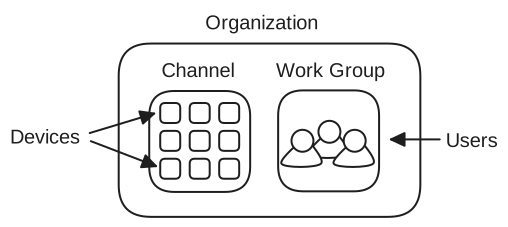
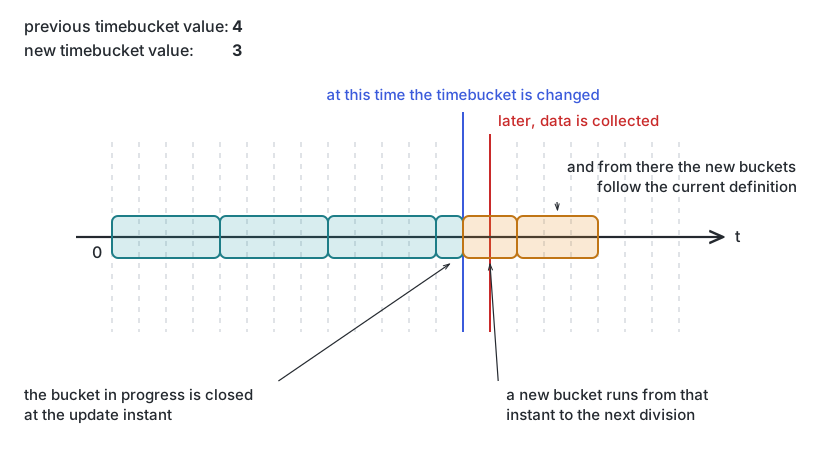 Changing the time bucket to a lower value
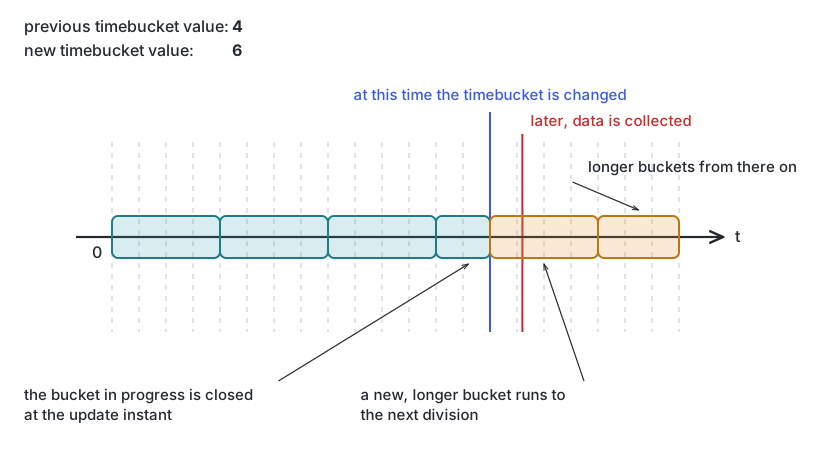 Changing the time bucket to a bigger value
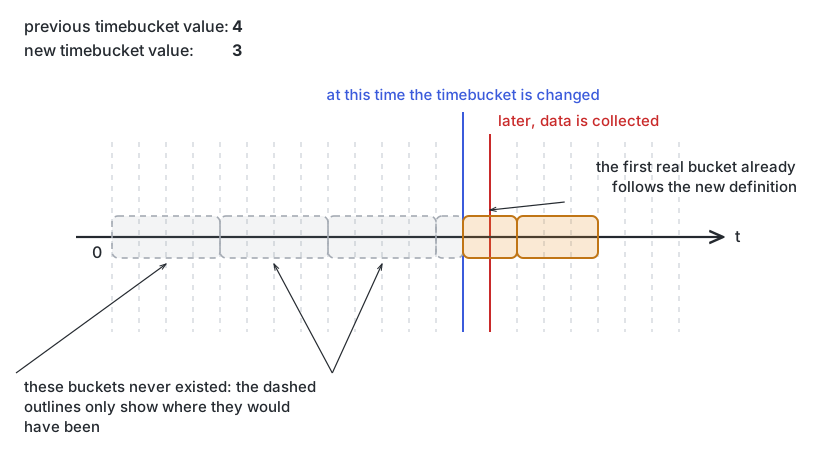 Changing the time bucket before the first data collection of a device
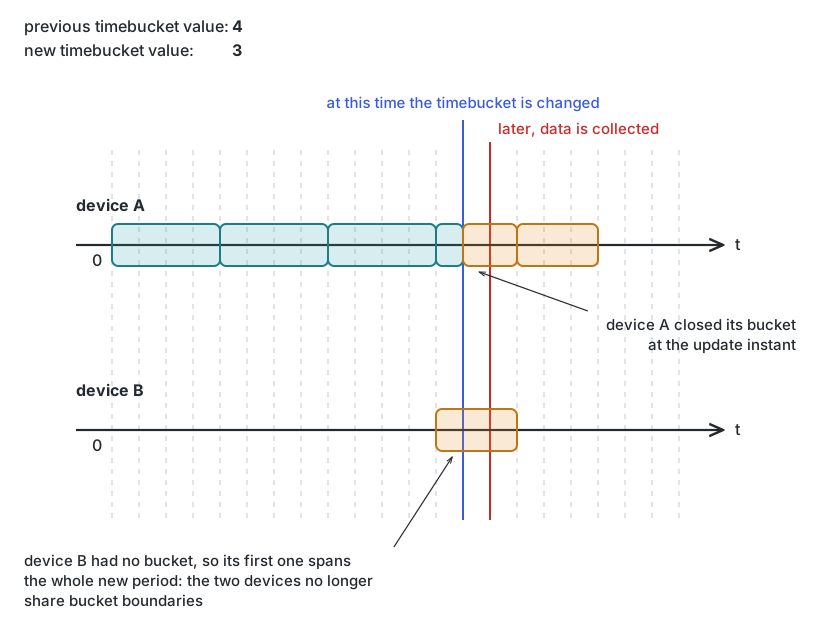 Two devices with different buckets after changing the time bucket
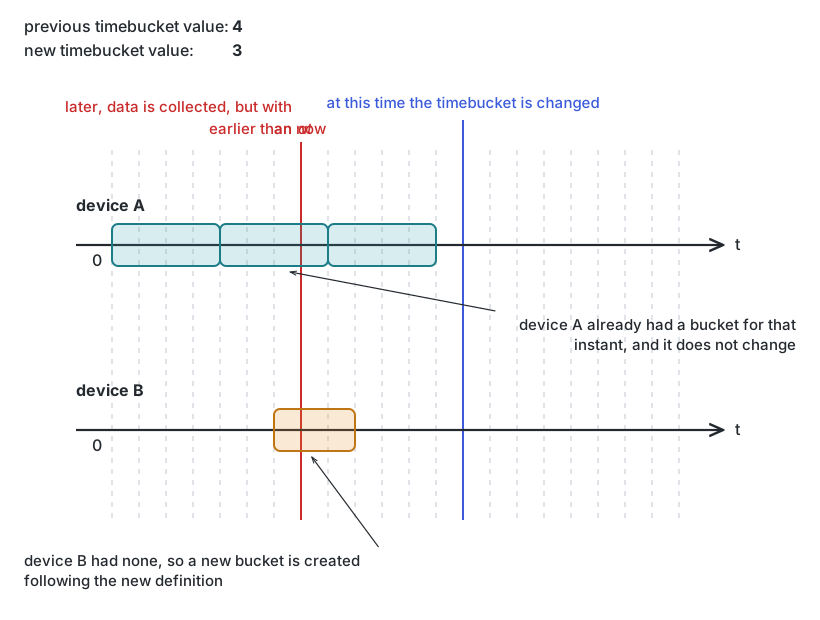 Two devices with different buckets in the past after changing the time bucket
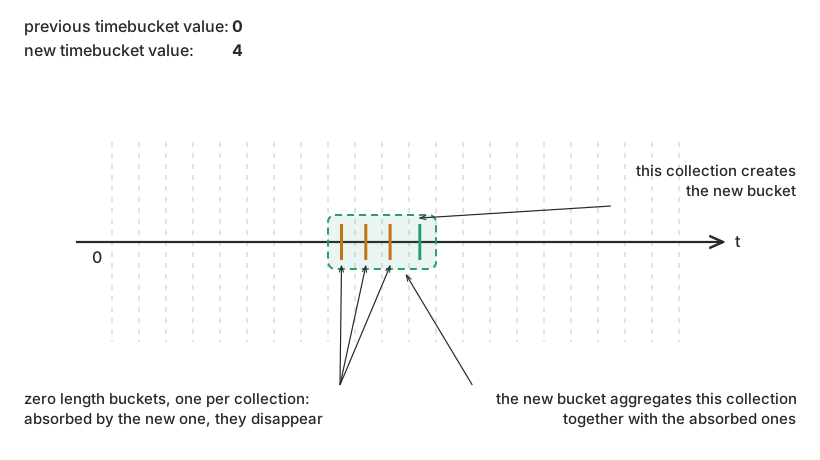 Changing the time bucket from zero to a higher value